Computer randomly restart!

ikantuna

New member
Local time
2:43 AM
Messages
3
All of a sudden, my computer automatically restart.. I haven't done any changes nor update the system within this past week and it's automatically/randomly restart for no reason. Today is the first time(ever in my life) the problem occur and it's been 3 times in this one whole day!

I formated my computer around February, and I just don't know why must the stuff happened today...

so, here is the detail of the problem...

Problem signature:
Problem Event Name: BlueScreen
OS Version: 6.1.7601.2.1.0.256.1
Locale ID: 1086

Additional information about the problem:
BCCode: 1a
BCP1: 0000000000000403
BCP2: FFFFF68000083170
BCP3: E880000078B01867
BCP4: FFCFF68000083170
OS Version: 6_1_7601
Service Pack: 1_0
Product: 256_1

Files that help describe the problem:
C:\Windows\Minidump\052311-16109-01.dmp
C:\Users\Rizuan\AppData\Local\Temp\WER-36421-0.sysdata.xml

Read our privacy statement online:
Windows 7 Privacy Statement - Microsoft Windows

If the online privacy statement is not available, please read our privacy statement offline:
C:\Windows\system32\en-US\erofflps.txt

I'm using: Intel Core 2 Duo E6550
4GB RAM
Asus 8800GS

I want to know what's the problem since I've got a submission on this upcoming Thursday!

need a reply ASAP!
 

My Computer

OS
Windows 7 Ultimate x64
A google search shows that memory (RAM) is a good possibility for the problem.
First step, with the PC powered off, reseat all the memory modules.

If it continues run a memory test and/or remove all but one memory module and try it again. If it still does it, replace that memory module with a different one. If it still does it, there are other problems but at least you have eliminated the memory.
 

My Computer

Computer type
PC/Desktop
Computer Manufacturer/Model Number
My Own Build
OS
Windows 10 64 bit
CPU
Intel i7 6700K
Motherboard
ASUS ROG Maximus VIII Hero
Memory
16GB Corsair Dominator
Graphics Card(s)
Intel CPU Graphics
Sound Card
RealTek
Monitor(s) Displays
27" Dell S2719dgf
Screen Resolution
2560X1440
Hard Drives
1 TB Samsung 850 EVO SSD for Win 10 Pro
500GB Samsung 850 EVO SSD for Win 10 Insider
2 TB drive for backup
PSU
EVGA Supernova 750G2
Case
BeQuiet Silent Base 600
Cooling
Deepcool Captain 120EX
Keyboard
Microsoft Wireless 2000
Mouse
Microsoft wireless
Internet Speed
100 MB/sec (Cable)
Antivirus
Microsoft Defender and Malwarebytes
Browser
Edge/Firefox
Other Info
Cakewalk (Sonar) by BandLab and Studio One 4.1 Pro recording studio software. MOTU 896Mk3 Hybrid recording interface, Frontier Tranzport wireless control unit, Behringer X-Touch Control Surface.
Five USB connected optical drives for CD Audio production using Nero BurningROM
This is the BSOD file:

MEGAUPLOAD - The leading online storage and file delivery service

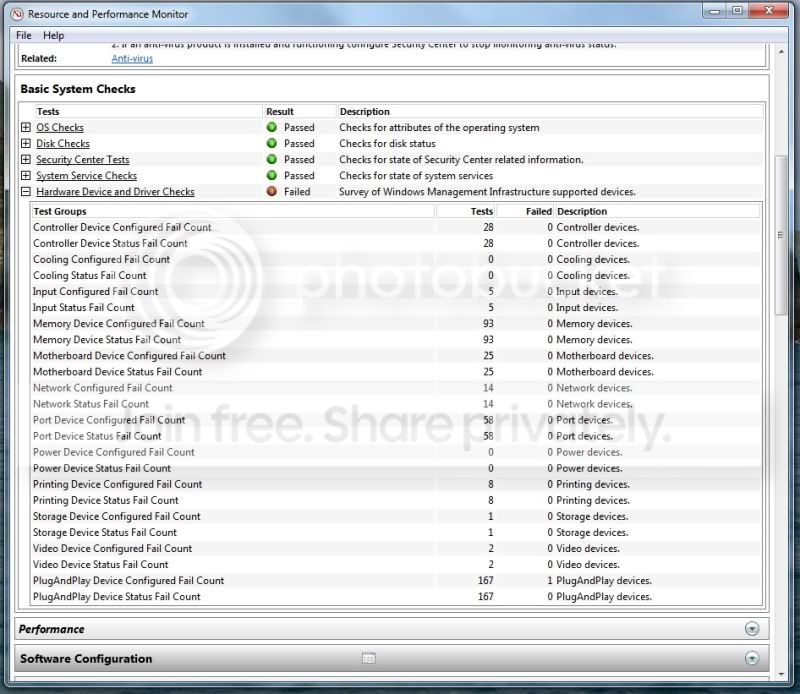
This is the problem in detail according to System Health Report

gambar2.jpg
 

My Computer

OS
Windows 7 Ultimate x64
Do a google search for BCCode: 1a and see if anything is the same as your problem.
 

My Computer

Computer type
PC/Desktop
Computer Manufacturer/Model Number
My Own Build
OS
Windows 10 64 bit
CPU
Intel i7 6700K
Motherboard
ASUS ROG Maximus VIII Hero
Memory
16GB Corsair Dominator
Graphics Card(s)
Intel CPU Graphics
Sound Card
RealTek
Monitor(s) Displays
27" Dell S2719dgf
Screen Resolution
2560X1440
Hard Drives
1 TB Samsung 850 EVO SSD for Win 10 Pro
500GB Samsung 850 EVO SSD for Win 10 Insider
2 TB drive for backup
PSU
EVGA Supernova 750G2
Case
BeQuiet Silent Base 600
Cooling
Deepcool Captain 120EX
Keyboard
Microsoft Wireless 2000
Mouse
Microsoft wireless
Internet Speed
100 MB/sec (Cable)
Antivirus
Microsoft Defender and Malwarebytes
Browser
Edge/Firefox
Other Info
Cakewalk (Sonar) by BandLab and Studio One 4.1 Pro recording studio software. MOTU 896Mk3 Hybrid recording interface, Frontier Tranzport wireless control unit, Behringer X-Touch Control Surface.
Five USB connected optical drives for CD Audio production using Nero BurningROM

My Computer

Computer Manufacturer/Model Number
HP m8000n
OS
Windows 7 Ultimate x86
CPU
DualCore AMD Athlon 64 X2, 2600 MHz 5200+
Motherboard
Asus M2N68-LA (Narra)
Memory
Samsung 2GB DDR2
Graphics Card(s)
Onboard NVIDIA GeForce 6150SE nForce 430
Sound Card
Onboard nVIDIA nForce 6100-430 (MCP61P)
Monitor(s) Displays
Westinghouse 19" LED
Screen Resolution
1280x1024
Hard Drives
SATA II Seagate Barracuda 500GB
USB II WD Elements 500GB
USB II WD My Book 1TB
USB II WD My Book 2TB
PSU
Stock (HP)
Case
Stock (HP)
Cooling
Stock
Keyboard
Logitech Classic KB 200
Mouse
Standard HP opticle USB mouse
I play with my RAM arrangement just like according to fireberd post.. I removed two out of four RAMs I own since 2006 and my computer work perfectly well since then.. and when I tried to put those RAM again, it start to produce a beeping sound straight from the mother board.. I guess it's a warning sound that my old RAM got fried!

going to get a new one tomorrow.. thanks for the help!
 

My Computer

OS
Windows 7 Ultimate x64
Thanks for the feedback and that it helped you find the problem. :)
 

My Computer

Computer type
PC/Desktop
Computer Manufacturer/Model Number
My Own Build
OS
Windows 10 64 bit
CPU
Intel i7 6700K
Motherboard
ASUS ROG Maximus VIII Hero
Memory
16GB Corsair Dominator
Graphics Card(s)
Intel CPU Graphics
Sound Card
RealTek
Monitor(s) Displays
27" Dell S2719dgf
Screen Resolution
2560X1440
Hard Drives
1 TB Samsung 850 EVO SSD for Win 10 Pro
500GB Samsung 850 EVO SSD for Win 10 Insider
2 TB drive for backup
PSU
EVGA Supernova 750G2
Case
BeQuiet Silent Base 600
Cooling
Deepcool Captain 120EX
Keyboard
Microsoft Wireless 2000
Mouse
Microsoft wireless
Internet Speed
100 MB/sec (Cable)
Antivirus
Microsoft Defender and Malwarebytes
Browser
Edge/Firefox
Other Info
Cakewalk (Sonar) by BandLab and Studio One 4.1 Pro recording studio software. MOTU 896Mk3 Hybrid recording interface, Frontier Tranzport wireless control unit, Behringer X-Touch Control Surface.
Five USB connected optical drives for CD Audio production using Nero BurningROM
Back
Top