Computer randomly restarting (NO BSOD)

Hypermega

New member
Local time
7:35 PM
Messages
8
Hey!

Since yesterday, my computer has been radomly restarting without any warnings. Sometimes it restarts when I'm on the motherboard first screen (the screen that appears when computer starts). I don't think it's overheating, because the first time I've started it today it shut down after 2 minutes. Also the fans doesn't stop working when the computer restarts and there's no "Blue Screen of Death", it just restarts without any warnigs.

I've built this computer on July, PSU and RAM are from my brother old computer.

CPU: Intel Core i3-4160 CPU @ 3.60GHz
GPU: Gigabyte GeForce GTX 960 WindForce 2GB
Motherboard: B85-G41 PC MATE (MSI)
PSU: Corsair TX650W
RAM: 3x 2GB DDR3

What could be causing it? I just can't do anything on that PC...
Thanks!
 

My Computer

Computer type
PC/Desktop
OS
Windows7
CPU
Intel Core i3-4160 CPU @ 3.60GHz
Motherboard
B85-G41 PC MATE (MSI)
Memory
3x 2GB DDR3
Graphics Card(s)
Gigabyte GeForce GTX 960 WindForce 2GB
Hard Drives
1x 1TB
Browser
Google Chrome
Hello & welcome!

Your power supply might be failing.
Check voltages in BIOS and post them here.

Place RAM sticks differently in slots or remove stick by stick and see will it randomly restart.

Also, are you sure that computer isn't overheating?
Go to BIOS >Check temps >Let it sit and check are temps gradually rising.
Have cleaned your computer recently?
 
Last edited:

My Computer

OS
Windows 7 x64 Pro
I would suspect the power supply or the RAM, as unrealRage has mentioned.

I would check the RAM with a utility like Memtest86+. Let it run for eight passes, preferably over night, but watch the first couple to see if it spontaneously reboots.

Here is where you can get the program:

Memtest86+ - Advanced Memory Diagnostic Tool
 

My Computer

Computer type
PC/Desktop
Computer Manufacturer/Model Number
Mellon Labs (custom build)
OS
Win 7 Pro x64/Win 10 Pro x64 dual boot
CPU
AMD FX 8350 Vishera @ 4200
Motherboard
ASUS M5A97 R2.0
Memory
16 GB Mushkin Blackline DDR3-2400 @ 1866 (9-10-10-10-31)
Graphics Card(s)
XFX Radeon R9 280 Double D Black Edition
Sound Card
Realtek HD Audio on MB. Sounds great.
Monitor(s) Displays
Acer 24", Acer 22"
Screen Resolution
3840 x 1080
Hard Drives
1 x Mushkin Chronos 120 GB SSD (Win 10)
1 x Samsung 850 EVO 250 GB SSD (Win 7)
1 x WD 1TB SATA Blue
1 x WD 1TB SATA Green
PSU
Corsair TX-750
Case
CoolerMaster HAF 912+
Cooling
Coolermaster Seidon 240M Liquid AIO. 6 case fans
Keyboard
Logitech G710+
Mouse
Logitech G500s
Internet Speed
Much better since I got fiber, but still way overpriced.
Antivirus
MSE, Malware Bytes for scanning
Browser
Firefox
Other Info
Corsair VOID USB headphones.

A Mellon Labs X-1 - LCD Smartie driven system status display.

Brought to you by the letter E
Hello & welcome!

Your power supply might be failing.
Check voltages in BIOS and post them here.

Place RAM sticks differently in slots or remove stick by stick and see will it randomly restart.

Also, are you sure that computer isn't overheating?
Go to BIOS >Check temps >Let it sit and check are temps gradually rising.
Have cleaned your computer recently?

Hey, hope you still can help me since I didn't answered you for some days. :)

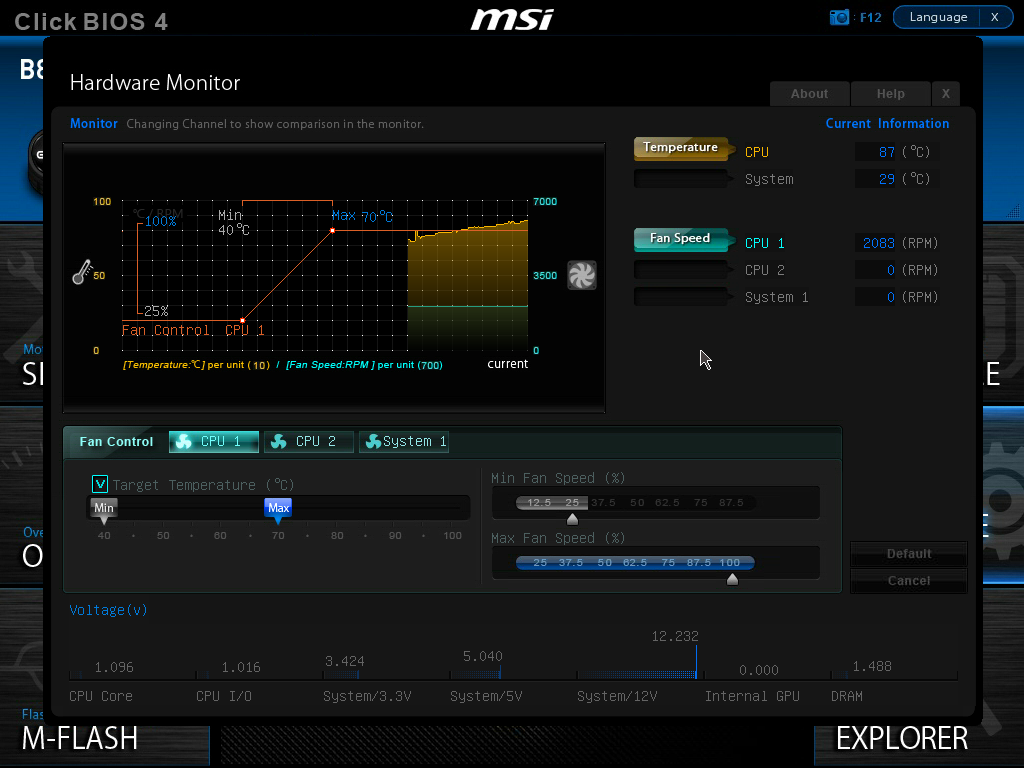
Here are the voltages (hope that is it, never ever touched a BIOS screen :P):
Ykqt5ze.png


RAM sticks are all fine.

And a thing I've noticed about overheating - right after I turned on the computer for the first time on the day, I went to the BIOS screen and noticed CPU was 80ºC, then I was able to enter the desktop without computer restarting, runned speccy and CPU was 40ºC... Don't know what to trust to be honest. :\

Thanks for your help!

I would suspect the power supply or the RAM, as unrealRage has mentioned.

I would check the RAM with a utility like Memtest86+. Let it run for eight passes, preferably over night, but watch the first couple to see if it spontaneously reboots.

Here is where you can get the program:

Memtest86+ - Advanced Memory Diagnostic Tool

The thing is I can't run it since my computer keeps restarting randomly... It will most likely restart on them middle of the test...

Thanks anyway! :)
 

My Computer

Computer type
PC/Desktop
OS
Windows7
CPU
Intel Core i3-4160 CPU @ 3.60GHz
Motherboard
B85-G41 PC MATE (MSI)
Memory
3x 2GB DDR3
Graphics Card(s)
Gigabyte GeForce GTX 960 WindForce 2GB
Hard Drives
1x 1TB
Browser
Google Chrome
Open your computer and make sure that your heat sink/fan is securely attached to your CPU, and that it is fitting in the bracket properly.

A BIOS temp reading of 87C on your CPU is way too hot. Speccy might be reading wrong. Your BIOS should be right, unless you have a failed sensor.
 

My Computer

Computer type
PC/Desktop
Computer Manufacturer/Model Number
Mellon Labs (custom build)
OS
Win 7 Pro x64/Win 10 Pro x64 dual boot
CPU
AMD FX 8350 Vishera @ 4200
Motherboard
ASUS M5A97 R2.0
Memory
16 GB Mushkin Blackline DDR3-2400 @ 1866 (9-10-10-10-31)
Graphics Card(s)
XFX Radeon R9 280 Double D Black Edition
Sound Card
Realtek HD Audio on MB. Sounds great.
Monitor(s) Displays
Acer 24", Acer 22"
Screen Resolution
3840 x 1080
Hard Drives
1 x Mushkin Chronos 120 GB SSD (Win 10)
1 x Samsung 850 EVO 250 GB SSD (Win 7)
1 x WD 1TB SATA Blue
1 x WD 1TB SATA Green
PSU
Corsair TX-750
Case
CoolerMaster HAF 912+
Cooling
Coolermaster Seidon 240M Liquid AIO. 6 case fans
Keyboard
Logitech G710+
Mouse
Logitech G500s
Internet Speed
Much better since I got fiber, but still way overpriced.
Antivirus
MSE, Malware Bytes for scanning
Browser
Firefox
Other Info
Corsair VOID USB headphones.

A Mellon Labs X-1 - LCD Smartie driven system status display.

Brought to you by the letter E
Open your computer and make sure that your heat sink/fan is securely attached to your CPU, and that it is fitting in the bracket properly.

A BIOS temp reading of 87C on your CPU is way too hot. Speccy might be reading wrong. Your BIOS should be right, unless you have a failed sensor.


I will go buy thermal paste now and apply it, just tell me a thing since I'm not an expert (not even close to it) on computers. I must wait a few days for the thermal paste to make effect or it will be instantly after I applied it?

The fan is securely attached to my CPU, I've checked it yesterday. :)
And are you sure it is possible to get 80ºC on the CPU 15 seconds after turning the computer on for the first time? Because my BIOS tells that my CPU has that temperature right after turning my computer on for the first time on the day.

Thanks for your help, once again!
 

My Computer

Computer type
PC/Desktop
OS
Windows7
CPU
Intel Core i3-4160 CPU @ 3.60GHz
Motherboard
B85-G41 PC MATE (MSI)
Memory
3x 2GB DDR3
Graphics Card(s)
Gigabyte GeForce GTX 960 WindForce 2GB
Hard Drives
1x 1TB
Browser
Google Chrome
Open your computer and make sure that your heat sink/fan is securely attached to your CPU, and that it is fitting in the bracket properly.

A BIOS temp reading of 87C on your CPU is way too hot. Speccy might be reading wrong. Your BIOS should be right, unless you have a failed sensor.

I've applied the thermal paste and the CPU temperature doesn't go above 40ºC now, but computer still restarting randomly. Most likely PSU, right? Any way to know if that's it or no? I don't have another PSU or anyone with desktop computers to lend me a PSU... :\
 

My Computer

Computer type
PC/Desktop
OS
Windows7
CPU
Intel Core i3-4160 CPU @ 3.60GHz
Motherboard
B85-G41 PC MATE (MSI)
Memory
3x 2GB DDR3
Graphics Card(s)
Gigabyte GeForce GTX 960 WindForce 2GB
Hard Drives
1x 1TB
Browser
Google Chrome
Open your computer and make sure that your heat sink/fan is securely attached to your CPU, and that it is fitting in the bracket properly.

A BIOS temp reading of 87C on your CPU is way too hot. Speccy might be reading wrong. Your BIOS should be right, unless you have a failed sensor.

I've applied the thermal paste and the CPU temperature doesn't go above 40ºC now, but computer still restarting randomly. Most likely PSU, right? Any way to know if that's it or no? I don't have another PSU or anyone with desktop computers to lend me a PSU... :\

Check both the Bios and Speccy to see if the temp agrees? If they do, I would think the PSU is failing. How long have you had it? A new one can fail, but the older it is, the more likely it could fail. If you have had it for four or five years, I think it would be time for a new one. The Corsair that you have is a good brand. I have that also. Let us know the Speccy and Bios temp.
 

My Computer

Computer type
PC/Desktop
Computer Manufacturer/Model Number
Custom Build
OS
Windows 7 Home Premium 32-Bit - Build 7600 SP1
CPU
Intel Core i3-2120 3.30Ghz
Motherboard
Asus P8Z68-V LX Intel Z68 Socket H2 ATX
Memory
Kingston 4 GB DDR3 1333 mhz
Graphics Card(s)
AMD Radeon HD6670
Sound Card
Sound Blaster Audigy SE 24-Bit
Monitor(s) Displays
Asus VE228
Screen Resolution
1440 X 900
Hard Drives
OCZ Vertex 3 120 GB Sata 3 SSD ==
Kingston SH103/S3 120 G Hyper X 120 GB SSD ==
Western Digital 500 GB Caviar Green 7200 RPM ==
PSU
Corsair CX600M == 600 Watt
Case
NZXT Apollo - Silver with Clear Side Panel
Cooling
Three 120 mm Fans
Keyboard
Microsoft Natural 4000
Mouse
Microsoft Custom Optical 3000
Internet Speed
AT&T Fiber Optic Wireless Network
Antivirus
Microsoft Security Essentials
Browser
Chrome
Other Info
120 mm Blue LED Fan -- Three Blue LED Lazer Light Sticks
Open your computer and make sure that your heat sink/fan is securely attached to your CPU, and that it is fitting in the bracket properly.

A BIOS temp reading of 87C on your CPU is way too hot. Speccy might be reading wrong. Your BIOS should be right, unless you have a failed sensor.

I've applied the thermal paste and the CPU temperature doesn't go above 40ºC now, but computer still restarting randomly. Most likely PSU, right? Any way to know if that's it or no? I don't have another PSU or anyone with desktop computers to lend me a PSU... :\

Check both the Bios and Speccy to see if the temp agrees? If they do, I would think the PSU is failing. How long have you had it? A new one can fail, but the older it is, the more likely it could fail. If you have had it for four or five years, I think it would be time for a new one. The Corsair that you have is a good brand. I have that also. Let us know the Speccy and Bios temp.

Hello!

I've reused my PSU and RAM from my brother's old computer, don't know the exact date of when the PSU was bought, but I'm nearly sure it's 5+ years. On the BIOS the temperature doesn't go above 40ºC since yesterday, when I applied new thermal paste. And I can't check on speccy now because the restarts don't let me.

I can buy a new PSU, but I really want to make sure that it is the PSU that is failing, since I am saving for an SSD and buying a new PSU when it still won't work would be absurd.

Thanks for your help! :)
 

My Computer

Computer type
PC/Desktop
OS
Windows7
CPU
Intel Core i3-4160 CPU @ 3.60GHz
Motherboard
B85-G41 PC MATE (MSI)
Memory
3x 2GB DDR3
Graphics Card(s)
Gigabyte GeForce GTX 960 WindForce 2GB
Hard Drives
1x 1TB
Browser
Google Chrome
I've applied the thermal paste and the CPU temperature doesn't go above 40ºC now, but computer still restarting randomly. Most likely PSU, right? Any way to know if that's it or no? I don't have another PSU or anyone with desktop computers to lend me a PSU... :\

Check both the Bios and Speccy to see if the temp agrees? If they do, I would think the PSU is failing. How long have you had it? A new one can fail, but the older it is, the more likely it could fail. If you have had it for four or five years, I think it would be time for a new one. The Corsair that you have is a good brand. I have that also. Let us know the Speccy and Bios temp.

Hello!

I've reused my PSU and RAM from my brother's old computer, don't know the exact date of when the PSU was bought, but I'm nearly sure it's 5+ years. On the BIOS the temperature doesn't go above 40ºC since yesterday, when I applied new thermal paste. And I can't check on speccy now because the restarts don't let me.

I can buy a new PSU, but I really want to make sure that it is the PSU that is failing, since I am saving for an SSD and buying a new PSU when it still won't work would be absurd.

Thanks for your help! :)

You are in Portugal, I am not sure what you can buy online there. In the USA I purchased a PSU and it did not correct my problem so I was able to return it. If that is possible where you live, that would be an option. I returned mine from Newegg.com with the explanation taht it did not work. If you can purchase from them where you are, that would be a solution to your problem.
 

My Computer

Computer type
PC/Desktop
Computer Manufacturer/Model Number
Custom Build
OS
Windows 7 Home Premium 32-Bit - Build 7600 SP1
CPU
Intel Core i3-2120 3.30Ghz
Motherboard
Asus P8Z68-V LX Intel Z68 Socket H2 ATX
Memory
Kingston 4 GB DDR3 1333 mhz
Graphics Card(s)
AMD Radeon HD6670
Sound Card
Sound Blaster Audigy SE 24-Bit
Monitor(s) Displays
Asus VE228
Screen Resolution
1440 X 900
Hard Drives
OCZ Vertex 3 120 GB Sata 3 SSD ==
Kingston SH103/S3 120 G Hyper X 120 GB SSD ==
Western Digital 500 GB Caviar Green 7200 RPM ==
PSU
Corsair CX600M == 600 Watt
Case
NZXT Apollo - Silver with Clear Side Panel
Cooling
Three 120 mm Fans
Keyboard
Microsoft Natural 4000
Mouse
Microsoft Custom Optical 3000
Internet Speed
AT&T Fiber Optic Wireless Network
Antivirus
Microsoft Security Essentials
Browser
Chrome
Other Info
120 mm Blue LED Fan -- Three Blue LED Lazer Light Sticks
Well since you've fixed CPU overheating issue and power supply has good voltages ,download HWMONITOR | Softwares | CPUID and check graphics card temperature & all temperatures overall.Too hot hard drive or graphics card cause restars.

That power supply is old but it doesn't mean that it is the problem.My power supply is almost 8 years old man.Never had a trouble;it survived fried motherboard,a thousand power outages,..

Yes,power supply might be the issue.If you can lend someones power supply to check is it the issue,just to be sure.

Also,check all your hardware connections.
 

My Computer

OS
Windows 7 x64 Pro
Open your computer and make sure that your heat sink/fan is securely attached to your CPU, and that it is fitting in the bracket properly.

A BIOS temp reading of 87C on your CPU is way too hot. Speccy might be reading wrong. Your BIOS should be right, unless you have a failed sensor.

I've applied the thermal paste and the CPU temperature doesn't go above 40ºC now, but computer still restarting randomly. Most likely PSU, right? Any way to know if that's it or no? I don't have another PSU or anyone with desktop computers to lend me a PSU... :\

I just thought of a problem I had when I installed my Corsair PSU. The 24 pin cable from the PSU to the Motherboard was very hard to secure. I did not hear a click when I connected the PSU. If you are not hearing a definite CLICK when you connect the 24 pin cable, it is not connected.
 

My Computer

Computer type
PC/Desktop
Computer Manufacturer/Model Number
Custom Build
OS
Windows 7 Home Premium 32-Bit - Build 7600 SP1
CPU
Intel Core i3-2120 3.30Ghz
Motherboard
Asus P8Z68-V LX Intel Z68 Socket H2 ATX
Memory
Kingston 4 GB DDR3 1333 mhz
Graphics Card(s)
AMD Radeon HD6670
Sound Card
Sound Blaster Audigy SE 24-Bit
Monitor(s) Displays
Asus VE228
Screen Resolution
1440 X 900
Hard Drives
OCZ Vertex 3 120 GB Sata 3 SSD ==
Kingston SH103/S3 120 G Hyper X 120 GB SSD ==
Western Digital 500 GB Caviar Green 7200 RPM ==
PSU
Corsair CX600M == 600 Watt
Case
NZXT Apollo - Silver with Clear Side Panel
Cooling
Three 120 mm Fans
Keyboard
Microsoft Natural 4000
Mouse
Microsoft Custom Optical 3000
Internet Speed
AT&T Fiber Optic Wireless Network
Antivirus
Microsoft Security Essentials
Browser
Chrome
Other Info
120 mm Blue LED Fan -- Three Blue LED Lazer Light Sticks
Check both the Bios and Speccy to see if the temp agrees? If they do, I would think the PSU is failing. How long have you had it? A new one can fail, but the older it is, the more likely it could fail. If you have had it for four or five years, I think it would be time for a new one. The Corsair that you have is a good brand. I have that also. Let us know the Speccy and Bios temp.

Hello!

I've reused my PSU and RAM from my brother's old computer, don't know the exact date of when the PSU was bought, but I'm nearly sure it's 5+ years. On the BIOS the temperature doesn't go above 40ºC since yesterday, when I applied new thermal paste. And I can't check on speccy now because the restarts don't let me.

I can buy a new PSU, but I really want to make sure that it is the PSU that is failing, since I am saving for an SSD and buying a new PSU when it still won't work would be absurd.

Thanks for your help! :)

You are in Portugal, I am not sure what you can buy online there. In the USA I purchased a PSU and it did not correct my problem so I was able to return it. If that is possible where you live, that would be an option. I returned mine from Newegg.com with the explanation taht it did not work. If you can purchase from them where you are, that would be a solution to your problem.

Don't think there is any store that will take the PSU back and give the money, to be honest. Also, the PSU fan is spinning, could it mean that the PSU isn't the problem, or it can still be?

Well since you've fixed CPU overheating issue and power supply has good voltages ,download HWMONITOR | Softwares | CPUID and check graphics card temperature & all temperatures overall.Too hot hard drive or graphics card cause restars.

That power supply is old but it doesn't mean that it is the problem.My power supply is almost 8 years old man.Never had a trouble;it survived fried motherboard,a thousand power outages,..

Yes,power supply might be the issue.If you can lend someones power supply to check is it the issue,just to be sure.

Also,check all your hardware connections.

I can't run that if my computer keeps restarting... :\

All my hardware connection seem to be right, and my friends that have desktops have PSUs that are not compatible with my other stuff...

Open your computer and make sure that your heat sink/fan is securely attached to your CPU, and that it is fitting in the bracket properly.

A BIOS temp reading of 87C on your CPU is way too hot. Speccy might be reading wrong. Your BIOS should be right, unless you have a failed sensor.

I've applied the thermal paste and the CPU temperature doesn't go above 40ºC now, but computer still restarting randomly. Most likely PSU, right? Any way to know if that's it or no? I don't have another PSU or anyone with desktop computers to lend me a PSU... :\

I just thought of a problem I had when I installed my Corsair PSU. The 24 pin cable from the PSU to the Motherboard was very hard to secure. I did not hear a click when I connected the PSU. If you are not hearing a definite CLICK when you connect the 24 pin cable, it is not connected.

The 24 pin cable is connected correctly.
 

My Computer

Computer type
PC/Desktop
OS
Windows7
CPU
Intel Core i3-4160 CPU @ 3.60GHz
Motherboard
B85-G41 PC MATE (MSI)
Memory
3x 2GB DDR3
Graphics Card(s)
Gigabyte GeForce GTX 960 WindForce 2GB
Hard Drives
1x 1TB
Browser
Google Chrome
If the fan is running, that does not mean the PSU is good. It could still run no matter what. == If your temps are good and you have checked several other things also, I think the only thing left is the PSU being bad.
 

My Computer

Computer type
PC/Desktop
Computer Manufacturer/Model Number
Custom Build
OS
Windows 7 Home Premium 32-Bit - Build 7600 SP1
CPU
Intel Core i3-2120 3.30Ghz
Motherboard
Asus P8Z68-V LX Intel Z68 Socket H2 ATX
Memory
Kingston 4 GB DDR3 1333 mhz
Graphics Card(s)
AMD Radeon HD6670
Sound Card
Sound Blaster Audigy SE 24-Bit
Monitor(s) Displays
Asus VE228
Screen Resolution
1440 X 900
Hard Drives
OCZ Vertex 3 120 GB Sata 3 SSD ==
Kingston SH103/S3 120 G Hyper X 120 GB SSD ==
Western Digital 500 GB Caviar Green 7200 RPM ==
PSU
Corsair CX600M == 600 Watt
Case
NZXT Apollo - Silver with Clear Side Panel
Cooling
Three 120 mm Fans
Keyboard
Microsoft Natural 4000
Mouse
Microsoft Custom Optical 3000
Internet Speed
AT&T Fiber Optic Wireless Network
Antivirus
Microsoft Security Essentials
Browser
Chrome
Other Info
120 mm Blue LED Fan -- Three Blue LED Lazer Light Sticks
If the fan is running, that does not mean the PSU is good. It could still run no matter what. == If your temps are good and you have checked several other things also, I think the only thing left is the PSU being bad.

Whatever, I'll risk it and buy the PSU the upcoming week, really hope that's the issue. I'll need a new PSU if I upgrade anyway.

Thanks for your help guys, I'll reply again if the new PSU does not solve the problem.
 

My Computer

Computer type
PC/Desktop
OS
Windows7
CPU
Intel Core i3-4160 CPU @ 3.60GHz
Motherboard
B85-G41 PC MATE (MSI)
Memory
3x 2GB DDR3
Graphics Card(s)
Gigabyte GeForce GTX 960 WindForce 2GB
Hard Drives
1x 1TB
Browser
Google Chrome
Back
Top