Computer randomly shutting down, not due to overheating

MrsA08

New member
Local time
9:49 AM
Messages
3
I have a 4 year old Toshiba Satellite i5 that had predominantly been run almost as a desktop. We have it hooked up to a monitor and only use it as a lap top when travelling. Over the past few months it has been randomly shutting down. At first we thought it was because we were running it with the lid down so we starting running it with the lid cracked and that seemed to help initially. About two weeks ago it started doing it again. The events have absolutely no pattern any commonalities. I am fairly novice when it comes to fixing anything on computers, I know how to do a disk check, clear my cache, etc. I was able to run a system diagnotic, but I don't know what to do with any of the data. Any help would be greatly appreciated.
 

My Computer

Computer type
Laptop
Computer Manufacturer/Model Number
Toshiba Satellite A665
OS
Microsoft Windows 7 Home Premium 64-bit 7601 Multiprocessor Free Service Pack 1
CPU
Intel(R) Core(TM) i5 CPU M 480 @ 2.67GHz
Motherboard
TOSHIBA NWQAA
Memory
4.00 GB
Graphics Card(s)
Intel(R) HD Graphics
Sound Card
(1) Realtek High Definition Audio (2) Intel(R) Display Aud
Screen Resolution
1024 x 768 x 32 bits (4294967296 colors) @ 59 Hz
Hard Drives
Hitachi HTS545050B9A300
Antivirus
Norton
Browser
Chrome
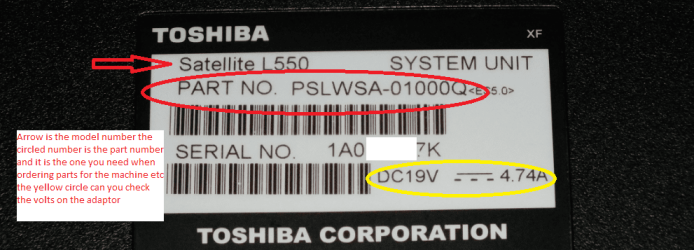
Hello and welcome MrsA08 now first up some more system specs please and the PART NO on the back sticker (see pic) because it really pins the machine down for drivers etc etc

SYSTEM SPECS

mate can we have some system specs please as what you have postedgives us not that much to work with and given there are so many manufacturersof components and configurations that do influence what goes on within anygiven machine and OS.

http://www.sevenforums.com/tutorials/180324-system-info-see-your-system-specs.html


Now when you say it is not heating just how do you know that because you have not specified the temp of the machine parts CPU and motherboard etc If you have run something like Speccy then le t us know otherwise run it and post back the results https://www.piriform.com/speccy/download

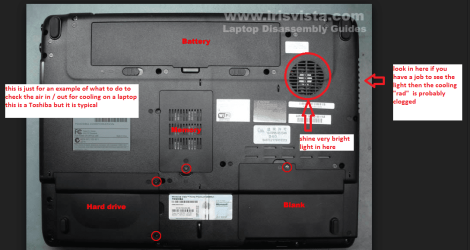
If you would please read this and ost back what you see in the part where I mention looking into the outlet air vent.

CLEANING A LAPTOP FAN & COOLER RAD

The thing you do is to turnover the laptop and shine a very bright light into the air intake aperture (youwill see the fan there) and then while doing that look at the outlet vent onthe end of the laptop you should see the light quite clearly shining throughthe cooling " radiator" if not - it is clogged and will need cleaningas will probably the fan opening.

You can do this by blowingit out using a compressed air can in short bursts.

BUT ONE WORD OF WARNING DO NOT blow the air into the fan opening withoutinserting say a plastic rod or large cable tie to stop the fan from spinning asthe air blast will spin the fan at a very high speed that it is not designed totake and may wreck the bearing!!

To clean the slots in the radiator use a pipecleaner or one of those craft covered wire sticks - they are referred to aschinelle sticks - see pic. But do be very careful not to be overly heavy handedyou will find it might take a second or two or a few minutes to clear theheavier build ups.

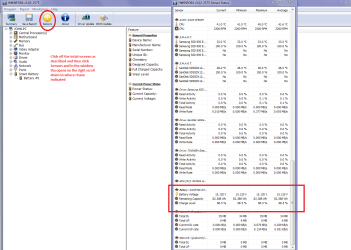
Could you also test the adaptor volts and use this for us to see what the battery condition is.
Run this and when you get to Sensors scroll down until you get to the battery cell conditions / capacities


Using HW Info

PART A:

You can test the volts onthe PSU with HW Info HWiNFO,HWiNFO32/64 - Download <download the right bit version and close the right hand window select Sensorsand scroll down to the power section where you will see what the volts aredoing see my pic. In my pic the section (Nuvoton)with VBATT is a dead give away you are in the section for the rail voltages.There are other section titles and one that pops up often is ITE

Now the voltage on thedifferent rails have to be within 5% =+/- of what is required or the machinewill not work properly if at all.

See this for the railvoltage info

http://www.tomshardware.com/reviews/power-supply-specifications-atx-reference,3061.html (Section 2.)

The original right handwindow shows the machine running and is handy for that but for looking at thecomponents in some detail close it and use the main left hand side panel

FOR OTHER COMPONENTS

PART B:

Open each small squarewith + in it on the section the components are in and then click on theindividual component/s (it willhighlight in blue) - in the right hand side will appear all sorts of detailsincluding brands speeds and other essential info that particular device. Seepic for example.


The pic is of my Asus rigged much the same way as you do yours but I ma interested in the condition of that battery - the volts should all fall within that +/- 5% of the stated voltage
 

Attachments

  • PART NO.PNG
    PART NO.PNG
    112.5 KB · Views: 0
  • LAPTOP VENTING.PNG
    LAPTOP VENTING.PNG
    466.2 KB · Views: 0
  • LAPTOP BATTERY.PNG
    LAPTOP BATTERY.PNG
    178.2 KB · Views: 0
  • CHINELLE.PNG
    CHINELLE.PNG
    349.5 KB · Views: 19

My Computer

Computer type
PC/Desktop
Computer Manufacturer/Model Number
Own build (new) Desk1 / Asus ROG Win 7 / Desk2 1st build
OS
Desk1 7 Home Prem / Desk2 10 Pro / Main lap Asus ROG 10 Pro 2 laptop Toshiba 7 Pro Asus P2520 7 & 10
CPU
Desk1 i5 3750K / Laptop i7 GTX 860M / Desk2 i5 2500
Motherboard
Desk1 Asus P877-V / Desk2 Gigabyte H67 UD3H / Laptop ?
Memory
Desk1 8GB (1866) / Desk2 16GB (1333) / Laptop 8Gb DDR3
Graphics Card(s)
Desk 1& 2NVidia GTX 650 & Laptops on board Intel
Sound Card
Desk 1 & 2 -XONAR DG Realtek High Def audio Laptop
Monitor(s) Displays
Desk 1 Benq HD 2450 / Desk2 Philips 24" / Laptop 17.5"
Screen Resolution
1920x1080 D1 & D2 & Laptop 1
Hard Drives
Desk1 Samsung 120GB 830 SSD
Asus ROG 256GB 850 Pro SSD
Desk2 Samsung 840 256 SSD
Toshiba 120GB EVO
PSU
Desk 1 Corsair HX 1050/ Laptop ? / Desk 2 Corsair HX 650
Case
Desk 1 Cooler HAF XM ? Toshiba laptop / Desk2 Coolermaster
Cooling
Fans on all Desk1 -2 Desk2 - all Coolermasters 5 Laptop ?
Keyboard
Desk 1 MS Sidewinder X6 Desk 2 MS Sidewinder X 4
Mouse
Desk 1&2 - Gigabyte MS 900 gamer - laptop - Logitec wireless
Internet Speed
ADSL2+
Other Info
One other Desktop (tester) and spare Toshba laptop both with SSD's
Running Kaspersky 2016 ISS on all machines config'd identically
Logitec audio stereo systems on each machine (x3)
Canon MG5250MFC
Router/modem TP-Link running WPA2SK
Part number

Thank you for helping me with this problem. I have a part number for you and hope this helps. PSAWOU-OL3031
DC19V---3.42A
 

My Computer

Computer type
Laptop
Computer Manufacturer/Model Number
Toshiba Satellite A665
OS
Microsoft Windows 7 Home Premium 64-bit 7601 Multiprocessor Free Service Pack 1
CPU
Intel(R) Core(TM) i5 CPU M 480 @ 2.67GHz
Motherboard
TOSHIBA NWQAA
Memory
4.00 GB
Graphics Card(s)
Intel(R) HD Graphics
Sound Card
(1) Realtek High Definition Audio (2) Intel(R) Display Aud
Screen Resolution
1024 x 768 x 32 bits (4294967296 colors) @ 59 Hz
Hard Drives
Hitachi HTS545050B9A300
Antivirus
Norton
Browser
Chrome
I am hesitant to purchase or download anything on this computer. It stores all my work information and if it crashes I am completely screwed. I have a backup hard drive, but am not sure how to "backup" yet. I am really knowledgeable with several programs, but a complete novice when it comes to PC repair.
 

My Computer

Computer type
Laptop
Computer Manufacturer/Model Number
Toshiba Satellite A665
OS
Microsoft Windows 7 Home Premium 64-bit 7601 Multiprocessor Free Service Pack 1
CPU
Intel(R) Core(TM) i5 CPU M 480 @ 2.67GHz
Motherboard
TOSHIBA NWQAA
Memory
4.00 GB
Graphics Card(s)
Intel(R) HD Graphics
Sound Card
(1) Realtek High Definition Audio (2) Intel(R) Display Aud
Screen Resolution
1024 x 768 x 32 bits (4294967296 colors) @ 59 Hz
Hard Drives
Hitachi HTS545050B9A300
Antivirus
Norton
Browser
Chrome

My Computer

Computer type
PC/Desktop
Computer Manufacturer/Model Number
Custom Build
OS
Windows 7 Ultimate x64 SP1
CPU
AMD Phenom 2 1090T
Motherboard
Gigabyte GA-890FXA-UD5
Memory
2x8GB Kingston HyperX Fury Black 1600Mhz Unganged
Graphics Card(s)
MSI GTX 970 Gaming 4G
Sound Card
Realtek On-Board HD 7.1 Audio / Logitech G35
Monitor(s) Displays
3xAcer GD245HQ
Screen Resolution
1920x1080
Hard Drives
Samsung 850 Pro 512GB SSD - OS /
WD Caviar Black SATA 3 - 1 TBx2 - Dynamic RAID 0 /
WD Caviar Green SATA 2 - 640GBx2 - Dynamic RAID 0 /
WD Caviar Green SATA 2 - 640GB - Internal Backup /
Seagate Barracude SATA 3 - 3TB - External Backup/ Sync
PSU
HighPower 1000W
Case
Cooler Master HAF 932
Cooling
Noctua NH-D14
Keyboard
Logitech G19
Mouse
Logitech G500
Internet Speed
100/4 Mbit Cable (100GB quota)
Antivirus
ZoneAlarm Extreme Security / MBAM Pro / MBAE Free / SAS Free
Browser
IE 11 - Firefox - Chrome
Other Info
Logitech F710/ G27/ G940/ Z5500 // TrackIR 5 // Nvidia 3D Surround Vision
Ok I am going along with Gokay on the advice there but can you run the HW Info so that I can see the battery voltages / capacities? please and also the model number a I am not getting any hits with that PART NO. even on the US site ie in my pic it is a Satellite L550 I need to know that too now.

Now any latest updates are not going to affect your data and as I just said what Gokay said re imaging you need to do asap and if I were you like myself do it on a regular basis - say weekly or sooner if you like. The you have the whole lot on one external drive to back up and /or reinstall from.

You could go as far as to clone that drive if like me are pedantic enough to do that you will need Macrium and an adaptor as in my pics to hook up an external drive. I do this because if the original drive fails then it is just a matter of swapping in the clone drive and away you go. To recover data from the old drive can be done in two ways a) form the image or b) a method using a Ubuntu boot disk

But first things first that model number please.
 

Attachments

  • USB SATA ADAPTOR.PNG
    USB SATA ADAPTOR.PNG
    160.4 KB · Views: 0

My Computer

Computer type
PC/Desktop
Computer Manufacturer/Model Number
Own build (new) Desk1 / Asus ROG Win 7 / Desk2 1st build
OS
Desk1 7 Home Prem / Desk2 10 Pro / Main lap Asus ROG 10 Pro 2 laptop Toshiba 7 Pro Asus P2520 7 & 10
CPU
Desk1 i5 3750K / Laptop i7 GTX 860M / Desk2 i5 2500
Motherboard
Desk1 Asus P877-V / Desk2 Gigabyte H67 UD3H / Laptop ?
Memory
Desk1 8GB (1866) / Desk2 16GB (1333) / Laptop 8Gb DDR3
Graphics Card(s)
Desk 1& 2NVidia GTX 650 & Laptops on board Intel
Sound Card
Desk 1 & 2 -XONAR DG Realtek High Def audio Laptop
Monitor(s) Displays
Desk 1 Benq HD 2450 / Desk2 Philips 24" / Laptop 17.5"
Screen Resolution
1920x1080 D1 & D2 & Laptop 1
Hard Drives
Desk1 Samsung 120GB 830 SSD
Asus ROG 256GB 850 Pro SSD
Desk2 Samsung 840 256 SSD
Toshiba 120GB EVO
PSU
Desk 1 Corsair HX 1050/ Laptop ? / Desk 2 Corsair HX 650
Case
Desk 1 Cooler HAF XM ? Toshiba laptop / Desk2 Coolermaster
Cooling
Fans on all Desk1 -2 Desk2 - all Coolermasters 5 Laptop ?
Keyboard
Desk 1 MS Sidewinder X6 Desk 2 MS Sidewinder X 4
Mouse
Desk 1&2 - Gigabyte MS 900 gamer - laptop - Logitec wireless
Internet Speed
ADSL2+
Other Info
One other Desktop (tester) and spare Toshba laptop both with SSD's
Running Kaspersky 2016 ISS on all machines config'd identically
Logitec audio stereo systems on each machine (x3)
Canon MG5250MFC
Router/modem TP-Link running WPA2SK
Back
Top