Computer restart unmotivated.

darkhorse

New member
Power User
Local time
11:51 PM
Messages
514
Location
Denmark
I have encountered, that my computer does restart unmotivated, and suddenly.

Could it be the backup batteri for the BIOS ?.

Is there any log somewhere ?
 

My Computer

Computer type
PC/Desktop
Computer Manufacturer/Model Number
Homemade
OS
Windows 7 Ultimate
CPU
E7300
Motherboard
ASUS P5Q DeLuxe
Memory
4g
Graphics Card(s)
NVIDIA GeForce 7300 LE
Sound Card
N/A
Monitor(s) Displays
Acer
Screen Resolution
1600x1200
Hard Drives
Samsung HD503HI ATA Device
PSU
Seasonic
Case
ATX
Cooling
FAN
Keyboard
Logitech
Mouse
HP
Internet Speed
20/2
Antivirus
MSE
Browser
IE9, Chrome, Firefox
Hi Darkhorse,

If the CMOS settings are incorrect due to a failing CMOS battery,
that may possibly account for the reboots, although there are other causes,
like bad memory, overheating issues and possibly a failing PSU.

Do you get a CMOS checksum error at boot? Is the system time incorrect frequently?
If so replace the battery.

You can stop the restart problem by stopping automatic startup when your computer's having a problem by way of System Failure Settings to Stop Automatic Restarts
(bear in mind this will not fix the issue, just stop the restarts):

1. Click Start and Open the Control Panel, choose icon view
2. Go to System, Click on System.
3. Select Advanced System Settings and choose Advanced tab.
4. Under Startup and Recovery, click on Settings.
5. Under System failure uncheck Automatically restart.

Check all fans are running correctly, the inside of the case is free of dust (which can act like an insulator).
Monitoring the temperature of the system using :ar: HWMonitor

Take memtest. Run for 8 passes and test each stick in a know good slot for an additional 6 passes.

:ar: http://www.sevenforums.com/tutorials/105647-ram-test-memtest86.html
   Tip
Run these tests overnight, pay particular attention to #3 in tutorial


cheers

Dave
 

My Computer

Computer type
PC/Desktop
OS
Windows 7 Professional 64bit
CPU
AMD Athlon (tm) X2 5200+ Dual Core 2712 Mhz
Motherboard
Asus
Memory
4GB
Graphics Card(s)
Nividia GeForce 8600 GTS- DIED 25/7/2013 R.I.P
Sound Card
None
Monitor(s) Displays
22" Yuraku LCD (Dont ask)
Screen Resolution
1280x960
Hard Drives
2TB WD Caviar green
PSU
Windy up type
Case
Scout cm Storm
Cooling
Hair dryer on full cool power ;-)
Keyboard
QWERTY
Mouse
Microsoft Special
Internet Speed
BT Infinity 9.38Mb/s Wheeeeeeeeeeeeeeee!!
Antivirus
MSE
Browser
Internet Explore 10 and Chrome
Other Info
Don't shout...I've got a Hangover!
@Northernsoul55

Hi and thanks for your reply to my query.


I will run through your suggestions, and will report back after.
 

My Computer

Computer type
PC/Desktop
Computer Manufacturer/Model Number
Homemade
OS
Windows 7 Ultimate
CPU
E7300
Motherboard
ASUS P5Q DeLuxe
Memory
4g
Graphics Card(s)
NVIDIA GeForce 7300 LE
Sound Card
N/A
Monitor(s) Displays
Acer
Screen Resolution
1600x1200
Hard Drives
Samsung HD503HI ATA Device
PSU
Seasonic
Case
ATX
Cooling
FAN
Keyboard
Logitech
Mouse
HP
Internet Speed
20/2
Antivirus
MSE
Browser
IE9, Chrome, Firefox
No problem, look forward to your reply.

cheers

Dave
 

My Computer

Computer type
PC/Desktop
OS
Windows 7 Professional 64bit
CPU
AMD Athlon (tm) X2 5200+ Dual Core 2712 Mhz
Motherboard
Asus
Memory
4GB
Graphics Card(s)
Nividia GeForce 8600 GTS- DIED 25/7/2013 R.I.P
Sound Card
None
Monitor(s) Displays
22" Yuraku LCD (Dont ask)
Screen Resolution
1280x960
Hard Drives
2TB WD Caviar green
PSU
Windy up type
Case
Scout cm Storm
Cooling
Hair dryer on full cool power ;-)
Keyboard
QWERTY
Mouse
Microsoft Special
Internet Speed
BT Infinity 9.38Mb/s Wheeeeeeeeeeeeeeee!!
Antivirus
MSE
Browser
Internet Explore 10 and Chrome
Other Info
Don't shout...I've got a Hangover!
Back again after the tests.

I have not received any CMOS checksum errors. The system time is ok.

I stopped the restart from your advice.

Also I removed dust from the fan on the CPU. Was not a huge amount, and I remove it often.

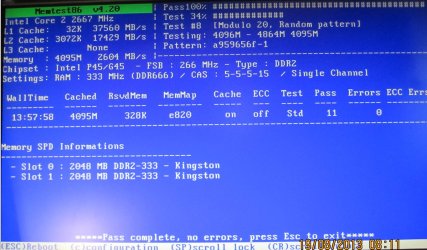
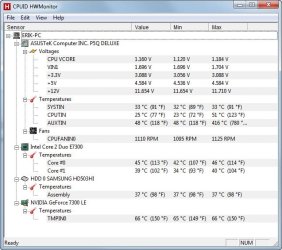
The HWMonitor and MEMTEST results are shown in the dumps here.
 

Attachments

  • memtest.jpg
    memtest.jpg
    144.6 KB · Views: 6
  • hwmonitor.jpg
    hwmonitor.jpg
    58 KB · Views: 9

My Computer

Computer type
PC/Desktop
Computer Manufacturer/Model Number
Homemade
OS
Windows 7 Ultimate
CPU
E7300
Motherboard
ASUS P5Q DeLuxe
Memory
4g
Graphics Card(s)
NVIDIA GeForce 7300 LE
Sound Card
N/A
Monitor(s) Displays
Acer
Screen Resolution
1600x1200
Hard Drives
Samsung HD503HI ATA Device
PSU
Seasonic
Case
ATX
Cooling
FAN
Keyboard
Logitech
Mouse
HP
Internet Speed
20/2
Antivirus
MSE
Browser
IE9, Chrome, Firefox
Hi,

Looks to me like your Vcore voltage is too low, but I am not 100% so I have
asked another member Essenbe to check it out for you.
(Please be patient as he is off-line at the moment)

You could check in the BIOS to see if your settings are set to stock?

How is the computer now, has the restarts stopped since disabling Automat restart?

cheers

Dave
 

My Computer

Computer type
PC/Desktop
OS
Windows 7 Professional 64bit
CPU
AMD Athlon (tm) X2 5200+ Dual Core 2712 Mhz
Motherboard
Asus
Memory
4GB
Graphics Card(s)
Nividia GeForce 8600 GTS- DIED 25/7/2013 R.I.P
Sound Card
None
Monitor(s) Displays
22" Yuraku LCD (Dont ask)
Screen Resolution
1280x960
Hard Drives
2TB WD Caviar green
PSU
Windy up type
Case
Scout cm Storm
Cooling
Hair dryer on full cool power ;-)
Keyboard
QWERTY
Mouse
Microsoft Special
Internet Speed
BT Infinity 9.38Mb/s Wheeeeeeeeeeeeeeee!!
Antivirus
MSE
Browser
Internet Explore 10 and Chrome
Other Info
Don't shout...I've got a Hangover!
Hi.

That is fine with Essenbe, I will wait for him. Thanks for asking him.

I'll see how my BIOS settings looks like.

The computer has behaved ok since I asked here :-)
 

My Computer

Computer type
PC/Desktop
Computer Manufacturer/Model Number
Homemade
OS
Windows 7 Ultimate
CPU
E7300
Motherboard
ASUS P5Q DeLuxe
Memory
4g
Graphics Card(s)
NVIDIA GeForce 7300 LE
Sound Card
N/A
Monitor(s) Displays
Acer
Screen Resolution
1600x1200
Hard Drives
Samsung HD503HI ATA Device
PSU
Seasonic
Case
ATX
Cooling
FAN
Keyboard
Logitech
Mouse
HP
Internet Speed
20/2
Antivirus
MSE
Browser
IE9, Chrome, Firefox
Darkhorse, sorrry for the delay. This is simply personal preference, but I don't like HW monitor for values. A lot of people really like it so, again personal preference. The voltages I see look low. ATX standards are +/- 5%. Most those voltages are below that. If you can, please go to bios and most boards have a Hardware Monitor, please give me the values you find there for the +12V, +5v , and +3.3V. Also, I've never had that CPU so am not sure about your Vcore. If you could would you download Core Temp. It is a temp monitoring program but has another improtant value it shows. The VID it shows is directly related to Vcore. The values Intel Gives are Vid ranges. Could you give me the VID from Core temp? According to Intel the VID should be between 0.85V – 1.3625V.
 
Last edited:

My Computers

System One System Two

  • Computer type
    PC/Desktop
    Computer Manufacturer/Model Number
    ALWAYS UNDER CONSTRUCTION
    OS
    Windows 11 Pro
    CPU
    Ryzen 9 5900X
    Motherboard
    Asus X570 Crosshair Viii Hero
    Memory
    32GB G Skill DDR4-3600
    Graphics Card(s)
    EVGA RTX 3080 FTW 3 Ultra
    Sound Card
    On Board/Sennheiser PC37X Headset
    Monitor(s) Displays
    3 X Asus 27"
    Screen Resolution
    2560x1440
    Hard Drives
    2 X 1 TB NVME drives
    PSU
    EVGA 850
    Case
    Phanteks Eclipse P400A
    Cooling
    EVGA 280 AIO
    Keyboard
    Logitech G510s/ Logitech G13
    Mouse
    Logitech G502
    Internet Speed
    24/1
    Antivirus
    ESET/MBAM Pro/SAS Pro
    Browser
    Chrome/ Firefox/ Edge
  • Computer type
    Laptop
    System Manufacturer/Model Number
    Dell 16 Plus
    OS
    Windows 11 Pro
    CPU
    Intel Ultra 9 288V
    Memory
    32 GB LPDDR5X 8533
    Monitor(s) Displays
    16" Mini-LED HDR600 Touch 90 Hz
    Screen Resolution
    2560X1600
    Hard Drives
    1 TB NVME
@essenbe

No problem with the delay. For me this is just a hobby :-)

I took a photo of the BIOS, and also installed the Core Temp.


Both picts are shown here.
 

Attachments

  • BIOS.jpg
    BIOS.jpg
    132.4 KB · Views: 6
  • coretemp.jpg
    coretemp.jpg
    25.8 KB · Views: 5

My Computer

Computer type
PC/Desktop
Computer Manufacturer/Model Number
Homemade
OS
Windows 7 Ultimate
CPU
E7300
Motherboard
ASUS P5Q DeLuxe
Memory
4g
Graphics Card(s)
NVIDIA GeForce 7300 LE
Sound Card
N/A
Monitor(s) Displays
Acer
Screen Resolution
1600x1200
Hard Drives
Samsung HD503HI ATA Device
PSU
Seasonic
Case
ATX
Cooling
FAN
Keyboard
Logitech
Mouse
HP
Internet Speed
20/2
Antivirus
MSE
Browser
IE9, Chrome, Firefox
In BIOS your 5V is good, your 3.3V is barely within ATX Standards but is OK, it didn't show your +12V for some reason. Vcore looks ok. From the values I've seen in bios and HW Monitor, I would say your PSU is borderline. Seasonic is an excellent brand, how old is it? I may suggest going into bios and look at your ram, timings, frequency and voltage and your sata controller mode (IDE,AHCI) then set optimized defaults, set your sata controller the way it is right now and set your ram timings, voltage and frequency to manufacturers specs, which should be the way they are right now, but check. Sometimes setting everything back to default levels solves problems that would tke forever to run down. Also, if you have any issues with bios not holding the values you set or your clock being off, replace the CMOS battery. They are quite cheap and pretty common. I imagine you know, but if you replace your CMOS battery, all bios settings will be lost. You will have to go back in and set defaults then completely reset bios, including date and time.
 

My Computers

System One System Two

  • Computer type
    PC/Desktop
    Computer Manufacturer/Model Number
    ALWAYS UNDER CONSTRUCTION
    OS
    Windows 11 Pro
    CPU
    Ryzen 9 5900X
    Motherboard
    Asus X570 Crosshair Viii Hero
    Memory
    32GB G Skill DDR4-3600
    Graphics Card(s)
    EVGA RTX 3080 FTW 3 Ultra
    Sound Card
    On Board/Sennheiser PC37X Headset
    Monitor(s) Displays
    3 X Asus 27"
    Screen Resolution
    2560x1440
    Hard Drives
    2 X 1 TB NVME drives
    PSU
    EVGA 850
    Case
    Phanteks Eclipse P400A
    Cooling
    EVGA 280 AIO
    Keyboard
    Logitech G510s/ Logitech G13
    Mouse
    Logitech G502
    Internet Speed
    24/1
    Antivirus
    ESET/MBAM Pro/SAS Pro
    Browser
    Chrome/ Firefox/ Edge
  • Computer type
    Laptop
    System Manufacturer/Model Number
    Dell 16 Plus
    OS
    Windows 11 Pro
    CPU
    Intel Ultra 9 288V
    Memory
    32 GB LPDDR5X 8533
    Monitor(s) Displays
    16" Mini-LED HDR600 Touch 90 Hz
    Screen Resolution
    2560X1600
    Hard Drives
    1 TB NVME
Why do you think, that the 12V is not shown ?. It's shown in the first dump I show.

The Seasonic PSU, I don't know it's age, but it's some years old.

How do I reset BIOS ?. By removing the BIOS battery or ?.

Also how do I set defaults then completely ?. To what values ?.

By reading the manual for the MOBO ?.

The link to the MOBO manual is here:

P5Q Deluxe - Motherboards - ASUS

And it's windows 7 ultimate 64bit
 

My Computer

Computer type
PC/Desktop
Computer Manufacturer/Model Number
Homemade
OS
Windows 7 Ultimate
CPU
E7300
Motherboard
ASUS P5Q DeLuxe
Memory
4g
Graphics Card(s)
NVIDIA GeForce 7300 LE
Sound Card
N/A
Monitor(s) Displays
Acer
Screen Resolution
1600x1200
Hard Drives
Samsung HD503HI ATA Device
PSU
Seasonic
Case
ATX
Cooling
FAN
Keyboard
Logitech
Mouse
HP
Internet Speed
20/2
Antivirus
MSE
Browser
IE9, Chrome, Firefox
There's usually an 'optimized defaults' or just a defaults setting in bios. It's usually listed in the help section if not in the exit menu. You can completely reset it bu removing the CMOS battery after you unplug the PSU and hold down the start button for 20-30 seconds to drain the standby power, but then you need to set optimized defaults after that. Let me see.
 

My Computers

System One System Two

  • Computer type
    PC/Desktop
    Computer Manufacturer/Model Number
    ALWAYS UNDER CONSTRUCTION
    OS
    Windows 11 Pro
    CPU
    Ryzen 9 5900X
    Motherboard
    Asus X570 Crosshair Viii Hero
    Memory
    32GB G Skill DDR4-3600
    Graphics Card(s)
    EVGA RTX 3080 FTW 3 Ultra
    Sound Card
    On Board/Sennheiser PC37X Headset
    Monitor(s) Displays
    3 X Asus 27"
    Screen Resolution
    2560x1440
    Hard Drives
    2 X 1 TB NVME drives
    PSU
    EVGA 850
    Case
    Phanteks Eclipse P400A
    Cooling
    EVGA 280 AIO
    Keyboard
    Logitech G510s/ Logitech G13
    Mouse
    Logitech G502
    Internet Speed
    24/1
    Antivirus
    ESET/MBAM Pro/SAS Pro
    Browser
    Chrome/ Firefox/ Edge
  • Computer type
    Laptop
    System Manufacturer/Model Number
    Dell 16 Plus
    OS
    Windows 11 Pro
    CPU
    Intel Ultra 9 288V
    Memory
    32 GB LPDDR5X 8533
    Monitor(s) Displays
    16" Mini-LED HDR600 Touch 90 Hz
    Screen Resolution
    2560X1600
    Hard Drives
    1 TB NVME
In BIOS press F5 and you will get a confirmation screen asking if you want to load defaults, press yes, then set the sata controller to the way it is right now, set the ram frequency, timings and voltage to manufacturers specs (it should be that way now), then set the boot options, save and exit.

EDIT: If you don't have it please download and install CPUz and post screenshots of the Mainboard, CPU, Memory and SPD tabs. If the SPD tab is empty, in the top left where it says channel 1 use the dropdown list and select the next channel.
 
Last edited:

My Computers

System One System Two

  • Computer type
    PC/Desktop
    Computer Manufacturer/Model Number
    ALWAYS UNDER CONSTRUCTION
    OS
    Windows 11 Pro
    CPU
    Ryzen 9 5900X
    Motherboard
    Asus X570 Crosshair Viii Hero
    Memory
    32GB G Skill DDR4-3600
    Graphics Card(s)
    EVGA RTX 3080 FTW 3 Ultra
    Sound Card
    On Board/Sennheiser PC37X Headset
    Monitor(s) Displays
    3 X Asus 27"
    Screen Resolution
    2560x1440
    Hard Drives
    2 X 1 TB NVME drives
    PSU
    EVGA 850
    Case
    Phanteks Eclipse P400A
    Cooling
    EVGA 280 AIO
    Keyboard
    Logitech G510s/ Logitech G13
    Mouse
    Logitech G502
    Internet Speed
    24/1
    Antivirus
    ESET/MBAM Pro/SAS Pro
    Browser
    Chrome/ Firefox/ Edge
  • Computer type
    Laptop
    System Manufacturer/Model Number
    Dell 16 Plus
    OS
    Windows 11 Pro
    CPU
    Intel Ultra 9 288V
    Memory
    32 GB LPDDR5X 8533
    Monitor(s) Displays
    16" Mini-LED HDR600 Touch 90 Hz
    Screen Resolution
    2560X1600
    Hard Drives
    1 TB NVME
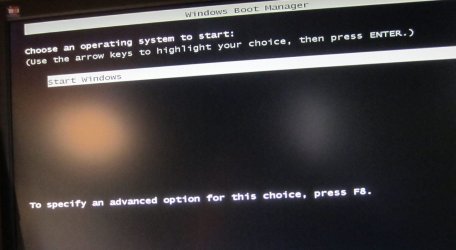
If I use F5, I get what is the way to choose Failsafe mode by entering F8.

I do not get up the screen asking if I want to load defaults. But that I can do by entering Exit in the BIOS, and I have done so.

I'm not sure where to set the sata controller, the ram frequency, timings and voltage.

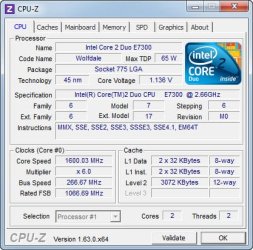
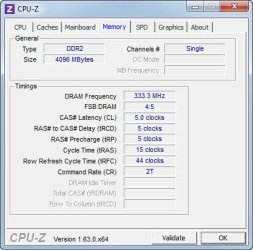
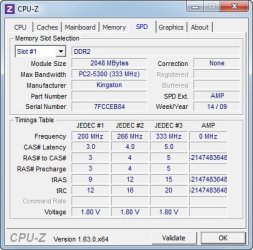
Dumps from CPU-Z is attached.
 

Attachments

  • F5.jpg
    F5.jpg
    71.3 KB · Views: 4
  • Mainboard.jpg
    Mainboard.jpg
    29.4 KB · Views: 2
  • CPU.jpg
    CPU.jpg
    42.3 KB · Views: 2
  • Memory.jpg
    Memory.jpg
    28.5 KB · Views: 2
  • SPD.jpg
    SPD.jpg
    37.1 KB · Views: 2

My Computer

Computer type
PC/Desktop
Computer Manufacturer/Model Number
Homemade
OS
Windows 7 Ultimate
CPU
E7300
Motherboard
ASUS P5Q DeLuxe
Memory
4g
Graphics Card(s)
NVIDIA GeForce 7300 LE
Sound Card
N/A
Monitor(s) Displays
Acer
Screen Resolution
1600x1200
Hard Drives
Samsung HD503HI ATA Device
PSU
Seasonic
Case
ATX
Cooling
FAN
Keyboard
Logitech
Mouse
HP
Internet Speed
20/2
Antivirus
MSE
Browser
IE9, Chrome, Firefox
Do you get that screen every time you start? What I told you about F5 came from your manual. If you are using the F5 on start up that may be the issue. You need to go into BIOS, once there press F5. Your ram looks good. It's set up right. All this stuff is in your manual, but I can look it up for you if you want. The Dram (Ram) timings, frequency an Voltage should be under the AI Tweaker tab. I suspect the Sata controller will be under Advanced tab, but I'll look for you.
 

My Computers

System One System Two

  • Computer type
    PC/Desktop
    Computer Manufacturer/Model Number
    ALWAYS UNDER CONSTRUCTION
    OS
    Windows 11 Pro
    CPU
    Ryzen 9 5900X
    Motherboard
    Asus X570 Crosshair Viii Hero
    Memory
    32GB G Skill DDR4-3600
    Graphics Card(s)
    EVGA RTX 3080 FTW 3 Ultra
    Sound Card
    On Board/Sennheiser PC37X Headset
    Monitor(s) Displays
    3 X Asus 27"
    Screen Resolution
    2560x1440
    Hard Drives
    2 X 1 TB NVME drives
    PSU
    EVGA 850
    Case
    Phanteks Eclipse P400A
    Cooling
    EVGA 280 AIO
    Keyboard
    Logitech G510s/ Logitech G13
    Mouse
    Logitech G502
    Internet Speed
    24/1
    Antivirus
    ESET/MBAM Pro/SAS Pro
    Browser
    Chrome/ Firefox/ Edge
  • Computer type
    Laptop
    System Manufacturer/Model Number
    Dell 16 Plus
    OS
    Windows 11 Pro
    CPU
    Intel Ultra 9 288V
    Memory
    32 GB LPDDR5X 8533
    Monitor(s) Displays
    16" Mini-LED HDR600 Touch 90 Hz
    Screen Resolution
    2560X1600
    Hard Drives
    1 TB NVME
The sata mode is on the main tab under storage configuration, select storage configuration and press enter to open it. Make sure you set it to what it is now or your computer won't boot. See section 3.3.6 in your manual. You will have a choice of IDE, AHCI or Raid.
 

My Computers

System One System Two

  • Computer type
    PC/Desktop
    Computer Manufacturer/Model Number
    ALWAYS UNDER CONSTRUCTION
    OS
    Windows 11 Pro
    CPU
    Ryzen 9 5900X
    Motherboard
    Asus X570 Crosshair Viii Hero
    Memory
    32GB G Skill DDR4-3600
    Graphics Card(s)
    EVGA RTX 3080 FTW 3 Ultra
    Sound Card
    On Board/Sennheiser PC37X Headset
    Monitor(s) Displays
    3 X Asus 27"
    Screen Resolution
    2560x1440
    Hard Drives
    2 X 1 TB NVME drives
    PSU
    EVGA 850
    Case
    Phanteks Eclipse P400A
    Cooling
    EVGA 280 AIO
    Keyboard
    Logitech G510s/ Logitech G13
    Mouse
    Logitech G502
    Internet Speed
    24/1
    Antivirus
    ESET/MBAM Pro/SAS Pro
    Browser
    Chrome/ Firefox/ Edge
  • Computer type
    Laptop
    System Manufacturer/Model Number
    Dell 16 Plus
    OS
    Windows 11 Pro
    CPU
    Intel Ultra 9 288V
    Memory
    32 GB LPDDR5X 8533
    Monitor(s) Displays
    16" Mini-LED HDR600 Touch 90 Hz
    Screen Resolution
    2560X1600
    Hard Drives
    1 TB NVME
Do you get that screen every time you start? What I told you about F5 came from your manual. If you are using the F5 on start up that may be the issue. You need to go into BIOS, once there press F5. Your ram looks good. It's set up right. All this stuff is in your manual, but I can look it up for you if you want. The Dram (Ram) timings, frequency an Voltage should be under the AI Tweaker tab. I suspect the Sata controller will be under Advanced tab, but I'll look for you.

I misunderstood it, sorry. If entering BIOS and F5 the default option came up. But I did not get any options, and this is exactly what I also get, if I do the same from the Exit menu in the BIOS.

BTW, having loaded the default, the socalled ASUS Express Gate SSD come up when booting, and at that point I cannot use it as the mouse is not active at that time of the boot. Never mind, I deselected the express gat ssd to avoid it's booting

Thanks for looking at the SATA this time.
 

My Computer

Computer type
PC/Desktop
Computer Manufacturer/Model Number
Homemade
OS
Windows 7 Ultimate
CPU
E7300
Motherboard
ASUS P5Q DeLuxe
Memory
4g
Graphics Card(s)
NVIDIA GeForce 7300 LE
Sound Card
N/A
Monitor(s) Displays
Acer
Screen Resolution
1600x1200
Hard Drives
Samsung HD503HI ATA Device
PSU
Seasonic
Case
ATX
Cooling
FAN
Keyboard
Logitech
Mouse
HP
Internet Speed
20/2
Antivirus
MSE
Browser
IE9, Chrome, Firefox
The sata mode is on the main tab under storage configuration, select storage configuration and press enter to open it. Make sure you set it to what it is now or your computer won't boot. See section 3.3.6 in your manual. You will have a choice of IDE, AHCI or Raid.

It's set to IDE now.
 

My Computer

Computer type
PC/Desktop
Computer Manufacturer/Model Number
Homemade
OS
Windows 7 Ultimate
CPU
E7300
Motherboard
ASUS P5Q DeLuxe
Memory
4g
Graphics Card(s)
NVIDIA GeForce 7300 LE
Sound Card
N/A
Monitor(s) Displays
Acer
Screen Resolution
1600x1200
Hard Drives
Samsung HD503HI ATA Device
PSU
Seasonic
Case
ATX
Cooling
FAN
Keyboard
Logitech
Mouse
HP
Internet Speed
20/2
Antivirus
MSE
Browser
IE9, Chrome, Firefox
Hi,

Exactly which motherboard do you have??? Its confusing to all?

This one you gave to Essenbe?

The link to the MOBO manual is here: P5Q Deluxe - Motherboards - ASUS

Or what you have stated in your system specs?

Code:
System Manufacturer/Model Number Homemade 
OS Windows 7 Ultimate 
CPU FX4100 
Motherboard [COLOR=red]ASRock 970 Extreme3[/COLOR] 
Memory 8G Corsair 
Graphics Card HD5400 
Sound Card N/A 
Monitor(s) Displays Acer 
Screen Resolution 1600x1200

Please clarify?

cheers

Dave
 

My Computer

Computer type
PC/Desktop
OS
Windows 7 Professional 64bit
CPU
AMD Athlon (tm) X2 5200+ Dual Core 2712 Mhz
Motherboard
Asus
Memory
4GB
Graphics Card(s)
Nividia GeForce 8600 GTS- DIED 25/7/2013 R.I.P
Sound Card
None
Monitor(s) Displays
22" Yuraku LCD (Dont ask)
Screen Resolution
1280x960
Hard Drives
2TB WD Caviar green
PSU
Windy up type
Case
Scout cm Storm
Cooling
Hair dryer on full cool power ;-)
Keyboard
QWERTY
Mouse
Microsoft Special
Internet Speed
BT Infinity 9.38Mb/s Wheeeeeeeeeeeeeeee!!
Antivirus
MSE
Browser
Internet Explore 10 and Chrome
Other Info
Don't shout...I've got a Hangover!
OK, that's what you want it set to after you reset bios defaults, also check the Ram timings and voltage in AI Tweaker. I think we are a little confused. When we help someone we need to know the hardware we are dealing with. The motherboard and CPU we are discussing here is completely different in what is in your system specs.
 

My Computers

System One System Two

  • Computer type
    PC/Desktop
    Computer Manufacturer/Model Number
    ALWAYS UNDER CONSTRUCTION
    OS
    Windows 11 Pro
    CPU
    Ryzen 9 5900X
    Motherboard
    Asus X570 Crosshair Viii Hero
    Memory
    32GB G Skill DDR4-3600
    Graphics Card(s)
    EVGA RTX 3080 FTW 3 Ultra
    Sound Card
    On Board/Sennheiser PC37X Headset
    Monitor(s) Displays
    3 X Asus 27"
    Screen Resolution
    2560x1440
    Hard Drives
    2 X 1 TB NVME drives
    PSU
    EVGA 850
    Case
    Phanteks Eclipse P400A
    Cooling
    EVGA 280 AIO
    Keyboard
    Logitech G510s/ Logitech G13
    Mouse
    Logitech G502
    Internet Speed
    24/1
    Antivirus
    ESET/MBAM Pro/SAS Pro
    Browser
    Chrome/ Firefox/ Edge
  • Computer type
    Laptop
    System Manufacturer/Model Number
    Dell 16 Plus
    OS
    Windows 11 Pro
    CPU
    Intel Ultra 9 288V
    Memory
    32 GB LPDDR5X 8533
    Monitor(s) Displays
    16" Mini-LED HDR600 Touch 90 Hz
    Screen Resolution
    2560X1600
    Hard Drives
    1 TB NVME
Back
Top