
Computer - restore to factory condition without disk or backup?

Debby

New member
Member
VIP
Local time
3:34 AM
Messages
164
Hi! Is it possible to restore my laptop computer back to factory condition, without restore disks and without backups? I'd like to know if this is possible in case I need to ever repair computers that don't have a set of repair disks that go with them.

Aside from that, my main concern now - is getting this HP laptap computer I'm using at the moment - restored back to factory condition. I have a set of Restore disks that work fine for restoring my other laptop computer to factory condition. But when I recently tried them on this HP one, the first one I put in failed to even start the process. I had put the first disk in the computer and clicked on Restart. Should I have turned it completely off first? This computer uses Windows 7, just like my other computer. So I'd think the repair disk set should work for both of the computers. Or am I wrong? :p
 

My Computer My Computer

Computer type
Laptop
Computer Manufacturer/Model Number
HP
OS
Windows 7
CPU
Intel(R) Core(TM)2 Duo CPU T5870 @ 2.00GHz
Motherboard
Intel(R) Core(TM)2 Duo CPU T5870 @ 2.00GHz
Memory
Intel(R) Core(TM)2 Duo CPU T5870 @ 2.00GHz
Graphics Card(s)
Intel(R) Core(TM)2 Duo CPU T5870 @ 2.00GHz
Sound Card
Intel(R) Core(TM)2 Duo CPU T5870 @ 2.00GHz
Monitor(s) Displays
Intel(R) Core(TM)2 Duo CPU T5870 @ 2.00GHz
Screen Resolution
Intel(R) Core(TM)2 Duo CPU T5870 @ 2.00GHz
Hard Drives
Intel(R) Core(TM)2 Duo CPU T5870 @ 2.00GHz
PSU
Intel(R) Core(TM)2 Duo CPU T5870 @ 2.00GHz
Case
Intel(R) Core(TM)2 Duo CPU T5870 @ 2.00GHz
Cooling
Intel(R) Core(TM)2 Duo CPU T5870 @ 2.00GHz
Keyboard
Intel(R) Core(TM)2 Duo CPU T5870 @ 2.00GHz
Mouse
Intel(R) Core(TM)2 Duo CPU T5870 @ 2.00GHz
Internet Speed
Intel(R) Core(TM)2 Duo CPU T5870 @ 2.00GHz
Antivirus
Windows Defender
Browser
Google Chrome
Other Info
Intel(R) Core(TM)2 Duo CPU T5870 @ 2.00GHz
Hi Debby,

Hi! Is it possible to restore my laptop computer back to factory condition, without restore disks and without backups? I'd like to know if this is possible in case I need to ever repair computers that don't have a set of repair disks that go with them.

Aside from that, my main concern now - is getting this HP laptap computer I'm using at the moment - restored back to factory condition. I have a set of Restore disks that work fine for restoring my other laptop computer to factory condition. But when I recently tried them on this HP one, the first one I put in failed to even start the process. I had put the first disk in the computer and clicked on Restart. Should I have turned it completely off first? This computer uses Windows 7, just like my other computer. So I'd think the repair disk set should work for both of the computers. Or am I wrong?

A couple of things . . .

[1] Have you got a recovery partition [reset to factory]?

[2] Update System Specifications

Please update your system specifications in your UserCP => Edit System Spec setup. It will help us to help you!

This SevenForums tutorial [Published by Brink and written by CyberZeus] uses an automated tool which makes this task very easy and quick to do. Click here => System Info - See Your System Specs.


Thanks.
 

My Computer My Computer

Computer type
Laptop
Computer Manufacturer/Model Number
Fujitsu LIFEBOOK
OS
Win 7 HP SP1 64-bit Vista HB SP2 32-bit Linux Mint 18.3
CPU
Intel(R) Pentium(R) CPU P6200 @ 2.13GHz
Motherboard
FUJITSU FJNBB06
Memory
4.00 GB
Graphics Card(s)
Intel(R) Graphics Media Accelerator HD
Sound Card
[1] Realtek High Definition Audio [2] Intel(R) Display Audio
Screen Resolution
1366 x 768 x 32 bits (4294967296 colors) @ 59 Hz
Hard Drives
TOSHIBA MK5076GSX
Antivirus
AVG FREE
Many OEM recovery will only work with the one PC as it may be locked to the BIOS of the PC and have drivers for that PC which again won't work with another PC. The other problems are if any repair disk is old and not at current service pack legal it won't work. Restoration to factory defaults may mean you then need over 1,000 updates.
We generally suggest using free image software to make up-to-date recovery disks
 

My Computer My Computer

Computer type
PC/Desktop
OS
win 8 32 bit
Hi, and thanks! Do I need blank DVDs to do this? If so, what size and about how many? Thanks!
 

My Computer My Computer

Computer type
Laptop
Computer Manufacturer/Model Number
HP
OS
Windows 7
CPU
Intel(R) Core(TM)2 Duo CPU T5870 @ 2.00GHz
Motherboard
Intel(R) Core(TM)2 Duo CPU T5870 @ 2.00GHz
Memory
Intel(R) Core(TM)2 Duo CPU T5870 @ 2.00GHz
Graphics Card(s)
Intel(R) Core(TM)2 Duo CPU T5870 @ 2.00GHz
Sound Card
Intel(R) Core(TM)2 Duo CPU T5870 @ 2.00GHz
Monitor(s) Displays
Intel(R) Core(TM)2 Duo CPU T5870 @ 2.00GHz
Screen Resolution
Intel(R) Core(TM)2 Duo CPU T5870 @ 2.00GHz
Hard Drives
Intel(R) Core(TM)2 Duo CPU T5870 @ 2.00GHz
PSU
Intel(R) Core(TM)2 Duo CPU T5870 @ 2.00GHz
Case
Intel(R) Core(TM)2 Duo CPU T5870 @ 2.00GHz
Cooling
Intel(R) Core(TM)2 Duo CPU T5870 @ 2.00GHz
Keyboard
Intel(R) Core(TM)2 Duo CPU T5870 @ 2.00GHz
Mouse
Intel(R) Core(TM)2 Duo CPU T5870 @ 2.00GHz
Internet Speed
Intel(R) Core(TM)2 Duo CPU T5870 @ 2.00GHz
Antivirus
Windows Defender
Browser
Google Chrome
Other Info
Intel(R) Core(TM)2 Duo CPU T5870 @ 2.00GHz
Hi! I have absolutely no backup made on this computer, and this computer is over 10 years old. So how can a system image help me, since I have no backups made and the present condition of my computer isn't satisfactory? One site I went to to ask about how to make a system image - said it only restores to the last known good condition of the computer. Is that true?
 

My Computer My Computer

Computer type
Laptop
Computer Manufacturer/Model Number
HP
OS
Windows 7
CPU
Intel(R) Core(TM)2 Duo CPU T5870 @ 2.00GHz
Motherboard
Intel(R) Core(TM)2 Duo CPU T5870 @ 2.00GHz
Memory
Intel(R) Core(TM)2 Duo CPU T5870 @ 2.00GHz
Graphics Card(s)
Intel(R) Core(TM)2 Duo CPU T5870 @ 2.00GHz
Sound Card
Intel(R) Core(TM)2 Duo CPU T5870 @ 2.00GHz
Monitor(s) Displays
Intel(R) Core(TM)2 Duo CPU T5870 @ 2.00GHz
Screen Resolution
Intel(R) Core(TM)2 Duo CPU T5870 @ 2.00GHz
Hard Drives
Intel(R) Core(TM)2 Duo CPU T5870 @ 2.00GHz
PSU
Intel(R) Core(TM)2 Duo CPU T5870 @ 2.00GHz
Case
Intel(R) Core(TM)2 Duo CPU T5870 @ 2.00GHz
Cooling
Intel(R) Core(TM)2 Duo CPU T5870 @ 2.00GHz
Keyboard
Intel(R) Core(TM)2 Duo CPU T5870 @ 2.00GHz
Mouse
Intel(R) Core(TM)2 Duo CPU T5870 @ 2.00GHz
Internet Speed
Intel(R) Core(TM)2 Duo CPU T5870 @ 2.00GHz
Antivirus
Windows Defender
Browser
Google Chrome
Other Info
Intel(R) Core(TM)2 Duo CPU T5870 @ 2.00GHz
Hi Debby,

The reason I asked if you have a recovery partition [reset to factory] is because HP laptops usually come with a recovery partition [reset to factory]!

Disk Management

Post a screenshot of the Disk Management => Disk Management - Post a Screen Capture Image.
Pay special attention to Step 5.
 

My Computer My Computer

Computer type
Laptop
Computer Manufacturer/Model Number
Fujitsu LIFEBOOK
OS
Win 7 HP SP1 64-bit Vista HB SP2 32-bit Linux Mint 18.3
CPU
Intel(R) Pentium(R) CPU P6200 @ 2.13GHz
Motherboard
FUJITSU FJNBB06
Memory
4.00 GB
Graphics Card(s)
Intel(R) Graphics Media Accelerator HD
Sound Card
[1] Realtek High Definition Audio [2] Intel(R) Display Audio
Screen Resolution
1366 x 768 x 32 bits (4294967296 colors) @ 59 Hz
Hard Drives
TOSHIBA MK5076GSX
Antivirus
AVG FREE
How do I look for and find the Recovery partition?

How do I look for and find the Recovery partition? And see proof that it exists? Thanks!:D
 

My Computer My Computer

Computer type
Laptop
Computer Manufacturer/Model Number
HP
OS
Windows 7
CPU
Intel(R) Core(TM)2 Duo CPU T5870 @ 2.00GHz
Motherboard
Intel(R) Core(TM)2 Duo CPU T5870 @ 2.00GHz
Memory
Intel(R) Core(TM)2 Duo CPU T5870 @ 2.00GHz
Graphics Card(s)
Intel(R) Core(TM)2 Duo CPU T5870 @ 2.00GHz
Sound Card
Intel(R) Core(TM)2 Duo CPU T5870 @ 2.00GHz
Monitor(s) Displays
Intel(R) Core(TM)2 Duo CPU T5870 @ 2.00GHz
Screen Resolution
Intel(R) Core(TM)2 Duo CPU T5870 @ 2.00GHz
Hard Drives
Intel(R) Core(TM)2 Duo CPU T5870 @ 2.00GHz
PSU
Intel(R) Core(TM)2 Duo CPU T5870 @ 2.00GHz
Case
Intel(R) Core(TM)2 Duo CPU T5870 @ 2.00GHz
Cooling
Intel(R) Core(TM)2 Duo CPU T5870 @ 2.00GHz
Keyboard
Intel(R) Core(TM)2 Duo CPU T5870 @ 2.00GHz
Mouse
Intel(R) Core(TM)2 Duo CPU T5870 @ 2.00GHz
Internet Speed
Intel(R) Core(TM)2 Duo CPU T5870 @ 2.00GHz
Antivirus
Windows Defender
Browser
Google Chrome
Other Info
Intel(R) Core(TM)2 Duo CPU T5870 @ 2.00GHz

My Computer My Computer

Computer type
Laptop
Computer Manufacturer/Model Number
Fujitsu LIFEBOOK
OS
Win 7 HP SP1 64-bit Vista HB SP2 32-bit Linux Mint 18.3
CPU
Intel(R) Pentium(R) CPU P6200 @ 2.13GHz
Motherboard
FUJITSU FJNBB06
Memory
4.00 GB
Graphics Card(s)
Intel(R) Graphics Media Accelerator HD
Sound Card
[1] Realtek High Definition Audio [2] Intel(R) Display Audio
Screen Resolution
1366 x 768 x 32 bits (4294967296 colors) @ 59 Hz
Hard Drives
TOSHIBA MK5076GSX
Antivirus
AVG FREE
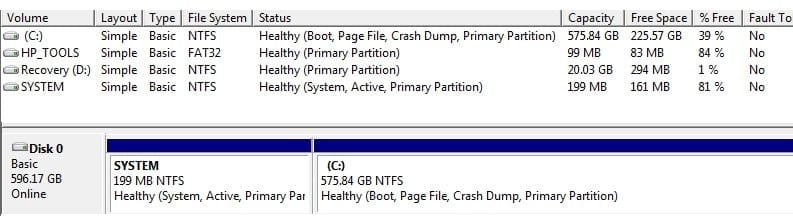
Ok here is a picture of what you see when I click on Computer Management. management.jpg
 

My Computer My Computer

Computer type
Laptop
Computer Manufacturer/Model Number
HP
OS
Windows 7
CPU
Intel(R) Core(TM)2 Duo CPU T5870 @ 2.00GHz
Motherboard
Intel(R) Core(TM)2 Duo CPU T5870 @ 2.00GHz
Memory
Intel(R) Core(TM)2 Duo CPU T5870 @ 2.00GHz
Graphics Card(s)
Intel(R) Core(TM)2 Duo CPU T5870 @ 2.00GHz
Sound Card
Intel(R) Core(TM)2 Duo CPU T5870 @ 2.00GHz
Monitor(s) Displays
Intel(R) Core(TM)2 Duo CPU T5870 @ 2.00GHz
Screen Resolution
Intel(R) Core(TM)2 Duo CPU T5870 @ 2.00GHz
Hard Drives
Intel(R) Core(TM)2 Duo CPU T5870 @ 2.00GHz
PSU
Intel(R) Core(TM)2 Duo CPU T5870 @ 2.00GHz
Case
Intel(R) Core(TM)2 Duo CPU T5870 @ 2.00GHz
Cooling
Intel(R) Core(TM)2 Duo CPU T5870 @ 2.00GHz
Keyboard
Intel(R) Core(TM)2 Duo CPU T5870 @ 2.00GHz
Mouse
Intel(R) Core(TM)2 Duo CPU T5870 @ 2.00GHz
Internet Speed
Intel(R) Core(TM)2 Duo CPU T5870 @ 2.00GHz
Antivirus
Windows Defender
Browser
Google Chrome
Other Info
Intel(R) Core(TM)2 Duo CPU T5870 @ 2.00GHz
Yip you have a recovery partition so you can restore the pc back to how it was bought brand new. We need exact model to tell you how to recover normally if you search YouTube there are videos to guide you
 

My Computer My Computer

Computer type
PC/Desktop
OS
win 8 32 bit
Hi Debby,

Ok here is a picture of what you see when I click on Computer Management. View attachment 409480

OK. That means that you do have a Recovery Partition! Therefore, you can restore your computer back to the same state that it was when it was brand new [OOBE]. This is called a Factory Reset!

IMPORTANT: Make sure that you backup ALL your essential files to an external HDD or USB BEFORE you start the Factory Reset. This is because during the clean install process, ALL your User Accounts, Folders, Files, Documents, Pictures, Music, Videos, Data Files, Icons, and any installed programs will be erased and become irretrievable. It is also still strongly advised that you create a system image as a secondary precaution. This way, if things go wrong, you will be able to restore your OS back to the exact same state that it is in NOW [when the system image was made] in a very short time. There are two imaging programs which are very popular among members here, the first is AOMEI Backupper Standard [FREE], and the second is Macrium Reflect [FREE].

IMPORTANT: REMOVE any connected drives BEFORE you start the Factory Reset.

I hope this helps!
 

My Computer My Computer

Computer type
Laptop
Computer Manufacturer/Model Number
Fujitsu LIFEBOOK
OS
Win 7 HP SP1 64-bit Vista HB SP2 32-bit Linux Mint 18.3
CPU
Intel(R) Pentium(R) CPU P6200 @ 2.13GHz
Motherboard
FUJITSU FJNBB06
Memory
4.00 GB
Graphics Card(s)
Intel(R) Graphics Media Accelerator HD
Sound Card
[1] Realtek High Definition Audio [2] Intel(R) Display Audio
Screen Resolution
1366 x 768 x 32 bits (4294967296 colors) @ 59 Hz
Hard Drives
TOSHIBA MK5076GSX
Antivirus
AVG FREE
If Debby tells us the exact model of her HP laptop, we might be able to explain how to make recovery discs for it.
 

My Computers My Computers

System One System Two

  • Computer type
    PC/Desktop
    OS
    7 X64
    CPU
    i5 8400
    Motherboard
    gigabyte b365m ds3h
    Memory
    2x8gb 3200mhz
    Hard Drives
    various
    PSU
    pure power 11 400w cm
    Case
    Coolermaster
    Cooling
    cryorig m9i
  • Computer type
    PC/Desktop
    OS
    7x64
    CPU
    g5400
    Motherboard
    ga b365m ds3h
    Memory
    8gb ddr4 2400
    PSU
    xfx pro 450w
Hi! Ok - My System information under Tools, says that the type of model I have, is a HP Pavilion g7 Notebook PC. Thanks!
 

My Computer My Computer

Computer type
Laptop
Computer Manufacturer/Model Number
HP
OS
Windows 7
CPU
Intel(R) Core(TM)2 Duo CPU T5870 @ 2.00GHz
Motherboard
Intel(R) Core(TM)2 Duo CPU T5870 @ 2.00GHz
Memory
Intel(R) Core(TM)2 Duo CPU T5870 @ 2.00GHz
Graphics Card(s)
Intel(R) Core(TM)2 Duo CPU T5870 @ 2.00GHz
Sound Card
Intel(R) Core(TM)2 Duo CPU T5870 @ 2.00GHz
Monitor(s) Displays
Intel(R) Core(TM)2 Duo CPU T5870 @ 2.00GHz
Screen Resolution
Intel(R) Core(TM)2 Duo CPU T5870 @ 2.00GHz
Hard Drives
Intel(R) Core(TM)2 Duo CPU T5870 @ 2.00GHz
PSU
Intel(R) Core(TM)2 Duo CPU T5870 @ 2.00GHz
Case
Intel(R) Core(TM)2 Duo CPU T5870 @ 2.00GHz
Cooling
Intel(R) Core(TM)2 Duo CPU T5870 @ 2.00GHz
Keyboard
Intel(R) Core(TM)2 Duo CPU T5870 @ 2.00GHz
Mouse
Intel(R) Core(TM)2 Duo CPU T5870 @ 2.00GHz
Internet Speed
Intel(R) Core(TM)2 Duo CPU T5870 @ 2.00GHz
Antivirus
Windows Defender
Browser
Google Chrome
Other Info
Intel(R) Core(TM)2 Duo CPU T5870 @ 2.00GHz

My Computers My Computers

System One System Two

  • Computer type
    PC/Desktop
    OS
    7 X64
    CPU
    i5 8400
    Motherboard
    gigabyte b365m ds3h
    Memory
    2x8gb 3200mhz
    Hard Drives
    various
    PSU
    pure power 11 400w cm
    Case
    Coolermaster
    Cooling
    cryorig m9i
  • Computer type
    PC/Desktop
    OS
    7x64
    CPU
    g5400
    Motherboard
    ga b365m ds3h
    Memory
    8gb ddr4 2400
    PSU
    xfx pro 450w
For creating recovery discs:
YouTube
 

My Computers My Computers

System One System Two

  • Computer type
    PC/Desktop
    OS
    7 X64
    CPU
    i5 8400
    Motherboard
    gigabyte b365m ds3h
    Memory
    2x8gb 3200mhz
    Hard Drives
    various
    PSU
    pure power 11 400w cm
    Case
    Coolermaster
    Cooling
    cryorig m9i
  • Computer type
    PC/Desktop
    OS
    7x64
    CPU
    g5400
    Motherboard
    ga b365m ds3h
    Memory
    8gb ddr4 2400
    PSU
    xfx pro 450w
Thanks! Ok I'll go to Youtube to look for instructions on how to create recovery disks too.
 

My Computer My Computer

Computer type
Laptop
Computer Manufacturer/Model Number
HP
OS
Windows 7
CPU
Intel(R) Core(TM)2 Duo CPU T5870 @ 2.00GHz
Motherboard
Intel(R) Core(TM)2 Duo CPU T5870 @ 2.00GHz
Memory
Intel(R) Core(TM)2 Duo CPU T5870 @ 2.00GHz
Graphics Card(s)
Intel(R) Core(TM)2 Duo CPU T5870 @ 2.00GHz
Sound Card
Intel(R) Core(TM)2 Duo CPU T5870 @ 2.00GHz
Monitor(s) Displays
Intel(R) Core(TM)2 Duo CPU T5870 @ 2.00GHz
Screen Resolution
Intel(R) Core(TM)2 Duo CPU T5870 @ 2.00GHz
Hard Drives
Intel(R) Core(TM)2 Duo CPU T5870 @ 2.00GHz
PSU
Intel(R) Core(TM)2 Duo CPU T5870 @ 2.00GHz
Case
Intel(R) Core(TM)2 Duo CPU T5870 @ 2.00GHz
Cooling
Intel(R) Core(TM)2 Duo CPU T5870 @ 2.00GHz
Keyboard
Intel(R) Core(TM)2 Duo CPU T5870 @ 2.00GHz
Mouse
Intel(R) Core(TM)2 Duo CPU T5870 @ 2.00GHz
Internet Speed
Intel(R) Core(TM)2 Duo CPU T5870 @ 2.00GHz
Antivirus
Windows Defender
Browser
Google Chrome
Other Info
Intel(R) Core(TM)2 Duo CPU T5870 @ 2.00GHz
HERE

says it is for desktops, but the process is pretty much the same for laptops, iirc.
 

My Computers My Computers

System One System Two

  • Computer type
    PC/Desktop
    OS
    7 X64
    CPU
    i5 8400
    Motherboard
    gigabyte b365m ds3h
    Memory
    2x8gb 3200mhz
    Hard Drives
    various
    PSU
    pure power 11 400w cm
    Case
    Coolermaster
    Cooling
    cryorig m9i
  • Computer type
    PC/Desktop
    OS
    7x64
    CPU
    g5400
    Motherboard
    ga b365m ds3h
    Memory
    8gb ddr4 2400
    PSU
    xfx pro 450w
Back
Top