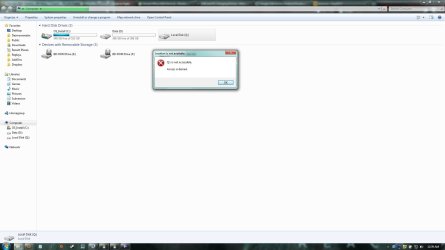
Computer shows drive which isn't there

dasmowenator

New member
Local time
1:47 PM
Messages
4
I had a friend who plugged his USB hard drive into my computer the other day and my computer wasn't able to use it (I think it was a mac format), but it still showed up in my Computer folder. When we took it back out, the drive is still in my Computer folder. It's been over 24 hours and I've restarted my computer... the stupid non-existent hard drive is still in my Computer. Does anyone know how to get rid of this? It's listed under "Hard Disk Drives" not "Devices with Removable Storage", so there is no eject option when I right-click.
 

My Computer

OS
Windows 7 Home Premium x64
Do you have a program (such as smartdefrag) that was mapped to this drive?
 

My Computer

Computer Manufacturer/Model Number
Dell and Custom
OS
Systems 1 and 2: Windows 7 Enterprise x64, Win 8 Developer
CPU
System 1: i7 [email protected], System 2: AMD FX-4100 Zambezi 3.6G
Motherboard
System 1:Dell 06NWYK System 2: ASUS M5A97 AM3+
Memory
System 1: 8GB System 2: 8GB
Graphics Card(s)
System 1: ATI FirePro V4800 System 2: Radeon HD 6850
Sound Card
System 1: onboard System 2: onboard
Monitor(s) Displays
System1: Viewsonic HDMI 24"
Screen Resolution
System 1: 1920x1080 System 2: 1920x1080
Hard Drives
System 1: Mirrored .5B drives System 2: Seagate Barracuda ST1000DM003 1TB 7200 RPM 64MB Cache SATA 6.0Gb/s
Case
System 1: Dell System 2: Cooler Master
Internet Speed
10 MBPS
I have VirtualCloneDrive mapped to another drive (drive F), which works just fine. But this drive is mapped to drive Q, and it just appeared when I plugged the external hard drive in
 

My Computer

OS
Windows 7 Home Premium x64
Something to do with Office 2010 perhaps.
 

My Computers

System One System Two

  • Computer type
    PC/Desktop
    OS
    7 X64
    CPU
    i5 8400
    Motherboard
    gigabyte b365m ds3h
    Memory
    2x8gb 3200mhz
    Hard Drives
    various
    PSU
    pure power 11 400w cm
    Case
    Coolermaster
    Cooling
    cryorig m9i
  • Computer type
    PC/Desktop
    OS
    7x64
    CPU
    g5400
    Motherboard
    ga b365m ds3h
    Memory
    8gb ddr4 2400
    PSU
    xfx pro 450w

My Computer

Computer Manufacturer/Model Number
HP Pavilion e9110t
OS
Windows 7 Home Premium 64 Bit
CPU
Intel(R) Core(TM)2 Quad CPU Q9550 @ 2.83GHz
Motherboard
Pegatron IPIEL-LA3
Memory
6.00 GB Hundai HMT125U6BFR8C-H9
Graphics Card(s)
ATI Radeon HD 4850
Sound Card
Realtek High Definition Audio/ATI High Definition Audio
Monitor(s) Displays
Acer AL2216W
Screen Resolution
1680x1050
Hard Drives
Hitachi HDP725050GLA360 ATA Device 500 GB
PSU
Unknown/installed by HP
Case
HP generic case
Cooling
Intel Stock Cooling
Keyboard
HP Keyboard
Mouse
HP Mouse
Internet Speed
Download: 19.15 Mbps Upload: 1.67 Mbps
Other Info
Network Adapter Realtek RTL8168D/8111D Family PCI-E Gigabit Ethernet NIC (NDIS 6.20)
Network Adapter 802.11n Wireless PCI Express Card LAN Adapter
Hmmmm
However, his drive seems to have a bar under it showing how much data is stored. Mine is just blank.
Here's the message I get when I double-click it.
 

Attachments

  • screen.jpg
    screen.jpg
    69.8 KB · Views: 5
  • screen2.jpg
    screen2.jpg
    76.7 KB · Views: 11

My Computer

OS
Windows 7 Home Premium x64
Hmmmm
However, his drive seems to have a bar under it showing how much data is stored. Mine is just blank.
Here's the message I get when I double-click it.

That is actually pretty standard. It looks like the image by Derekimo was of the Q drive he created to test if the installation could finish. See http://www.sevenforums.com/hardware-devices/47823-extra-drives-showing-up-explorer.html#post448811, http://www.sevenforums.com/general-discussion/56838-mystery-drive-q.html#post517438, and Office 2010 Beta Click-to-Run causes Q Drive issue! - Microsoft Help | DSLReports Forums as they have the same behavior as your Q drive.
 

My Computer

Computer Manufacturer/Model Number
HP Pavilion e9110t
OS
Windows 7 Home Premium 64 Bit
CPU
Intel(R) Core(TM)2 Quad CPU Q9550 @ 2.83GHz
Motherboard
Pegatron IPIEL-LA3
Memory
6.00 GB Hundai HMT125U6BFR8C-H9
Graphics Card(s)
ATI Radeon HD 4850
Sound Card
Realtek High Definition Audio/ATI High Definition Audio
Monitor(s) Displays
Acer AL2216W
Screen Resolution
1680x1050
Hard Drives
Hitachi HDP725050GLA360 ATA Device 500 GB
PSU
Unknown/installed by HP
Case
HP generic case
Cooling
Intel Stock Cooling
Keyboard
HP Keyboard
Mouse
HP Mouse
Internet Speed
Download: 19.15 Mbps Upload: 1.67 Mbps
Other Info
Network Adapter Realtek RTL8168D/8111D Family PCI-E Gigabit Ethernet NIC (NDIS 6.20)
Network Adapter 802.11n Wireless PCI Express Card LAN Adapter
Wow, well I guess that must be it then - weird that it first appeared when I plugged in an improperly formatted hard drive

So do you know how to get rid of that Q drive? I don't see the solution in any of the links

Thanks
 

My Computer

OS
Windows 7 Home Premium x64
Wow, well I guess that must be it then - weird that it first appeared when I plugged in an improperly formatted hard drive

So do you know how to get rid of that Q drive? I don't see the solution in any of the links

Thanks

You would have to uninstall Office and re-install it without the Click to Run feature.
 

My Computer

Computer Manufacturer/Model Number
HP Pavilion e9110t
OS
Windows 7 Home Premium 64 Bit
CPU
Intel(R) Core(TM)2 Quad CPU Q9550 @ 2.83GHz
Motherboard
Pegatron IPIEL-LA3
Memory
6.00 GB Hundai HMT125U6BFR8C-H9
Graphics Card(s)
ATI Radeon HD 4850
Sound Card
Realtek High Definition Audio/ATI High Definition Audio
Monitor(s) Displays
Acer AL2216W
Screen Resolution
1680x1050
Hard Drives
Hitachi HDP725050GLA360 ATA Device 500 GB
PSU
Unknown/installed by HP
Case
HP generic case
Cooling
Intel Stock Cooling
Keyboard
HP Keyboard
Mouse
HP Mouse
Internet Speed
Download: 19.15 Mbps Upload: 1.67 Mbps
Other Info
Network Adapter Realtek RTL8168D/8111D Family PCI-E Gigabit Ethernet NIC (NDIS 6.20)
Network Adapter 802.11n Wireless PCI Express Card LAN Adapter
Back
Top