Solved Computer shut down after installing GTX 780

Tobbe127

New member
Local time
7:49 PM
Messages
13
I bought an upgrade kit to my old computer, purchased 16GB ram Intel Core i7-4770K 3.50Ghz, ASUS GTX 780 and MSI Z87-G45 gaming motherboard.

So i started installing drivers for my motherboard, after that was done i downloaded the latest drivers for my graphic card and around there my computer started to shut off, and it did that a few times before it didnt even got on windows before it restarted, i tried to run it in safemode and it work a little longer.

Day after that i ran my computer on my integrating graphic card which worked fine and still does, but my computer didnt find any compatible nvidia unit installed on my computer, so i unplug my graphic card and move it to another pci port restart my computer and put the dvi-cabel in VGA/DVI+I the other one is DVI+D and that one didnt work at all, so i get in towindows like yesterday, but it only take a few secounds before my computer die and restarts, then i log in and i see "windows didnt close properly" dont know exact message so i look and i see i got a Bluescreen like this..


OS Version: 6.1.7601.2.1.0.256.1
Locla ID 1053

BCCode 116
BCP 1 FFFFFA80102312F0
BCP 2 FFFFF8800F995074
BCP 3 FFFFFFFFC000009A
BCP 4 0000000000000004

OS Version 6_1_7601
Service Pack 1_0
Product 256_1

C:\Windows\Minidump\121413-19203-01.dmp
C:\Users\Tobe\AppData\Local\Temp\WER-44631-0.sysdata.xml

I searched on Google and came to this page in a thread with the same code as 116, and he had met with the answer that there was no air flow or that the graphics card got very hot or something like that.

Might be alot of typos, not that good at english, but i tried my best to help you help me :)

Thanks.

EDIT: This is the link i got http://www.sevenforums.com/bsod-help-support/59114-bsod-bccode-116-nvidia.html
 

My Computer

Computer type
PC/Desktop
Computer Manufacturer/Model Number
Custom
OS
Windows Ultimate x64
CPU
Intel core i7-4770K @ 3.50Ghz
Motherboard
MSI Z87-G45
Memory
16GB
Graphics Card(s)
Asus GTX 780
Antivirus
ComHem säkerhetspaket
Browser
Firefox

My Computer

Computer type
PC/Desktop
Computer Manufacturer/Model Number
Own build (new) Desk1 / Asus ROG Win 7 / Desk2 1st build
OS
Desk1 7 Home Prem / Desk2 10 Pro / Main lap Asus ROG 10 Pro 2 laptop Toshiba 7 Pro Asus P2520 7 & 10
CPU
Desk1 i5 3750K / Laptop i7 GTX 860M / Desk2 i5 2500
Motherboard
Desk1 Asus P877-V / Desk2 Gigabyte H67 UD3H / Laptop ?
Memory
Desk1 8GB (1866) / Desk2 16GB (1333) / Laptop 8Gb DDR3
Graphics Card(s)
Desk 1& 2NVidia GTX 650 & Laptops on board Intel
Sound Card
Desk 1 & 2 -XONAR DG Realtek High Def audio Laptop
Monitor(s) Displays
Desk 1 Benq HD 2450 / Desk2 Philips 24" / Laptop 17.5"
Screen Resolution
1920x1080 D1 & D2 & Laptop 1
Hard Drives
Desk1 Samsung 120GB 830 SSD
Asus ROG 256GB 850 Pro SSD
Desk2 Samsung 840 256 SSD
Toshiba 120GB EVO
PSU
Desk 1 Corsair HX 1050/ Laptop ? / Desk 2 Corsair HX 650
Case
Desk 1 Cooler HAF XM ? Toshiba laptop / Desk2 Coolermaster
Cooling
Fans on all Desk1 -2 Desk2 - all Coolermasters 5 Laptop ?
Keyboard
Desk 1 MS Sidewinder X6 Desk 2 MS Sidewinder X 4
Mouse
Desk 1&2 - Gigabyte MS 900 gamer - laptop - Logitec wireless
Internet Speed
ADSL2+
Other Info
One other Desktop (tester) and spare Toshba laptop both with SSD's
Running Kaspersky 2016 ISS on all machines config'd identically
Logitec audio stereo systems on each machine (x3)
Canon MG5250MFC
Router/modem TP-Link running WPA2SK
Code:
BCCode 116

These are almost always graphics related as you are finding out. The usual advice is to upgrade the drivers, but you seem to have tried that already.

In this case, I would completely uninstall the NVidia drivers, and then let Windows Update install an older (but certified) Microsoft driver to test to see whether your system is more stable.

Post back your findings.
 

My Computer

Computer type
PC/Desktop
Computer Manufacturer/Model Number
Golden Mk. I.4
OS
Windows 10 Pro x64 ; Xubuntu x64
CPU
Intel i7 860 @ 2.80 GHz O/C'ed to 4.0GHz
Motherboard
Gigabyte P55A-UD3R Rev.1. Award BIOS F13
Memory
16GB Corsair Vengance DDR3 @ 661 MHz Dual Channel (9-9-9-24)
Graphics Card(s)
EVGA NVidia GTX 560 1024MB
Sound Card
Realtek Integrated
Monitor(s) Displays
Dual Samsung SyncMaster 2494HS
Screen Resolution
1920*1080 and 1920*1080
Hard Drives
1*Samsung 840 EVO 120GB SSD;
1*OCZ Vertex 2 60GB SSD;
2*Samsung F3 SpinPoint 1TB in RAID0;
1*Samsung F1 SpinPoint 1TB;
2*Western Digital 1TB External USB 3.0
1*Western Digital 500GB External USB 3.0
1*Seagate 500GB External USB 2.0
PSU
Thermaltake ToughPower QFan 750W
Case
Thermaltake Element S VK60001W2Z
Cooling
Corsair H60 Water Cooling, 2*230mm and 2*80mm case fans
Keyboard
Logitech G110
Mouse
Logitech MX518

My Computer

Computer type
PC/Desktop
Computer Manufacturer/Model Number
Custom
OS
Windows Ultimate x64
CPU
Intel core i7-4770K @ 3.50Ghz
Motherboard
MSI Z87-G45
Memory
16GB
Graphics Card(s)
Asus GTX 780
Antivirus
ComHem säkerhetspaket
Browser
Firefox
I did run it today again after i used sfc/scannow and i didnt get any bad files but when i ran my computer it was on for like 10 min but as soon as i just touched my computer and started my browser it shut off :S


My Computer

Computer type
PC/Desktop
Computer Manufacturer/Model Number
Custom
OS
Windows Ultimate x64
CPU
Intel core i7-4770K @ 3.50Ghz
Motherboard
MSI Z87-G45
Memory
16GB
Graphics Card(s)
Asus GTX 780
Antivirus
ComHem säkerhetspaket
Browser
Firefox
Have you run a check on temperatures?

HWiNFO64 is a pretty good monitor. When you run it, select Sensor Only on the small window that pops up. Post an image of the temperature and voltage area after about 5 minutes of PC running.
 

My Computer

Computer type
PC/Desktop
Computer Manufacturer/Model Number
Built 2/11/2011
OS
Windows 7 Pro-x64
CPU
i7-2600 3.4GHz - 3.8GHz Turbo
Motherboard
Intel DH67BL-B3
Memory
8Gb - 2x4GB, Muskin 991770 PC3-1333
Graphics Card(s)
Integrated Intel HD 2000
Sound Card
Integrated Intel 10.1 HD, RealTek ALC892
Monitor(s) Displays
Asus LCD VH222H, Haier HL24XSL2a
Screen Resolution
1920x1080, 1920x1080
Hard Drives
Crucial SSD C300-128Gb,
Western Digital WD5002AALX - 500Gb,
Western Digital WD7501AALS - 750Gb
PSU
Seasonic 650W 80+ Gold Modular
Case
Rosewill Defender
Cooling
Stock CPU, Four 120mm case fans, PCH fan added
Keyboard
Logitech EX100 Y-RBH94 Wireless
Mouse
Logitech EX100 M-RCE95 Wireless
Internet Speed
3.0/1.5 Mbs
Antivirus
Microsoft Security Essentials
Browser
Microsoft Internet Explorer 11
Other Info
Antec Veris Premier-Multimedia IR Station,
Cyber Accoustics-3602 Speakers,
AFT XM-5U Card Reader,
Hauppauge TV-HVR-2250,
Sony LX300 USB Turntable
i did check my motherboard temp and cpu temp on BIOS and cpu was around 40 and motherboard 25
EDIT: i downloaded that program and its running right now.
 

My Computer

Computer type
PC/Desktop
Computer Manufacturer/Model Number
Custom
OS
Windows Ultimate x64
CPU
Intel core i7-4770K @ 3.50Ghz
Motherboard
MSI Z87-G45
Memory
16GB
Graphics Card(s)
Asus GTX 780
Antivirus
ComHem säkerhetspaket
Browser
Firefox
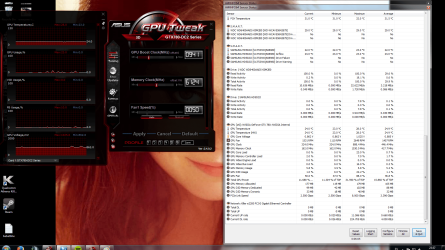
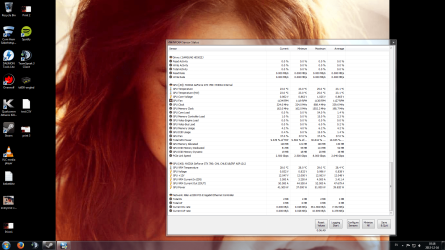
So this is th result

it ran for about 7 mins now so right before i took the pictures it crashed :shock:
 

Attachments

  • Print 1.png
    Print 1.png
    275.4 KB · Views: 7
  • Print 2.png
    Print 2.png
    277.7 KB · Views: 6

My Computer

Computer type
PC/Desktop
Computer Manufacturer/Model Number
Custom
OS
Windows Ultimate x64
CPU
Intel core i7-4770K @ 3.50Ghz
Motherboard
MSI Z87-G45
Memory
16GB
Graphics Card(s)
Asus GTX 780
Antivirus
ComHem säkerhetspaket
Browser
Firefox
See Post #3
 

My Computer

Computer type
PC/Desktop
Computer Manufacturer/Model Number
Golden Mk. I.4
OS
Windows 10 Pro x64 ; Xubuntu x64
CPU
Intel i7 860 @ 2.80 GHz O/C'ed to 4.0GHz
Motherboard
Gigabyte P55A-UD3R Rev.1. Award BIOS F13
Memory
16GB Corsair Vengance DDR3 @ 661 MHz Dual Channel (9-9-9-24)
Graphics Card(s)
EVGA NVidia GTX 560 1024MB
Sound Card
Realtek Integrated
Monitor(s) Displays
Dual Samsung SyncMaster 2494HS
Screen Resolution
1920*1080 and 1920*1080
Hard Drives
1*Samsung 840 EVO 120GB SSD;
1*OCZ Vertex 2 60GB SSD;
2*Samsung F3 SpinPoint 1TB in RAID0;
1*Samsung F1 SpinPoint 1TB;
2*Western Digital 1TB External USB 3.0
1*Western Digital 500GB External USB 3.0
1*Seagate 500GB External USB 2.0
PSU
Thermaltake ToughPower QFan 750W
Case
Thermaltake Element S VK60001W2Z
Cooling
Corsair H60 Water Cooling, 2*230mm and 2*80mm case fans
Keyboard
Logitech G110
Mouse
Logitech MX518
Code:
BCCode 116
In this case, I would completely uninstall the NVidia drivers, and then let Windows Update install an older (but certified) Microsoft driver to test to see whether your system is more stable..

Do you mean windows update or should i go to nvidias webpage and download an older driver?
 

My Computer

Computer type
PC/Desktop
Computer Manufacturer/Model Number
Custom
OS
Windows Ultimate x64
CPU
Intel core i7-4770K @ 3.50Ghz
Motherboard
MSI Z87-G45
Memory
16GB
Graphics Card(s)
Asus GTX 780
Antivirus
ComHem säkerhetspaket
Browser
Firefox
Windows Update.

The drivers will be older, but they are Microsoft Certified, meaning they are more likely to be stable. We are doing this to test whether its a driver problem, or not.
 

My Computer

Computer type
PC/Desktop
Computer Manufacturer/Model Number
Golden Mk. I.4
OS
Windows 10 Pro x64 ; Xubuntu x64
CPU
Intel i7 860 @ 2.80 GHz O/C'ed to 4.0GHz
Motherboard
Gigabyte P55A-UD3R Rev.1. Award BIOS F13
Memory
16GB Corsair Vengance DDR3 @ 661 MHz Dual Channel (9-9-9-24)
Graphics Card(s)
EVGA NVidia GTX 560 1024MB
Sound Card
Realtek Integrated
Monitor(s) Displays
Dual Samsung SyncMaster 2494HS
Screen Resolution
1920*1080 and 1920*1080
Hard Drives
1*Samsung 840 EVO 120GB SSD;
1*OCZ Vertex 2 60GB SSD;
2*Samsung F3 SpinPoint 1TB in RAID0;
1*Samsung F1 SpinPoint 1TB;
2*Western Digital 1TB External USB 3.0
1*Western Digital 500GB External USB 3.0
1*Seagate 500GB External USB 2.0
PSU
Thermaltake ToughPower QFan 750W
Case
Thermaltake Element S VK60001W2Z
Cooling
Corsair H60 Water Cooling, 2*230mm and 2*80mm case fans
Keyboard
Logitech G110
Mouse
Logitech MX518
Excuse my ignorance, but how will i do that? will windows make an update if it dont find drivers for my graphic card?
 

My Computer

Computer type
PC/Desktop
Computer Manufacturer/Model Number
Custom
OS
Windows Ultimate x64
CPU
Intel core i7-4770K @ 3.50Ghz
Motherboard
MSI Z87-G45
Memory
16GB
Graphics Card(s)
Asus GTX 780
Antivirus
ComHem säkerhetspaket
Browser
Firefox
Yes.

Do the following:

1. Uninstall the NVidia driver
2. Reboot the computer
3. Run Windows Update - it will automatically find the appropriate driver for your card
 

My Computer

Computer type
PC/Desktop
Computer Manufacturer/Model Number
Golden Mk. I.4
OS
Windows 10 Pro x64 ; Xubuntu x64
CPU
Intel i7 860 @ 2.80 GHz O/C'ed to 4.0GHz
Motherboard
Gigabyte P55A-UD3R Rev.1. Award BIOS F13
Memory
16GB Corsair Vengance DDR3 @ 661 MHz Dual Channel (9-9-9-24)
Graphics Card(s)
EVGA NVidia GTX 560 1024MB
Sound Card
Realtek Integrated
Monitor(s) Displays
Dual Samsung SyncMaster 2494HS
Screen Resolution
1920*1080 and 1920*1080
Hard Drives
1*Samsung 840 EVO 120GB SSD;
1*OCZ Vertex 2 60GB SSD;
2*Samsung F3 SpinPoint 1TB in RAID0;
1*Samsung F1 SpinPoint 1TB;
2*Western Digital 1TB External USB 3.0
1*Western Digital 500GB External USB 3.0
1*Seagate 500GB External USB 2.0
PSU
Thermaltake ToughPower QFan 750W
Case
Thermaltake Element S VK60001W2Z
Cooling
Corsair H60 Water Cooling, 2*230mm and 2*80mm case fans
Keyboard
Logitech G110
Mouse
Logitech MX518
Also, reset your system back to defaults (timing and voltage) until you get a stable system. This is not the time to be OCing. The temps look good, I couldn't see the rest of the voltages but memory seems high depending on the modules you're using.

I think he means Windows' Update since that's what he said. ;)
 

My Computer

Computer type
PC/Desktop
Computer Manufacturer/Model Number
Built 2/11/2011
OS
Windows 7 Pro-x64
CPU
i7-2600 3.4GHz - 3.8GHz Turbo
Motherboard
Intel DH67BL-B3
Memory
8Gb - 2x4GB, Muskin 991770 PC3-1333
Graphics Card(s)
Integrated Intel HD 2000
Sound Card
Integrated Intel 10.1 HD, RealTek ALC892
Monitor(s) Displays
Asus LCD VH222H, Haier HL24XSL2a
Screen Resolution
1920x1080, 1920x1080
Hard Drives
Crucial SSD C300-128Gb,
Western Digital WD5002AALX - 500Gb,
Western Digital WD7501AALS - 750Gb
PSU
Seasonic 650W 80+ Gold Modular
Case
Rosewill Defender
Cooling
Stock CPU, Four 120mm case fans, PCH fan added
Keyboard
Logitech EX100 Y-RBH94 Wireless
Mouse
Logitech EX100 M-RCE95 Wireless
Internet Speed
3.0/1.5 Mbs
Antivirus
Microsoft Security Essentials
Browser
Microsoft Internet Explorer 11
Other Info
Antec Veris Premier-Multimedia IR Station,
Cyber Accoustics-3602 Speakers,
AFT XM-5U Card Reader,
Hauppauge TV-HVR-2250,
Sony LX300 USB Turntable
Ok i did as you told about windows updates, didnt really change anything for me, i am now using my graphic card but i tried play 3 games.

Dota 2 worked fine never got in to a match to see what would happen.
Path of exile it worked to get in to the game but as soon as i warped in to a zone were its monster, crash!
Rome II it wouldnt even start, took ages for it to load.

Also i tried to upgrade my Windows score and it started to check som D3D something, crashed

But by dont really doing anything it works pretty solid.

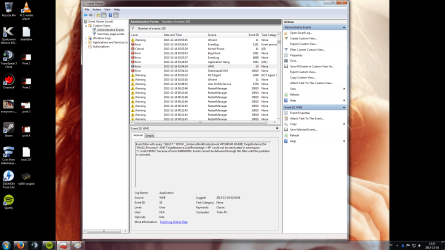
Some more pics
 

Attachments

  • print 3.png
    print 3.png
    287.6 KB · Views: 3
  • print 4.png
    print 4.png
    353.2 KB · Views: 3

My Computer

Computer type
PC/Desktop
Computer Manufacturer/Model Number
Custom
OS
Windows Ultimate x64
CPU
Intel core i7-4770K @ 3.50Ghz
Motherboard
MSI Z87-G45
Memory
16GB
Graphics Card(s)
Asus GTX 780
Antivirus
ComHem säkerhetspaket
Browser
Firefox
Upload the latest BSOD and I'll see if I can get someone more proficient at dump analysis to have a look.
 

My Computer

Computer type
PC/Desktop
Computer Manufacturer/Model Number
Golden Mk. I.4
OS
Windows 10 Pro x64 ; Xubuntu x64
CPU
Intel i7 860 @ 2.80 GHz O/C'ed to 4.0GHz
Motherboard
Gigabyte P55A-UD3R Rev.1. Award BIOS F13
Memory
16GB Corsair Vengance DDR3 @ 661 MHz Dual Channel (9-9-9-24)
Graphics Card(s)
EVGA NVidia GTX 560 1024MB
Sound Card
Realtek Integrated
Monitor(s) Displays
Dual Samsung SyncMaster 2494HS
Screen Resolution
1920*1080 and 1920*1080
Hard Drives
1*Samsung 840 EVO 120GB SSD;
1*OCZ Vertex 2 60GB SSD;
2*Samsung F3 SpinPoint 1TB in RAID0;
1*Samsung F1 SpinPoint 1TB;
2*Western Digital 1TB External USB 3.0
1*Western Digital 500GB External USB 3.0
1*Seagate 500GB External USB 2.0
PSU
Thermaltake ToughPower QFan 750W
Case
Thermaltake Element S VK60001W2Z
Cooling
Corsair H60 Water Cooling, 2*230mm and 2*80mm case fans
Keyboard
Logitech G110
Mouse
Logitech MX518

My Computer

Computer type
PC/Desktop
Computer Manufacturer/Model Number
Own build (new) Desk1 / Asus ROG Win 7 / Desk2 1st build
OS
Desk1 7 Home Prem / Desk2 10 Pro / Main lap Asus ROG 10 Pro 2 laptop Toshiba 7 Pro Asus P2520 7 & 10
CPU
Desk1 i5 3750K / Laptop i7 GTX 860M / Desk2 i5 2500
Motherboard
Desk1 Asus P877-V / Desk2 Gigabyte H67 UD3H / Laptop ?
Memory
Desk1 8GB (1866) / Desk2 16GB (1333) / Laptop 8Gb DDR3
Graphics Card(s)
Desk 1& 2NVidia GTX 650 & Laptops on board Intel
Sound Card
Desk 1 & 2 -XONAR DG Realtek High Def audio Laptop
Monitor(s) Displays
Desk 1 Benq HD 2450 / Desk2 Philips 24" / Laptop 17.5"
Screen Resolution
1920x1080 D1 & D2 & Laptop 1
Hard Drives
Desk1 Samsung 120GB 830 SSD
Asus ROG 256GB 850 Pro SSD
Desk2 Samsung 840 256 SSD
Toshiba 120GB EVO
PSU
Desk 1 Corsair HX 1050/ Laptop ? / Desk 2 Corsair HX 650
Case
Desk 1 Cooler HAF XM ? Toshiba laptop / Desk2 Coolermaster
Cooling
Fans on all Desk1 -2 Desk2 - all Coolermasters 5 Laptop ?
Keyboard
Desk 1 MS Sidewinder X6 Desk 2 MS Sidewinder X 4
Mouse
Desk 1&2 - Gigabyte MS 900 gamer - laptop - Logitec wireless
Internet Speed
ADSL2+
Other Info
One other Desktop (tester) and spare Toshba laptop both with SSD's
Running Kaspersky 2016 ISS on all machines config'd identically
Logitec audio stereo systems on each machine (x3)
Canon MG5250MFC
Router/modem TP-Link running WPA2SK

My Computer

Computer type
PC/Desktop
Computer Manufacturer/Model Number
Built 2/11/2011
OS
Windows 7 Pro-x64
CPU
i7-2600 3.4GHz - 3.8GHz Turbo
Motherboard
Intel DH67BL-B3
Memory
8Gb - 2x4GB, Muskin 991770 PC3-1333
Graphics Card(s)
Integrated Intel HD 2000
Sound Card
Integrated Intel 10.1 HD, RealTek ALC892
Monitor(s) Displays
Asus LCD VH222H, Haier HL24XSL2a
Screen Resolution
1920x1080, 1920x1080
Hard Drives
Crucial SSD C300-128Gb,
Western Digital WD5002AALX - 500Gb,
Western Digital WD7501AALS - 750Gb
PSU
Seasonic 650W 80+ Gold Modular
Case
Rosewill Defender
Cooling
Stock CPU, Four 120mm case fans, PCH fan added
Keyboard
Logitech EX100 Y-RBH94 Wireless
Mouse
Logitech EX100 M-RCE95 Wireless
Internet Speed
3.0/1.5 Mbs
Antivirus
Microsoft Security Essentials
Browser
Microsoft Internet Explorer 11
Other Info
Antec Veris Premier-Multimedia IR Station,
Cyber Accoustics-3602 Speakers,
AFT XM-5U Card Reader,
Hauppauge TV-HVR-2250,
Sony LX300 USB Turntable

My Computer

Computer type
PC/Desktop
Computer Manufacturer/Model Number
Custom
OS
Windows Ultimate x64
CPU
Intel core i7-4770K @ 3.50Ghz
Motherboard
MSI Z87-G45
Memory
16GB
Graphics Card(s)
Asus GTX 780
Antivirus
ComHem säkerhetspaket
Browser
Firefox
Back
Top