
Computer shuts down while TV is connected through HDMI

omglaserguns

New member
My notebook is shutting down when i try to watch (through media player classic) a movie while the TV is connected with a HDMI cable (cause i want to watch it on a larger screen). When the TV is not connect everything works perfectly.

Oh, and there is no sound on TV when i connect it to the laptop, i've tried to fix it but as you see i made it even worse.

Any suggestions will be highly appreciated.
 

My Computer

OS
Windows 7 (32-bit)
CPU
Intel Pentium Dual CPU T3200
Motherboard
ASUSTeK Computer Inc. F5GL 1.0
Memory
Slot 'SODIMM1' has 2048 MB
Graphics Card(s)
NVIDIA GeForce 8200M G
Sound Card
High Definition Audio (2x)
Hard Drives
Hitachi HTS542525K9SA00 [Hard drive] (250,06 GB)
Hi omglaserguns,

Can you please fill out your system specs? Click "User CP" at the top of this page, then on the left hand side click "Edit System Spec" and fill out as much information as possible. That will help us help you :D

Cheers,

Walker
Windows Outreach Team
 

My Computer

Computer Manufacturer/Model Number
HP Pavilion dm3 (netbook) *** 27" iMac (Dual-Boot)
OS
Windows 7 Home Premium (64-bit) *** Windows XP SP3 (32-bit), OSX 10.6
CPU
AMD Athlon Neo X2 1.6GHz *** Intel Core i7 Quad Core 2.8GHz
Memory
4.00 GB *** 4.00 GB
Graphics Card(s)
ATI Radeon HD 3200, 384MB *** ATI Radeon HD 4850, 1GB
Sound Card
ATI High Definition Audio *** ATI High Definition Audio
Monitor(s) Displays
LG Flatron W2053TX
Screen Resolution
1600 x 900 (monitor), 1266 x 768 (laptop) *** 2560 x 1440
Hard Drives
300 GB SATA (internal), 500 GB HP SimpleSave (external) *** 1 TB SATA (internal), 160 GB LaCie (external)
Mouse
Logitech Cordless Optical Mouse for Notebooks
Internet Speed
Broadband
Done, i hope it'll help)
 

My Computer

OS
Windows 7 (32-bit)
CPU
Intel Pentium Dual CPU T3200
Motherboard
ASUSTeK Computer Inc. F5GL 1.0
Memory
Slot 'SODIMM1' has 2048 MB
Graphics Card(s)
NVIDIA GeForce 8200M G
Sound Card
High Definition Audio (2x)
Hard Drives
Hitachi HTS542525K9SA00 [Hard drive] (250,06 GB)
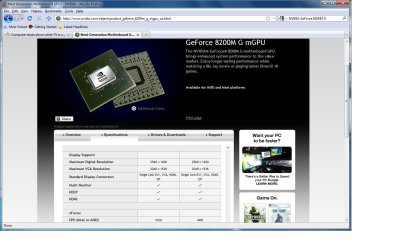
Do you have the display resolution set to the native resolution of the tv (ie. 720p,1080p)? Most people complain that the screen is not aligned properly either vertically or horizontally. Your graphics card has a maximum of 2560 x 1600 through hdmi and 2048 x 1536 though vga.

Have you tried connecting through the vga connection?
 

Attachments

  • Capture.jpg
    Capture.jpg
    277.6 KB · Views: 215

My Computer

OS
Windows 7
nickle, thanks a lot! my resolution was 1280x800 so i changed it to 1280x720 and now it works fine) Thanks a lot once again :)
 

My Computer

OS
Windows 7 (32-bit)
CPU
Intel Pentium Dual CPU T3200
Motherboard
ASUSTeK Computer Inc. F5GL 1.0
Memory
Slot 'SODIMM1' has 2048 MB
Graphics Card(s)
NVIDIA GeForce 8200M G
Sound Card
High Definition Audio (2x)
Hard Drives
Hitachi HTS542525K9SA00 [Hard drive] (250,06 GB)
Thanks for your help, nickle! I'm glad you were able to get it fixed, omglaserguns. Please let us know if you need any help in the future :) I am flagging this thread to be marked as 'Solved'.

Cheers,

Walker
Windows Outreach Team
 

My Computer

Computer Manufacturer/Model Number
HP Pavilion dm3 (netbook) *** 27" iMac (Dual-Boot)
OS
Windows 7 Home Premium (64-bit) *** Windows XP SP3 (32-bit), OSX 10.6
CPU
AMD Athlon Neo X2 1.6GHz *** Intel Core i7 Quad Core 2.8GHz
Memory
4.00 GB *** 4.00 GB
Graphics Card(s)
ATI Radeon HD 3200, 384MB *** ATI Radeon HD 4850, 1GB
Sound Card
ATI High Definition Audio *** ATI High Definition Audio
Monitor(s) Displays
LG Flatron W2053TX
Screen Resolution
1600 x 900 (monitor), 1266 x 768 (laptop) *** 2560 x 1440
Hard Drives
300 GB SATA (internal), 500 GB HP SimpleSave (external) *** 1 TB SATA (internal), 160 GB LaCie (external)
Mouse
Logitech Cordless Optical Mouse for Notebooks
Internet Speed
Broadband
Back
Top