Computer shuts off and turns back on suddenly

Inferdramon

New member
Member
Local time
12:35 AM
Messages
25
This has happened to me a few times already. The first time was in February. Then it happened yesterday. Today it happened again. The symptoms are always the same.

The computer would suddenly shut off without warning. The power light would go out completely, but then it would turn itself back on. The computer would make a weird noise. Hard to explain. It's like it's trying to run something. But it's not the usual "whirrrrr" sound I typically hear when it's busy. I wish I could explain it better.

Looking at the Event Logs, I noticed this for each of the 3 times it blacked out like this:

ACPI thermal zone ACPI\ThermalZone\THRM has been enumerated.
_PSV = 323K
_TC1 = 4
_TC2 = 3
_TSP = 6000ms
_AC0 = 323K
_AC1 = 0K
_AC2 = 0K
_AC3 = 0K
_AC4 = 0K
_AC5 = 0K
_AC6 = 0K
_AC7 = 0K
_AC8 = 0K
_AC9 = 0K
_CRT = 393K
_HOT = 0K
_PSL - see event data.

Could this be an overheating issue? Or maybe a power supply issue?
 

My Computer My Computer

OS
Windows 7

My Computer My Computer

Computer Manufacturer/Model Number
Lenovo ThinkCenter, Custom Built PC, Acer Aspire V3-771G-9809
OS
Windows 7 enterprise 64 bit, Windows 7 Pro 64 bit ,Windows 8 64bit
CPU
Core i5-2400, Athlon 64 X2 6400+ ,Core i7-3632QM
Motherboard
ASUS M4A79 Deluxe
Memory
4GB, 4gb g.skill ddr2, 8gb
Graphics Card(s)
Radeon HD 4550 sgb, Radeon HD 4870, NVIDIA Geforce GT 650m
Monitor(s) Displays
dual samsung 22" monitors
Hard Drives
500GB, Western Digital WD Blue WD6400AAKS 640GB 7200 RPM 16MB Cache SATA 3.0Gb/s, 1TB
Case
Antec Twelve Hundred V3 Black Steel ATX Full Tower
Cooling
ASUS Silent Square Pro
Mouse
Razar Death adder
Internet Speed
20 mbps
Whoops I think I posted this in the wrong place. This wasn't a BSOD. No dump files were made. I apologize.
 

My Computer My Computer

OS
Windows 7

My Computer My Computer

Computer Manufacturer/Model Number
Lenovo ThinkCenter, Custom Built PC, Acer Aspire V3-771G-9809
OS
Windows 7 enterprise 64 bit, Windows 7 Pro 64 bit ,Windows 8 64bit
CPU
Core i5-2400, Athlon 64 X2 6400+ ,Core i7-3632QM
Motherboard
ASUS M4A79 Deluxe
Memory
4GB, 4gb g.skill ddr2, 8gb
Graphics Card(s)
Radeon HD 4550 sgb, Radeon HD 4870, NVIDIA Geforce GT 650m
Monitor(s) Displays
dual samsung 22" monitors
Hard Drives
500GB, Western Digital WD Blue WD6400AAKS 640GB 7200 RPM 16MB Cache SATA 3.0Gb/s, 1TB
Case
Antec Twelve Hundred V3 Black Steel ATX Full Tower
Cooling
ASUS Silent Square Pro
Mouse
Razar Death adder
Internet Speed
20 mbps
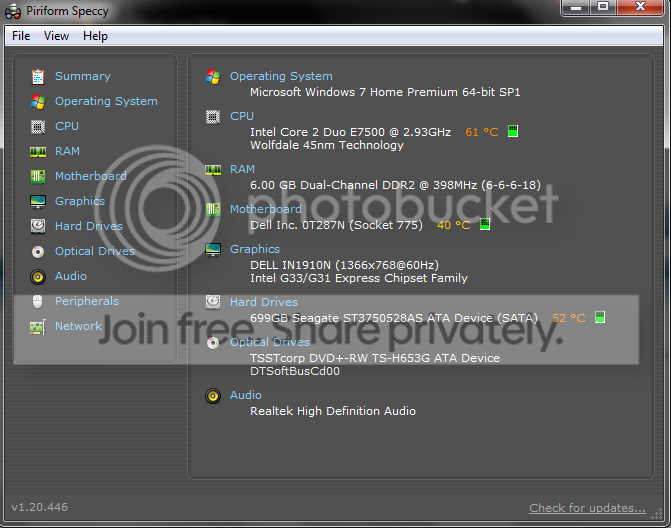
Speccy.png
 

My Computer My Computer

OS
Windows 7
The temperatures on your hard drive do seem high you may want to try cleaning the dust out of your computer using canned air. Another thought is malware, please run through these tutorials to check for and get rid of any malware:

Windows Defender Offline
Tdsskiller
 

My Computer My Computer

Computer Manufacturer/Model Number
Lenovo ThinkCenter, Custom Built PC, Acer Aspire V3-771G-9809
OS
Windows 7 enterprise 64 bit, Windows 7 Pro 64 bit ,Windows 8 64bit
CPU
Core i5-2400, Athlon 64 X2 6400+ ,Core i7-3632QM
Motherboard
ASUS M4A79 Deluxe
Memory
4GB, 4gb g.skill ddr2, 8gb
Graphics Card(s)
Radeon HD 4550 sgb, Radeon HD 4870, NVIDIA Geforce GT 650m
Monitor(s) Displays
dual samsung 22" monitors
Hard Drives
500GB, Western Digital WD Blue WD6400AAKS 640GB 7200 RPM 16MB Cache SATA 3.0Gb/s, 1TB
Case
Antec Twelve Hundred V3 Black Steel ATX Full Tower
Cooling
ASUS Silent Square Pro
Mouse
Razar Death adder
Internet Speed
20 mbps
One thing I forgot to mention is that when I had internet installed when I first moved here back in December, the guy placed both the router and the modem right on the computer's side. My computer tower is laid on its side. When I touch it, it always feels really warm. Could the router and modem be causing an increase in temperature?
 

My Computer My Computer

OS
Windows 7
The could I know that the router I have gives off quite a bit of heat you may want to try moving them off of your computer so that it does not have to deal with any heat they might be putting off or blocking from escaping.
 

My Computer My Computer

Computer Manufacturer/Model Number
Lenovo ThinkCenter, Custom Built PC, Acer Aspire V3-771G-9809
OS
Windows 7 enterprise 64 bit, Windows 7 Pro 64 bit ,Windows 8 64bit
CPU
Core i5-2400, Athlon 64 X2 6400+ ,Core i7-3632QM
Motherboard
ASUS M4A79 Deluxe
Memory
4GB, 4gb g.skill ddr2, 8gb
Graphics Card(s)
Radeon HD 4550 sgb, Radeon HD 4870, NVIDIA Geforce GT 650m
Monitor(s) Displays
dual samsung 22" monitors
Hard Drives
500GB, Western Digital WD Blue WD6400AAKS 640GB 7200 RPM 16MB Cache SATA 3.0Gb/s, 1TB
Case
Antec Twelve Hundred V3 Black Steel ATX Full Tower
Cooling
ASUS Silent Square Pro
Mouse
Razar Death adder
Internet Speed
20 mbps
I successfully moved the router off the computer, but the modem cannot be moved. One wire is so thick it's hard to push it onto the ledge above where the PC is kept, and another wire is pulled very tightly, making it near impossible to position the modem on the top ledge.
 

My Computer My Computer

OS
Windows 7
The computer is probably full of dust. Just clean it out.
 

My Computer My Computer

Computer type
PC/Desktop
Computer Manufacturer/Model Number
Custom Build
OS
Microsoft Windows 7 Home Premium 64-bit 7601 Multiprocessor Free Service Pack 1
CPU
AMD Phenom(tm) II X4 965 Processor
Motherboard
ASUSTeK Computer INC. M4A785-M
Memory
8.0 GB
Graphics Card(s)
NVIDIA GeForce GTX 560 Ti
Sound Card
(1) NVIDIA High Definition Audio (2) NVIDIA High Definitio
Monitor(s) Displays
Samsung SyncMaster T220G
Screen Resolution
1680 x 1050 x 32 bits (4294967296 colors) @ 59 Hz
Hard Drives
WDC WD7500AADS-00M2B0
PSU
650 Watt
Case
Cooler Master HAF XM
Cooling
Air
Keyboard
CompUSA SK-6200
Mouse
Logitech M-510
Internet Speed
Comcast
Antivirus
MSE
Browser
Firefox 27.0 IE 11
Other Info
Belkin Hub To Go F5U706
Cleaning it is probably a good idea too, check local electronics stores or hardware stores for compressed air and blow out all the dust you can from inside the case and see if that helps as well.
 

My Computer My Computer

Computer Manufacturer/Model Number
Lenovo ThinkCenter, Custom Built PC, Acer Aspire V3-771G-9809
OS
Windows 7 enterprise 64 bit, Windows 7 Pro 64 bit ,Windows 8 64bit
CPU
Core i5-2400, Athlon 64 X2 6400+ ,Core i7-3632QM
Motherboard
ASUS M4A79 Deluxe
Memory
4GB, 4gb g.skill ddr2, 8gb
Graphics Card(s)
Radeon HD 4550 sgb, Radeon HD 4870, NVIDIA Geforce GT 650m
Monitor(s) Displays
dual samsung 22" monitors
Hard Drives
500GB, Western Digital WD Blue WD6400AAKS 640GB 7200 RPM 16MB Cache SATA 3.0Gb/s, 1TB
Case
Antec Twelve Hundred V3 Black Steel ATX Full Tower
Cooling
ASUS Silent Square Pro
Mouse
Razar Death adder
Internet Speed
20 mbps
Take precautions to avoid static discharge onto electronics: don't work on carpet, use anti-stat wrist straps or keep touching case metal while reaching inside. Never use metal vacuum attachments.

 
Back
Top