Solved Computer shuts off while playing

Example

New member
Local time
12:14 AM
Messages
10
Hello,

In advance, sorry for my English

Computer shutting down after 30 mins gaming, some times after 1-2 hours without blue screen...

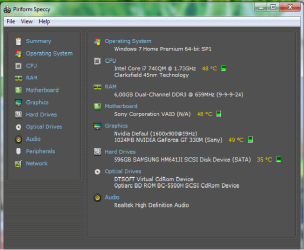
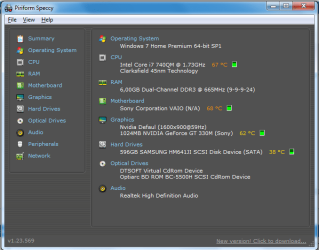
I've cleaned my fan, thermal paste replaced, Windows 7 Home premium 64 bits re installed, all drivers updated. BIOS updated and default settings set. Also I've bot notebook cooler fan pad. Temperatures of CPU, GPU and motherboard during gaming never over 70 deg. C.

I've checked power output from battery charger to computer, it's 19,6 V, so it's OK. Laptop always on charger, without battery. With battery and without it's keep shooting down.

In attachment there is BOSD files after computer crashed.
 

Attachments

My Computer

Computer type
Laptop
OS
Windows 7 Home Premium 64bit

My Computer

Computer type
PC/Desktop
Computer Manufacturer/Model Number
Golden Mk. I.4
OS
Windows 10 Pro x64 ; Xubuntu x64
CPU
Intel i7 860 @ 2.80 GHz O/C'ed to 4.0GHz
Motherboard
Gigabyte P55A-UD3R Rev.1. Award BIOS F13
Memory
16GB Corsair Vengance DDR3 @ 661 MHz Dual Channel (9-9-9-24)
Graphics Card(s)
EVGA NVidia GTX 560 1024MB
Sound Card
Realtek Integrated
Monitor(s) Displays
Dual Samsung SyncMaster 2494HS
Screen Resolution
1920*1080 and 1920*1080
Hard Drives
1*Samsung 840 EVO 120GB SSD;
1*OCZ Vertex 2 60GB SSD;
2*Samsung F3 SpinPoint 1TB in RAID0;
1*Samsung F1 SpinPoint 1TB;
2*Western Digital 1TB External USB 3.0
1*Western Digital 500GB External USB 3.0
1*Seagate 500GB External USB 2.0
PSU
Thermaltake ToughPower QFan 750W
Case
Thermaltake Element S VK60001W2Z
Cooling
Corsair H60 Water Cooling, 2*230mm and 2*80mm case fans
Keyboard
Logitech G110
Mouse
Logitech MX518
There is in attachment 2 pictures, 1st before gaming, 2nd during gaming. I'm observing always those temperatures during gaming, some times it's coming up to 70 deg. C (CPU and motherboard), GPU usually not more than 67.
 

Attachments

  • Before.png
    Before.png
    30.4 KB · Views: 21
  • during gaming.png
    during gaming.png
    24 KB · Views: 21

My Computer

Computer type
Laptop
OS
Windows 7 Home Premium 64bit
That doesn't look to bad to me.

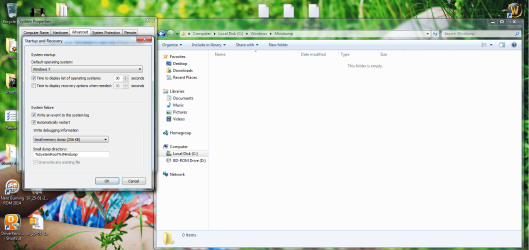
If you look in C:\Windows\Minidump.....is there a file with a .dmp extension present?
 

My Computer

Computer type
PC/Desktop
Computer Manufacturer/Model Number
Golden Mk. I.4
OS
Windows 10 Pro x64 ; Xubuntu x64
CPU
Intel i7 860 @ 2.80 GHz O/C'ed to 4.0GHz
Motherboard
Gigabyte P55A-UD3R Rev.1. Award BIOS F13
Memory
16GB Corsair Vengance DDR3 @ 661 MHz Dual Channel (9-9-9-24)
Graphics Card(s)
EVGA NVidia GTX 560 1024MB
Sound Card
Realtek Integrated
Monitor(s) Displays
Dual Samsung SyncMaster 2494HS
Screen Resolution
1920*1080 and 1920*1080
Hard Drives
1*Samsung 840 EVO 120GB SSD;
1*OCZ Vertex 2 60GB SSD;
2*Samsung F3 SpinPoint 1TB in RAID0;
1*Samsung F1 SpinPoint 1TB;
2*Western Digital 1TB External USB 3.0
1*Western Digital 500GB External USB 3.0
1*Seagate 500GB External USB 2.0
PSU
Thermaltake ToughPower QFan 750W
Case
Thermaltake Element S VK60001W2Z
Cooling
Corsair H60 Water Cooling, 2*230mm and 2*80mm case fans
Keyboard
Logitech G110
Mouse
Logitech MX518
No, in C:\Windows\Minidump there is no .dmp file.

Crash happens usually when i'm coming to place where is lots of people, bosses...
 

Attachments

  • Minidump.png
    Minidump.png
    188.9 KB · Views: 6

My Computer

Computer type
Laptop
OS
Windows 7 Home Premium 64bit

My Computer

Computer type
PC/Desktop
Computer Manufacturer/Model Number
Golden Mk. I.4
OS
Windows 10 Pro x64 ; Xubuntu x64
CPU
Intel i7 860 @ 2.80 GHz O/C'ed to 4.0GHz
Motherboard
Gigabyte P55A-UD3R Rev.1. Award BIOS F13
Memory
16GB Corsair Vengance DDR3 @ 661 MHz Dual Channel (9-9-9-24)
Graphics Card(s)
EVGA NVidia GTX 560 1024MB
Sound Card
Realtek Integrated
Monitor(s) Displays
Dual Samsung SyncMaster 2494HS
Screen Resolution
1920*1080 and 1920*1080
Hard Drives
1*Samsung 840 EVO 120GB SSD;
1*OCZ Vertex 2 60GB SSD;
2*Samsung F3 SpinPoint 1TB in RAID0;
1*Samsung F1 SpinPoint 1TB;
2*Western Digital 1TB External USB 3.0
1*Western Digital 500GB External USB 3.0
1*Seagate 500GB External USB 2.0
PSU
Thermaltake ToughPower QFan 750W
Case
Thermaltake Element S VK60001W2Z
Cooling
Corsair H60 Water Cooling, 2*230mm and 2*80mm case fans
Keyboard
Logitech G110
Mouse
Logitech MX518
I did pass both tests, and no malfunction were found, looks like :)

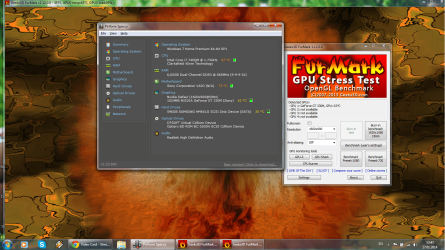
Here's 1 picture with FurMark with temperatures after aprox. 10 mins testing and OCCT report pictures in .zip file. OCCT has requested me update the DirectX to latest version, so maybe that can be reason.
I didn't had time to check it, so i'll check it and give you feed back.
 

Attachments

  • FurMark.png
    FurMark.png
    451.2 KB · Views: 3
  • 2014-01-27.zip
    2014-01-27.zip
    245.2 KB · Views: 1

My Computer

Computer type
Laptop
OS
Windows 7 Home Premium 64bit
Computer still have crashes..
In C:\Windows\LiveKernelReports\WATCHDOG after each crash appears .dmp file..

I attached file which appeared after last crash
 

Attachments

My Computer

Computer type
Laptop
OS
Windows 7 Home Premium 64bit
can anyone help please? :(
 

My Computer

Computer type
Laptop
OS
Windows 7 Home Premium 64bit
Code:
6: kd> lmvm nvlddmkm
start             end                 module name
fffff880`08421000 fffff880`08f06000   nvlddmkm T (no symbols)           
    Loaded symbol image file: nvlddmkm.sys
    Image path: nvlddmkm.sys
    Image name: nvlddmkm.sys
    Timestamp:        Fri [COLOR="Red"]Jun 21[/COLOR] 18:36:16 [COLOR="red"]2013[/COLOR] (51C41788)
    CheckSum:         00AB87FF
    ImageSize:        00AE5000
    Translations:     0000.04b0 0000.04e4 0409.04b0 0409.04e4
Mini Kernel Dump does not contain unloaded driver list
Have you checked for an updated video display driver?
 

My Computer

Computer type
PC/Desktop
Computer Manufacturer/Model Number
Golden Mk. I.4
OS
Windows 10 Pro x64 ; Xubuntu x64
CPU
Intel i7 860 @ 2.80 GHz O/C'ed to 4.0GHz
Motherboard
Gigabyte P55A-UD3R Rev.1. Award BIOS F13
Memory
16GB Corsair Vengance DDR3 @ 661 MHz Dual Channel (9-9-9-24)
Graphics Card(s)
EVGA NVidia GTX 560 1024MB
Sound Card
Realtek Integrated
Monitor(s) Displays
Dual Samsung SyncMaster 2494HS
Screen Resolution
1920*1080 and 1920*1080
Hard Drives
1*Samsung 840 EVO 120GB SSD;
1*OCZ Vertex 2 60GB SSD;
2*Samsung F3 SpinPoint 1TB in RAID0;
1*Samsung F1 SpinPoint 1TB;
2*Western Digital 1TB External USB 3.0
1*Western Digital 500GB External USB 3.0
1*Seagate 500GB External USB 2.0
PSU
Thermaltake ToughPower QFan 750W
Case
Thermaltake Element S VK60001W2Z
Cooling
Corsair H60 Water Cooling, 2*230mm and 2*80mm case fans
Keyboard
Logitech G110
Mouse
Logitech MX518
Looks like now is OK

Thank you very much for helping!
 

My Computer

Computer type
Laptop
OS
Windows 7 Home Premium 64bit
Back
Top