Computer slow, RAM full, no processes using it...

Mirac7

New member
Today, when I powered up my computer, i have noticed that it has been on 'Welcome' for 10-15 seconds, which is more than usual 'up to 1'.
But I ignored it. However, while I was playing game, it froze for a moment several times.
Ignored it again. But, when I started Firefox, and waited and waited and waited... and waited, I have came to a conclusion that my computer runs slower than usual.
I've ran task manager and saw that my RAM memory is 3,98/4 GB full. Also my hard drive is 100% busy all the time. Indicator is constantly on...
Then I checked running processes to find out that they combined wouldn't spend more than 2 GB of memory.
I've already had this problem on my laptop before, but there was some kind of WMP updater or something taking this, but nothing here.
Anyway, I've restarted it and all, and scanned my system and did everything I could think of, but something's wrong.
What is taking my RAM? How to bring it back to normal?
P.S. I have Windows 7 and 8 developer preview installed, but I had it before the problem occured. Win8 is not having difficulties...

Please help...
 

My Computer

OS
Windows 7 Ultimate x64, Windows 8 Developer Preview x64
CPU
Pentium(R) Dual Core CPU E6700 @3.20 GHz
Motherboard
Gigabyte G41MT-D3V
Memory
DDR3 4 GB
Graphics Card(s)
Intel GMA X4500
Sound Card
Realtek ALC889 @ Intel 82801GB ICH7 - High Definition Audio
Monitor(s) Displays
Acer A221HQL
Hard Drives
Seagate Baracuda ST31000524AS (931 GB)
WD My Book 1130 (1862 GB)
You came to the conclusion that your PC runs slower than usual? Really?

:D

Sorry, just poking a little fun at ya. :)

But seriously - what would help us here is if you could provide a screenshot of your maximized Task Manager window, specificially the Processes tab. Please make sure to check the box "Show processes from all users" at the bottom before taking the screenshot.

Let's see what's going on here. Since you observe the slowdown at startup even before your desktop appears, it sounds like a service or background task running under system credentials, rather than a user-owned process.
 

My Computer

Computer type
PC/Desktop
Computer Manufacturer/Model Number
Custom-built
OS
Windows 7 Professional SP1 32-bit
CPU
Intel Core 2 Duo E6600 2.4GHz
Motherboard
Asus PL5D2
Memory
4GB DDR2-667 (4x1GB in dual-channel config)
Graphics Card(s)
nVidia GeForce 9800 GT
Sound Card
Creative X-Fi XtremeMusic
Monitor(s) Displays
Acer P236H
Screen Resolution
1920x1200 (DVI)
Hard Drives
OCZ SSD Vertex Plus 60GB SATA (Firmware 3.55), 64MB cache
Hitachi HD321KJ SATA, 320GB, 7200rpm, 16MB cache
PSU
Antec TruePower 2.0
Case
Cooler Master Centurion
Cooling
Too many fans
Keyboard
Standard
Mouse
Microsoft wireless optical mouse
Internet Speed
AT&T U-verse (18mbit/sec)
Antivirus
Microsoft Security Essentials
Browser
Firefox
Other Info
Other devices:
Compaq CQ-60 laptop
Google Nexus 7 (2012) tablet
Nvidia SHIELD tablet (US/LTE)
Hardkernel ODROID-XU single-board computer (Samsung Exynos 5420)
Today, when I powered up my computer, i have noticed that it has been on 'Welcome' for 10-15 seconds, which is more than usual 'up to 1'.
But I ignored it. However, while I was playing game, it froze for a moment several times.
Ignored it again. But, when I started Firefox, and waited and waited and waited... and waited, I have came to a conclusion that my computer runs slower than usual.
I've ran task manager and saw that my RAM memory is 3,98/4 GB full. Also my hard drive is 100% busy all the time. Indicator is constantly on...
Then I checked running processes to find out that they combined wouldn't spend more than 2 GB of memory.
I've already had this problem on my laptop before, but there was some kind of WMP updater or something taking this, but nothing here.
Anyway, I've restarted it and all, and scanned my system and did everything I could think of, but something's wrong.
What is taking my RAM? How to bring it back to normal?
P.S. I have Windows 7 and 8 developer preview installed, but I had it before the problem occured. Win8 is not having difficulties...

Please help...

Make a screenshot of ProcesExplorer: Process Explorer
 

My Computer

Computer Manufacturer/Model Number
Homebuilt
OS
Windows 7 Home Premium x64
CPU
Core i7 2600K
Motherboard
Asus P8Z77-V LX
Memory
4GB DDR3 Kingston HyperX
Graphics Card(s)
Gigabyte GTX 670
Sound Card
Realtek HD Audio
Monitor(s) Displays
Delium Monitor
Screen Resolution
1360 x 768
Hard Drives
C: (500GB)
PSU
Corsair 620W
Case
Antec
Cooling
Cooling Master
Keyboard
Logitech
Mouse
Logitech wireless mouse M 505
Internet Speed
60MBPS
Well, I've been searching the youtube and the web for something to help me at least a little bit while waiting for answer and I've managed to find a software that brought my RAM to normal:
AMS Network
However, my hard drive is still 100% busy, making my computer still slow.
I'd be grateful if you helped me about it.
If you still need screenshots, let me know...
Tnx.
 

My Computer

OS
Windows 7 Ultimate x64, Windows 8 Developer Preview x64
CPU
Pentium(R) Dual Core CPU E6700 @3.20 GHz
Motherboard
Gigabyte G41MT-D3V
Memory
DDR3 4 GB
Graphics Card(s)
Intel GMA X4500
Sound Card
Realtek ALC889 @ Intel 82801GB ICH7 - High Definition Audio
Monitor(s) Displays
Acer A221HQL
Hard Drives
Seagate Baracuda ST31000524AS (931 GB)
WD My Book 1130 (1862 GB)
Well, I've been searching the youtube and the web for something to help me at least a little bit while waiting for answer and I've managed to find a software that brought my RAM to normal:
AMS Network
However, my hard drive is still 100% busy, making my computer still slow.
I'd be grateful if you helped me about it.
If you still need screenshots, let me know...
Tnx.

Well... take a look in here:
(i'm sorry for the dutch language but I think you know where to navigate ?! :)
 

Attachments

  • ll.png
    ll.png
    66.7 KB · Views: 196
  • lll.png
    lll.png
    38.4 KB · Views: 161

My Computer

Computer Manufacturer/Model Number
Homebuilt
OS
Windows 7 Home Premium x64
CPU
Core i7 2600K
Motherboard
Asus P8Z77-V LX
Memory
4GB DDR3 Kingston HyperX
Graphics Card(s)
Gigabyte GTX 670
Sound Card
Realtek HD Audio
Monitor(s) Displays
Delium Monitor
Screen Resolution
1360 x 768
Hard Drives
C: (500GB)
PSU
Corsair 620W
Case
Antec
Cooling
Cooling Master
Keyboard
Logitech
Mouse
Logitech wireless mouse M 505
Internet Speed
60MBPS
Here it is:
2pzjuar.png

What now?
 

My Computer

OS
Windows 7 Ultimate x64, Windows 8 Developer Preview x64
CPU
Pentium(R) Dual Core CPU E6700 @3.20 GHz
Motherboard
Gigabyte G41MT-D3V
Memory
DDR3 4 GB
Graphics Card(s)
Intel GMA X4500
Sound Card
Realtek ALC889 @ Intel 82801GB ICH7 - High Definition Audio
Monitor(s) Displays
Acer A221HQL
Hard Drives
Seagate Baracuda ST31000524AS (931 GB)
WD My Book 1130 (1862 GB)
Here it is:
2pzjuar.png

What now?

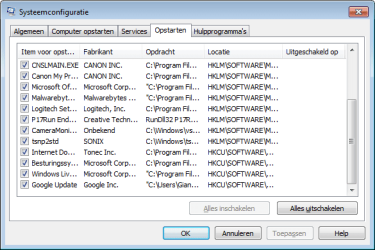
I don't see anything that you can remove but I would try this:
(Disable everything (not microsoft services !!!!)
(So we can see if the HDD is calmer then :p)
 

Attachments

  • foto.png
    foto.png
    23.7 KB · Views: 45
  • fotoll.png
    fotoll.png
    26.8 KB · Views: 25

My Computer

Computer Manufacturer/Model Number
Homebuilt
OS
Windows 7 Home Premium x64
CPU
Core i7 2600K
Motherboard
Asus P8Z77-V LX
Memory
4GB DDR3 Kingston HyperX
Graphics Card(s)
Gigabyte GTX 670
Sound Card
Realtek HD Audio
Monitor(s) Displays
Delium Monitor
Screen Resolution
1360 x 768
Hard Drives
C: (500GB)
PSU
Corsair 620W
Case
Antec
Cooling
Cooling Master
Keyboard
Logitech
Mouse
Logitech wireless mouse M 505
Internet Speed
60MBPS
what exactly do i need to do?
 

My Computer

OS
Windows 7 Ultimate x64, Windows 8 Developer Preview x64
CPU
Pentium(R) Dual Core CPU E6700 @3.20 GHz
Motherboard
Gigabyte G41MT-D3V
Memory
DDR3 4 GB
Graphics Card(s)
Intel GMA X4500
Sound Card
Realtek ALC889 @ Intel 82801GB ICH7 - High Definition Audio
Monitor(s) Displays
Acer A221HQL
Hard Drives
Seagate Baracuda ST31000524AS (931 GB)
WD My Book 1130 (1862 GB)

My Computer

Computer Manufacturer/Model Number
Homebuilt
OS
Windows 7 Home Premium x64
CPU
Core i7 2600K
Motherboard
Asus P8Z77-V LX
Memory
4GB DDR3 Kingston HyperX
Graphics Card(s)
Gigabyte GTX 670
Sound Card
Realtek HD Audio
Monitor(s) Displays
Delium Monitor
Screen Resolution
1360 x 768
Hard Drives
C: (500GB)
PSU
Corsair 620W
Case
Antec
Cooling
Cooling Master
Keyboard
Logitech
Mouse
Logitech wireless mouse M 505
Internet Speed
60MBPS
all right!

problem solved.

many thanks

edit:
happened again!:mad:

that software for ram was helping until the computer was restarted...
 
Last edited:

My Computer

OS
Windows 7 Ultimate x64, Windows 8 Developer Preview x64
CPU
Pentium(R) Dual Core CPU E6700 @3.20 GHz
Motherboard
Gigabyte G41MT-D3V
Memory
DDR3 4 GB
Graphics Card(s)
Intel GMA X4500
Sound Card
Realtek ALC889 @ Intel 82801GB ICH7 - High Definition Audio
Monitor(s) Displays
Acer A221HQL
Hard Drives
Seagate Baracuda ST31000524AS (931 GB)
WD My Book 1130 (1862 GB)
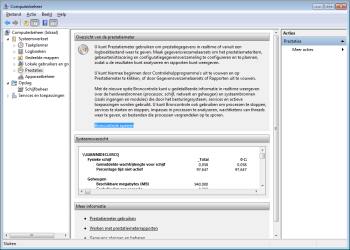
all right!

problem solved.

many thanks

Yes but I recommend you to enable your AV with start-up :p
(and some other programs you really need)
 

My Computer

Computer Manufacturer/Model Number
Homebuilt
OS
Windows 7 Home Premium x64
CPU
Core i7 2600K
Motherboard
Asus P8Z77-V LX
Memory
4GB DDR3 Kingston HyperX
Graphics Card(s)
Gigabyte GTX 670
Sound Card
Realtek HD Audio
Monitor(s) Displays
Delium Monitor
Screen Resolution
1360 x 768
Hard Drives
C: (500GB)
PSU
Corsair 620W
Case
Antec
Cooling
Cooling Master
Keyboard
Logitech
Mouse
Logitech wireless mouse M 505
Internet Speed
60MBPS
back to ram

how to fix ram issues
 

My Computer

OS
Windows 7 Ultimate x64, Windows 8 Developer Preview x64
CPU
Pentium(R) Dual Core CPU E6700 @3.20 GHz
Motherboard
Gigabyte G41MT-D3V
Memory
DDR3 4 GB
Graphics Card(s)
Intel GMA X4500
Sound Card
Realtek ALC889 @ Intel 82801GB ICH7 - High Definition Audio
Monitor(s) Displays
Acer A221HQL
Hard Drives
Seagate Baracuda ST31000524AS (931 GB)
WD My Book 1130 (1862 GB)
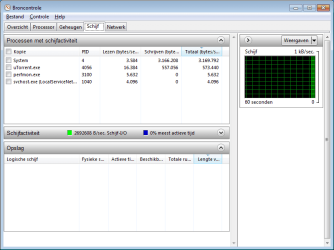
back to ram

how to fix ram issues

Download Proces Explorer: Process Explorer

and take a look what is using all the memory

(Sorry just asking but did you do my last suggestion (with the photos) ?)
 

My Computer

Computer Manufacturer/Model Number
Homebuilt
OS
Windows 7 Home Premium x64
CPU
Core i7 2600K
Motherboard
Asus P8Z77-V LX
Memory
4GB DDR3 Kingston HyperX
Graphics Card(s)
Gigabyte GTX 670
Sound Card
Realtek HD Audio
Monitor(s) Displays
Delium Monitor
Screen Resolution
1360 x 768
Hard Drives
C: (500GB)
PSU
Corsair 620W
Case
Antec
Cooling
Cooling Master
Keyboard
Logitech
Mouse
Logitech wireless mouse M 505
Internet Speed
60MBPS
it doesn't seem like anything is taking my ram...

all processes combined wouldn't take out more than half...
 

My Computer

OS
Windows 7 Ultimate x64, Windows 8 Developer Preview x64
CPU
Pentium(R) Dual Core CPU E6700 @3.20 GHz
Motherboard
Gigabyte G41MT-D3V
Memory
DDR3 4 GB
Graphics Card(s)
Intel GMA X4500
Sound Card
Realtek ALC889 @ Intel 82801GB ICH7 - High Definition Audio
Monitor(s) Displays
Acer A221HQL
Hard Drives
Seagate Baracuda ST31000524AS (931 GB)
WD My Book 1130 (1862 GB)
with photos, you mean disabling services and stuff?
 

My Computer

OS
Windows 7 Ultimate x64, Windows 8 Developer Preview x64
CPU
Pentium(R) Dual Core CPU E6700 @3.20 GHz
Motherboard
Gigabyte G41MT-D3V
Memory
DDR3 4 GB
Graphics Card(s)
Intel GMA X4500
Sound Card
Realtek ALC889 @ Intel 82801GB ICH7 - High Definition Audio
Monitor(s) Displays
Acer A221HQL
Hard Drives
Seagate Baracuda ST31000524AS (931 GB)
WD My Book 1130 (1862 GB)

My Computer

Computer Manufacturer/Model Number
Homebuilt
OS
Windows 7 Home Premium x64
CPU
Core i7 2600K
Motherboard
Asus P8Z77-V LX
Memory
4GB DDR3 Kingston HyperX
Graphics Card(s)
Gigabyte GTX 670
Sound Card
Realtek HD Audio
Monitor(s) Displays
Delium Monitor
Screen Resolution
1360 x 768
Hard Drives
C: (500GB)
PSU
Corsair 620W
Case
Antec
Cooling
Cooling Master
Keyboard
Logitech
Mouse
Logitech wireless mouse M 505
Internet Speed
60MBPS
unable! already disabled...
 

My Computer

OS
Windows 7 Ultimate x64, Windows 8 Developer Preview x64
CPU
Pentium(R) Dual Core CPU E6700 @3.20 GHz
Motherboard
Gigabyte G41MT-D3V
Memory
DDR3 4 GB
Graphics Card(s)
Intel GMA X4500
Sound Card
Realtek ALC889 @ Intel 82801GB ICH7 - High Definition Audio
Monitor(s) Displays
Acer A221HQL
Hard Drives
Seagate Baracuda ST31000524AS (931 GB)
WD My Book 1130 (1862 GB)
unable! already disabled...

What do you mean ??? I ask you to disable everything (not microsoft services in msconfig)
 

My Computer

Computer Manufacturer/Model Number
Homebuilt
OS
Windows 7 Home Premium x64
CPU
Core i7 2600K
Motherboard
Asus P8Z77-V LX
Memory
4GB DDR3 Kingston HyperX
Graphics Card(s)
Gigabyte GTX 670
Sound Card
Realtek HD Audio
Monitor(s) Displays
Delium Monitor
Screen Resolution
1360 x 768
Hard Drives
C: (500GB)
PSU
Corsair 620W
Case
Antec
Cooling
Cooling Master
Keyboard
Logitech
Mouse
Logitech wireless mouse M 505
Internet Speed
60MBPS
already disabled:

21npshf.png
 

My Computer

OS
Windows 7 Ultimate x64, Windows 8 Developer Preview x64
CPU
Pentium(R) Dual Core CPU E6700 @3.20 GHz
Motherboard
Gigabyte G41MT-D3V
Memory
DDR3 4 GB
Graphics Card(s)
Intel GMA X4500
Sound Card
Realtek ALC889 @ Intel 82801GB ICH7 - High Definition Audio
Monitor(s) Displays
Acer A221HQL
Hard Drives
Seagate Baracuda ST31000524AS (931 GB)
WD My Book 1130 (1862 GB)

My Computer

Computer Manufacturer/Model Number
Homebuilt
OS
Windows 7 Home Premium x64
CPU
Core i7 2600K
Motherboard
Asus P8Z77-V LX
Memory
4GB DDR3 Kingston HyperX
Graphics Card(s)
Gigabyte GTX 670
Sound Card
Realtek HD Audio
Monitor(s) Displays
Delium Monitor
Screen Resolution
1360 x 768
Hard Drives
C: (500GB)
PSU
Corsair 620W
Case
Antec
Cooling
Cooling Master
Keyboard
Logitech
Mouse
Logitech wireless mouse M 505
Internet Speed
60MBPS
Back
Top