computer sometimes starts up

thewolfe

New member
Power User
Local time
9:59 PM
Messages
203
I have a Toshiba satellite L755-S5112 running Windows 7. Sometimes it won't boot up at all and sometimes it gets to the "Welcome" screen and stops there. And sometimes it does bootup.

If I do get it to boot up it is very very slow. I tried to run my antivirus and it started up and then quit. I ran malwarebites and it found "Trojan.happili" which I removed.

Is there a partition on this computer that I can reinstall Windows from? And will my data be safe?

I do have a cable that I should be able to connect to the hard drive and see on my other computer so that I could save the data.

What say you?
 

My Computer

Computer Manufacturer/Model Number
Dell Inspiron 1525
OS
Windows 7
CPU
Intel Core(TM)2 Duo T5750 2.00 GHz
Memory
3GB
Hard Drives
232 GB
I have a Toshiba satellite L755-S5112 running Windows 7. Sometimes it won't boot up at all and sometimes it gets to the "Welcome" screen and stops there. And sometimes it does bootup.

If I do get it to boot up it is very very slow. I tried to run my antivirus and it started up and then quit. I ran malwarebites and it found "Trojan.happili" which I removed.

Is there a partition on this computer that I can reinstall Windows from? And will my data be safe?

I do have a cable that I should be able to connect to the hard drive and see on my other computer so that I could save the data.

What say you?

If you upload a snip of your Disk Management, it will allow us to see how things are setup. http://www.sevenforums.com/tutorials/9733-screenshots-files-upload-post-seven-forums.html
 

My Computer

Computer type
PC/Desktop
Computer Manufacturer/Model Number
Custom Build
OS
Windows 7 Home Premium 32-Bit - Build 7600 SP1
CPU
Intel Core i3-2120 3.30Ghz
Motherboard
Asus P8Z68-V LX Intel Z68 Socket H2 ATX
Memory
Kingston 4 GB DDR3 1333 mhz
Graphics Card(s)
AMD Radeon HD6670
Sound Card
Sound Blaster Audigy SE 24-Bit
Monitor(s) Displays
Asus VE228
Screen Resolution
1440 X 900
Hard Drives
OCZ Vertex 3 120 GB Sata 3 SSD ==
Kingston SH103/S3 120 G Hyper X 120 GB SSD ==
Western Digital 500 GB Caviar Green 7200 RPM ==
PSU
Corsair CX600M == 600 Watt
Case
NZXT Apollo - Silver with Clear Side Panel
Cooling
Three 120 mm Fans
Keyboard
Microsoft Natural 4000
Mouse
Microsoft Custom Optical 3000
Internet Speed
AT&T Fiber Optic Wireless Network
Antivirus
Microsoft Security Essentials
Browser
Chrome
Other Info
120 mm Blue LED Fan -- Three Blue LED Lazer Light Sticks

My Computer

Computer type
PC/Desktop
Computer Manufacturer/Model Number
Skylake Special #666
OS
Windows 10 Pro x64
CPU
Intel Core i7 6700K
Motherboard
Asus Sabertooth Z170 Mark 1
Memory
GSkill TridentZ RGB 16GB 3600 16-16-16-36
Graphics Card(s)
EVGA GTX 980 Ti SC x2
Sound Card
Realtek High Definition
Monitor(s) Displays
AOC G2460PG
Screen Resolution
1920 x 1080 144Hz
Hard Drives
Samsung 860 Pro 256GB, Seagate Barracuda 4TB x2
PSU
EVGA 1000 P2, EVGA White Custom Braided Cables
Case
Corsair Vengeance C70 Gunmetal Black
Cooling
Corsair H100i v2, Corsair ML120 x2, Thermal Grizzly Kryonaut
Keyboard
Logitech G910 Orion Spectrum
Mouse
Logitech G700s
Internet Speed
Verizon Fios Quantum Gateway 75/75
Antivirus
Windows Defender, Malwarebytes Free 3.8.3
Browser
Chrome
Other Info
Corsair SP120 x4, LG Blu-ray Drive, Durabrand HT-395 100 Watt Dolby Digital Amp, Corsair H2100 Wireless 7.1 Headset
You may still be infected .... Please do the following:

Copy and paste these lines in Note pad.

@Echo on
pushd\windows\system32\drivers\etc
attrib -h -s -r hosts
echo 127.0.0.1 localhost>HOSTS
attrib +r +h +s hosts
popd
ipconfig /release
ipconfig /renew
ipconfig /flushdns
netsh winsock reset all
netsh int ip reset all
shutdown -r -t 1
del %0


Save as flush.bat to your desktop.
Double click on the flush.bat file to run it.Vista and Windows 7... right click the .bat file and choose to run as Administrator. Your computer will reboot itself.

Next, download TFC by Old Timer TFC - Temp File Cleaner by OldTimer - Geeks to Go Forums and save it to your desktop.
Save any unsaved work. TFC will close ALL open programs including your browser!
Double-click on TFC.exe to run it. If you are using Vista/Windows 7 right-click on the file and choose Run As Administrator.
Click the Start button to begin the cleaning process and let it run uninterrupted to completion.
Important! If TFC prompts you to reboot, please do so immediately. If not prompted, manually reboot the machine anyway to ensure a complete clean.

Now, download DDS from one of these links:
DDS.com
DDS.pif
  • Disable any script blocking protection
  • Double click the dds icon to run the tool.
  • When done, DDS will open two (2) logs:
    1. DDS.txt
    2. Attach.txt <--- will be minimized in the task tray
  • Save both reports to your desktop.
Include the contents of both logs in your next post.
 

My Computer

Computer type
PC/Desktop
Computer Manufacturer/Model Number
Bruce ... somewhere in his 40's
OS
Windows 7 Ultimate 32bit SP1
CPU
Intel(R) Core(TM)2 Quad CPU @ 2.40GHz, 2400 MHz
Motherboard
INTEL/D975XBX2
Memory
4 GB
Graphics Card(s)
ATI Radeon HD 2600 Pro
Monitor(s) Displays
Samsung SyncMaster 914v
Screen Resolution
1280 x 1024
Hard Drives
2/500GB each ... ST3500630AS ATA Device.
One is not connected
PSU
Rocketfish 700 W
Case
G.Skill Gigabyte Chassis
Keyboard
Standard PS/2 Keyboard
Mouse
Microsoft PS/2 Mouse
Internet Speed
DSL
Antivirus
Avira Internet Security
Browser
IE 11
Other Info
ATI HDMI Audio
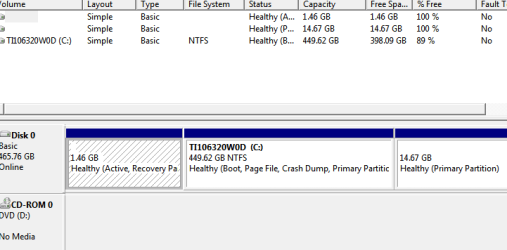
Here's the Disk mgt screenshot, I think
 

Attachments

  • DiskMgt.PNG
    DiskMgt.PNG
    8 KB · Views: 16

My Computer

Computer Manufacturer/Model Number
Dell Inspiron 1525
OS
Windows 7
CPU
Intel Core(TM)2 Duo T5750 2.00 GHz
Memory
3GB
Hard Drives
232 GB
You have no System flag which shows where the boot files are installed and booting Win7 from. This is rare and a concern.

Try running Startup Repair - Run up to 3 Separate Times which will repair or rewrite the files and any other problems with boot if necessary.

Otherwise it looks like a factory preinstall, which is a corrupt Win7 to begin with given all of the bloatware which throttles the OS's native performance. Have you looked over the steps to get the superior Clean Reinstall - Factory OEM Windows 7?

At the minimum I'd Clean Up Factory Bloatware
 
Last edited:
Going to try Startup Repair. Can I do that in SafeMode? Runs and starts up normal in Safemode. Stalls out trying to startup regularly.
 

My Computer

Computer Manufacturer/Model Number
Dell Inspiron 1525
OS
Windows 7
CPU
Intel Core(TM)2 Duo T5750 2.00 GHz
Memory
3GB
Hard Drives
232 GB
I have backed up the data. I'm checking to see if there is a disk. This is a friends computer.

So Safe mode is out, if I understand.
 

My Computer

Computer Manufacturer/Model Number
Dell Inspiron 1525
OS
Windows 7
CPU
Intel Core(TM)2 Duo T5750 2.00 GHz
Memory
3GB
Hard Drives
232 GB
If I may leave a point of view. Because your infection was a rootkit Trojan.happili that was stated that malwarebytes removed.
I would recommend reading post #5 again by Jacee.
I will go away now.
 

My Computer

Computer type
PC/Desktop
Computer Manufacturer/Model Number
Home made Desktop
OS
Windows 10 Pro. 64/ version 1709 Windows 7 Pro/64
CPU
Intel i7-6800K @ 4.3
Motherboard
ASUS X-99 Deluxe II
Memory
Corsair Platinum 16 gig @2400
Graphics Card(s)
EVGA GTX 1070 OC
Monitor(s) Displays
Asus 27" LED LCD/VE278Q
Screen Resolution
1920-1080 or 1280-720 HDMI
Hard Drives
INTEL SSD 730-240 Gb Sata 3.0/
PSU
EVGA Platium 1200W
Case
Phanteks Luxe Tempered Glass 8 fans/ one radiator
Cooling
XSPC/ Water Cooled CPU
Keyboard
Das 4 Professional
Mouse
Logitech M705/MX Anywhere 2-S
Internet Speed
100 mbits
Antivirus
Microsoft Security Essentials/ Malwarebytes Premium 3.0/ SAS
Browser
I.E. 11 default/Firefox/ ISP Time Warner Cable/Spectrum
Other Info
LG BluRay Burner/
Sound system-KLipsch-THX/
Icy Dock ssd Hot Swap bays.
I will indeed.
 

My Computer

Computer Manufacturer/Model Number
Dell Inspiron 1525
OS
Windows 7
CPU
Intel Core(TM)2 Duo T5750 2.00 GHz
Memory
3GB
Hard Drives
232 GB
Have downloaded all the progies and will start the procedure when I get a little time. Thanks
 

My Computer

Computer Manufacturer/Model Number
Dell Inspiron 1525
OS
Windows 7
CPU
Intel Core(TM)2 Duo T5750 2.00 GHz
Memory
3GB
Hard Drives
232 GB
Can I run Jacee's procedures in Safe Mode? I can sometimes get to reg mode but icons on desktop won't respond.
 

My Computer

Computer Manufacturer/Model Number
Dell Inspiron 1525
OS
Windows 7
CPU
Intel Core(TM)2 Duo T5750 2.00 GHz
Memory
3GB
Hard Drives
232 GB
Did get to load in reg mode and I'm down to running dds and it's been running for about an hour. Don't know whether it's frozen or runs a long time. No logs created yet.
 

My Computer

Computer Manufacturer/Model Number
Dell Inspiron 1525
OS
Windows 7
CPU
Intel Core(TM)2 Duo T5750 2.00 GHz
Memory
3GB
Hard Drives
232 GB
I have run malwarebytes in safe mode as well as Avast and Ccleaner. I'm going to run them again in safe mode and run Jacee's suggestions again.
 

My Computer

Computer Manufacturer/Model Number
Dell Inspiron 1525
OS
Windows 7
CPU
Intel Core(TM)2 Duo T5750 2.00 GHz
Memory
3GB
Hard Drives
232 GB
No joy on DDS. Won't run. What now?
 

My Computer

Computer Manufacturer/Model Number
Dell Inspiron 1525
OS
Windows 7
CPU
Intel Core(TM)2 Duo T5750 2.00 GHz
Memory
3GB
Hard Drives
232 GB
Back
Top