Solved Computer starts during sleep mode

Aperture

New member
Member
Local time
3:12 AM
Messages
94
I often put my computer in Sleep mode - as a matter of fact I changed the Power button to say Sleep instead of Shut Down.
Just recently it started coming on all on its own even though I'm nowhere near it.
This will happen at different time intervals after I put it to sleep, no pattern, sometimes 10 minutes later sometimes 2 hours.... just depends.

Any ideas what could be going on?

Thanks

A
 

My Computer

OS
Windows 7 Home Premium
Not sure really, but just as a suggestion you might check your BIOS settings to see whats going on. It may be wake on LAN or other settings there that could cause this. Or could something be bumping your mouse/keyboard? (cat, kids, etc.) :)
 

My Computer

Computer Manufacturer/Model Number
Custom
OS
Windows 7 ultimate X64
CPU
Core i7 870 Lynnfield
Motherboard
MSI P55-GD55
Memory
4GB Corsair XMS 3 1600Mhz
Graphics Card(s)
GeForce 8800 GTS (for the time being)
Sound Card
Onboard 7.1 digital
Monitor(s) Displays
Dell 19"
Screen Resolution
1280x1024
Hard Drives
Barracuda 750Gb
PSU
Corsair TX 650w
Case
Thermaltake Armour Extreme Edition
Cooling
Corsair H50
Keyboard
Dell XPS slim
Mouse
Dell XPS mouse (only good product)
Internet Speed
100 Mbps +/-
Its turning itself on to run a event. turn events off so it wont wake to scan scanvirus or defrag and others.

I often put my computer in Sleep mode - as a matter of fact I changed the Power button to say Sleep instead of Shut Down.
Just recently it started coming on all on its own even though I'm nowhere near it.
This will happen at different time intervals after I put it to sleep, no pattern, sometimes 10 minutes later sometimes 2 hours.... just depends.

Any ideas what could be going on?

Thanks

A
 

My Computer

Computer Manufacturer/Model Number
i built the computer myself
OS
windows 7 home 64-bit
CPU
amd athal 2.4 x2
Motherboard
msi
Memory
2 gig
Graphics Card(s)
gforce
Sound Card
msi
Monitor(s) Displays
32" lcd tv
Hard Drives
2.0 gig
1.5 gig
1.0 gig
PSU
450 watts
Case
i forget the name
Cooling
i forget
Hello Aperture,

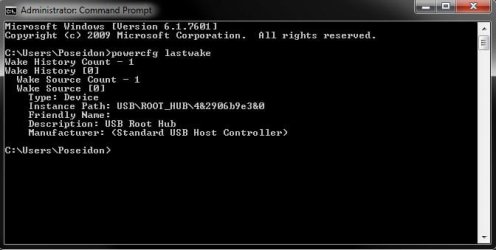
In addition, you might run the lastwake command to see if it may be able to help ID what last woke your computer.

Hope this helps,
Shawn
 

My Computer

Computer type
PC/Desktop
Computer Manufacturer/Model Number
Self built custom
OS
64-bit Windows 11 Pro for Workstations
CPU
Intel i7-8700K OC'd to 5 GHz
Motherboard
ASUS ROG Maximus XI Formula Z390
Memory
64 GB (4x16GB) G.SKILL TridentZ RGB DDR4 3600 MHz
Graphics Card(s)
ASUS ROG-STRIX-GTX1080TI-O11G-GAMING
Sound Card
Integrated
Monitor(s) Displays
2 x Samsung Odyssey G7 27"
Screen Resolution
2560x1440
Hard Drives
1TB Samsung 990 PRO M.2,
4TB Samsung 990 PRO PRO M.2,
TerraMaster F8 SSD Plus NAS
PSU
Seasonic Prime Titanium 850W
Case
Thermaltake Core P3
Cooling
Corsair Hydro H115i
Keyboard
Logitech wireless K800
Mouse
Logitech MX Master 4
Internet Speed
2 Gb/s Download and 100 Mb/s Upload
Antivirus
Malwarebyte Anti-Malware Premium
Browser
Google Chrome
Other Info
Logitech Z625 speaker system,
Logitech BRIO 4K Pro webcam,
HP Color LaserJet Pro MFP M477fdn,
APC SMART-UPS RT 1000 XL - SURT1000XLI,
Galaxy S23 Plus phone
Its turning itself on to run a event. turn events off so it wont wake to scan scanvirus or defrag and others.

I often put my computer in Sleep mode - as a matter of fact I changed the Power button to say Sleep instead of Shut Down.
Just recently it started coming on all on its own even though I'm nowhere near it.
This will happen at different time intervals after I put it to sleep, no pattern, sometimes 10 minutes later sometimes 2 hours.... just depends.

Any ideas what could be going on?

Thanks

A

Wake on Lan:
Fix for Windows 7 "random wake from sleep" problem « Jack Ukleja

You can find at the end of the article a Fix-it solution for Windows Media Center task scheduler: HERE
 

My Computer

Computer type
PC/Desktop
Computer Manufacturer/Model Number
Custom Build
OS
Windows 7 Professional SP1 - x64 [Non-UEFI Boot]
CPU
Ivy Bridge Core i5 3570K (Delidded)
Motherboard
Asus P8Z77-V LE PLUS
Memory
G.Skill "Ares" DDR3 PC3-12800 - 1600MHz (16Gb)
Graphics Card(s)
Asus Dual-RX480-O4G
Sound Card
Creative Sound Blaster Z w/5.1 sound system
Monitor(s) Displays
Asus IPS 23"
Screen Resolution
16/9
Hard Drives
Internal:
500Go Sata 6Gb/s (x2)
500Go Sata 3Gb/s (x2)
SSD 60Go Sata 6Gb/s
PSU
In Win C 900W Series 80+ Platinum
Case
Thermaltake Chaser A71
Cooling
Custom Water Cooling Loop
Keyboard
Cooler Master QuickFire XTi
Mouse
Razer Imperator 2012 (4G)
Antivirus
MSE
Browser
IE 11.0.xxx Rtm
Other Info
"Raid0" with Intel Smart Response Technology (HDD/SSD)
Found that in case registry settings behavior had been changed,

go Start Button=>Run (type in box, regedit) at prompt command click YES:

Go here:

[HKEY_LOCAL_MACHINE\SYSTEM\CurrentControlSet\services\eventlog]

Check the value be set by default to 2:
"ObjectName"="NT AUTHORITY\\LocalService"
"Start"=dword:00000002

And Here:
[HKEY_LOCAL_MACHINE\SYSTEM\CurrentControlSet\services\Schedule]
"ObjectName"="LocalSystem"
"Start"=dword:00000002
 

My Computer

Computer type
PC/Desktop
Computer Manufacturer/Model Number
Custom Build
OS
Windows 7 Professional SP1 - x64 [Non-UEFI Boot]
CPU
Ivy Bridge Core i5 3570K (Delidded)
Motherboard
Asus P8Z77-V LE PLUS
Memory
G.Skill "Ares" DDR3 PC3-12800 - 1600MHz (16Gb)
Graphics Card(s)
Asus Dual-RX480-O4G
Sound Card
Creative Sound Blaster Z w/5.1 sound system
Monitor(s) Displays
Asus IPS 23"
Screen Resolution
16/9
Hard Drives
Internal:
500Go Sata 6Gb/s (x2)
500Go Sata 3Gb/s (x2)
SSD 60Go Sata 6Gb/s
PSU
In Win C 900W Series 80+ Platinum
Case
Thermaltake Chaser A71
Cooling
Custom Water Cooling Loop
Keyboard
Cooler Master QuickFire XTi
Mouse
Razer Imperator 2012 (4G)
Antivirus
MSE
Browser
IE 11.0.xxx Rtm
Other Info
"Raid0" with Intel Smart Response Technology (HDD/SSD)
Just wanted to come back and say thanks for your help.

I believe the problem is fixed. I went into the power options and under my power setting, high performance, made some changes.
I also went into the device manager and went into the USB controllers and disabled "Allow the computer....." in all the USB Root Hubs.

Whatever was causing the problem appears to be ok because I left the computer in "Sleep" over night and it never came on.

So, thanks a lot for your help.
Hope this was it.

A
 

My Computer

OS
Windows 7 Home Premium
It seems I have found the source of these constant startups in sleep mode.

When I go to the device manager and go through the Universal Serial Bus Controllers the Power Management>"Allow the computer..." is unchecked on all of them.

Also under Power Management (my plan is High Performance) the "USB settings" in Power Options is "Disabled".

I have attached a picture of the "Last Wake Command".
What would be my next step in insuring this stops from now on?

Thanks

A


Untitled-1.jpg
 

My Computer

OS
Windows 7 Home Premium

My Computer

Computer type
PC/Desktop
Computer Manufacturer/Model Number
Self built custom
OS
64-bit Windows 11 Pro for Workstations
CPU
Intel i7-8700K OC'd to 5 GHz
Motherboard
ASUS ROG Maximus XI Formula Z390
Memory
64 GB (4x16GB) G.SKILL TridentZ RGB DDR4 3600 MHz
Graphics Card(s)
ASUS ROG-STRIX-GTX1080TI-O11G-GAMING
Sound Card
Integrated
Monitor(s) Displays
2 x Samsung Odyssey G7 27"
Screen Resolution
2560x1440
Hard Drives
1TB Samsung 990 PRO M.2,
4TB Samsung 990 PRO PRO M.2,
TerraMaster F8 SSD Plus NAS
PSU
Seasonic Prime Titanium 850W
Case
Thermaltake Core P3
Cooling
Corsair Hydro H115i
Keyboard
Logitech wireless K800
Mouse
Logitech MX Master 4
Internet Speed
2 Gb/s Download and 100 Mb/s Upload
Antivirus
Malwarebyte Anti-Malware Premium
Browser
Google Chrome
Other Info
Logitech Z625 speaker system,
Logitech BRIO 4K Pro webcam,
HP Color LaserJet Pro MFP M477fdn,
APC SMART-UPS RT 1000 XL - SURT1000XLI,
Galaxy S23 Plus phone
Back
Top