computer startup problem

Thariin

New member
Local time
4:27 AM
Messages
6
i am having aproblem with my computer, i have a HP computer with i3 processor, 8 gb RAM, geforce 320 graphicscard and 1TB HDD. (don't know if that info is helpfull).

The computer wont go any further than the windows load screen, where it goes black and then starts the startup repair tool. the repair wizard has been running for about 4 hours now but i haven't seen anyone showing any faith or trust in the repairtool on this forum so far.

is there an easy way for me to either save the data or reinstall windows without loosing the data?
i have my entire life in pictures on the computer.


don't know if im making any sence hope someone can help me out.

regards Thariin
 

My Computer

Computer type
PC/Desktop
Computer Manufacturer/Model Number
packard bell
OS
windows 7 home premium 64 bit
CPU
i3
Memory
8gb
Graphics Card(s)
geforce 320

My Computer

Computer type
PC/Desktop
Computer Manufacturer/Model Number
Dude Build
OS
Windows 10 Pro X64
CPU
Intel(R) Core(TM) i5-3570K CPU OC@ 4.5GHZ Turbo
Motherboard
MSI Z77A-G45 Gaming
Memory
8.00 GB DDR3 1600Mhz
Graphics Card(s)
MSI Gaming X GTX 1070
Sound Card
Realtek High Definition
Monitor(s) Displays
Dell S23O9W, HP L1710
Screen Resolution
DELL-1920 x 1080 HP-1280 x1024
Hard Drives
Crucial m4 256 SSD, WD 7200RPM 500GB WD 1TB
PSU
Seasonic X650 GOLD
Case
Zalman Z12
Cooling
Antec Kuhler 920
Keyboard
Logitech
Mouse
MSI DS100 Interceptor
Internet Speed
50 down and 5 up
Antivirus
MSE
Browser
Chrome, IE 11
Other Info
Logitech X-620 Speakers
thanks for the quick reply. ill try that :)
and thanks for giving me a guide for it. ^_^
 

My Computer

Computer type
PC/Desktop
Computer Manufacturer/Model Number
packard bell
OS
windows 7 home premium 64 bit
CPU
i3
Memory
8gb
Graphics Card(s)
geforce 320
You're welcome, let us know if it works for you. There are many great tutorials here to help you.
 

My Computer

Computer type
PC/Desktop
Computer Manufacturer/Model Number
Dude Build
OS
Windows 10 Pro X64
CPU
Intel(R) Core(TM) i5-3570K CPU OC@ 4.5GHZ Turbo
Motherboard
MSI Z77A-G45 Gaming
Memory
8.00 GB DDR3 1600Mhz
Graphics Card(s)
MSI Gaming X GTX 1070
Sound Card
Realtek High Definition
Monitor(s) Displays
Dell S23O9W, HP L1710
Screen Resolution
DELL-1920 x 1080 HP-1280 x1024
Hard Drives
Crucial m4 256 SSD, WD 7200RPM 500GB WD 1TB
PSU
Seasonic X650 GOLD
Case
Zalman Z12
Cooling
Antec Kuhler 920
Keyboard
Logitech
Mouse
MSI DS100 Interceptor
Internet Speed
50 down and 5 up
Antivirus
MSE
Browser
Chrome, IE 11
Other Info
Logitech X-620 Speakers
the only dvd i have is one called: "system recovery media - windows 7 home premium sp1" is this something i can use for the repair installation or do i need to find something else?
 

My Computer

Computer type
PC/Desktop
Computer Manufacturer/Model Number
packard bell
OS
windows 7 home premium 64 bit
CPU
i3
Memory
8gb
Graphics Card(s)
geforce 320
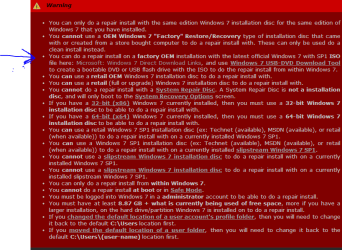
That looks to be the HP recovery disc for a factory oem. I would use the link in the tutorial to download windows 7 with sp1 found in the repair install tutorial. I do think that the disc you have will offer the repair install also.

7link.PNG
 

My Computer

Computer type
PC/Desktop
Computer Manufacturer/Model Number
Dude Build
OS
Windows 10 Pro X64
CPU
Intel(R) Core(TM) i5-3570K CPU OC@ 4.5GHZ Turbo
Motherboard
MSI Z77A-G45 Gaming
Memory
8.00 GB DDR3 1600Mhz
Graphics Card(s)
MSI Gaming X GTX 1070
Sound Card
Realtek High Definition
Monitor(s) Displays
Dell S23O9W, HP L1710
Screen Resolution
DELL-1920 x 1080 HP-1280 x1024
Hard Drives
Crucial m4 256 SSD, WD 7200RPM 500GB WD 1TB
PSU
Seasonic X650 GOLD
Case
Zalman Z12
Cooling
Antec Kuhler 920
Keyboard
Logitech
Mouse
MSI DS100 Interceptor
Internet Speed
50 down and 5 up
Antivirus
MSE
Browser
Chrome, IE 11
Other Info
Logitech X-620 Speakers
It doesn't sound like he can boot into windows far enough to run the repair install. If he wants to recover his files he can boot to a live cd like linux or Hiren's boot cd to copy the files to a flash drive or external HD.
 

My Computer

Computer type
PC/Desktop
Computer Manufacturer/Model Number
Dell
OS
Win 7 x64
CPU
Core I5
Windows will not load up, but he should be able to boot from the disc. That is good advice to preserve his files.
 

My Computer

Computer type
PC/Desktop
Computer Manufacturer/Model Number
Dude Build
OS
Windows 10 Pro X64
CPU
Intel(R) Core(TM) i5-3570K CPU OC@ 4.5GHZ Turbo
Motherboard
MSI Z77A-G45 Gaming
Memory
8.00 GB DDR3 1600Mhz
Graphics Card(s)
MSI Gaming X GTX 1070
Sound Card
Realtek High Definition
Monitor(s) Displays
Dell S23O9W, HP L1710
Screen Resolution
DELL-1920 x 1080 HP-1280 x1024
Hard Drives
Crucial m4 256 SSD, WD 7200RPM 500GB WD 1TB
PSU
Seasonic X650 GOLD
Case
Zalman Z12
Cooling
Antec Kuhler 920
Keyboard
Logitech
Mouse
MSI DS100 Interceptor
Internet Speed
50 down and 5 up
Antivirus
MSE
Browser
Chrome, IE 11
Other Info
Logitech X-620 Speakers
Windows will not load up, but he should be able to boot from the disc. That is good advice to preserve his files.


Thanks.

If he can't boot into Windows 7 then he can't follow the directions in the tutorial and perform a repair install, which in Windows 7 is basically an in place upgrade. That was a nice thing with XP, you could run a repair install by booting from the disc. You have to be inside of Windows 7 to run the installer from the disc and perform the "üpgrade".
 

My Computer

Computer type
PC/Desktop
Computer Manufacturer/Model Number
Dell
OS
Win 7 x64
CPU
Core I5
i am having aproblem with my computer, i have a HP computer with i3 processor, 8 gb RAM, geforce 320 graphicscard and 1TB HDD. (don't know if that info is helpfull).

The computer wont go any further than the windows load screen, where it goes black and then starts the startup repair tool. the repair wizard has been running for about 4 hours now but i haven't seen anyone showing any faith or trust in the repairtool on this forum so far.

is there an easy way for me to either save the data or reinstall windows without loosing the data?
i have my entire life in pictures on the computer.


don't know if im making any sence hope someone can help me out.

regards Thariin

Try the following link for one of the most comprehensive articles I have found to troubleshoot boot failure problems;

What to Do When Windows Won?t Boot

HTH
 

My Computer

Computer type
PC/Desktop
Computer Manufacturer/Model Number
Custom Built
OS
Windows 7 Professional x64
CPU
Intel i5 quad processor
Motherboard
DP67BG
Memory
16 GB
Graphics Card(s)
Radeon HD 5770
Sound Card
Realtek High Definition Audio
Monitor(s) Displays
Samsung SyncMaster
Screen Resolution
1920X1080
Hard Drives
WD 2TB (SATA Internal)
WD 1TB (USB External)
PSU
Corsair GS800
Case
Tower (Generic)
Cooling
3 Internal Fans
Keyboard
MS Wireless
Mouse
MS Optical Wired
Internet Speed
54 mbps
Antivirus
Emsisoft
Browser
IE-Version 9, Palemoon-Version 24.2.0
right so i tried booting on the dvd and when the windows installation/ repair options begin im given the choice of either making an installation or a repair of windows. when choosing repair i basacly get thrown back to the system recovery options. But even though i have several restore points, they only work until it says the recovery was a succes and the gives me an error like was unable to find farcry3.exe or something completely unrelated for the recovery.

the data i need is located in my documents folder. can anyone give me a guide on how to get them to my eksternal hdd? tried the backdoor method with the "load drivers option" but werent succesfull as it changes my language to chinese or something like that.

regards Thariin
 
Last edited:

My Computer

Computer type
PC/Desktop
Computer Manufacturer/Model Number
packard bell
OS
windows 7 home premium 64 bit
CPU
i3
Memory
8gb
Graphics Card(s)
geforce 320
after a long time of errors and frustration i decided to make a new installation of windows 7. this left me with a new problem. i cant connect to the internet and i dont know how to identify my motherboard in order to get the right ethernet drivers.

help me once again?

PS. i was able to backup all my files thanks to the help you guys gave me :)
 

My Computer

Computer type
PC/Desktop
Computer Manufacturer/Model Number
packard bell
OS
windows 7 home premium 64 bit
CPU
i3
Memory
8gb
Graphics Card(s)
geforce 320

My Computer

Computer type
PC/Desktop
Computer Manufacturer/Model Number
home built
OS
Multi-Boot W7_Pro_x64 W8.1_Pro_x64 W10_Pro_x64 +Linux_VMs +Chromium_VM
CPU
AMD Athlon II x4 620
Motherboard
Gigabyte GA-MA785G-UD3H
Memory
6GB GSkill DDR2 800
Graphics Card(s)
AMD 4670 GPU + AMD 4200 IGP
Sound Card
on board Realtek ALC889A
Monitor(s) Displays
RCA 40" LCD TV, Insignia 32" LCD TV, HP 15" LCD monitor
Screen Resolution
1680 x 1050
Hard Drives
OCZ Vertex 3 120GB,
Samsung F3 1TB (3),
Several others - WD, Seagate, Hitachi, ...
PSU
Corsair 500 W
Case
Rosewill mid tower
Cooling
CM 90mm rifle
Keyboard
Gyration wireless, Logitech wireless, Dell USB wired
Mouse
Gyration wireless, Logitech wireless, V7 USB wired
Internet Speed
Spectrum - 100Mbps D / 10Mbps U
Antivirus
Avast, MBAM3, EMET, WinPatrol
Browser
Pale Moon, Firefox, IE
Other Info
2 multi-boot PC's
Mainly HTPC/Office/Gen purpose (no gaming).
Trendnet USB KVM.
LG DVD burner/Blue Ray Player.
Tray system for removable SATA backup drives.

Not currently OCd, under-volted.
I use Hybrid sleep, rarely re-boot or shutdown.

Hauppauge HD-PVR, Avermedia PCIe TV Tuner, Hauppauge PCI TV Tuner.
Back
Top