
Solved Computer suddenly locks itself, trying to get it to stop

MetalMan228

New member
Member
VIP
Local time
9:56 PM
Messages
265
Location
Lancaster PA
Hi everyone. I tried to search the forums before i made this post, but cannot seem to find a post that helps me out. My PC is suddenly deciding to lock itself after being left alone for a while. It happens whether i just leave it sit with the monitor off, or even if i put the computer to sleep if i am going to be a way for a while. It never did this before. Please note the following:

There is NO screensaver
There is NO password
The computer is NOT on a network
The display is set to turn off NEVER.

I have set my PC for use with High Performance Audio, and do not want it to sleep, lock, or have a screen saver start up while in the process of ripping, burning CD's etc.

This just started two days ago. I have not downloaded or changed anything or any setting. I just came home, and had set my PC to sleep. When i got home, the monitor was on with the Login screen showing and saying it is locked. Any help would be greatly appreciated!!:banghead:
 

My Computer My Computer

At a glance

Windows 7 professional 64 bitAMD Athlon(tm) II X2 220 Processor3GBNVIDIA GeForce 6150SE nForce 430
Computer type
PC/Desktop
Computer Manufacturer/Model Number
HP 505B B2C02UT Business Desktop
OS
Windows 7 professional 64 bit
CPU
AMD Athlon(tm) II X2 220 Processor
Motherboard
PEGATRON (2A99)
Memory
3GB
Graphics Card(s)
NVIDIA GeForce 6150SE nForce 430
Sound Card
Realtek ALC662 High Definition Audio (OEM)
Monitor(s) Displays
OEM Dell CRT
Screen Resolution
N/A
Hard Drives
(1) NCQ Smart IV 500GB Hard Drive - 7,200RPM - SATA 3.0Gb/s

HP LightScribe CD/DVD burner
PSU
OEM HP 300 watt
Case
OEM
Cooling
OEM
Keyboard
wired Logitech K120
Mouse
wired M100 mouse
Internet Speed
G5 High Speed Internet
Antivirus
ZoneAlarm Extreme Security
Browser
FF36.04 IE11
Other Info
JRivers Media Center v17

AudioQuest dragonfly DAC V1.2

Mackie MR5 Studio Monitors
By locked you mean it is now asking you for a password to login or the screen is just in the lock state?

....You may want to check the task scheduler to see if there is a task in there set to lock the machine after idle.
 

My Computer My Computer

At a glance

Windows 7 Pro 64-Biti716GBNvidia
Computer Manufacturer/Model Number
Custom
OS
Windows 7 Pro 64-Bit
CPU
i7
Motherboard
Gigabyte
Memory
16GB
Graphics Card(s)
Nvidia
Sound Card
Onboard
Monitor(s) Displays
Asus
Hard Drives
Seagate
PSU
Antec
Case
Fractial Design
Cooling
Stock
When i turn the monitor back on i see a screen asking if i want to change users and that this PC is "locked". I have to click on my name to unlock it. I checked the task scheduler and found nothing unusual.
 

My Computer My Computer

At a glance

Windows 7 professional 64 bitAMD Athlon(tm) II X2 220 Processor3GBNVIDIA GeForce 6150SE nForce 430
Computer type
PC/Desktop
Computer Manufacturer/Model Number
HP 505B B2C02UT Business Desktop
OS
Windows 7 professional 64 bit
CPU
AMD Athlon(tm) II X2 220 Processor
Motherboard
PEGATRON (2A99)
Memory
3GB
Graphics Card(s)
NVIDIA GeForce 6150SE nForce 430
Sound Card
Realtek ALC662 High Definition Audio (OEM)
Monitor(s) Displays
OEM Dell CRT
Screen Resolution
N/A
Hard Drives
(1) NCQ Smart IV 500GB Hard Drive - 7,200RPM - SATA 3.0Gb/s

HP LightScribe CD/DVD burner
PSU
OEM HP 300 watt
Case
OEM
Cooling
OEM
Keyboard
wired Logitech K120
Mouse
wired M100 mouse
Internet Speed
G5 High Speed Internet
Antivirus
ZoneAlarm Extreme Security
Browser
FF36.04 IE11
Other Info
JRivers Media Center v17

AudioQuest dragonfly DAC V1.2

Mackie MR5 Studio Monitors
My Computer My Computer

At a glance

Windows 7 Pro 64-Biti716GBNvidia
Computer Manufacturer/Model Number
Custom
OS
Windows 7 Pro 64-Bit
CPU
i7
Motherboard
Gigabyte
Memory
16GB
Graphics Card(s)
Nvidia
Sound Card
Onboard
Monitor(s) Displays
Asus
Hard Drives
Seagate
PSU
Antec
Case
Fractial Design
Cooling
Stock
See if you can do a System Restore to a date before the problem started.

Click on the Start button and type System Restore, click on System Restore and when you get to the window with your restore points, select a date before you had problems. Notice the box in the lower left corner "Show more restore points"
 

My Computer My Computer

At a glance

Windows 7 Home Premium 64biti3-5308 Gbonboard
Computer Manufacturer/Model Number
HP p6370t
OS
Windows 7 Home Premium 64bit
CPU
i3-530
Motherboard
MSI - IONA
Memory
8 Gb
Graphics Card(s)
onboard
Sound Card
onboard
Monitor(s) Displays
Dell ST2400
Screen Resolution
1920x1080
Hard Drives
Intell 520 SSD 120Gb, WD6400AAKS, 640Gb & WD USB MyBook 1Tb
Internet Speed
1.5 Mmbps, Hughes Satellite
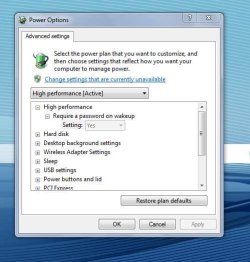
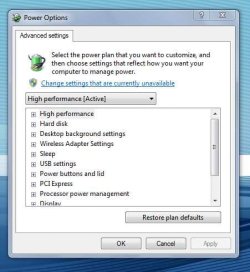
Ok, i went to the advanced power settings and found that it may have been asking for a password, see 1st pic.

I reset it as shown in 2ed pic.

I will have to wait a while, (few days??) to see if the problem clears, but i think that may have been the it. I do believe that i had it set that way when i first made the adjustments for HP audio, but the "require a password" was not highlighted. And I occasionally remember having the locking problem, but not all the time. Never put two and two together:shock:!
 

Attachments

  • SP32-20121024-173417.jpg
    SP32-20121024-173417.jpg
    36.9 KB · Views: 25
  • SP32-20121024-173434.jpg
    SP32-20121024-173434.jpg
    32.2 KB · Views: 25

My Computer My Computer

At a glance

Windows 7 professional 64 bitAMD Athlon(tm) II X2 220 Processor3GBNVIDIA GeForce 6150SE nForce 430
Computer type
PC/Desktop
Computer Manufacturer/Model Number
HP 505B B2C02UT Business Desktop
OS
Windows 7 professional 64 bit
CPU
AMD Athlon(tm) II X2 220 Processor
Motherboard
PEGATRON (2A99)
Memory
3GB
Graphics Card(s)
NVIDIA GeForce 6150SE nForce 430
Sound Card
Realtek ALC662 High Definition Audio (OEM)
Monitor(s) Displays
OEM Dell CRT
Screen Resolution
N/A
Hard Drives
(1) NCQ Smart IV 500GB Hard Drive - 7,200RPM - SATA 3.0Gb/s

HP LightScribe CD/DVD burner
PSU
OEM HP 300 watt
Case
OEM
Cooling
OEM
Keyboard
wired Logitech K120
Mouse
wired M100 mouse
Internet Speed
G5 High Speed Internet
Antivirus
ZoneAlarm Extreme Security
Browser
FF36.04 IE11
Other Info
JRivers Media Center v17

AudioQuest dragonfly DAC V1.2

Mackie MR5 Studio Monitors
Good! Hope this works.
 

My Computer My Computer

At a glance

Windows 7 Pro 64-Biti716GBNvidia
Computer Manufacturer/Model Number
Custom
OS
Windows 7 Pro 64-Bit
CPU
i7
Motherboard
Gigabyte
Memory
16GB
Graphics Card(s)
Nvidia
Sound Card
Onboard
Monitor(s) Displays
Asus
Hard Drives
Seagate
PSU
Antec
Case
Fractial Design
Cooling
Stock
Well, i put my PC to sleep this morning, ran some errands, and when i came home the monitor was on again, and the PC was once again locked. I guess that did not solve the problem:cry:. OK, Round two!! Next suggestion please, lol.
 

My Computer My Computer

At a glance

Windows 7 professional 64 bitAMD Athlon(tm) II X2 220 Processor3GBNVIDIA GeForce 6150SE nForce 430
Computer type
PC/Desktop
Computer Manufacturer/Model Number
HP 505B B2C02UT Business Desktop
OS
Windows 7 professional 64 bit
CPU
AMD Athlon(tm) II X2 220 Processor
Motherboard
PEGATRON (2A99)
Memory
3GB
Graphics Card(s)
NVIDIA GeForce 6150SE nForce 430
Sound Card
Realtek ALC662 High Definition Audio (OEM)
Monitor(s) Displays
OEM Dell CRT
Screen Resolution
N/A
Hard Drives
(1) NCQ Smart IV 500GB Hard Drive - 7,200RPM - SATA 3.0Gb/s

HP LightScribe CD/DVD burner
PSU
OEM HP 300 watt
Case
OEM
Cooling
OEM
Keyboard
wired Logitech K120
Mouse
wired M100 mouse
Internet Speed
G5 High Speed Internet
Antivirus
ZoneAlarm Extreme Security
Browser
FF36.04 IE11
Other Info
JRivers Media Center v17

AudioQuest dragonfly DAC V1.2

Mackie MR5 Studio Monitors
Well, if the machine is not staying asleep then there is a program or another computer on the network that is waking it up. Do you have any other computers on the network? What programs are running... such as Anti-Virus, things that are always running...?
 

My Computer My Computer

At a glance

Windows 7 Pro 64-Biti716GBNvidia
Computer Manufacturer/Model Number
Custom
OS
Windows 7 Pro 64-Bit
CPU
i7
Motherboard
Gigabyte
Memory
16GB
Graphics Card(s)
Nvidia
Sound Card
Onboard
Monitor(s) Displays
Asus
Hard Drives
Seagate
PSU
Antec
Case
Fractial Design
Cooling
Stock
There is nothing running that has not always been on my PC, so this is a rather recent issue for it. I am hoping to not try the restore option either. After a few more days now the computer only locks now if put into sleep mode. It is fine and does not lock at any other time.
 

My Computer My Computer

At a glance

Windows 7 professional 64 bitAMD Athlon(tm) II X2 220 Processor3GBNVIDIA GeForce 6150SE nForce 430
Computer type
PC/Desktop
Computer Manufacturer/Model Number
HP 505B B2C02UT Business Desktop
OS
Windows 7 professional 64 bit
CPU
AMD Athlon(tm) II X2 220 Processor
Motherboard
PEGATRON (2A99)
Memory
3GB
Graphics Card(s)
NVIDIA GeForce 6150SE nForce 430
Sound Card
Realtek ALC662 High Definition Audio (OEM)
Monitor(s) Displays
OEM Dell CRT
Screen Resolution
N/A
Hard Drives
(1) NCQ Smart IV 500GB Hard Drive - 7,200RPM - SATA 3.0Gb/s

HP LightScribe CD/DVD burner
PSU
OEM HP 300 watt
Case
OEM
Cooling
OEM
Keyboard
wired Logitech K120
Mouse
wired M100 mouse
Internet Speed
G5 High Speed Internet
Antivirus
ZoneAlarm Extreme Security
Browser
FF36.04 IE11
Other Info
JRivers Media Center v17

AudioQuest dragonfly DAC V1.2

Mackie MR5 Studio Monitors
Check your network cards wire and wireless to make sure they do not log you out or lock you out.
It seems thats the only thing none has said. Make sure they dont have the option to log you out.
Hope that will work for you.
LA
 

My Computer My Computer

At a glance

Windows 7 Ultimate 64 bit2.674 GNividia 9400 GT
Computer Manufacturer/Model Number
Acer
OS
Windows 7 Ultimate 64 bit
CPU
2.67
Memory
4 G
Graphics Card(s)
Nividia 9400 GT
Sound Card
Realteck
Monitor(s) Displays
Panasonic TV
Hard Drives
2 TB Hitachi 7200 rpm
Find cause (in my case !) but it is related to all !!! I suddenly disable Enable write caching on the device (HGST HTS 541010A9E680 SATA Disk Device) HDD Driver, and after short inactivity that cause lock of Windows, Windows loose info about disk & lock OS !!! I enable it again, and no more problems !!! (CHECK IT in C: Properties. hardware, polices !!! Thank you for your attention, Respectfully yours Zenicablues
 

My Computer My Computer

At a glance

Windows 7 Ultimate x64
Computer type
PC/Desktop
Computer Manufacturer/Model Number
HP
OS
Windows 7 Ultimate x64
Back
Top