Computer Taken over by GOD :P

Magoo

New member
Member
Local time
12:01 PM
Messages
75
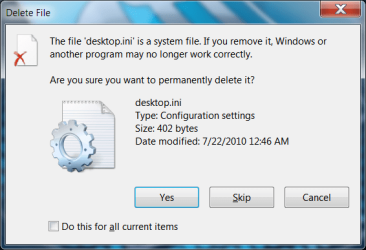
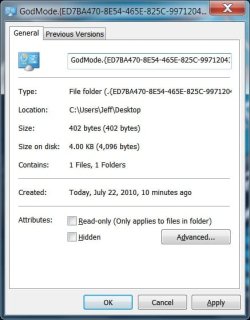
Every Couple (reboots maybe around 10 approx)the godmode icon appears on my desktop, Don't ask me how or why it just does, I delete it and keeps coming back. I would like to just get rid of it for good! I also get an error msg about are you sure you wanna delete this file "desktop.ini" I delete it and it will just sudeendly decide to come back whenever it wants too! Pictures are attached to make it more clear.

Thanks,
Magoo
 

Attachments

  • Onthedesktop.JPG
    Onthedesktop.JPG
    10.1 KB · Views: 321
  • whenigotodeleteit.png
    whenigotodeleteit.png
    23.4 KB · Views: 10
  • properties.jpg
    properties.jpg
    36 KB · Views: 8

My Computer My Computer

OS
Window 7 x64
CPU
I7 930
Motherboard
P6X58-Premium
Memory
6 gig Corsair Dominator
Graphics Card(s)
ATI 5800
Sound Card
Onboard
Monitor(s) Displays
24" Dell IPS
Hard Drives
Vertex 2 100 SSD
6 X 2TB Samgsung HDD
PSU
Seasonic X750
Case
Corsair 800D
Cooling
Corsair H50
Internet Speed
100 Mb/s
Every Couple (reboots maybe around 10 approx)the godmode icon appears on my desktop, Don't ask me how or why it just does, I delete it and keeps coming back. I would like to just get rid of it for good! I also get an error msg about are you sure you wanna delete this file "desktop.ini" I delete it and it will just sudeendly decide to come back whenever it wants too! Pictures are attached to make it more clear.

Thanks,
Magoo

First have you run a system wide virus scan?

Second reboot in safemode (F8) and navigate to the folder c:\users\your username\desktop. the godmode shortcut should be there, delete it.

Third do a search for "godmode" on the entire C:\ drive and where ever you find it delete them as well.

If you have any problems deleting them from within windows boot from the win 7 dvd go to the cmd window and navigate to where they are from there then delete them.

This works I have done it on many recalcitrant godmode shortcuts.

Ken

EDIT: the desktop.ini file also has a fix. search sevenforums for it. (I just dont remember what it is atm.
 

My Computer My Computer

Computer Manufacturer/Model Number
HP Pavillion dv-7 1005 Tx
OS
Win 8 Release candidate 8400
CPU
[email protected]
Memory
4 gigs
Graphics Card(s)
Nvidia 9600M
Sound Card
HD built-in
Monitor(s) Displays
17" Wxga
Screen Resolution
1440x900
Cooling
none
Internet Speed
45Mb down 5Mb up
1) Check in MSCONFIG=> Startup tab for something that may be triggering that.

2) Try deleting the folder in Safe mode, the run a registry cleanup with CCleaner.
 

My Computer My Computer

Computer Manufacturer/Model Number
Too many to describe...
OS
Windows 7 x64 pro/ Windows 7 x86 Pro/ XP SP3 x86
ok thanks for the help guys, will do the above and report back, It just wierd something is triggering it to show up , but I have no idea what ????????
 

My Computer My Computer

OS
Window 7 x64
CPU
I7 930
Motherboard
P6X58-Premium
Memory
6 gig Corsair Dominator
Graphics Card(s)
ATI 5800
Sound Card
Onboard
Monitor(s) Displays
24" Dell IPS
Hard Drives
Vertex 2 100 SSD
6 X 2TB Samgsung HDD
PSU
Seasonic X750
Case
Corsair 800D
Cooling
Corsair H50
Internet Speed
100 Mb/s
Well it keep coming back, Virus and malware scan is Clean, Went into safe mode and deleted it, 20 mins it later its back, I notice it has a read only permission, which I can remove no problem. Could it be something in the registry making it pop up? Checked msn config and startup nothing there at all, hmmm I'm stumped!
 

My Computer My Computer

OS
Window 7 x64
CPU
I7 930
Motherboard
P6X58-Premium
Memory
6 gig Corsair Dominator
Graphics Card(s)
ATI 5800
Sound Card
Onboard
Monitor(s) Displays
24" Dell IPS
Hard Drives
Vertex 2 100 SSD
6 X 2TB Samgsung HDD
PSU
Seasonic X750
Case
Corsair 800D
Cooling
Corsair H50
Internet Speed
100 Mb/s
OK did exactly as you said , took owership, rebooted into safe mod, took owership again and deleted , I got that msg are "The file desktop.in is a system file are you sure you want to delete it" again.... Same as the picture I posted above. I guess time will tell.
 

My Computer My Computer

OS
Window 7 x64
CPU
I7 930
Motherboard
P6X58-Premium
Memory
6 gig Corsair Dominator
Graphics Card(s)
ATI 5800
Sound Card
Onboard
Monitor(s) Displays
24" Dell IPS
Hard Drives
Vertex 2 100 SSD
6 X 2TB Samgsung HDD
PSU
Seasonic X750
Case
Corsair 800D
Cooling
Corsair H50
Internet Speed
100 Mb/s
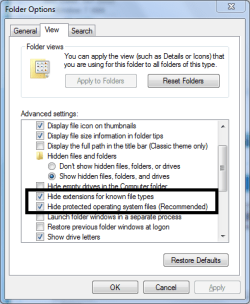
Go to Folder Options and check these 2 boxes:

Capture.PNG
 

My Computer My Computer

Computer Manufacturer/Model Number
Samsung NP530U4B-S02IN
OS
Windows® 8 Pro (64-bit)
CPU
Intel® Core™ i5 Processor 2467M (1.60GHz, 3MB L3 Cache)
Motherboard
Samsung Electronics
Memory
6GB DDR3 System Memory at 1,333MHz (on BD 4GB + 2GB x 1)
Graphics Card(s)
AMD Radeon™ HD7550M 1GB DDR3 (Ext. Graphic)
Sound Card
Realtek High Definition Audio
Monitor(s) Displays
35.56cm (14.0) SuperBright 300nit HD LED Display
Screen Resolution
1366x768
Hard Drives
1TB S-ATA II Hard Drive (5400RPM) with ExpressCache 16GB SSD
Internet Speed
sucks
Antivirus
Microsoft Security Essentials
Browser
Google Chrome (Sync enabled)
Those are checked, It gives me that msg, when I try to delete the godmode folder, I guess cause maybe its a hack trick whatever you wanna call it...
 

My Computer My Computer

OS
Window 7 x64
CPU
I7 930
Motherboard
P6X58-Premium
Memory
6 gig Corsair Dominator
Graphics Card(s)
ATI 5800
Sound Card
Onboard
Monitor(s) Displays
24" Dell IPS
Hard Drives
Vertex 2 100 SSD
6 X 2TB Samgsung HDD
PSU
Seasonic X750
Case
Corsair 800D
Cooling
Corsair H50
Internet Speed
100 Mb/s
This may sound drastic, but I would consider wiping the drive and reinstalling. The GodMode folder doesn't just appear...it has to be put there. If your computer has been compromised that much...I'd have no faith using it any further.
 

My Computer My Computer

OS
Windows 7 Ultimate x64 SP1
CPU
Intel Core i7-2600
Motherboard
Gigabyte GA-P67A-UD3P-B3
Memory
12 GB Patriot Extreme DDR3-1333
Graphics Card(s)
Nvidia GTX 470
Monitor(s) Displays
Dell UltraSharp 2209WA
Hard Drives
OCZ Agility3 240 GB, WD5001AALS, WD7501AALS
PSU
OCZ ModStream 700W
Case
CoolerMaster HAF 912 Advanced
Cooling
CoolerMaster Hyper 212 Plus
Wow tooo drastic for me............ Are you think virus or malware that kinda thing? Something is telling it do creat that folder on the desktop, No sure what though.
 

My Computer My Computer

OS
Window 7 x64
CPU
I7 930
Motherboard
P6X58-Premium
Memory
6 gig Corsair Dominator
Graphics Card(s)
ATI 5800
Sound Card
Onboard
Monitor(s) Displays
24" Dell IPS
Hard Drives
Vertex 2 100 SSD
6 X 2TB Samgsung HDD
PSU
Seasonic X750
Case
Corsair 800D
Cooling
Corsair H50
Internet Speed
100 Mb/s
You have to create a folder with a very specific string of characters to get the GodMode icon to appear. Unless someone else has physical access to your computer, such a friend, that could have put it there, you have somekind of serious malware or hack. I've never heard of malware creating that folder.
 

My Computer My Computer

OS
Windows 7 Ultimate x64 SP1
CPU
Intel Core i7-2600
Motherboard
Gigabyte GA-P67A-UD3P-B3
Memory
12 GB Patriot Extreme DDR3-1333
Graphics Card(s)
Nvidia GTX 470
Monitor(s) Displays
Dell UltraSharp 2209WA
Hard Drives
OCZ Agility3 240 GB, WD5001AALS, WD7501AALS
PSU
OCZ ModStream 700W
Case
CoolerMaster HAF 912 Advanced
Cooling
CoolerMaster Hyper 212 Plus
Hold on. Deacon, are you saying GodMode actually exist in Win7?
 

My Computer My Computer

Computer type
Laptop
Computer Manufacturer/Model Number
Toshiba P775-S7100
OS
Windows 7 Professional SP1 64-bit
CPU
Intel Core i5-2450M @2.5 GHz
Memory
6 GB DDR3 1333MHz
Graphics Card(s)
Intel HD 3000
Monitor(s) Displays
Built-in 17.3" LED; 22" Insignia NS-L22Q-10A
Screen Resolution
1600x900; 1360x768
Hard Drives
750 GB Hitachi
1TB Seagate FreeAgent External
Internet Speed
Verizon DSL Speed(Down/Up): 3360 Kbps / 800 Kbps
Antivirus
MSE and MBAM Pro
Browser
IE10
Yes, absolutely. It's been a pretty well known trick, Easter Egg, whatever you want to call it, in the enthusiast arena since a little after Windows 7 was release last August. If you create a new folder with a specific name and character string, you'll get the GodMode folder, which gives you access to many configuration options in your system, all in one place. That's why I'm telling the OP that it just doesn't happen by mistake.

http://news.cnet.com/8301-13860_3-10423985-56.html
 

My Computer My Computer

OS
Windows 7 Ultimate x64 SP1
CPU
Intel Core i7-2600
Motherboard
Gigabyte GA-P67A-UD3P-B3
Memory
12 GB Patriot Extreme DDR3-1333
Graphics Card(s)
Nvidia GTX 470
Monitor(s) Displays
Dell UltraSharp 2209WA
Hard Drives
OCZ Agility3 240 GB, WD5001AALS, WD7501AALS
PSU
OCZ ModStream 700W
Case
CoolerMaster HAF 912 Advanced
Cooling
CoolerMaster Hyper 212 Plus
I used the RC, I looked up all kinds of way to change all kind of stuff and never heard of this. Its cool.
 

My Computer My Computer

Computer type
Laptop
Computer Manufacturer/Model Number
Toshiba P775-S7100
OS
Windows 7 Professional SP1 64-bit
CPU
Intel Core i5-2450M @2.5 GHz
Memory
6 GB DDR3 1333MHz
Graphics Card(s)
Intel HD 3000
Monitor(s) Displays
Built-in 17.3" LED; 22" Insignia NS-L22Q-10A
Screen Resolution
1600x900; 1360x768
Hard Drives
750 GB Hitachi
1TB Seagate FreeAgent External
Internet Speed
Verizon DSL Speed(Down/Up): 3360 Kbps / 800 Kbps
Antivirus
MSE and MBAM Pro
Browser
IE10
Well I did a MBAM scan and nothing was found, Also did A Nod32 scan (clean) , Went threw my hijack this log and found nothing out of the ordinary. Very strange.
 

My Computer My Computer

OS
Window 7 x64
CPU
I7 930
Motherboard
P6X58-Premium
Memory
6 gig Corsair Dominator
Graphics Card(s)
ATI 5800
Sound Card
Onboard
Monitor(s) Displays
24" Dell IPS
Hard Drives
Vertex 2 100 SSD
6 X 2TB Samgsung HDD
PSU
Seasonic X750
Case
Corsair 800D
Cooling
Corsair H50
Internet Speed
100 Mb/s
That's why I asked if someone had physical access to your system. I've never heard of malware creating this folder, because it is useless without access to the system, or a remote desktop app, etc. I would be very weary of how it got there, and that's why I wouldn't trust the system's integrity.

A friend of mine had something like this once. Turns out he was hacked, and someone dropped VNC on his system, and could take control anytime they wanted. When a system is compromised like that, you really only have one option.
 

My Computer My Computer

OS
Windows 7 Ultimate x64 SP1
CPU
Intel Core i7-2600
Motherboard
Gigabyte GA-P67A-UD3P-B3
Memory
12 GB Patriot Extreme DDR3-1333
Graphics Card(s)
Nvidia GTX 470
Monitor(s) Displays
Dell UltraSharp 2209WA
Hard Drives
OCZ Agility3 240 GB, WD5001AALS, WD7501AALS
PSU
OCZ ModStream 700W
Case
CoolerMaster HAF 912 Advanced
Cooling
CoolerMaster Hyper 212 Plus
You might want to check the network map (control panel>newtwork and sharing center>see network map), and check networks places (explorer>network). Make sure no one else is connected to your network. If anyone lives with you, then ask them if they touched your computer.
 

My Computer My Computer

Computer type
Laptop
Computer Manufacturer/Model Number
Toshiba P775-S7100
OS
Windows 7 Professional SP1 64-bit
CPU
Intel Core i5-2450M @2.5 GHz
Memory
6 GB DDR3 1333MHz
Graphics Card(s)
Intel HD 3000
Monitor(s) Displays
Built-in 17.3" LED; 22" Insignia NS-L22Q-10A
Screen Resolution
1600x900; 1360x768
Hard Drives
750 GB Hitachi
1TB Seagate FreeAgent External
Internet Speed
Verizon DSL Speed(Down/Up): 3360 Kbps / 800 Kbps
Antivirus
MSE and MBAM Pro
Browser
IE10
You might also want to make sure both remote access services and remote registry are disabled in services. As long as you don't stream media to anything, you won't notice any ill effects.
 

My Computer My Computer

Computer type
Laptop
Computer Manufacturer/Model Number
Toshiba P775-S7100
OS
Windows 7 Professional SP1 64-bit
CPU
Intel Core i5-2450M @2.5 GHz
Memory
6 GB DDR3 1333MHz
Graphics Card(s)
Intel HD 3000
Monitor(s) Displays
Built-in 17.3" LED; 22" Insignia NS-L22Q-10A
Screen Resolution
1600x900; 1360x768
Hard Drives
750 GB Hitachi
1TB Seagate FreeAgent External
Internet Speed
Verizon DSL Speed(Down/Up): 3360 Kbps / 800 Kbps
Antivirus
MSE and MBAM Pro
Browser
IE10
Well did everything suggested and even renamed it to blah , it will still come back every 5-6 reboots , with the Folder showing blah, read only properties and when I delete it , Windows thinks its a system.ini file? Anyway to remove by registry? or make windows think it's not system.ini file?
 

My Computer My Computer

OS
Window 7 x64
CPU
I7 930
Motherboard
P6X58-Premium
Memory
6 gig Corsair Dominator
Graphics Card(s)
ATI 5800
Sound Card
Onboard
Monitor(s) Displays
24" Dell IPS
Hard Drives
Vertex 2 100 SSD
6 X 2TB Samgsung HDD
PSU
Seasonic X750
Case
Corsair 800D
Cooling
Corsair H50
Internet Speed
100 Mb/s
Back
Top