Computer thinks its on a vpn

T0by

New member
Local time
7:12 PM
Messages
26
My internet browers work but somethings like my skype home doesnt load it says "Skype home unavaliable" and when I try to login to Leauge of Legends it says error.

I have to use a VPN connected to America (Im in the UK) for it to login and skype to load.

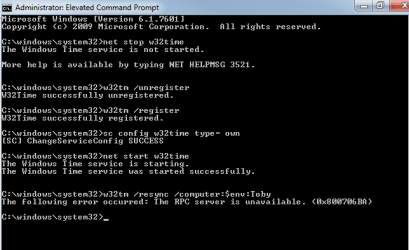
Leauge of legends have told me to do w32tm /resync in my cmd and it comes up with a error (0x80070424)
 

My Computer

Computer type
PC/Desktop
Computer Manufacturer/Model Number
Built myself
OS
Windows 7 Ultimate x64
CPU
AMD FX(tm)-4100 Quad-core Processor
Motherboard
Asus Sabertooth 990FX R2.0
Memory
(2x8Gb) DDR3 Corsair Vengeance
Graphics Card(s)
NINVIDA Geforce 660
Monitor(s) Displays
3 27Inch LG monitors
Screen Resolution
1920 x1080
Hard Drives
Corsiar Force 3 SSD (Size: 110GB)
ST2000DM001-1CH164 (Size: 1863GB)
PSU
750w
Case
zalman z11 plus
Cooling
Pro freezer 7
Keyboard
Razer Lycosa Mirror Edition
Mouse
Razer Taipan
Antivirus
malwarebytes
Browser
Firefox
I have tried resyncing w32tm but I get "The RPC server is unavaiable. (0x8000706BA)
 

My Computer

Computer type
PC/Desktop
Computer Manufacturer/Model Number
Built myself
OS
Windows 7 Ultimate x64
CPU
AMD FX(tm)-4100 Quad-core Processor
Motherboard
Asus Sabertooth 990FX R2.0
Memory
(2x8Gb) DDR3 Corsair Vengeance
Graphics Card(s)
NINVIDA Geforce 660
Monitor(s) Displays
3 27Inch LG monitors
Screen Resolution
1920 x1080
Hard Drives
Corsiar Force 3 SSD (Size: 110GB)
ST2000DM001-1CH164 (Size: 1863GB)
PSU
750w
Case
zalman z11 plus
Cooling
Pro freezer 7
Keyboard
Razer Lycosa Mirror Edition
Mouse
Razer Taipan
Antivirus
malwarebytes
Browser
Firefox
If I remember correctly, w32tm is a time syncronisation option in Windows. You shouldn't need to use a VPN connection. It is possible for your time to be out of sync and therefore is why you are getting rejected.

Have you tried to run the command as an administrator in an elevated command prompt? The issue may be due to privilege issues.

Follow this tutorial to create an elevated command prompt and then enter the same command as previous.

http://www.sevenforums.com/tutorials/783-elevated-command-prompt.html

Hope This Helps,
Josh :)
 

My Computer

Computer type
PC/Desktop
Computer Manufacturer/Model Number
Custom Built
OS
Windows 7 Professional x64 SP1 ; Windows Server 2012 R2 Standard
CPU
Intel Core i5 2400 @ 3.10GHz
Motherboard
Foxconn H67MP-S/-V/H67MP
Memory
8.0GB DDR3 @ 665MHz (2GBx4)
Graphics Card(s)
AMD Radeon HD 6870
Sound Card
Realtek High Definition Audio
Monitor(s) Displays
AOC 2243W & SMB1930NW
Screen Resolution
1440x900 & 1920x1080
Hard Drives
977GB Seagate ST31000524AS ATA Drive (SATA)
250GB WD iSCSI attached Drive
PSU
750W Gaming PSU
Case
Novatech Night
Cooling
Fan
Keyboard
Dell Standard PS/2 Keyboard
Mouse
R.A.T 07 Gaming Mouse
Internet Speed
Download: 10 Mbps Ping: 30ms Upload: 0.81 Mbps
Browser
Google Chrome
Other Info
Optiarc DVD RW AD-5260S ATA Device
I did that and this is what I get
 

Attachments

  • screenshot.png
    screenshot.png
    8.5 KB · Views: 12

My Computer

Computer type
PC/Desktop
Computer Manufacturer/Model Number
Built myself
OS
Windows 7 Ultimate x64
CPU
AMD FX(tm)-4100 Quad-core Processor
Motherboard
Asus Sabertooth 990FX R2.0
Memory
(2x8Gb) DDR3 Corsair Vengeance
Graphics Card(s)
NINVIDA Geforce 660
Monitor(s) Displays
3 27Inch LG monitors
Screen Resolution
1920 x1080
Hard Drives
Corsiar Force 3 SSD (Size: 110GB)
ST2000DM001-1CH164 (Size: 1863GB)
PSU
750w
Case
zalman z11 plus
Cooling
Pro freezer 7
Keyboard
Razer Lycosa Mirror Edition
Mouse
Razer Taipan
Antivirus
malwarebytes
Browser
Firefox
Back
Top