Computer Transition for a 'Dummy' who ...

MourningStar

(_x_)
Power User
VIP
Local time
7:37 AM
Messages
1,308
... plans to stay with W7 until sw/hw death.

I (the dummy) want to be ready for a scenario where I wake up one day and discover that my machine (W7) has gone to computer heaven. This would mean going to my local store (Walmart, Office Depot, BestBuy, whatever, etc.) and buying a new machine. I periodically copy to external drive 'My Documents/Pictures/Music/Videos/Downloads(where I store most of my collected-over-time program setup/install files) etc. and any other custom folders with non-system stuff. This is time consuming, but the only way I know how to 'backup' my stuff.

Is this the best dummy-friendly process? If not, please suggest alternative methods. My desire would be to load my previous computer data to the new machine as painless as possible.

-thx
 

My Computer My Computer

At a glance

Microsoft Windows 7 Home Premium 64-bit 7601 ...Pentium(R) Dual-Core CPU E5300 @ 2.60GHz6.00 GBIntel(R) G33/G31 Express Chipset Family
Computer type
PC/Desktop
Computer Manufacturer/Model Number
HP (HP-P6212F)
OS
Microsoft Windows 7 Home Premium 64-bit 7601 Multiprocessor Free Service Pack 1
CPU
Pentium(R) Dual-Core CPU E5300 @ 2.60GHz
Motherboard
PEGATRON CORPORATION Benicia
Memory
6.00 GB
Graphics Card(s)
Intel(R) G33/G31 Express Chipset Family
Sound Card
Realtek High Definition Audio
Monitor(s) Displays
24'' HP WS LCD
Screen Resolution
1920 x 1080 x 32 bits (4294967296 colors) @ 60 Hz
Hard Drives
(1) ATA Hitachi HDT72106 SCSI Disk Device (2) Generic- Compact Flash USB Device (3) Generic- MS/MS-Pro USB Device (4) Generic- SD/MMC USB Device (5) Generic- SM/xD-Picture USB Device (6) Verbatim STORE N GO USB Device
Keyboard
Logitech G510s
Mouse
Logitech Trackball M570
Antivirus
Microsoft Security Essentials / Malwarebytes
Browser
IE / Firefox / Chrome
1. If you just want want your files to transfer to a new operating system on a new machine, a good way of backing up for that is to use karens replicator.

Karen's Replicator the Backup Utility for Windows v3.7.5 Released November 2, 2019 | Karen's Power Tools | Utilities for Windows | KarenWare.com


2. If you want to transfer the existing operating system including files and settings and programs, then you need to make an image.

You could do it by using the built in windows system image program to create an image onto an external disk. It creates images in vhd format.
Backup Complete Computer - Create an Image Backup

Or you could use a 3rd party imaging program.

Simplest to use is aomei backupper - pro version is available on giveaway at the moment

aomei backupper pro giveaway

Or you could use O&O diskimage pro version 12 available on giveaway at the moment. It lots of functions and features, but less obvious to use for beginers. One advantage is it can create images in vhd format, which are accessible by other programs.

Register for free O&O Diskimage Pro V12 license here:
Registration for your FREE license of O&O DiskImage 12
They send an email. Click the link in the email they sent you and you will receive another email with your license key

Download O&O Diskimage Pro V12 program in English
Download Archive
 
Last edited:

My Computers My Computers

  • At a glance

    7 X64i5 84002x8gb 3200mhz
    Computer type
    PC/Desktop
    OS
    7 X64
    CPU
    i5 8400
    Motherboard
    gigabyte b365m ds3h
    Memory
    2x8gb 3200mhz
    Hard Drives
    various
    PSU
    pure power 11 400w cm
    Case
    Coolermaster
    Cooling
    cryorig m9i
  • At a glance

    7x64g54008gb ddr4 2400
    Computer type
    PC/Desktop
    OS
    7x64
    CPU
    g5400
    Motherboard
    ga b365m ds3h
    Memory
    8gb ddr4 2400
    PSU
    xfx pro 450w
Simple way is use Google backup and sync or MS one drive both will backup on there own in second then on the new pc files will appear as if by magic all on there own. Google photos is Free and unlimited
 

My Computer My Computer

At a glance

win 8 32 bit
Computer type
PC/Desktop
OS
win 8 32 bit
If you want to keep Win 7 updated and continue using then read the following link carefully. I have three Win 7 computers updated to the February 11 updates. If all goes well then 2024 will be the end of my win 7 machines.

Error | My Digital Life Forums
 

My Computer My Computer

At a glance

Windows 10 22H2 ProIntel(R) Xeon W-10885M2x 32 GB DDR4 ECC memory (128 GB max)Intel onboard GPU 1080p - Quadro RTX 5000 Max...
Computer type
Laptop
Computer Manufacturer/Model Number
Dell Precision 15 7550 Workstation
OS
Windows 10 22H2 Pro
CPU
Intel(R) Xeon W-10885M
Motherboard
Dell
Memory
2x 32 GB DDR4 ECC memory (128 GB max)
Graphics Card(s)
Intel onboard GPU 1080p - Quadro RTX 5000 Max-Q GPU 4K
Hard Drives
1TB Samsung 9100 Pro main M2 SSD
2x 2TB Samsung 9100 Pro temp storage M2 SSD (6 TB max)
Mouse
Logitech MX-25 Bluetooth
Internet Speed
slow
Antivirus
MS
Browser
Pale Moon 34.x.x - x64 AVX2 build
Whenever my machine meets it's maker ...

(currently firing great on all cylinders, so definitely unknown when it happens)

... the new machine will have whatever Windows/MAC OS is current at that time.

p.s. - just want to be ready
 

My Computer My Computer

At a glance

Microsoft Windows 7 Home Premium 64-bit 7601 ...Pentium(R) Dual-Core CPU E5300 @ 2.60GHz6.00 GBIntel(R) G33/G31 Express Chipset Family
Computer type
PC/Desktop
Computer Manufacturer/Model Number
HP (HP-P6212F)
OS
Microsoft Windows 7 Home Premium 64-bit 7601 Multiprocessor Free Service Pack 1
CPU
Pentium(R) Dual-Core CPU E5300 @ 2.60GHz
Motherboard
PEGATRON CORPORATION Benicia
Memory
6.00 GB
Graphics Card(s)
Intel(R) G33/G31 Express Chipset Family
Sound Card
Realtek High Definition Audio
Monitor(s) Displays
24'' HP WS LCD
Screen Resolution
1920 x 1080 x 32 bits (4294967296 colors) @ 60 Hz
Hard Drives
(1) ATA Hitachi HDT72106 SCSI Disk Device (2) Generic- Compact Flash USB Device (3) Generic- MS/MS-Pro USB Device (4) Generic- SD/MMC USB Device (5) Generic- SM/xD-Picture USB Device (6) Verbatim STORE N GO USB Device
Keyboard
Logitech G510s
Mouse
Logitech Trackball M570
Antivirus
Microsoft Security Essentials / Malwarebytes
Browser
IE / Firefox / Chrome
Do you really want to spent days re-installing all your programs? You might run into system problems or a virus while the hard drive is still healthy, and your image of the HD is your best insurance.

If you're ready to keep 7 for a while, and you're in no hurry to move to 10, I would back up the entire hard drive, not just the data. That's what I have on an exterior drive. I use the free version of Macrium Reflect with the Programs/System (C) on one file, and the Data(D) on a 2nd file.

I agree about Karen's Replicator, which is intuitive. I've used it for years to back up my Firefox and Thunderbird profiles nightly to a flash drive. Karen Kenworthy passed on some years ago, but her brother now runs the site and updates all the programs. He has a newsletter to inform you of updates.
 
Last edited:

My Computer My Computer

At a glance

Win 7 Ult 64-bitG620 2.6GHZ Pentium R6 GB
Computer type
PC/Desktop
Computer Manufacturer/Model Number
HP p6-2020t
OS
Win 7 Ult 64-bit
CPU
G620 2.6GHZ Pentium R
Memory
6 GB
Monitor(s) Displays
25" HPLV2311
Screen Resolution
1920 x 1200
Hard Drives
1 SATA, 1 exterior SATA
Case
HP
Cooling
PSU
Antivirus
Glasswire
Browser
Waterfox; Firefox; Chrome for work
Other Info
Firewall--Glasswire
Similar specs in Gateway DX4200
Verizon FIOS Wired network

1 other Win7 computer-- has SSD
I periodically copy to external drive 'My Documents/Pictures/Music/Videos/Downloads(where I store most of my collected-over-time program setup/install files) etc. and any other custom folders with non-system stuff. This is time consuming, but the only way I know how to 'backup' my stuff.

Is this the best dummy-friendly process? If not, please suggest alternative methods. My desire would be to load my previous computer data to the new machine as painless as possible.
In all likelihood, your new computer when you get it will be one running Windows 10.

Your strategy of backing-up is perfectly fine, but if you find it tedious, you could automate it to make it easier. This is one option for doing that:
SyncToy - Backup User Data

When the time comes to reload backups to a new computer, its as simple as just copying the backed-up data back to a new computer.
 

My Computer My Computer

At a glance

Windows 10 Pro x64 ; Xubuntu x64Intel i7 860 @ 2.80 GHz O/C'ed to 4.0GHz16GB Corsair Vengance DDR3 @ 661 MHz Dual Cha...EVGA NVidia GTX 560 1024MB
Computer type
PC/Desktop
Computer Manufacturer/Model Number
Golden Mk. I.4
OS
Windows 10 Pro x64 ; Xubuntu x64
CPU
Intel i7 860 @ 2.80 GHz O/C'ed to 4.0GHz
Motherboard
Gigabyte P55A-UD3R Rev.1. Award BIOS F13
Memory
16GB Corsair Vengance DDR3 @ 661 MHz Dual Channel (9-9-9-24)
Graphics Card(s)
EVGA NVidia GTX 560 1024MB
Sound Card
Realtek Integrated
Monitor(s) Displays
Dual Samsung SyncMaster 2494HS
Screen Resolution
1920*1080 and 1920*1080
Hard Drives
1*Samsung 840 EVO 120GB SSD;
1*OCZ Vertex 2 60GB SSD;
2*Samsung F3 SpinPoint 1TB in RAID0;
1*Samsung F1 SpinPoint 1TB;
2*Western Digital 1TB External USB 3.0
1*Western Digital 500GB External USB 3.0
1*Seagate 500GB External USB 2.0
PSU
Thermaltake ToughPower QFan 750W
Case
Thermaltake Element S VK60001W2Z
Cooling
Corsair H60 Water Cooling, 2*230mm and 2*80mm case fans
Keyboard
Logitech G110
Mouse
Logitech MX518
1. If you just want want your files to transfer to a new operating system on a new machine, a good way of backing up for that is to use karens replicator.

Karen's Replicator the Backup Utility for Windows v3.7.5 Released November 2, 2019 | Karen's Power Tools | Utilities for Windows | KarenWare.com


2. If you want to transfer the existing operating system including files and settings and programs, then you need to make an image.

You could do it by using the built in windows system image program to create an image onto an external disk. It creates images in vhd format.
Backup Complete Computer - Create an Image Backup

Or you could use a 3rd party imaging program.

Simplest to use is aomei backupper - pro version is available on giveaway at the moment

aomei backupper pro giveaway

Or you could use O&O diskimage pro version 12 available on giveaway at the moment. It lots of functions and features, but less obvious to use for beginers. One advantage is it can create images in vhd format, which are accessible by other programs.

Register for free O&O Diskimage Pro V12 license here:
Registration for your FREE license of O&O DiskImage 12
They send an email. Click the link in the email they sent you and you will receive another email with your license key

Download O&O Diskimage Pro V12 program in English
Download Archive

The aomei backupper you suggest sounds good but there seems to be no way to download it. I have used Opera, Chrome, and Firefox on two different computers and your link goes to a Google Translated page. The download link there goes to another download link and that link goes to a page pushing Windows 10 with no mention of the backup tool.
 

My Computer My Computer

At a glance

Windows 7 Pro 64bitIntel® Core™ i3 Processor 3.7ghzCrucial (2x8GB) DDR4-2400on board
Computer type
PC/Desktop
Computer Manufacturer/Model Number
Home built Asus
OS
Windows 7 Pro 64bit
CPU
Intel® Core™ i3 Processor 3.7ghz
Motherboard
Asus Intel Prime H270-Pro LGA 1151 ATX
Memory
Crucial (2x8GB) DDR4-2400
Graphics Card(s)
on board
Monitor(s) Displays
BENQ GL2450HE (24 inch)
Screen Resolution
1980 x 1080
Hard Drives
C drive is SSD Crucial 500gb mostly for the OS
PSU
Corsair CX750
Case
A big black one
Cooling
Cooler Master Hyper TX3i on the processor
Keyboard
Logitech k2700 wireless
Mouse
Logitech M575 wireless trackball
Internet Speed
Just under about 7mb/s on a good day
Antivirus
Avira Free
Browser
Opera, Firefox, Chrome, and Supermium
search aomei backupper
 

My Computer My Computer

At a glance

Windows 10 22H2 ProIntel(R) Xeon W-10885M2x 32 GB DDR4 ECC memory (128 GB max)Intel onboard GPU 1080p - Quadro RTX 5000 Max...
Computer type
Laptop
Computer Manufacturer/Model Number
Dell Precision 15 7550 Workstation
OS
Windows 10 22H2 Pro
CPU
Intel(R) Xeon W-10885M
Motherboard
Dell
Memory
2x 32 GB DDR4 ECC memory (128 GB max)
Graphics Card(s)
Intel onboard GPU 1080p - Quadro RTX 5000 Max-Q GPU 4K
Hard Drives
1TB Samsung 9100 Pro main M2 SSD
2x 2TB Samsung 9100 Pro temp storage M2 SSD (6 TB max)
Mouse
Logitech MX-25 Bluetooth
Internet Speed
slow
Antivirus
MS
Browser
Pale Moon 34.x.x - x64 AVX2 build
A nice shiny website wanting $49 for the version mentioned above that was free.
 

My Computer My Computer

At a glance

Windows 7 Pro 64bitIntel® Core™ i3 Processor 3.7ghzCrucial (2x8GB) DDR4-2400on board
Computer type
PC/Desktop
Computer Manufacturer/Model Number
Home built Asus
OS
Windows 7 Pro 64bit
CPU
Intel® Core™ i3 Processor 3.7ghz
Motherboard
Asus Intel Prime H270-Pro LGA 1151 ATX
Memory
Crucial (2x8GB) DDR4-2400
Graphics Card(s)
on board
Monitor(s) Displays
BENQ GL2450HE (24 inch)
Screen Resolution
1980 x 1080
Hard Drives
C drive is SSD Crucial 500gb mostly for the OS
PSU
Corsair CX750
Case
A big black one
Cooling
Cooler Master Hyper TX3i on the processor
Keyboard
Logitech k2700 wireless
Mouse
Logitech M575 wireless trackball
Internet Speed
Just under about 7mb/s on a good day
Antivirus
Avira Free
Browser
Opera, Firefox, Chrome, and Supermium

My Computers My Computers

  • At a glance

    7 X64i5 84002x8gb 3200mhz
    Computer type
    PC/Desktop
    OS
    7 X64
    CPU
    i5 8400
    Motherboard
    gigabyte b365m ds3h
    Memory
    2x8gb 3200mhz
    Hard Drives
    various
    PSU
    pure power 11 400w cm
    Case
    Coolermaster
    Cooling
    cryorig m9i
  • At a glance

    7x64g54008gb ddr4 2400
    Computer type
    PC/Desktop
    OS
    7x64
    CPU
    g5400
    Motherboard
    ga b365m ds3h
    Memory
    8gb ddr4 2400
    PSU
    xfx pro 450w
Thanks for that but the code and the download both come down as cr.download files with no way to open or get them to do anything. This is looking like another epic like my fresh install and updates a few weeks ago.
 

My Computer My Computer

At a glance

Windows 7 Pro 64bitIntel® Core™ i3 Processor 3.7ghzCrucial (2x8GB) DDR4-2400on board
Computer type
PC/Desktop
Computer Manufacturer/Model Number
Home built Asus
OS
Windows 7 Pro 64bit
CPU
Intel® Core™ i3 Processor 3.7ghz
Motherboard
Asus Intel Prime H270-Pro LGA 1151 ATX
Memory
Crucial (2x8GB) DDR4-2400
Graphics Card(s)
on board
Monitor(s) Displays
BENQ GL2450HE (24 inch)
Screen Resolution
1980 x 1080
Hard Drives
C drive is SSD Crucial 500gb mostly for the OS
PSU
Corsair CX750
Case
A big black one
Cooling
Cooler Master Hyper TX3i on the processor
Keyboard
Logitech k2700 wireless
Mouse
Logitech M575 wireless trackball
Internet Speed
Just under about 7mb/s on a good day
Antivirus
Avira Free
Browser
Opera, Firefox, Chrome, and Supermium

My Computers My Computers

  • At a glance

    7 X64i5 84002x8gb 3200mhz
    Computer type
    PC/Desktop
    OS
    7 X64
    CPU
    i5 8400
    Motherboard
    gigabyte b365m ds3h
    Memory
    2x8gb 3200mhz
    Hard Drives
    various
    PSU
    pure power 11 400w cm
    Case
    Coolermaster
    Cooling
    cryorig m9i
  • At a glance

    7x64g54008gb ddr4 2400
    Computer type
    PC/Desktop
    OS
    7x64
    CPU
    g5400
    Motherboard
    ga b365m ds3h
    Memory
    8gb ddr4 2400
    PSU
    xfx pro 450w

My Computer My Computer

At a glance

Windows 10 22H2 ProIntel(R) Xeon W-10885M2x 32 GB DDR4 ECC memory (128 GB max)Intel onboard GPU 1080p - Quadro RTX 5000 Max...
Computer type
Laptop
Computer Manufacturer/Model Number
Dell Precision 15 7550 Workstation
OS
Windows 10 22H2 Pro
CPU
Intel(R) Xeon W-10885M
Motherboard
Dell
Memory
2x 32 GB DDR4 ECC memory (128 GB max)
Graphics Card(s)
Intel onboard GPU 1080p - Quadro RTX 5000 Max-Q GPU 4K
Hard Drives
1TB Samsung 9100 Pro main M2 SSD
2x 2TB Samsung 9100 Pro temp storage M2 SSD (6 TB max)
Mouse
Logitech MX-25 Bluetooth
Internet Speed
slow
Antivirus
MS
Browser
Pale Moon 34.x.x - x64 AVX2 build
There is somthing starnge about your system.

Try using a different browser

What is a .CRDOWNLOAD File and Can You Delete It?

I have tried Opera, Chrome, and Firefox. If one of those can't deal with it, I don't want it anyway.
I haven't a clue what it is, mon ami. Since I had no way to open it I have deleted it.

Not to worry. I'll try something different.
 

My Computer My Computer

At a glance

Windows 7 Pro 64bitIntel® Core™ i3 Processor 3.7ghzCrucial (2x8GB) DDR4-2400on board
Computer type
PC/Desktop
Computer Manufacturer/Model Number
Home built Asus
OS
Windows 7 Pro 64bit
CPU
Intel® Core™ i3 Processor 3.7ghz
Motherboard
Asus Intel Prime H270-Pro LGA 1151 ATX
Memory
Crucial (2x8GB) DDR4-2400
Graphics Card(s)
on board
Monitor(s) Displays
BENQ GL2450HE (24 inch)
Screen Resolution
1980 x 1080
Hard Drives
C drive is SSD Crucial 500gb mostly for the OS
PSU
Corsair CX750
Case
A big black one
Cooling
Cooler Master Hyper TX3i on the processor
Keyboard
Logitech k2700 wireless
Mouse
Logitech M575 wireless trackball
Internet Speed
Just under about 7mb/s on a good day
Antivirus
Avira Free
Browser
Opera, Firefox, Chrome, and Supermium
We know what it is. That wasn't a question, it is a link.

Is this is a wind up.
 

My Computers My Computers

  • At a glance

    7 X64i5 84002x8gb 3200mhz
    Computer type
    PC/Desktop
    OS
    7 X64
    CPU
    i5 8400
    Motherboard
    gigabyte b365m ds3h
    Memory
    2x8gb 3200mhz
    Hard Drives
    various
    PSU
    pure power 11 400w cm
    Case
    Coolermaster
    Cooling
    cryorig m9i
  • At a glance

    7x64g54008gb ddr4 2400
    Computer type
    PC/Desktop
    OS
    7x64
    CPU
    g5400
    Motherboard
    ga b365m ds3h
    Memory
    8gb ddr4 2400
    PSU
    xfx pro 450w
We know what it is. That wasn't a question, it is a link.

Is this is a wind up.

Is this a wind up? Certainly not. I have asked for help a few times here and received rapid useful replies, for which I am very appreciative. I have to keep asking for simple step by step instructions to get to a resolution but it usually works in the end. The Jargonese that many of you speak is of no help to a novice.

I didn't know what a .crdownload is having never seen one before. Very poor light at my workstation and my eyes are over 70 years old so didn't notice that your question was in fact a link. I have now followed the link and the explanation there makes everything clear. I suffer crap connectivity here in the middle of nowhere so I assume with such a big download (104 mb) it must have stalled or something so didn't finish and change its name to something that would associate it with the AOMEI that I was expecting to see. I had the promotional code written down from one of the links but it is no longer valid. I tried the free version but the one thing I wanted to do (full backup image-system, settings, and files) is only available in the paid for version. So it has been uninstalled. I am sure there are many other things out there I can use, it is just that this one was said to be simple to use so I thought I would try it.
 

My Computer My Computer

At a glance

Windows 7 Pro 64bitIntel® Core™ i3 Processor 3.7ghzCrucial (2x8GB) DDR4-2400on board
Computer type
PC/Desktop
Computer Manufacturer/Model Number
Home built Asus
OS
Windows 7 Pro 64bit
CPU
Intel® Core™ i3 Processor 3.7ghz
Motherboard
Asus Intel Prime H270-Pro LGA 1151 ATX
Memory
Crucial (2x8GB) DDR4-2400
Graphics Card(s)
on board
Monitor(s) Displays
BENQ GL2450HE (24 inch)
Screen Resolution
1980 x 1080
Hard Drives
C drive is SSD Crucial 500gb mostly for the OS
PSU
Corsair CX750
Case
A big black one
Cooling
Cooler Master Hyper TX3i on the processor
Keyboard
Logitech k2700 wireless
Mouse
Logitech M575 wireless trackball
Internet Speed
Just under about 7mb/s on a good day
Antivirus
Avira Free
Browser
Opera, Firefox, Chrome, and Supermium
Just tested. It works fine for me.

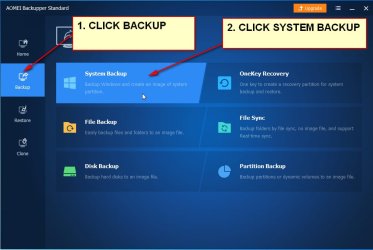
To make a system image :

aomeisystembackup.jpg
 

My Computers My Computers

  • At a glance

    7 X64i5 84002x8gb 3200mhz
    Computer type
    PC/Desktop
    OS
    7 X64
    CPU
    i5 8400
    Motherboard
    gigabyte b365m ds3h
    Memory
    2x8gb 3200mhz
    Hard Drives
    various
    PSU
    pure power 11 400w cm
    Case
    Coolermaster
    Cooling
    cryorig m9i
  • At a glance

    7x64g54008gb ddr4 2400
    Computer type
    PC/Desktop
    OS
    7x64
    CPU
    g5400
    Motherboard
    ga b365m ds3h
    Memory
    8gb ddr4 2400
    PSU
    xfx pro 450w
To use the Pro giveaway:

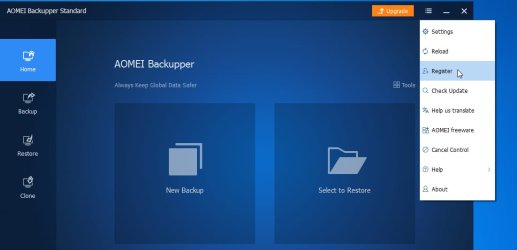
Select Register in the dropdwon

2019-11-16_153821.JPG


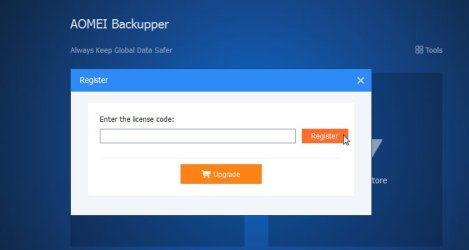
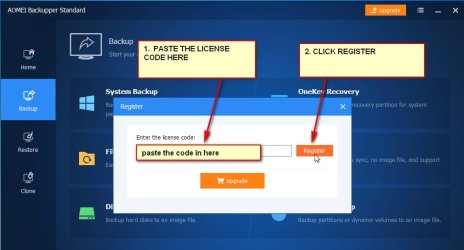
Then

register - Copy.jpg
 

My Computers My Computers

  • At a glance

    7 X64i5 84002x8gb 3200mhz
    Computer type
    PC/Desktop
    OS
    7 X64
    CPU
    i5 8400
    Motherboard
    gigabyte b365m ds3h
    Memory
    2x8gb 3200mhz
    Hard Drives
    various
    PSU
    pure power 11 400w cm
    Case
    Coolermaster
    Cooling
    cryorig m9i
  • At a glance

    7x64g54008gb ddr4 2400
    Computer type
    PC/Desktop
    OS
    7x64
    CPU
    g5400
    Motherboard
    ga b365m ds3h
    Memory
    8gb ddr4 2400
    PSU
    xfx pro 450w
... plans to stay with W7 until sw/hw death.

I (the dummy) want to be ready for a scenario where I wake up one day and discover that my machine (W7) has gone to computer heaven. This would mean going to my local store (Walmart, Office Depot, BestBuy, whatever, etc.) and buying a new machine. I periodically copy to external drive 'My Documents/Pictures/Music/Videos/Downloads(where I store most of my collected-over-time program setup/install files) etc. and any other custom folders with non-system stuff. This is time consuming, but the only way I know how to 'backup' my stuff.
Is this the best dummy-friendly process? If not, please suggest alternative methods. My desire would be to load my previous computer data to the new machine as painless as possible.
-thx

Ok, I don't know if I'm jumping to the beginning of the line, or the end of the line.
But dealing with the premise that your beloved Win-7 PC will stop working some day: :cry: I'm a computer tech, PC Builder, of 40 years, so I don't throw them out, I FIX THEM! Maybe even give them Custom Paint.
All the stores you mentioned sell crappy PC's at Lambo prices. Not for me! I build my own. (cheaper, faster, BETTER!)

Most new PC's today come with Win-10 HOME on them. What a POS!

So if your PC was either stolen or hit by a direct lightning strike, we look at your backup strategy.
.... Sounds like you're backing up all the data files that actually mean something to you.
I like to keep it simple, by storing all my data files under the "My Documents" heading (folder) so all I have to do is backup that folder and I've got everything I want to save.
All the programs that I need to run, I have on CD/DVD's, or on Flash Drives.
So in just a couple of hours, I can completely rebuild a PC's OS, from scratch.

A simple DOS Batch file, with a shortcut on the desktop, does my data backup trick nicely, and I can run my backup any time I want, with just a click on a desktop shortcut.
Actually, I have a folder on my desktop, with shortcuts in it that will backup my data to different locations.
Location one is a 256GB Flash Drive, #two is a 1TB USB External Drive, and #3 is an 8TB External USB drive. So, if one backup drive should fail, I still have the other two.

Over the past two decades, I've re-installed my OS several times, due to HD failures, etc. (three WD drives failed on me in just one summer. NO MORE WD for this old boy!)

But in all that time I've never lost even one bit of data, thanks to a great backup scheme. And in all this time, I've never had to buy even one piece of software. The DOS program "XCOPY" does all my backups for me. * And YES, xcopy still runs, even on Windows 10.
* Xcopy can be programmed to do progressive backups, by only copying new files, and files that have been changed, like an EXCEL Spreadsheet, that changes several times a week.
That also keep my backup time down to just a few seconds.


Using xcopy, I've set up backup schemes for many of my customers. They love the simplicity of it.

Y'all have a great day now, Y'hear?
TM :cool:
 

My Computer My Computer

At a glance

Win 7 Pro, SP1, x86, Win-11/Pro/64AMD8GB CrucialVarious
Computer type
PC/Desktop
Computer Manufacturer/Model Number
Various
OS
Win 7 Pro, SP1, x86, Win-11/Pro/64
CPU
AMD
Motherboard
Various
Memory
8GB Crucial
Graphics Card(s)
Various
Sound Card
OnBoard
Monitor(s) Displays
Acer 21.5"
Hard Drives
Crucial SSD, 500 GB
PSU
OEM
Case
SFF Slim Line Case
Cooling
OEM
Keyboard
eMachines
Mouse
Logitech Wireless
Internet Speed
varies
Antivirus
Windows Defender/Super Anti-Spyware
Browser
Firefox
Back
Top