Hi sboast

.
What you are experiencing are bug checks which are consistent with what you're describing.
The bug checks are all
0x9F which is
DRIVER POWER STATE FAILURE that happens in
transitions between power states most commonly S0 (ON state) > S3 (Sleep state)
or vice-versa. You can read more
HERE.
The most common cause is a device driver but sometimes it's the hardware itself
that is at fault.
Code:
[B]BugCheck 9F[/B], {3, fffffa8005ea7060, fffff80000b9c3d8, [COLOR=RoyalBlue][B]fffffa800cbace10[/B][/COLOR]}

*** WARNING: Unable to verify timestamp for netr28x.sys
*** ERROR: Module load completed but symbols could not be loaded for netr28x.sys
[COLOR=Red][B]Probably caused by : netr28x.sys[/B][/COLOR]
Code:
!irp [COLOR=RoyalBlue][B]fffffa800cbace10[/B][/COLOR]

     cmd  flg cl Device   File     Completion-Context
 [  0, 0]   0  0 00000000 00000000 00000000-00000000

            Args: 00000000 00000000 00000000 00000000
[COLOR=RoyalBlue][B]>[ 16, 2][/B][/COLOR]   0  0 fffffa800888b050 00000000 00000000-00000000
           \Driver\[COLOR=Red][B]netr28x[/B][/COLOR]
            Args: 00015400 00000000 00000005 00000003
 [ 16, 2]   0 e1 fffffa80088ce040 00000000 fffff8000370b200-fffffa800cc9f220 Success Error Cancel pending
           \Driver\vwifibus    nt!PopSystemIrpCompletion
            Args: 00015400 00000000 00000005 00000003
Code:
!DevExt fffffa8005ea71b0

  Device State = [B]PciStarted
[/B]
  [URL="http://www.pcidatabase.com/vendor_details.php?id=1633"][COLOR=DarkOrchid][U][B]Vendor ID 1814[/B][/U][/COLOR][/URL], Device ID 5392
  Subsystem Vendor ID 1814, Subsystem ID F053

 Header Type 0, Class Base/Sub 02/80  ([COLOR=RoyalBlue][B]Network Controller/'Other'[/B][/COLOR])

  Express capabilities: (OS controlled)
  Logical Device Power State: [COLOR=RoyalBlue][B]D0[/B][/COLOR] < [U]Also known as [B]S0[/B] [I]see link above.[/I][/U]
  Device Wake Level:          [B]Unspecified[/B]
  WaitWakeIrp:                <none>
This due to your Ralink 802.11n Extensible Wireless adapter, the river is not old
which is usually a good thing but I can seem to find where you might have downloaded this version.
How did you obtain it?
Code:
lmvm netr28x
start             end                 module name
fffff880`0603b000 fffff880`06293000   netr28x  T (no symbols)
    Loaded symbol image file: netr28x.sys
    Image path: netr28x.sys
    Image name: netr28x.sys
    Timestamp:        [B]Fri Apr 12 14:20:28 2013[/B]
Interestingly enough a different
0x9F bug check is a very similar story
but this time it's the weird Ethernet connection.
May I ask why are you connected by both wired and wireless?
Code:
[B]BugCheck 9F[/B], {3, fffffa8005eeea10, fffff80000b9c3d8, [COLOR=RoyalBlue][B]fffffa800dd6e010[/B][/COLOR]}

*** WARNING: Unable to verify timestamp for Rt64win7.sys
*** ERROR: Module load completed but symbols could not be loaded for Rt64win7.sys
[COLOR=Red][B]Probably caused by : Rt64win7.sys[/B][/COLOR]
Code:
!irp [COLOR=RoyalBlue][B]fffffa800dd6e010[/B][/COLOR]


Args: 00000000 00000000 00000000 00000000
>[ 16, 3]   0 e1 fffffa800880f050 00000000 fffff800036c8200-fffffa800cd31500 Success Error Cancel pending
           \Driver\RTL8167    nt!PopSystemIrpCompletion
Code:
!DevExt fffffa8005eeeb60

  Device State = [B]PciStarted[/B]
  Vendor ID [URL="http://www.pcidatabase.com/vendor_details.php?id=1697"][COLOR=DarkOrchid][U][B]10ec[/B][/U][/COLOR][/URL] ([COLOR=RoyalBlue][B]REALTEK SEMICONDUCTOR CO., LTD.[/B][/COLOR])  Device ID [URL="http://www.pcidatabase.com/vendor_details.php?id=1302"][COLOR=DarkOrchid][U][B]8168[/B][/U][/COLOR][/URL]
  Subsystem Vendor ID 103c (HEWLETT PACKARD)  Subsystem ID 2ABB

 Header Type 0, Class Base/Sub 02/00  ([COLOR=RoyalBlue][B]Network Controller/Ethernet[/B][/COLOR])

  Logical Device Power State: [COLOR=RoyalBlue][B]D0[/B][/COLOR]
  Device Wake Level:          [COLOR=RoyalBlue][B]D3[/B][/COLOR]
  WaitWakeIrp:                <none>
Here as well the driver is not terribly outdated.
Code:
lmvm Rt64win7
start             end                 module name
fffff880`05200000 fffff880`052d2000   Rt64win7 T (no symbols)
    Loaded symbol image file: Rt64win7.sys
    Image path: Rt64win7.sys
    Image name: Rt64win7.sys
    Timestamp:        [B]Wed Apr 10 06:00:34 2013[/B]
Try to disable each one of the connections separately then both
and see if it bug checks again when you're putting the PC to sleep.
Also the System Event Log is filled with the following:
Code:
Event[34953]:
  Log Name: System
  Source: Disk
  Date: 2013-06-15T03:00:22.669
  Event ID: 11
  Task: N/A
  Level: Error
  Opcode: N/A
  Keyword: Classic
  User: N/A
  User Name: N/A
  Computer: Beth-HP
  Description:
[B]The driver detected a controller error on \Device\[COLOR=Red]Harddisk1[/COLOR]\DR1.[/B]
Code:
Description    Disk drive
Model    Seagate FreeAgent GoFlex USB Device
Media Type    External hard disk media
Partition    [COLOR=Red][B]Disk #1,[/B][/COLOR] Partition #0
Is there a Paging File set to that drive?
You can check by looking at:

Which you get to by:
1. 
rb:Start Menu> Run >type
control.exe system
and press the
Enter key.
A windows will open and on the Left hand side you will see
Advanced system settings, click it.
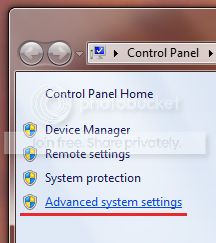
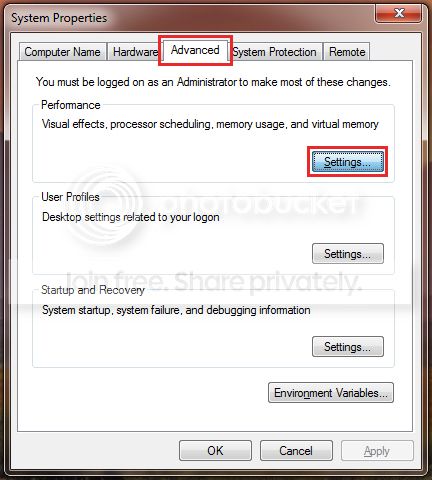
2. Next click on the
Advanced tab and
Settings which correspond to the
Performance section;
 3.
3. Then the
Advanced tab once more and click on the
Change button;
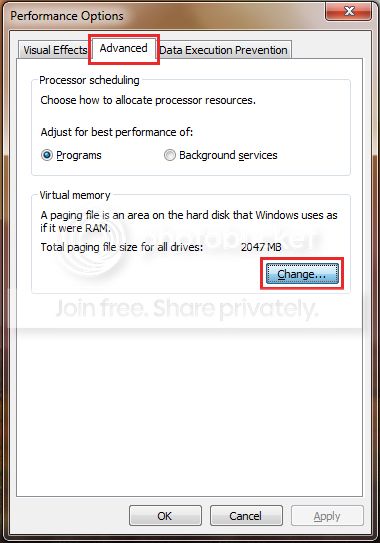
Try to disconnect the drive before putting the PC to sleep and see if it still bug checks
or lingers on reboot if it does.



