computer unresponsive/freezing while 0% cpu and memory use

xgladar

New member
Local time
10:13 PM
Messages
9
so on october 1st ive started getting problems with all programs becoming unresponsive or very slow (especially when starting/closing them). since then ive used malwarebytes , microsot sec. essentials and Ccleaner to try to find any malware but it didnt fix the problem. i tried system restore and the problem stayed around. ive then tried to use 3 different microsoft fix-it tools (performance, maintenance and files). then i used disk cleanup and removed about 7gb of old windows update files and that has seemed to help a little, but i still get more hangtime on programs than before.
programs relating to the internet seem to be especially prone to this, as skype and geforce experiance update seem to become completely unresponsive.
 

My Computer

Computer type
PC/Desktop
OS
windows 7 professional 64bit
CPU
intel duo core e8200 2.66 Ghz
Motherboard
asus
Memory
4 GB
Graphics Card(s)
Nvidia geforce gts 450
Antivirus
malwarebytes , micforost security essentials, spybot
Browser
chrome
Have you tried in safe mode? If that does not work, the problem may be the hard drive.
 

My Computer

Computer type
PC/Desktop
Computer Manufacturer/Model Number
Dell XPS 420
OS
Windows 10, Home Clean Install
CPU
Intel Core2 processsor Q8200(2.33Ghz 1333FSB) Quad Core Tech
Motherboard
Dell
Memory
6 gb
Graphics Card(s)
ATI Radeon 256MB HD3650
Sound Card
Intergrated 7.1 Channel Audio
Monitor(s) Displays
Dell SP2009W 20"
Hard Drives
640 GB Serial ATA Hard drive
Cooling
Fan
Keyboard
Dell USB Keyboard
Mouse
Dell Premium Optical USB
Internet Speed
DSL 2.85
tried it and the issue is just as bad in safe mode.in fact it appears even worse, like before i did the disk cleanup in normal windows.
 

My Computer

Computer type
PC/Desktop
OS
windows 7 professional 64bit
CPU
intel duo core e8200 2.66 Ghz
Motherboard
asus
Memory
4 GB
Graphics Card(s)
Nvidia geforce gts 450
Antivirus
malwarebytes , micforost security essentials, spybot
Browser
chrome
If you go to the website of the hard drive manufacturer you may be able to test the drive. That is my first thought. If may be that the drive is not large enough for all the software, etc that you installed. Can that be the problem?
 

My Computer

Computer type
PC/Desktop
Computer Manufacturer/Model Number
Dell XPS 420
OS
Windows 10, Home Clean Install
CPU
Intel Core2 processsor Q8200(2.33Ghz 1333FSB) Quad Core Tech
Motherboard
Dell
Memory
6 gb
Graphics Card(s)
ATI Radeon 256MB HD3650
Sound Card
Intergrated 7.1 Channel Audio
Monitor(s) Displays
Dell SP2009W 20"
Hard Drives
640 GB Serial ATA Hard drive
Cooling
Fan
Keyboard
Dell USB Keyboard
Mouse
Dell Premium Optical USB
Internet Speed
DSL 2.85
i used the western digital data lifeguard diagnostics tool and when i try to test the drives it reports and error when testing
 

My Computer

Computer type
PC/Desktop
OS
windows 7 professional 64bit
CPU
intel duo core e8200 2.66 Ghz
Motherboard
asus
Memory
4 GB
Graphics Card(s)
Nvidia geforce gts 450
Antivirus
malwarebytes , micforost security essentials, spybot
Browser
chrome
I can only advise based upon the information that I was given. There can be several causes for your problem, but I lean toward the hard drive. That is all that I can advise at this point.
 

My Computer

Computer type
PC/Desktop
Computer Manufacturer/Model Number
Dell XPS 420
OS
Windows 10, Home Clean Install
CPU
Intel Core2 processsor Q8200(2.33Ghz 1333FSB) Quad Core Tech
Motherboard
Dell
Memory
6 gb
Graphics Card(s)
ATI Radeon 256MB HD3650
Sound Card
Intergrated 7.1 Channel Audio
Monitor(s) Displays
Dell SP2009W 20"
Hard Drives
640 GB Serial ATA Hard drive
Cooling
Fan
Keyboard
Dell USB Keyboard
Mouse
Dell Premium Optical USB
Internet Speed
DSL 2.85
the test only fails when i try to test drive C: , can you suggest some ways to check/test my drive for bad files or sectors?
 

My Computer

Computer type
PC/Desktop
OS
windows 7 professional 64bit
CPU
intel duo core e8200 2.66 Ghz
Motherboard
asus
Memory
4 GB
Graphics Card(s)
Nvidia geforce gts 450
Antivirus
malwarebytes , micforost security essentials, spybot
Browser
chrome

My Computer

Computer type
PC/Desktop
Computer Manufacturer/Model Number
Dell XPS 420
OS
Windows 10, Home Clean Install
CPU
Intel Core2 processsor Q8200(2.33Ghz 1333FSB) Quad Core Tech
Motherboard
Dell
Memory
6 gb
Graphics Card(s)
ATI Radeon 256MB HD3650
Sound Card
Intergrated 7.1 Channel Audio
Monitor(s) Displays
Dell SP2009W 20"
Hard Drives
640 GB Serial ATA Hard drive
Cooling
Fan
Keyboard
Dell USB Keyboard
Mouse
Dell Premium Optical USB
Internet Speed
DSL 2.85
/scannow went through with a 100% integrity. but today after booting up the computer i noticed that microsoft security essentials have been deleted
 

My Computer

Computer type
PC/Desktop
OS
windows 7 professional 64bit
CPU
intel duo core e8200 2.66 Ghz
Motherboard
asus
Memory
4 GB
Graphics Card(s)
Nvidia geforce gts 450
Antivirus
malwarebytes , micforost security essentials, spybot
Browser
chrome
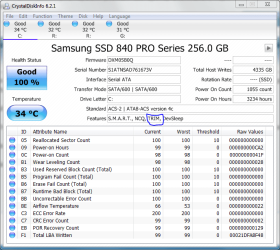
Deleted as in not running or gone? Download malware bytes free and run it and see if it finds anything also run crystal disk info and see what it says your drives health is. Do disk info first.
 

Attachments

  • trim.PNG
    trim.PNG
    37 KB · Views: 8

My Computer

Computer type
PC/Desktop
Computer Manufacturer/Model Number
Custom
OS
10 Pro x64
CPU
Ryzen 9 3900X
Motherboard
Asrock x370 Tachi
Memory
64GB(4x16GB) DDR4
Graphics Card(s)
EVGA 1080ti FTW3
Sound Card
ASUS Xonar Essence STX (V4 Bursons), ODAC rev B, NFB-11, O2
Monitor(s) Displays
3xASUS PB278Q/R, Optoma HD142X
Screen Resolution
3x1440p, 1080p
Hard Drives
512GB 850 EVO(OS, Programs)
4TB (Movies)
3TB (Downloads)
3TB (Programs)
1TB HDD (Games)
2x6TB R1 (videos)
PSU
AX760
Case
Fractal Define R5
Cooling
NH-D15S
Keyboard
Massdrop Ctrl with Box Navy's
Mouse
G903, Alioth XXL Mat
Internet Speed
280/40
Antivirus
MBAM, ESET
Browser
Canary 64 Bit
Other Info
I also own a Thinkpad P50 Xeon 4K, X220T, X1C5
ah okay a bit of a mixup, i used msconfig and left it on selective setup which is why security essentials did not start. ill use crystal disk now
 

My Computer

Computer type
PC/Desktop
OS
windows 7 professional 64bit
CPU
intel duo core e8200 2.66 Ghz
Motherboard
asus
Memory
4 GB
Graphics Card(s)
Nvidia geforce gts 450
Antivirus
malwarebytes , micforost security essentials, spybot
Browser
chrome
K, just post a screenshot of what it says.
 

My Computer

Computer type
PC/Desktop
Computer Manufacturer/Model Number
Custom
OS
10 Pro x64
CPU
Ryzen 9 3900X
Motherboard
Asrock x370 Tachi
Memory
64GB(4x16GB) DDR4
Graphics Card(s)
EVGA 1080ti FTW3
Sound Card
ASUS Xonar Essence STX (V4 Bursons), ODAC rev B, NFB-11, O2
Monitor(s) Displays
3xASUS PB278Q/R, Optoma HD142X
Screen Resolution
3x1440p, 1080p
Hard Drives
512GB 850 EVO(OS, Programs)
4TB (Movies)
3TB (Downloads)
3TB (Programs)
1TB HDD (Games)
2x6TB R1 (videos)
PSU
AX760
Case
Fractal Define R5
Cooling
NH-D15S
Keyboard
Massdrop Ctrl with Box Navy's
Mouse
G903, Alioth XXL Mat
Internet Speed
280/40
Antivirus
MBAM, ESET
Browser
Canary 64 Bit
Other Info
I also own a Thinkpad P50 Xeon 4K, X220T, X1C5
caution... that doesnt sound good
 

Attachments

  • crystalmeth.jpg
    crystalmeth.jpg
    77.8 KB · Views: 14

My Computer

Computer type
PC/Desktop
OS
windows 7 professional 64bit
CPU
intel duo core e8200 2.66 Ghz
Motherboard
asus
Memory
4 GB
Graphics Card(s)
Nvidia geforce gts 450
Antivirus
malwarebytes , micforost security essentials, spybot
Browser
chrome
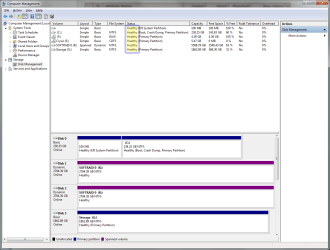
Nope, I would backup data on it before even trying to repair it. It says caution not danger so it may just be relocating bad sectors but if it increases rapidly then it is dying. What does it say in disk management?
 

Attachments

  • diskmangae.png
    diskmangae.png
    40.7 KB · Views: 2

My Computer

Computer type
PC/Desktop
Computer Manufacturer/Model Number
Custom
OS
10 Pro x64
CPU
Ryzen 9 3900X
Motherboard
Asrock x370 Tachi
Memory
64GB(4x16GB) DDR4
Graphics Card(s)
EVGA 1080ti FTW3
Sound Card
ASUS Xonar Essence STX (V4 Bursons), ODAC rev B, NFB-11, O2
Monitor(s) Displays
3xASUS PB278Q/R, Optoma HD142X
Screen Resolution
3x1440p, 1080p
Hard Drives
512GB 850 EVO(OS, Programs)
4TB (Movies)
3TB (Downloads)
3TB (Programs)
1TB HDD (Games)
2x6TB R1 (videos)
PSU
AX760
Case
Fractal Define R5
Cooling
NH-D15S
Keyboard
Massdrop Ctrl with Box Navy's
Mouse
G903, Alioth XXL Mat
Internet Speed
280/40
Antivirus
MBAM, ESET
Browser
Canary 64 Bit
Other Info
I also own a Thinkpad P50 Xeon 4K, X220T, X1C5
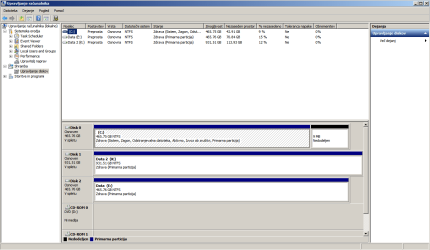
zdrava means healthy.
 

Attachments

  • slovenian.png
    slovenian.png
    27.6 KB · Views: 5

My Computer

Computer type
PC/Desktop
OS
windows 7 professional 64bit
CPU
intel duo core e8200 2.66 Ghz
Motherboard
asus
Memory
4 GB
Graphics Card(s)
Nvidia geforce gts 450
Antivirus
malwarebytes , micforost security essentials, spybot
Browser
chrome
Then if you have the space I would back up the data you need to keep to data drives you have there and checking the drive by clicking the tools tab of its properties then hitting error checking and making sure you check the box i have highlighted. It might ask you to reboot then it will do it as it boots windows.
 

Attachments

  • error check.png
    error check.png
    32.8 KB · Views: 2

My Computer

Computer type
PC/Desktop
Computer Manufacturer/Model Number
Custom
OS
10 Pro x64
CPU
Ryzen 9 3900X
Motherboard
Asrock x370 Tachi
Memory
64GB(4x16GB) DDR4
Graphics Card(s)
EVGA 1080ti FTW3
Sound Card
ASUS Xonar Essence STX (V4 Bursons), ODAC rev B, NFB-11, O2
Monitor(s) Displays
3xASUS PB278Q/R, Optoma HD142X
Screen Resolution
3x1440p, 1080p
Hard Drives
512GB 850 EVO(OS, Programs)
4TB (Movies)
3TB (Downloads)
3TB (Programs)
1TB HDD (Games)
2x6TB R1 (videos)
PSU
AX760
Case
Fractal Define R5
Cooling
NH-D15S
Keyboard
Massdrop Ctrl with Box Navy's
Mouse
G903, Alioth XXL Mat
Internet Speed
280/40
Antivirus
MBAM, ESET
Browser
Canary 64 Bit
Other Info
I also own a Thinkpad P50 Xeon 4K, X220T, X1C5
caution... that doesnt sound good

Mine said caution for about a year now. What I did is downloaded the free Macrium Reflect. If I lose my stuff because the hard drive failed. I have the drive backed up. I suggest that you do the same or back up your stuff on a frequent basis.
http://www.macrium.com/reflectfree.aspx
 

My Computer

Computer type
PC/Desktop
Computer Manufacturer/Model Number
Dell XPS 420
OS
Windows 10, Home Clean Install
CPU
Intel Core2 processsor Q8200(2.33Ghz 1333FSB) Quad Core Tech
Motherboard
Dell
Memory
6 gb
Graphics Card(s)
ATI Radeon 256MB HD3650
Sound Card
Intergrated 7.1 Channel Audio
Monitor(s) Displays
Dell SP2009W 20"
Hard Drives
640 GB Serial ATA Hard drive
Cooling
Fan
Keyboard
Dell USB Keyboard
Mouse
Dell Premium Optical USB
Internet Speed
DSL 2.85
Then if you have the space I would back up the data you need to keep to data drives you have there and checking the drive by clicking the tools tab of its properties then hitting error checking and making sure you check the box i have highlighted. It might ask you to reboot then it will do it as it boots windows.

this seems to have resolved the issue, some bad sectors were repaired during the startup and now all programs work like before. thank you for all your help
 

My Computer

Computer type
PC/Desktop
OS
windows 7 professional 64bit
CPU
intel duo core e8200 2.66 Ghz
Motherboard
asus
Memory
4 GB
Graphics Card(s)
Nvidia geforce gts 450
Antivirus
malwarebytes , micforost security essentials, spybot
Browser
chrome
Then if you have the space I would back up the data you need to keep to data drives you have there and checking the drive by clicking the tools tab of its properties then hitting error checking and making sure you check the box i have highlighted. It might ask you to reboot then it will do it as it boots windows.

this seems to have resolved the issue, some bad sectors were repaired during the startup and now all programs work like before. thank you for all your help

Just keep track and check how many are there once a month if it starts really increasing ditch the drive. Some can go bad and the drive is manufactured to have some spare ones to replace those, but once you get enough it goes downhill from there.
 

My Computer

Computer type
PC/Desktop
Computer Manufacturer/Model Number
Custom
OS
10 Pro x64
CPU
Ryzen 9 3900X
Motherboard
Asrock x370 Tachi
Memory
64GB(4x16GB) DDR4
Graphics Card(s)
EVGA 1080ti FTW3
Sound Card
ASUS Xonar Essence STX (V4 Bursons), ODAC rev B, NFB-11, O2
Monitor(s) Displays
3xASUS PB278Q/R, Optoma HD142X
Screen Resolution
3x1440p, 1080p
Hard Drives
512GB 850 EVO(OS, Programs)
4TB (Movies)
3TB (Downloads)
3TB (Programs)
1TB HDD (Games)
2x6TB R1 (videos)
PSU
AX760
Case
Fractal Define R5
Cooling
NH-D15S
Keyboard
Massdrop Ctrl with Box Navy's
Mouse
G903, Alioth XXL Mat
Internet Speed
280/40
Antivirus
MBAM, ESET
Browser
Canary 64 Bit
Other Info
I also own a Thinkpad P50 Xeon 4K, X220T, X1C5
Back
Top