Solved Computer will not read hard drives installed from another

Eurocoffee

New member
Local time
3:59 AM
Messages
6
Hi everyone.

My rig has been giving me problems so I have been using my backup. Both run 7 x64 with very similar hardware.

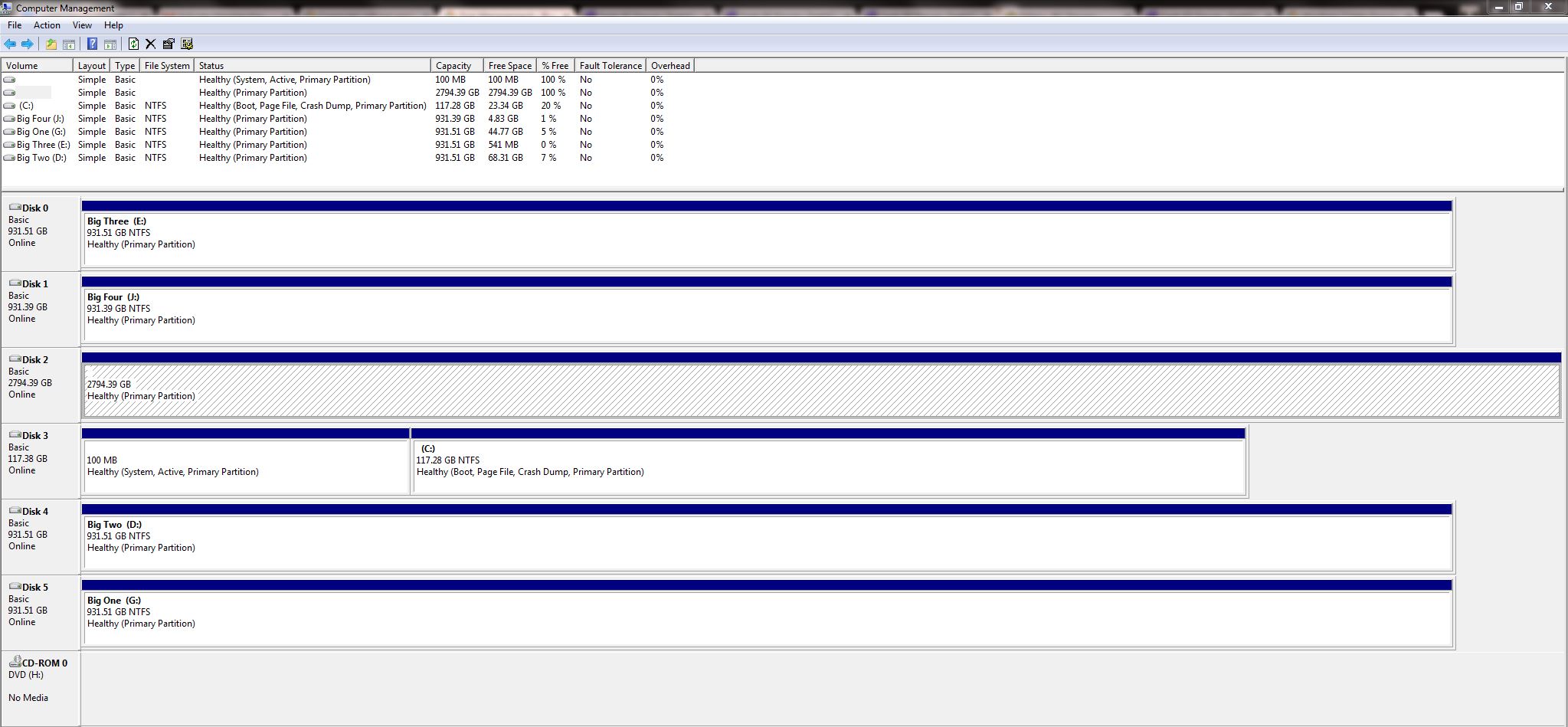
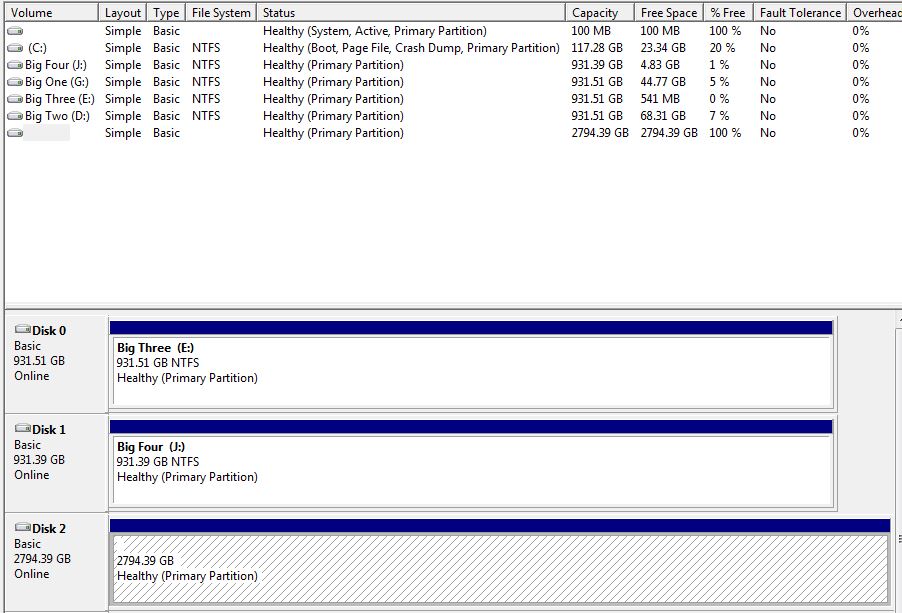
I'm attempting to install a WD 3tb drive that is known good and loaded with files. It installs fine and is readable in Device Manager but is not active or initialized?
FfkWK6V.jpg


When I right click on it I only get the option to Format, Change drive letter or path, or Convert to Dynamic Disk.
There is data on it that I want to access. How can I activate it without corrupting my files? Thanks in advance.
 

My Computer My Computer

Computer type
PC/Desktop
Computer Manufacturer/Model Number
Custom
OS
Win 7 x64
CPU
Q8800
Motherboard
Gigabyte ga-p43-es3g
Memory
8gb 800 2.1v
Graphics Card(s)
HD7950 3gb

My Computer My Computer

Computer type
PC/Desktop
Computer Manufacturer/Model Number
Home made Desktop
OS
Windows 10 Pro. 64/ version 1709 Windows 7 Pro/64
CPU
Intel i7-6800K @ 4.3
Motherboard
ASUS X-99 Deluxe II
Memory
Corsair Platinum 16 gig @2400
Graphics Card(s)
EVGA GTX 1070 OC
Monitor(s) Displays
Asus 27" LED LCD/VE278Q
Screen Resolution
1920-1080 or 1280-720 HDMI
Hard Drives
INTEL SSD 730-240 Gb Sata 3.0/
PSU
EVGA Platium 1200W
Case
Phanteks Luxe Tempered Glass 8 fans/ one radiator
Cooling
XSPC/ Water Cooled CPU
Keyboard
Das 4 Professional
Mouse
Logitech M705/MX Anywhere 2-S
Internet Speed
100 mbits
Antivirus
Microsoft Security Essentials/ Malwarebytes Premium 3.0/ SAS
Browser
I.E. 11 default/Firefox/ ISP Time Warner Cable/Spectrum
Other Info
LG BluRay Burner/
Sound system-KLipsch-THX/
Icy Dock ssd Hot Swap bays.
JHlo32v.jpg
 

My Computer My Computer

Computer type
PC/Desktop
Computer Manufacturer/Model Number
Custom
OS
Win 7 x64
CPU
Q8800
Motherboard
Gigabyte ga-p43-es3g
Memory
8gb 800 2.1v
Graphics Card(s)
HD7950 3gb
Wrong.

I and many other will not go off the forum to see a picture or a enlarged picture. That is why I requested you to use the tutorial.

Please follow this tutorial exactly.

Disk Management - Post a Screen Capture Image

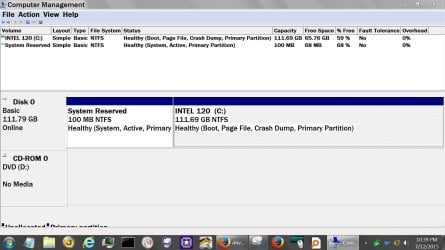
This is what I'm look for except from your computer.

Disc Management.JPG
 

My Computer My Computer

Computer type
PC/Desktop
Computer Manufacturer/Model Number
Home made Desktop
OS
Windows 10 Pro. 64/ version 1709 Windows 7 Pro/64
CPU
Intel i7-6800K @ 4.3
Motherboard
ASUS X-99 Deluxe II
Memory
Corsair Platinum 16 gig @2400
Graphics Card(s)
EVGA GTX 1070 OC
Monitor(s) Displays
Asus 27" LED LCD/VE278Q
Screen Resolution
1920-1080 or 1280-720 HDMI
Hard Drives
INTEL SSD 730-240 Gb Sata 3.0/
PSU
EVGA Platium 1200W
Case
Phanteks Luxe Tempered Glass 8 fans/ one radiator
Cooling
XSPC/ Water Cooled CPU
Keyboard
Das 4 Professional
Mouse
Logitech M705/MX Anywhere 2-S
Internet Speed
100 mbits
Antivirus
Microsoft Security Essentials/ Malwarebytes Premium 3.0/ SAS
Browser
I.E. 11 default/Firefox/ ISP Time Warner Cable/Spectrum
Other Info
LG BluRay Burner/
Sound system-KLipsch-THX/
Icy Dock ssd Hot Swap bays.
I don't get it. Excuse my ignorance, but what is wrong with the first picture?
You can clearly see All the fields without enlarging. The instructions provided say to:

Maximize the Disk Management window so it fills your entire screen.- check
Resize the window components so the status and sizes of the partitions are clearly shown. - check

So I did that. Now you're saying that's not good either.:confused:
 

My Computer My Computer

Computer type
PC/Desktop
Computer Manufacturer/Model Number
Custom
OS
Win 7 x64
CPU
Q8800
Motherboard
Gigabyte ga-p43-es3g
Memory
8gb 800 2.1v
Graphics Card(s)
HD7950 3gb
I don't understand how you made the font so large in the above picture. That isn't standard window font size.
 
Last edited:

My Computer My Computer

Computer type
PC/Desktop
Computer Manufacturer/Model Number
Custom
OS
Win 7 x64
CPU
Q8800
Motherboard
Gigabyte ga-p43-es3g
Memory
8gb 800 2.1v
Graphics Card(s)
HD7950 3gb
cBUkCV5.jpg


Better? If you can't read the above text, then I'm confident the problem isn't on my end.

I understand there is forum etiquette and such, as a new member I'm trying to be polite and learn the ropes, again sorry if I don't know the "correct" way to do this.
 

My Computer My Computer

Computer type
PC/Desktop
Computer Manufacturer/Model Number
Custom
OS
Win 7 x64
CPU
Q8800
Motherboard
Gigabyte ga-p43-es3g
Memory
8gb 800 2.1v
Graphics Card(s)
HD7950 3gb
You have me confused with someone that wants to argue about using a simple tutorial. I don't argue.
Do as you please.

Have a nice day
 

My Computer My Computer

Computer type
PC/Desktop
Computer Manufacturer/Model Number
Home made Desktop
OS
Windows 10 Pro. 64/ version 1709 Windows 7 Pro/64
CPU
Intel i7-6800K @ 4.3
Motherboard
ASUS X-99 Deluxe II
Memory
Corsair Platinum 16 gig @2400
Graphics Card(s)
EVGA GTX 1070 OC
Monitor(s) Displays
Asus 27" LED LCD/VE278Q
Screen Resolution
1920-1080 or 1280-720 HDMI
Hard Drives
INTEL SSD 730-240 Gb Sata 3.0/
PSU
EVGA Platium 1200W
Case
Phanteks Luxe Tempered Glass 8 fans/ one radiator
Cooling
XSPC/ Water Cooled CPU
Keyboard
Das 4 Professional
Mouse
Logitech M705/MX Anywhere 2-S
Internet Speed
100 mbits
Antivirus
Microsoft Security Essentials/ Malwarebytes Premium 3.0/ SAS
Browser
I.E. 11 default/Firefox/ ISP Time Warner Cable/Spectrum
Other Info
LG BluRay Burner/
Sound system-KLipsch-THX/
Icy Dock ssd Hot Swap bays.
When I right click on it I only get the option to Format, Change drive letter or path, or Convert to Dynamic Disk.
There is data on it that I want to access. How can I activate it without corrupting my files? Thanks in advance.

You won't see drives/partitions in Windows (file) Explorer (and most programs) if they don't have a drive letter.
Did you try adding a drive letter ?
 

My Computer My Computer

Computer type
PC/Desktop
Computer Manufacturer/Model Number
home built
OS
Multi-Boot W7_Pro_x64 W8.1_Pro_x64 W10_Pro_x64 +Linux_VMs +Chromium_VM
CPU
AMD Athlon II x4 620
Motherboard
Gigabyte GA-MA785G-UD3H
Memory
6GB GSkill DDR2 800
Graphics Card(s)
AMD 4670 GPU + AMD 4200 IGP
Sound Card
on board Realtek ALC889A
Monitor(s) Displays
RCA 40" LCD TV, Insignia 32" LCD TV, HP 15" LCD monitor
Screen Resolution
1680 x 1050
Hard Drives
OCZ Vertex 3 120GB,
Samsung F3 1TB (3),
Several others - WD, Seagate, Hitachi, ...
PSU
Corsair 500 W
Case
Rosewill mid tower
Cooling
CM 90mm rifle
Keyboard
Gyration wireless, Logitech wireless, Dell USB wired
Mouse
Gyration wireless, Logitech wireless, V7 USB wired
Internet Speed
Spectrum - 100Mbps D / 10Mbps U
Antivirus
Avast, MBAM3, EMET, WinPatrol
Browser
Pale Moon, Firefox, IE
Other Info
2 multi-boot PC's
Mainly HTPC/Office/Gen purpose (no gaming).
Trendnet USB KVM.
LG DVD burner/Blue Ray Player.
Tray system for removable SATA backup drives.

Not currently OCd, under-volted.
I use Hybrid sleep, rarely re-boot or shutdown.

Hauppauge HD-PVR, Avermedia PCIe TV Tuner, Hauppauge PCI TV Tuner.
When I right click on it I only get the option to Format, Change drive letter or path, or Convert to Dynamic Disk.
There is data on it that I want to access. How can I activate it without corrupting my files? Thanks in advance.

You won't see drives/partitions in Windows (file) Explorer (and most programs) if they don't have a drive letter.
Did you try adding a drive letter ?

:doh: Thank you very much David E. I forgot about that. Problem Solved.


And to my friend the Bear, instead of focusing on the details of my inexperience in using this forum, maybe next time you can put your arrogance to the side in an effort to be a more helpful member.
"You're doing it wrong" and "You can't follow simple instructions" are not helpful criticisms. Just stay out of it next time if you feel like being a dick and are not going to assist someone who is obviously not the most computer savvy, but making a true effort to politely reach out. Have nice day and stay in OH.
 

My Computer My Computer

Computer type
PC/Desktop
Computer Manufacturer/Model Number
Custom
OS
Win 7 x64
CPU
Q8800
Motherboard
Gigabyte ga-p43-es3g
Memory
8gb 800 2.1v
Graphics Card(s)
HD7950 3gb
I should of explained things better.

Other than security reasons their is another reason to use the forum method.

Many people around the world read our post.
They have various hardware and visual setting for there system. They also have different eye sight.

They are not going to change those settings to see a posted picture.
Using the forums tutorial and method to the best of my knowledge makes reading those picture work for most everybody.

With the system I'm on now has a 40in display across the room. I'm not going to changed the DPI, fonts, or resolution to read a posted picture.
Not many will.

If I could of read the picture I would of informed you that Drives need numbers and Partitions need to have Letters assigned.

This forum has thousands of tutorials that are probable the best in the world. You will see them post in most threads.

If one doesn't understand something about the tutorial all that needs to be done is ask for help. If I can't help I will find a member that can help.

I will not argue about such things. I will just find another member that needs help and continue on with my life.

I hope this gives one and all a better understand of why I post tutorials to help members.

Of course it also saves a lot of keyboard ink with me typing all that stuff in the tutorial over and over again.
 

My Computer My Computer

Computer type
PC/Desktop
Computer Manufacturer/Model Number
Home made Desktop
OS
Windows 10 Pro. 64/ version 1709 Windows 7 Pro/64
CPU
Intel i7-6800K @ 4.3
Motherboard
ASUS X-99 Deluxe II
Memory
Corsair Platinum 16 gig @2400
Graphics Card(s)
EVGA GTX 1070 OC
Monitor(s) Displays
Asus 27" LED LCD/VE278Q
Screen Resolution
1920-1080 or 1280-720 HDMI
Hard Drives
INTEL SSD 730-240 Gb Sata 3.0/
PSU
EVGA Platium 1200W
Case
Phanteks Luxe Tempered Glass 8 fans/ one radiator
Cooling
XSPC/ Water Cooled CPU
Keyboard
Das 4 Professional
Mouse
Logitech M705/MX Anywhere 2-S
Internet Speed
100 mbits
Antivirus
Microsoft Security Essentials/ Malwarebytes Premium 3.0/ SAS
Browser
I.E. 11 default/Firefox/ ISP Time Warner Cable/Spectrum
Other Info
LG BluRay Burner/
Sound system-KLipsch-THX/
Icy Dock ssd Hot Swap bays.
Back
Top