
Computer will not start first thing in the morning.

shibumi1

New member
Local time
3:40 PM
Messages
17
Location
Sydney, Blue Mountains.
Hi there, If I shut down the computer and then want to restart by pressing the power button my computer starts up as normal. However if I don't restart till the next morning pressing the power button does nothing.
I then have to turn off the power at the power point wait for the standby lights to go out and then turn the power back on and press the start button on the computer once or twice and it starts as normal as if nothing has occurred, all very frustrating and inconvenient. would someone please be able to help with this problem. Many thanks.
 

My Computer My Computer

At a glance

Ms Windows 7 Home Premium 64-bit. SP1.Intel Core i7 920 @ 2.67GHz12.00 GB Triple-Channel DDR3 @ 1300MHz (9-9-9...ATI Radeon HD 4800 Series
Computer type
PC/Desktop
Computer Manufacturer/Model Number
Self Built.
OS
Ms Windows 7 Home Premium 64-bit. SP1.
CPU
Intel Core i7 920 @ 2.67GHz
Motherboard
MSI Eclipse SLI (MS-7520) (CPU1)
Memory
12.00 GB Triple-Channel DDR3 @ 1300MHz (9-9-9-24)
Graphics Card(s)
ATI Radeon HD 4800 Series
Sound Card
Sound Blaster X-Fi Xtreme Audio
Monitor(s) Displays
Generic 66cms Widescreen Led
Screen Resolution
1920 x 1080 @ 59Hz
Hard Drives
625GB Western Digital WDC WD6401AALS-00L3B2 (RAID)
625GB Western Digital WDC WD6401AALS-00L3B2 (SATA)
PSU
Zalman 770 watt Modular
Case
Silverstone TJ 07 Black
Cooling
Noctua NH-U12PSE
Keyboard
HID Compliant, Logitech
Mouse
HID Compliant, Logitech
Internet Speed
Adsl 2. 3032/802 kbps. at last speed test.
Antivirus
Microsoft Security Essentials.
Browser
Pale Moon 24.4.1
Other Info
Optical Drives.
LG. HL-DT-ST DVD-RAM GH22NS30.
Sony. Optiarc DVD RW AD-7240S.
As of 01/10/09
You say you turn off the power at the power point.

What is meant by power point?
 

My Computer My Computer

At a glance

Windows 10 Pro. 64/ version 1709 Windows 7 Pr...Intel i7-6800K @ 4.3Corsair Platinum 16 gig @2400EVGA GTX 1070 OC
Computer type
PC/Desktop
Computer Manufacturer/Model Number
Home made Desktop
OS
Windows 10 Pro. 64/ version 1709 Windows 7 Pro/64
CPU
Intel i7-6800K @ 4.3
Motherboard
ASUS X-99 Deluxe II
Memory
Corsair Platinum 16 gig @2400
Graphics Card(s)
EVGA GTX 1070 OC
Monitor(s) Displays
Asus 27" LED LCD/VE278Q
Screen Resolution
1920-1080 or 1280-720 HDMI
Hard Drives
INTEL SSD 730-240 Gb Sata 3.0/
PSU
EVGA Platium 1200W
Case
Phanteks Luxe Tempered Glass 8 fans/ one radiator
Cooling
XSPC/ Water Cooled CPU
Keyboard
Das 4 Professional
Mouse
Logitech M705/MX Anywhere 2-S
Internet Speed
100 mbits
Antivirus
Microsoft Security Essentials/ Malwarebytes Premium 3.0/ SAS
Browser
I.E. 11 default/Firefox/ ISP Time Warner Cable/Spectrum
Other Info
LG BluRay Burner/
Sound system-KLipsch-THX/
Icy Dock ssd Hot Swap bays.
Sorry about, as you can see I am in Australia. By power point I mean the power socket the computer plugs into, hope this helps.
 

My Computer My Computer

At a glance

Ms Windows 7 Home Premium 64-bit. SP1.Intel Core i7 920 @ 2.67GHz12.00 GB Triple-Channel DDR3 @ 1300MHz (9-9-9...ATI Radeon HD 4800 Series
Computer type
PC/Desktop
Computer Manufacturer/Model Number
Self Built.
OS
Ms Windows 7 Home Premium 64-bit. SP1.
CPU
Intel Core i7 920 @ 2.67GHz
Motherboard
MSI Eclipse SLI (MS-7520) (CPU1)
Memory
12.00 GB Triple-Channel DDR3 @ 1300MHz (9-9-9-24)
Graphics Card(s)
ATI Radeon HD 4800 Series
Sound Card
Sound Blaster X-Fi Xtreme Audio
Monitor(s) Displays
Generic 66cms Widescreen Led
Screen Resolution
1920 x 1080 @ 59Hz
Hard Drives
625GB Western Digital WDC WD6401AALS-00L3B2 (RAID)
625GB Western Digital WDC WD6401AALS-00L3B2 (SATA)
PSU
Zalman 770 watt Modular
Case
Silverstone TJ 07 Black
Cooling
Noctua NH-U12PSE
Keyboard
HID Compliant, Logitech
Mouse
HID Compliant, Logitech
Internet Speed
Adsl 2. 3032/802 kbps. at last speed test.
Antivirus
Microsoft Security Essentials.
Browser
Pale Moon 24.4.1
Other Info
Optical Drives.
LG. HL-DT-ST DVD-RAM GH22NS30.
Sony. Optiarc DVD RW AD-7240S.
As of 01/10/09
Flip off your power switch at the end of the night or when your done with the pc, flip the power supply switch on and push the power button on the PC in the morning when you want to use it. See if that works.

You should be using a surge protector to plug your pc into which then goes to the wall socket, when you`re done with the PC, turn off the surge protector, when you flip the surge protector on your pc should start up with no issues.

Never plug a pc directly into the wall socket, if that`s what you are doing.

If you still have issues, then either the power supply is bad or going bad or the motherboard is going bad.

The Zalman should be under warranty, try to get it replaced.
 

My Computer My Computer

At a glance

Windows 10 Pro x64Intel Core i7 6700KGSkill TridentZ RGB 16GB 3600 16-16-16-36EVGA GTX 980 Ti SC x2
Computer type
PC/Desktop
Computer Manufacturer/Model Number
Skylake Special #666
OS
Windows 10 Pro x64
CPU
Intel Core i7 6700K
Motherboard
Asus Sabertooth Z170 Mark 1
Memory
GSkill TridentZ RGB 16GB 3600 16-16-16-36
Graphics Card(s)
EVGA GTX 980 Ti SC x2
Sound Card
Realtek High Definition
Monitor(s) Displays
AOC G2460PG
Screen Resolution
1920 x 1080 144Hz
Hard Drives
Samsung 860 Pro 256GB, Seagate Barracuda 4TB x2
PSU
EVGA 1000 P2, EVGA White Custom Braided Cables
Case
Corsair Vengeance C70 Gunmetal Black
Cooling
Corsair H100i v2, Corsair ML120 x2, Thermal Grizzly Kryonaut
Keyboard
Logitech G910 Orion Spectrum
Mouse
Logitech G700s
Internet Speed
Verizon Fios Quantum Gateway 75/75
Antivirus
Windows Defender, Malwarebytes Free 3.8.3
Browser
Chrome
Other Info
Corsair SP120 x4, LG Blu-ray Drive, Durabrand HT-395 100 Watt Dolby Digital Amp, Corsair H2100 Wireless 7.1 Headset
computer will not start first thing in the morning.

Hi AddRam, thanks for the reply however what you are suggesting is exactly what I am doing only at different times, thank you anyway, I may have to check power supply or mobo as you mentioned.
 

My Computer My Computer

At a glance

Ms Windows 7 Home Premium 64-bit. SP1.Intel Core i7 920 @ 2.67GHz12.00 GB Triple-Channel DDR3 @ 1300MHz (9-9-9...ATI Radeon HD 4800 Series
Computer type
PC/Desktop
Computer Manufacturer/Model Number
Self Built.
OS
Ms Windows 7 Home Premium 64-bit. SP1.
CPU
Intel Core i7 920 @ 2.67GHz
Motherboard
MSI Eclipse SLI (MS-7520) (CPU1)
Memory
12.00 GB Triple-Channel DDR3 @ 1300MHz (9-9-9-24)
Graphics Card(s)
ATI Radeon HD 4800 Series
Sound Card
Sound Blaster X-Fi Xtreme Audio
Monitor(s) Displays
Generic 66cms Widescreen Led
Screen Resolution
1920 x 1080 @ 59Hz
Hard Drives
625GB Western Digital WDC WD6401AALS-00L3B2 (RAID)
625GB Western Digital WDC WD6401AALS-00L3B2 (SATA)
PSU
Zalman 770 watt Modular
Case
Silverstone TJ 07 Black
Cooling
Noctua NH-U12PSE
Keyboard
HID Compliant, Logitech
Mouse
HID Compliant, Logitech
Internet Speed
Adsl 2. 3032/802 kbps. at last speed test.
Antivirus
Microsoft Security Essentials.
Browser
Pale Moon 24.4.1
Other Info
Optical Drives.
LG. HL-DT-ST DVD-RAM GH22NS30.
Sony. Optiarc DVD RW AD-7240S.
As of 01/10/09
Well then, maybe the computer is tired and like all of us, does not want to go to work in the morning :D
 

Attachments

  • SleepyAtTheComputer_Fatigue_Eyestrain1.jpg
    SleepyAtTheComputer_Fatigue_Eyestrain1.jpg
    18.1 KB · Views: 27

My Computer My Computer

At a glance

Windows 10 Pro x64Intel Core i7 6700KGSkill TridentZ RGB 16GB 3600 16-16-16-36EVGA GTX 980 Ti SC x2
Computer type
PC/Desktop
Computer Manufacturer/Model Number
Skylake Special #666
OS
Windows 10 Pro x64
CPU
Intel Core i7 6700K
Motherboard
Asus Sabertooth Z170 Mark 1
Memory
GSkill TridentZ RGB 16GB 3600 16-16-16-36
Graphics Card(s)
EVGA GTX 980 Ti SC x2
Sound Card
Realtek High Definition
Monitor(s) Displays
AOC G2460PG
Screen Resolution
1920 x 1080 144Hz
Hard Drives
Samsung 860 Pro 256GB, Seagate Barracuda 4TB x2
PSU
EVGA 1000 P2, EVGA White Custom Braided Cables
Case
Corsair Vengeance C70 Gunmetal Black
Cooling
Corsair H100i v2, Corsair ML120 x2, Thermal Grizzly Kryonaut
Keyboard
Logitech G910 Orion Spectrum
Mouse
Logitech G700s
Internet Speed
Verizon Fios Quantum Gateway 75/75
Antivirus
Windows Defender, Malwarebytes Free 3.8.3
Browser
Chrome
Other Info
Corsair SP120 x4, LG Blu-ray Drive, Durabrand HT-395 100 Watt Dolby Digital Amp, Corsair H2100 Wireless 7.1 Headset
I'm still not sure what a power point is.

By chance is a power point the wall socket, a extension cord, surge protector or maybe a circuit breaker box??
 

My Computer My Computer

At a glance

Windows 10 Pro. 64/ version 1709 Windows 7 Pr...Intel i7-6800K @ 4.3Corsair Platinum 16 gig @2400EVGA GTX 1070 OC
Computer type
PC/Desktop
Computer Manufacturer/Model Number
Home made Desktop
OS
Windows 10 Pro. 64/ version 1709 Windows 7 Pro/64
CPU
Intel i7-6800K @ 4.3
Motherboard
ASUS X-99 Deluxe II
Memory
Corsair Platinum 16 gig @2400
Graphics Card(s)
EVGA GTX 1070 OC
Monitor(s) Displays
Asus 27" LED LCD/VE278Q
Screen Resolution
1920-1080 or 1280-720 HDMI
Hard Drives
INTEL SSD 730-240 Gb Sata 3.0/
PSU
EVGA Platium 1200W
Case
Phanteks Luxe Tempered Glass 8 fans/ one radiator
Cooling
XSPC/ Water Cooled CPU
Keyboard
Das 4 Professional
Mouse
Logitech M705/MX Anywhere 2-S
Internet Speed
100 mbits
Antivirus
Microsoft Security Essentials/ Malwarebytes Premium 3.0/ SAS
Browser
I.E. 11 default/Firefox/ ISP Time Warner Cable/Spectrum
Other Info
LG BluRay Burner/
Sound system-KLipsch-THX/
Icy Dock ssd Hot Swap bays.
Yes the power point in Australia is the wall socket which the computer plugs into for power. Hope that helps.
 

My Computer My Computer

At a glance

Ms Windows 7 Home Premium 64-bit. SP1.Intel Core i7 920 @ 2.67GHz12.00 GB Triple-Channel DDR3 @ 1300MHz (9-9-9...ATI Radeon HD 4800 Series
Computer type
PC/Desktop
Computer Manufacturer/Model Number
Self Built.
OS
Ms Windows 7 Home Premium 64-bit. SP1.
CPU
Intel Core i7 920 @ 2.67GHz
Motherboard
MSI Eclipse SLI (MS-7520) (CPU1)
Memory
12.00 GB Triple-Channel DDR3 @ 1300MHz (9-9-9-24)
Graphics Card(s)
ATI Radeon HD 4800 Series
Sound Card
Sound Blaster X-Fi Xtreme Audio
Monitor(s) Displays
Generic 66cms Widescreen Led
Screen Resolution
1920 x 1080 @ 59Hz
Hard Drives
625GB Western Digital WDC WD6401AALS-00L3B2 (RAID)
625GB Western Digital WDC WD6401AALS-00L3B2 (SATA)
PSU
Zalman 770 watt Modular
Case
Silverstone TJ 07 Black
Cooling
Noctua NH-U12PSE
Keyboard
HID Compliant, Logitech
Mouse
HID Compliant, Logitech
Internet Speed
Adsl 2. 3032/802 kbps. at last speed test.
Antivirus
Microsoft Security Essentials.
Browser
Pale Moon 24.4.1
Other Info
Optical Drives.
LG. HL-DT-ST DVD-RAM GH22NS30.
Sony. Optiarc DVD RW AD-7240S.
As of 01/10/09
Yes it helps.
Remove your cord from the wall socket and the power supply.
Inspect both ends and sockets for any signs of damage or burning and aching.
 

My Computer My Computer

At a glance

Windows 10 Pro. 64/ version 1709 Windows 7 Pr...Intel i7-6800K @ 4.3Corsair Platinum 16 gig @2400EVGA GTX 1070 OC
Computer type
PC/Desktop
Computer Manufacturer/Model Number
Home made Desktop
OS
Windows 10 Pro. 64/ version 1709 Windows 7 Pro/64
CPU
Intel i7-6800K @ 4.3
Motherboard
ASUS X-99 Deluxe II
Memory
Corsair Platinum 16 gig @2400
Graphics Card(s)
EVGA GTX 1070 OC
Monitor(s) Displays
Asus 27" LED LCD/VE278Q
Screen Resolution
1920-1080 or 1280-720 HDMI
Hard Drives
INTEL SSD 730-240 Gb Sata 3.0/
PSU
EVGA Platium 1200W
Case
Phanteks Luxe Tempered Glass 8 fans/ one radiator
Cooling
XSPC/ Water Cooled CPU
Keyboard
Das 4 Professional
Mouse
Logitech M705/MX Anywhere 2-S
Internet Speed
100 mbits
Antivirus
Microsoft Security Essentials/ Malwarebytes Premium 3.0/ SAS
Browser
I.E. 11 default/Firefox/ ISP Time Warner Cable/Spectrum
Other Info
LG BluRay Burner/
Sound system-KLipsch-THX/
Icy Dock ssd Hot Swap bays.
Removed all cords and plugs, found no wear or damage, thanks anyway, I'LL keep checking.
 

My Computer My Computer

At a glance

Ms Windows 7 Home Premium 64-bit. SP1.Intel Core i7 920 @ 2.67GHz12.00 GB Triple-Channel DDR3 @ 1300MHz (9-9-9...ATI Radeon HD 4800 Series
Computer type
PC/Desktop
Computer Manufacturer/Model Number
Self Built.
OS
Ms Windows 7 Home Premium 64-bit. SP1.
CPU
Intel Core i7 920 @ 2.67GHz
Motherboard
MSI Eclipse SLI (MS-7520) (CPU1)
Memory
12.00 GB Triple-Channel DDR3 @ 1300MHz (9-9-9-24)
Graphics Card(s)
ATI Radeon HD 4800 Series
Sound Card
Sound Blaster X-Fi Xtreme Audio
Monitor(s) Displays
Generic 66cms Widescreen Led
Screen Resolution
1920 x 1080 @ 59Hz
Hard Drives
625GB Western Digital WDC WD6401AALS-00L3B2 (RAID)
625GB Western Digital WDC WD6401AALS-00L3B2 (SATA)
PSU
Zalman 770 watt Modular
Case
Silverstone TJ 07 Black
Cooling
Noctua NH-U12PSE
Keyboard
HID Compliant, Logitech
Mouse
HID Compliant, Logitech
Internet Speed
Adsl 2. 3032/802 kbps. at last speed test.
Antivirus
Microsoft Security Essentials.
Browser
Pale Moon 24.4.1
Other Info
Optical Drives.
LG. HL-DT-ST DVD-RAM GH22NS30.
Sony. Optiarc DVD RW AD-7240S.
As of 01/10/09
Sounds like you need a new PSU, could you answer this, did you have the PC plugged right into the wall socket ?

No surge protector ?
 

My Computer My Computer

At a glance

Windows 10 Pro x64Intel Core i7 6700KGSkill TridentZ RGB 16GB 3600 16-16-16-36EVGA GTX 980 Ti SC x2
Computer type
PC/Desktop
Computer Manufacturer/Model Number
Skylake Special #666
OS
Windows 10 Pro x64
CPU
Intel Core i7 6700K
Motherboard
Asus Sabertooth Z170 Mark 1
Memory
GSkill TridentZ RGB 16GB 3600 16-16-16-36
Graphics Card(s)
EVGA GTX 980 Ti SC x2
Sound Card
Realtek High Definition
Monitor(s) Displays
AOC G2460PG
Screen Resolution
1920 x 1080 144Hz
Hard Drives
Samsung 860 Pro 256GB, Seagate Barracuda 4TB x2
PSU
EVGA 1000 P2, EVGA White Custom Braided Cables
Case
Corsair Vengeance C70 Gunmetal Black
Cooling
Corsair H100i v2, Corsair ML120 x2, Thermal Grizzly Kryonaut
Keyboard
Logitech G910 Orion Spectrum
Mouse
Logitech G700s
Internet Speed
Verizon Fios Quantum Gateway 75/75
Antivirus
Windows Defender, Malwarebytes Free 3.8.3
Browser
Chrome
Other Info
Corsair SP120 x4, LG Blu-ray Drive, Durabrand HT-395 100 Watt Dolby Digital Amp, Corsair H2100 Wireless 7.1 Headset
Try a full power down. Shut the machine off, unplug it, then hold the power on button down for about 30 seconds. When you plug it back in the circuits will reinitialize.
 

My Computer My Computer

At a glance

Linux Lite 3.2 x64; Windows 7, 8.1Core2Duo 2.46GB ddr2nVidia
Computer type
PC/Desktop
Computer Manufacturer/Model Number
dell precision t3400 tower
OS
Linux Lite 3.2 x64; Windows 7, 8.1
CPU
Core2Duo 2.4
Memory
6GB ddr2
Graphics Card(s)
nVidia
Hard Drives
120gb SSD, 1TB HD, 2TB HD; sata II
Internet Speed
12/2
Browser
Vivaldi, Slimjet (Chromium) x64
Yes I have the PC plugged into the wall socket and have done so since 2005 and I have never had a surge protector.
I will try what ( paul1149 ) suggested above and let you all know how it goes tomorrow.Many thanks to you all.
 

My Computer My Computer

At a glance

Ms Windows 7 Home Premium 64-bit. SP1.Intel Core i7 920 @ 2.67GHz12.00 GB Triple-Channel DDR3 @ 1300MHz (9-9-9...ATI Radeon HD 4800 Series
Computer type
PC/Desktop
Computer Manufacturer/Model Number
Self Built.
OS
Ms Windows 7 Home Premium 64-bit. SP1.
CPU
Intel Core i7 920 @ 2.67GHz
Motherboard
MSI Eclipse SLI (MS-7520) (CPU1)
Memory
12.00 GB Triple-Channel DDR3 @ 1300MHz (9-9-9-24)
Graphics Card(s)
ATI Radeon HD 4800 Series
Sound Card
Sound Blaster X-Fi Xtreme Audio
Monitor(s) Displays
Generic 66cms Widescreen Led
Screen Resolution
1920 x 1080 @ 59Hz
Hard Drives
625GB Western Digital WDC WD6401AALS-00L3B2 (RAID)
625GB Western Digital WDC WD6401AALS-00L3B2 (SATA)
PSU
Zalman 770 watt Modular
Case
Silverstone TJ 07 Black
Cooling
Noctua NH-U12PSE
Keyboard
HID Compliant, Logitech
Mouse
HID Compliant, Logitech
Internet Speed
Adsl 2. 3032/802 kbps. at last speed test.
Antivirus
Microsoft Security Essentials.
Browser
Pale Moon 24.4.1
Other Info
Optical Drives.
LG. HL-DT-ST DVD-RAM GH22NS30.
Sony. Optiarc DVD RW AD-7240S.
As of 01/10/09
If you were talking about the Standby LED on your case, then your system was in Sleep, Hibernate, or Hybrid-Sleep mode and not actually shut down. Your case Standby LED will not be active if the system is actually off or fully on. Now, on most Desktops in particular, pressing the case power button will do nothing while the system is in those modes and because the system is in fact already on, just in a reduced power state (the power button is to initiate P.O.S.T. As a system in Standby has already been through P.O.S.T. it’s not going to do it again). You need to shake the mouse or press a key to “wake” it up. Unless you have changed the “Power Options” settings, at least Sleep will be enabled by default – so when you leave your system idle for a period of time that it is set to by default, it will enter into that mode automatically, and apart from the Standby LED flashing will appear to be entirely shut down (but it isn't; just in a very low power state). You also may or may not need to change BIOS or Windows settings to enable devices to “wake up” your system from those modes (occasionally nothing will be set for that in either BIOS or Windows and you therefore won’t be able to “wake up” your system until you manually select your mouse and/or keyboard to do it).

Otherwise, if none of the above applies, this could be literally caused by anything. You’ll need to provide more details than you have for us to realistically be able to help you nail down what is going on here.

Anyway, I feel a good place to start narrowing down the field would be Event Viewer. Any errors (‘warnings’ are next to useless as there are so many routine functions flagged as ‘warnings’) related to power in particular. Though, to rule out PSU, you’ll need to look at voltages in BIOS. If the fault tolerances are within the 12v, 5v and 3v ranges then that’s most likely not your culprit.

P.S. STOP interrupting power! If your system is in fact in Standby when you’re doing that you are GOING to induce corruption to your OS install (if not your other in-use data in ‘saved session’ memory)! You should only ever interrupt power (pull the plug, flip the PSU or power strip switch, hold the power button etc.) when you have absolutely NO other alternative to completely shut the system down. If that has been the case, I strongly recommend you run ChkDsk (with attempt to repair any errors if found).

P.P.S. You really should reconsider a power surge protector. You’re fine without one until that one power outage throws out a voltage arc when the grid comes back up – what takes out electronics. They are worth every penny (most decent ones aren’t even in excess of $50). Just this Saturday, one took out our Verizon ONT service panel in the garage (bare receptacle, no protection, closest to breaker panel; go figure). It happens. But it doesn’t have to.
 

My Computer My Computer

At a glance

7 Ultimate SP1 x64AMD FX-8350 4.0GHz8GB Corsair Vengeance LP DDR3 1600EVGA GTX760 SC 2GB GDDR5
Computer type
PC/Desktop
Computer Manufacturer/Model Number
Custom [03/21/2014]
OS
7 Ultimate SP1 x64
CPU
AMD FX-8350 4.0GHz
Motherboard
Asus M5A99FX Pro R2.0
Memory
8GB Corsair Vengeance LP DDR3 1600
Graphics Card(s)
EVGA GTX760 SC 2GB GDDR5
Sound Card
Realtek ALC892
Monitor(s) Displays
23" Syncmaster P2370HD
Screen Resolution
1920 x 1080
Hard Drives
Scorpio Black WD1003FZEX 1TB
PSU
Corsair RM 750W
Case
Gigabyte Sumo Omega
Cooling
Noctua NH-D14 | 6 120mm case.
Keyboard
Tt eSPORTS Poesidon Z - Blue Switch
Mouse
Logitech M510
Internet Speed
FiOS 100/100
Antivirus
MBAM
Browser
WaterFox & Chrome
Other Info
NETWORKING:
FiOS G1100 (v1.03)
Netgear WNDR37AV
Actiontec MI424WR (Rev. I)
PRINTER:
Canon MX340
HI there, firstly the suggestion offered by pau1149 made no difference but I thank him for his input.
Secondly lets accept that I should be using a surge protector and I will endeavor to order one, that being said a power outage was not the cause of my present problem.
Now to MagnusMagnus I will try to provide a more detailed scenario of my problem.
When I am finished for the evening I close my browser (Pale Moon) hit the Windows Icon to bring up and hit shut down and the computer shuts down and no amount of hitting the mouse or keyboard will start it up even though there are still led lights on in the case. To start the computer again I press the start button on the computer case and the system proceeds to start as normal loading Windows7 and I am off and running.
Now the only way the computer starts is if I power off at the wall socket wait for the led lights to go out then I switch the power on again on the wall socket and press the start button on the computer case, then it starts up as it normally would.
I hope this explains my problem, I just want to hit the start button and enjoy my computer.
 

My Computer My Computer

At a glance

Ms Windows 7 Home Premium 64-bit. SP1.Intel Core i7 920 @ 2.67GHz12.00 GB Triple-Channel DDR3 @ 1300MHz (9-9-9...ATI Radeon HD 4800 Series
Computer type
PC/Desktop
Computer Manufacturer/Model Number
Self Built.
OS
Ms Windows 7 Home Premium 64-bit. SP1.
CPU
Intel Core i7 920 @ 2.67GHz
Motherboard
MSI Eclipse SLI (MS-7520) (CPU1)
Memory
12.00 GB Triple-Channel DDR3 @ 1300MHz (9-9-9-24)
Graphics Card(s)
ATI Radeon HD 4800 Series
Sound Card
Sound Blaster X-Fi Xtreme Audio
Monitor(s) Displays
Generic 66cms Widescreen Led
Screen Resolution
1920 x 1080 @ 59Hz
Hard Drives
625GB Western Digital WDC WD6401AALS-00L3B2 (RAID)
625GB Western Digital WDC WD6401AALS-00L3B2 (SATA)
PSU
Zalman 770 watt Modular
Case
Silverstone TJ 07 Black
Cooling
Noctua NH-U12PSE
Keyboard
HID Compliant, Logitech
Mouse
HID Compliant, Logitech
Internet Speed
Adsl 2. 3032/802 kbps. at last speed test.
Antivirus
Microsoft Security Essentials.
Browser
Pale Moon 24.4.1
Other Info
Optical Drives.
LG. HL-DT-ST DVD-RAM GH22NS30.
Sony. Optiarc DVD RW AD-7240S.
As of 01/10/09
No it does not explain anything any better, you give 2 different conflicting stories.

First you say this:

When I am finished for the evening I close my browser (Pale Moon) hit the Windows Icon to bring up and hit shut down and the computer shuts down and no amount of hitting the mouse or keyboard will start it up even though there are still led lights on in the case. To start the computer again I press the start button on the computer case and the system proceeds to start as normal loading Windows7 and I am off and running.

Which is exactly what the PC should do.

Then you say this:

Now the only way the computer starts is if I power off at the wall socket wait for the led lights to go out then I switch the power on again on the wall socket and press the start button on the computer case, then it starts up as it normally would.

And why do you even mention this ?

and no amount of hitting the mouse or keyboard will start it ( you only do that to resume a computer from sleeping )

No computer does anything when it`s turned off.

Your computer has no idea if it`s been off for a night a week or a year, so why do you say "It won`t start in the morning" ????

What LED lights are still on, my board has a green power light on it that`s always on unless I turn off the surge protector, which I do every night when I`m done with the PC.

If your PC is plugged into the wall socket all night, there is no reason your PC shouldn`t start the next day by just pushing the power button.

But, your PC should NEVER be plugged directly into the wall socket, Never, Ever ever ever ever ever :shock:
 

My Computer My Computer

At a glance

Windows 10 Pro x64Intel Core i7 6700KGSkill TridentZ RGB 16GB 3600 16-16-16-36EVGA GTX 980 Ti SC x2
Computer type
PC/Desktop
Computer Manufacturer/Model Number
Skylake Special #666
OS
Windows 10 Pro x64
CPU
Intel Core i7 6700K
Motherboard
Asus Sabertooth Z170 Mark 1
Memory
GSkill TridentZ RGB 16GB 3600 16-16-16-36
Graphics Card(s)
EVGA GTX 980 Ti SC x2
Sound Card
Realtek High Definition
Monitor(s) Displays
AOC G2460PG
Screen Resolution
1920 x 1080 144Hz
Hard Drives
Samsung 860 Pro 256GB, Seagate Barracuda 4TB x2
PSU
EVGA 1000 P2, EVGA White Custom Braided Cables
Case
Corsair Vengeance C70 Gunmetal Black
Cooling
Corsair H100i v2, Corsair ML120 x2, Thermal Grizzly Kryonaut
Keyboard
Logitech G910 Orion Spectrum
Mouse
Logitech G700s
Internet Speed
Verizon Fios Quantum Gateway 75/75
Antivirus
Windows Defender, Malwarebytes Free 3.8.3
Browser
Chrome
Other Info
Corsair SP120 x4, LG Blu-ray Drive, Durabrand HT-395 100 Watt Dolby Digital Amp, Corsair H2100 Wireless 7.1 Headset
Either you are not shutting down properly or you need a new Power Supply.

Does the Power Supply have a switch, just use that instead of pulling the cord everyday.
 

My Computer My Computer

At a glance

Windows 10 Pro x64Intel Core i7 6700KGSkill TridentZ RGB 16GB 3600 16-16-16-36EVGA GTX 980 Ti SC x2
Computer type
PC/Desktop
Computer Manufacturer/Model Number
Skylake Special #666
OS
Windows 10 Pro x64
CPU
Intel Core i7 6700K
Motherboard
Asus Sabertooth Z170 Mark 1
Memory
GSkill TridentZ RGB 16GB 3600 16-16-16-36
Graphics Card(s)
EVGA GTX 980 Ti SC x2
Sound Card
Realtek High Definition
Monitor(s) Displays
AOC G2460PG
Screen Resolution
1920 x 1080 144Hz
Hard Drives
Samsung 860 Pro 256GB, Seagate Barracuda 4TB x2
PSU
EVGA 1000 P2, EVGA White Custom Braided Cables
Case
Corsair Vengeance C70 Gunmetal Black
Cooling
Corsair H100i v2, Corsair ML120 x2, Thermal Grizzly Kryonaut
Keyboard
Logitech G910 Orion Spectrum
Mouse
Logitech G700s
Internet Speed
Verizon Fios Quantum Gateway 75/75
Antivirus
Windows Defender, Malwarebytes Free 3.8.3
Browser
Chrome
Other Info
Corsair SP120 x4, LG Blu-ray Drive, Durabrand HT-395 100 Watt Dolby Digital Amp, Corsair H2100 Wireless 7.1 Headset
My led lights are inside the computer and stay on even though the computer has shut down.

"no amount of hitting the mouse or keyboard will start it"
I mentioned this in answer to the above MagnusMagnus.

Sorry if things are a little confusing but I am trying my best.
 

My Computer My Computer

At a glance

Ms Windows 7 Home Premium 64-bit. SP1.Intel Core i7 920 @ 2.67GHz12.00 GB Triple-Channel DDR3 @ 1300MHz (9-9-9...ATI Radeon HD 4800 Series
Computer type
PC/Desktop
Computer Manufacturer/Model Number
Self Built.
OS
Ms Windows 7 Home Premium 64-bit. SP1.
CPU
Intel Core i7 920 @ 2.67GHz
Motherboard
MSI Eclipse SLI (MS-7520) (CPU1)
Memory
12.00 GB Triple-Channel DDR3 @ 1300MHz (9-9-9-24)
Graphics Card(s)
ATI Radeon HD 4800 Series
Sound Card
Sound Blaster X-Fi Xtreme Audio
Monitor(s) Displays
Generic 66cms Widescreen Led
Screen Resolution
1920 x 1080 @ 59Hz
Hard Drives
625GB Western Digital WDC WD6401AALS-00L3B2 (RAID)
625GB Western Digital WDC WD6401AALS-00L3B2 (SATA)
PSU
Zalman 770 watt Modular
Case
Silverstone TJ 07 Black
Cooling
Noctua NH-U12PSE
Keyboard
HID Compliant, Logitech
Mouse
HID Compliant, Logitech
Internet Speed
Adsl 2. 3032/802 kbps. at last speed test.
Antivirus
Microsoft Security Essentials.
Browser
Pale Moon 24.4.1
Other Info
Optical Drives.
LG. HL-DT-ST DVD-RAM GH22NS30.
Sony. Optiarc DVD RW AD-7240S.
As of 01/10/09
My led lights are inside the computer and stay on even though the computer has shut down.

"no amount of hitting the mouse or keyboard will start it"
I mentioned this in answer to the above MagnusMagnus.

Sorry if things are a little confusing but I am trying my best.


You need turn on the power button that located on the computer case, not the power button on the keyboard. Some computers don't support turning on the computer from the keyboard.
 

My Computer My Computer

At a glance

W10 32 bit, XUbuntu 18.xx 64 bitIntel(R) Celeron(R) CPU G1620T @ 2.40GHz, 240...4GBIntel HD graphics
Computer type
PC/Desktop
Computer Manufacturer/Model Number
Dell All in one Inspiron 2020
OS
W10 32 bit, XUbuntu 18.xx 64 bit
CPU
Intel(R) Celeron(R) CPU G1620T @ 2.40GHz, 2400 Mhz
Motherboard
Dell
Memory
4GB
Graphics Card(s)
Intel HD graphics
Sound Card
High Definition Audio Device
Monitor(s) Displays
20 inch Screen
Screen Resolution
W7=1280 x 720 & Linux Mint Xfce=1360 x 768
Hard Drives
500 GB hard drive
Keyboard
Usb
Mouse
Usb
Internet Speed
High-Speed
Antivirus
MSE
Browser
Main Browser Firefox
Other Info
I have done a clean install of Windows 7 using Dell re-installation disk (Dell sent me one). I also use Free Macrium reflect backup and restore.
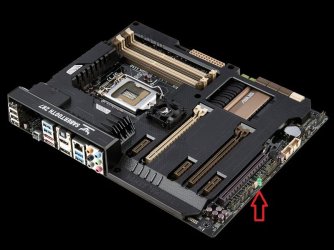
What LED light, post a picture pointing us to this LED light.

I don`t think you`re shutting down your PC properly.

Did this just start happening or what ?

This is the only light that stays on on my board when it has power, what LED light or lights are you talking about ?
 

Attachments

  • Asus Sabertooth Z87 #22.jpg
    Asus Sabertooth Z87 #22.jpg
    58.3 KB · Views: 3

My Computer My Computer

At a glance

Windows 10 Pro x64Intel Core i7 6700KGSkill TridentZ RGB 16GB 3600 16-16-16-36EVGA GTX 980 Ti SC x2
Computer type
PC/Desktop
Computer Manufacturer/Model Number
Skylake Special #666
OS
Windows 10 Pro x64
CPU
Intel Core i7 6700K
Motherboard
Asus Sabertooth Z170 Mark 1
Memory
GSkill TridentZ RGB 16GB 3600 16-16-16-36
Graphics Card(s)
EVGA GTX 980 Ti SC x2
Sound Card
Realtek High Definition
Monitor(s) Displays
AOC G2460PG
Screen Resolution
1920 x 1080 144Hz
Hard Drives
Samsung 860 Pro 256GB, Seagate Barracuda 4TB x2
PSU
EVGA 1000 P2, EVGA White Custom Braided Cables
Case
Corsair Vengeance C70 Gunmetal Black
Cooling
Corsair H100i v2, Corsair ML120 x2, Thermal Grizzly Kryonaut
Keyboard
Logitech G910 Orion Spectrum
Mouse
Logitech G700s
Internet Speed
Verizon Fios Quantum Gateway 75/75
Antivirus
Windows Defender, Malwarebytes Free 3.8.3
Browser
Chrome
Other Info
Corsair SP120 x4, LG Blu-ray Drive, Durabrand HT-395 100 Watt Dolby Digital Amp, Corsair H2100 Wireless 7.1 Headset
Back
Top