Computer won't recognize the HDD

addas

New member
Member
Local time
11:24 AM
Messages
66
Hello,
I have a Seagate HDD when I bought my laptop, it is 3 years old, last week I disassemble my laptop for cleaning it, everything went fine, but when I try to replace it, laptop won't boot, it is stuck on "Starting Windows" and as I see it waste a lot of processes, I tried to reinstall Windows, but it is also stuck in loading, so I bought new HDD and everything goes fine (I installed Windows)! but now I want to make the old HDD as External one, so I bought a HDD Enclosure, now I connect it to laptop, and the driver is successfully installed, but no hard disk icon! I want it to work again!

Thanks!
addas
 

My Computer

Computer type
Laptop
Computer Manufacturer/Model Number
Acer Aspire 4935G
OS
Windows 8 Pro with WMC 64-bit
CPU
Intel Core 2 Duo T6400
Motherboard
Acer Aspire 4935 Board
Screen Resolution
1366 X 768
Case
Laptop
Internet Speed
4 mbps
You might need to go into Disk Management and see what you've got.

Control Panel -> All Control Panel Items -> Adminsitrative Tool -> Disk Management

Maximize that window and adjust all columns to show max info, and post us a screenshot.

And let us know if you want to recover data from that drive.
 

My Computer

OS
Windows 7 Ultimate x64
Thanks for reply sibbil,
I don't want to recover anything

and the HDD is not listed in Computer or Disk Management
there is note says the driver installed. But it is not listed!

Thanks!
addas
 

My Computer

Computer type
Laptop
Computer Manufacturer/Model Number
Acer Aspire 4935G
OS
Windows 8 Pro with WMC 64-bit
CPU
Intel Core 2 Duo T6400
Motherboard
Acer Aspire 4935 Board
Screen Resolution
1366 X 768
Case
Laptop
Internet Speed
4 mbps
Can you feel it spin up when you power it?
 

My Computer

OS
Windows 7 Ultimate x64
Hello sibbil,
Yes I can feel it spinning, and by the way it is a laptop HDD

Regards
addas
 

My Computer

Computer type
Laptop
Computer Manufacturer/Model Number
Acer Aspire 4935G
OS
Windows 8 Pro with WMC 64-bit
CPU
Intel Core 2 Duo T6400
Motherboard
Acer Aspire 4935 Board
Screen Resolution
1366 X 768
Case
Laptop
Internet Speed
4 mbps
I don't know if I did something wrong but I touched the platter, I saw it is not clean at all!
I found something strange that the actuator arm first spin the platter then park (is that wrong?)
I found some scratches on the platter too!

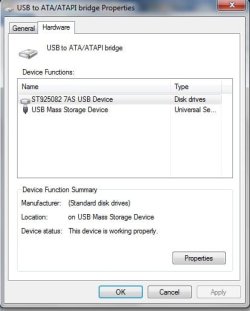
IMPORTANT NOTE: I opened Devices and Printers and I found the hard drive in USB to ATA/ATAPI bridge Properties and I posted an Image

NOTE 2: I didn't scan for bad sectors for the damaged HDD since 9 months before the HDD damage
 

Attachments

  • Damaged HDD.jpg
    Damaged HDD.jpg
    25.1 KB · Views: 7

My Computer

Computer type
Laptop
Computer Manufacturer/Model Number
Acer Aspire 4935G
OS
Windows 8 Pro with WMC 64-bit
CPU
Intel Core 2 Duo T6400
Motherboard
Acer Aspire 4935 Board
Screen Resolution
1366 X 768
Case
Laptop
Internet Speed
4 mbps
You had opened up the hard drive casing? You need to take very special precautions before ever trying that. Only to be done in a very clean, dust free, particle free environment. Other than that, I think the most you could ever expect from a drive after opening it is a one time data recovery, but even that depends on what you did inside that drive.

Sorry to say though, after opening, finding it dirty inside, and seeing scratches on the platter I would expect the drive is toast...
 

My Computer

OS
Windows 7 Ultimate x64
Admin please close the thread...
My HDD is dead... :(
and not recognized at all...
Wish this not happen to all of us...

Regards,
addas
 

My Computer

Computer type
Laptop
Computer Manufacturer/Model Number
Acer Aspire 4935G
OS
Windows 8 Pro with WMC 64-bit
CPU
Intel Core 2 Duo T6400
Motherboard
Acer Aspire 4935 Board
Screen Resolution
1366 X 768
Case
Laptop
Internet Speed
4 mbps
So sorry to hear that... Hopefully you had a copy of all your personal data that was on there.
 

My Computer

OS
Windows 7 Ultimate x64
Back
Top