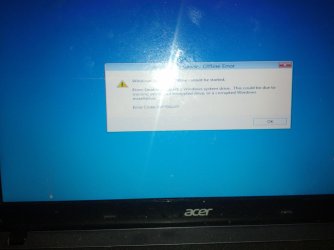
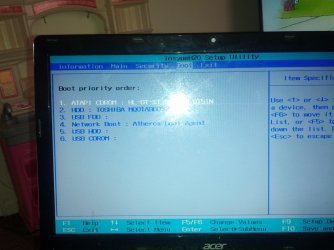
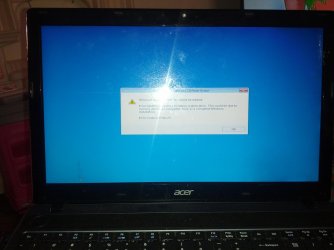
Computer won't start. Tried multiple solutions.

majabuu360

New member
Local time
9:55 AM
Messages
9
:cry:(I'm between average and novice when it comes to computers so I may not understand you at first)
Hi Ive' looked through the forums and I'm stuck. I'll first give the specs of my computer.
Aspire 532418
-Windows 7 32bit(i assume) -320 gb hdd
-intel b815 -dvd super multi dl drive
-intel hd graphics -acer nplify 802.11b/g/n
-4 gb ddr3 memory - 6 cell li-ion battery

Ok oringinally I was on my computer and I loaded to many file or screens at once so it froze. I turned off the computer by holding onto the on button to turn it off the reset. So when I turned on the computer it went to the startup repair progam. It ran but never finished so i turned it off in an attempt that the option to skip the startup repair would come up it didnt. So I left it on all night long, in attempts that it would fix itself, and went to work. When I came back in the morning it was still running the startup repair.
So I turned it off one more time and canceled once I got into the startup reapair screen again. Then I went through the other recovery options:
System Restore
System image recovery
Command prompt
Reinstall Windows
Windows memory dianostic tool
None of these worked
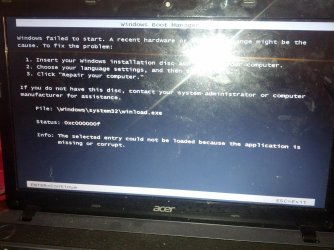
The last one I did memory dianostic tool put me to the picture with the black screen and the system32/winload with the status: 0xc000000f
(I havent been able to get back to the startup reapair since.)
Now wen I hit enter it puts e to this screen

Windows Valley

Sorry pictures arent in order
so I try advance option which pts me back to the first screen.
SO then I tried the windows repair cd 32 bit and 64bit which wouldnt work I changed around the boot sytem to run cd, dvd, and usb the cd still didnt work. So then I went with Window defenfer offline or system sweeper then I got this error code 0x8004cc01. So Usb worked but I dont think the cd drive is.:cry: I just want to use my computer please help
65a1558c-4130-45c3-93b4-e1de3c40739d_0.jpg

IMG_20130427_121411.jpg

IMG_20130427_121730.jpg

IMG_20130427_121528.jpg

IMG_20130427_121725.jpg
 

My Computer

Computer type
Laptop
Computer Manufacturer/Model Number
Acer Aspire 5349
OS
windows 7
CPU
intel b815
Memory
4 gb
Graphics Card(s)
intel hd graphics

My Computer

Computer type
PC/Desktop
Computer Manufacturer/Model Number
Bruce ... somewhere in his 40's
OS
Windows 7 Ultimate 32bit SP1
CPU
Intel(R) Core(TM)2 Quad CPU @ 2.40GHz, 2400 MHz
Motherboard
INTEL/D975XBX2
Memory
4 GB
Graphics Card(s)
ATI Radeon HD 2600 Pro
Monitor(s) Displays
Samsung SyncMaster 914v
Screen Resolution
1280 x 1024
Hard Drives
2/500GB each ... ST3500630AS ATA Device.
One is not connected
PSU
Rocketfish 700 W
Case
G.Skill Gigabyte Chassis
Keyboard
Standard PS/2 Keyboard
Mouse
Microsoft PS/2 Mouse
Internet Speed
DSL
Antivirus
Avira Internet Security
Browser
IE 11
Other Info
ATI HDMI Audio
@ Jacee im trying the method on the page so far it seems like it making some progress to early to tell. @ gregrocker I'll try that next I dont care about the files I just want access to my computer o Ill try that next without backing up my files
 

My Computer

Computer type
Laptop
Computer Manufacturer/Model Number
Acer Aspire 5349
OS
windows 7
CPU
intel b815
Memory
4 gb
Graphics Card(s)
intel hd graphics
"so im stuck the multi or the yummi I both installed. Now that may be my first problem i used them to install window installer onto the usb. Was there something else I was suppose to install? I have the same computer issue with not being able to load my computer. So I have yummi on the usb and connect it to the damaged computer. And go thorugh the option of windows installer. Which takes me to the startup reapir area. in one of these pictures i can get to the system restore area but nothing works. And then get asked for a dvd or final dvd. I just want to use my computer i dont care about the files please help:cry:"
thats wat i put in the links in the solved boot problem n im stuck now
 

My Computer

Computer type
Laptop
Computer Manufacturer/Model Number
Acer Aspire 5349
OS
windows 7
CPU
intel b815
Memory
4 gb
Graphics Card(s)
intel hd graphics
The installer is provided in both of the blue-link tutorials along with the tool to write it to flash stick. Please follow the steps of whichever approach you wish to take now:

In addition here is everything that can be done to for Troubleshooting Windows 7 Failure to Start
leading up to rescuiing your files to get the superior Clean Reinstall - Factory OEM Windows 7.

If you stick with the steps in the reinstall tutorial you'll get and keep a perfect install, the exact opposite of what you have with factory-preinstalled Win7 and better than 90% of other users have.
 
I got through most of the installation then i got this error also in the boot screen there is now three window that i can f8
 

Attachments

  • IMG_20130429_193103.jpg
    IMG_20130429_193103.jpg
    325.7 KB · Views: 2

My Computer

Computer type
Laptop
Computer Manufacturer/Model Number
Acer Aspire 5349
OS
windows 7
CPU
intel b815
Memory
4 gb
Graphics Card(s)
intel hd graphics
Back up your files, unplug all other HD's and peripherals,

Boot into BIOS setup, reset to defaults, save changes. If an EFI BIOS, enable Legacy BIOS or Compatibility Support Module, set DVD drive first to boot, HD second. Then set SATA controller to AHCI. Save changes and Exit.

Then boot into Win7 installer DVD or flash stick burned or written using tool and latest ISO for your licensed OS version here.

At first installer screen Press Shift + F10 to open a Command Box, type:

DISKPART
LIST DISK
SELECT DISK 0 (after confirming Windows 7 target HD #)
CLEAN
CREATE PARTITION PRIMARY SIZE=102400 (for 100gb partition, adjust as desired)
FORMAT FS=NTFS LABEL="WINDOWS 7"
ACTIVE
EXIT
EXIT

Next click Install Now, then Custom install to Clean Install Windows 7 to the partition you created. If it fails then report back at which step and the verbatim error message.

In addition read over these steps to understand the tools and methods which work best to get and maintain a perfect Clean Reinstall - Factory OEM Windows 7. The steps are the same for retail.

After install you can adjust partition size or Create new partitions for data, etc. in Disk Mgmt.You are creating the partition here for the purpose of marking it Active which overcomes certain install failures.
 
Back
Top