Solved Computer would not boot disconnecting storage drives

gilloz

New member
Member
Local time
3:02 AM
Messages
81
Location
High Desert, SoCal
OK, I was preparing my computer to do a clean install of Windows 7. A few weeks ago I inquired if it would be safer to disconnect my storage drives prior to doing a clean install of Windows 7. I went ahead and disconnected my storage drives except my computer would not boot up. I got a message telling me I had a boot up failure and to install my system disc and hit Enter. I did that, but nothing happened. I re-connected the storage drives only this time I did not get a message plus my computer did not boot up. I just had a blinking cursor at the upper Left corner of the screen. After a couple of hours of troubleshooting I entered the Setup BIOS and selected Load Defaults. Well, everything was back to normal and the computer booted up. I don't want to go through this again, so I am asking, how can I get my computer to boot up with only the C: Drive and without the storage drives connected? I am just leery about doing a clean install and having my storage drives affected one way or another, considering all my backups and settings are stored in these drives. Any help would be appreciated. Thanks
 

My Computer

Computer type
PC/Desktop
Computer Manufacturer/Model Number
Built Online @ AvaDirect
OS
Windows 7 Home Premium 64-Bit
CPU
E8500 Duel core
Motherboard
Asus P5ND
Memory
8 GB G Skill
Graphics Card(s)
XFX GeForce9600 GSO
Sound Card
Intergated
Monitor(s) Displays
Samsung 23"
Hard Drives
WD 320GB SATAII (2ea); 1TB WD SATA II
PSU
PC Power & Cooling 610 W
Case
NZXT Tempest Black
Cooling
Cooler Master Hyper 212 EVO
Keyboard
Logitech K520
Mouse
Logitech M310 Laser
Internet Speed
3 Mbps
Antivirus
McAFee
Browser
Firefox
It could be for many reasons.
I guess the boot loader isn't on your drive C: but on one of your Data HDD.
You probably has a Legacy system with Master boot record (MBR).
When it boots, the information of MBR transfer the booting system to a Boot Loader. On a MBR system you can only have one main Boot Loader. This Boot Loader can have more than one OS on it's parameters, that is, the boot sequence can be transfered to more than one secondary boot loader.
You also have Ubuntu on your system. If it has been installed after Windows and not on the same drive, the MBR on C: is transferring to Grub main boot loader on the drive where Ubuntu is installed. Grub then loads Ubuntu or transfer to Windows boot loader on C:.
If you take out this drive, MBR on C: won't find Grub and you can't boot.
To fix this, remove all drives except the one with Windows and with Windows Installation DVD make a boot repair. It will modify the MBR on C: to transfer boot sequence to windows. Ubuntu won't boot any more.

Then you have two options. Load Ubuntu from Windows boot loader (https://askubuntu.com/questions/139966/how-can-i-add-an-entry-for-ubuntu-to-the-windows-7-boot-menu) or install MBR on the Ubuntu drive that will transfer the boot sequence to Grub on that drive, a Grub boot repair (https://help.ubuntu.com/community/Boot-Repair). Before loading Grub boot repair, remove all HDD except the one that has Ubuntu. Then you will have two separated OS, each one with its own drive and MBR and you choose witch one to boot on BIOS.
 
Last edited:

My Computers

System One System Two

  • Computer type
    PC/Desktop
    Computer Manufacturer/Model Number
    custom build
    OS
    Windows 7 HP 64
    CPU
    i5 6600K - 800MHz to 4200MHz
    Motherboard
    GA-Z170-HD3P
    Memory
    4+4G GSkill DDR4 3000
    Graphics Card(s)
    IG - Intel 530
    Monitor(s) Displays
    Samsung 226BW
    Screen Resolution
    1680x1050
    Hard Drives
    (1) -1 SM951 – 128GB M.2 AHCI PCIe SSD drive for Windows 7 and Lubuntu
    (2) -1 WD SATA 3 - 1T for Data
    (3) -1 WD SATA 3 - 1T for backup
    PSU
    Thermaltake 450W TR2 gold
    Keyboard
    Old and good Chicony mechanical keyboard
    Mouse
    Logitech mX performance - 9 buttons (had to disable some)
    Internet Speed
    500Mb/s
    Browser
    Firefox 64
    Other Info
    TinyWall firewall
  • Computer type
    Laptop
    System Manufacturer/Model Number
    Asus Q550LF
    OS
    Windows 7 Pro
    CPU
    i7-4500U 800MHz to 3.0GHz
    Motherboard
    Asus Q550LF
    Memory
    (4+4)G DDR3 1600
    Graphics Card(s)
    IG intel 4400 + NVIDIA GeForce GT 745M
    Sound Card
    Realtek
    Monitor(s) Displays
    LG Display LP156WF4-SPH1
    Screen Resolution
    1920 x 1080
    Hard Drives
    BX500 120G SSD for Windows and programs +
    1T HDD for data
    Internet Speed
    500 Mb/s
    Browser
    Firefox
    Other Info
    TinyWall firewall

My Computer

Computer type
PC/Desktop
Computer Manufacturer/Model Number
Custom Build
OS
Windows 7 Home Premium 32-Bit - Build 7600 SP1
CPU
Intel Core i3-2120 3.30Ghz
Motherboard
Asus P8Z68-V LX Intel Z68 Socket H2 ATX
Memory
Kingston 4 GB DDR3 1333 mhz
Graphics Card(s)
AMD Radeon HD6670
Sound Card
Sound Blaster Audigy SE 24-Bit
Monitor(s) Displays
Asus VE228
Screen Resolution
1440 X 900
Hard Drives
OCZ Vertex 3 120 GB Sata 3 SSD ==
Kingston SH103/S3 120 G Hyper X 120 GB SSD ==
Western Digital 500 GB Caviar Green 7200 RPM ==
PSU
Corsair CX600M == 600 Watt
Case
NZXT Apollo - Silver with Clear Side Panel
Cooling
Three 120 mm Fans
Keyboard
Microsoft Natural 4000
Mouse
Microsoft Custom Optical 3000
Internet Speed
AT&T Fiber Optic Wireless Network
Antivirus
Microsoft Security Essentials
Browser
Chrome
Other Info
120 mm Blue LED Fan -- Three Blue LED Lazer Light Sticks
Thanks guys for your responses. First off, I no longer have Ubuntu on my system. I've tried changing my Signature in the past, but it stays the same. Not sure what I'm doing wrong. Also, I noticed that my 1st boot device was my C: drive as oppose to my CD/DVD drive. Changed that now.
I've never tried sending a Print Screen copy before, so I will send one as soon as I figure out how you do that. I will get on this later today. I have other priorities keeping me busy, sorry about that. I appreciate your responses. Thanks
 

My Computer

Computer type
PC/Desktop
Computer Manufacturer/Model Number
Built Online @ AvaDirect
OS
Windows 7 Home Premium 64-Bit
CPU
E8500 Duel core
Motherboard
Asus P5ND
Memory
8 GB G Skill
Graphics Card(s)
XFX GeForce9600 GSO
Sound Card
Intergated
Monitor(s) Displays
Samsung 23"
Hard Drives
WD 320GB SATAII (2ea); 1TB WD SATA II
PSU
PC Power & Cooling 610 W
Case
NZXT Tempest Black
Cooling
Cooler Master Hyper 212 EVO
Keyboard
Logitech K520
Mouse
Logitech M310 Laser
Internet Speed
3 Mbps
Antivirus
McAFee
Browser
Firefox
Thanks guys for your responses. First off, I no longer have Ubuntu on my system. I've tried changing my Signature in the past, but it stays the same. Not sure what I'm doing wrong. Also, I noticed that my 1st boot device was my C: drive as oppose to my CD/DVD drive. Changed that now.
I've never tried sending a Print Screen copy before, so I will send one as soon as I figure out how you do that. I will get on this later today. I have other priorities keeping me busy, sorry about that. I appreciate your responses. Thanks

Look in Message 3 and click on the blue type. There is your answer.
 

My Computer

Computer type
PC/Desktop
Computer Manufacturer/Model Number
Custom Build
OS
Windows 7 Home Premium 32-Bit - Build 7600 SP1
CPU
Intel Core i3-2120 3.30Ghz
Motherboard
Asus P8Z68-V LX Intel Z68 Socket H2 ATX
Memory
Kingston 4 GB DDR3 1333 mhz
Graphics Card(s)
AMD Radeon HD6670
Sound Card
Sound Blaster Audigy SE 24-Bit
Monitor(s) Displays
Asus VE228
Screen Resolution
1440 X 900
Hard Drives
OCZ Vertex 3 120 GB Sata 3 SSD ==
Kingston SH103/S3 120 G Hyper X 120 GB SSD ==
Western Digital 500 GB Caviar Green 7200 RPM ==
PSU
Corsair CX600M == 600 Watt
Case
NZXT Apollo - Silver with Clear Side Panel
Cooling
Three 120 mm Fans
Keyboard
Microsoft Natural 4000
Mouse
Microsoft Custom Optical 3000
Internet Speed
AT&T Fiber Optic Wireless Network
Antivirus
Microsoft Security Essentials
Browser
Chrome
Other Info
120 mm Blue LED Fan -- Three Blue LED Lazer Light Sticks
DiskMang.png
 

My Computer

Computer type
PC/Desktop
Computer Manufacturer/Model Number
Built Online @ AvaDirect
OS
Windows 7 Home Premium 64-Bit
CPU
E8500 Duel core
Motherboard
Asus P5ND
Memory
8 GB G Skill
Graphics Card(s)
XFX GeForce9600 GSO
Sound Card
Intergated
Monitor(s) Displays
Samsung 23"
Hard Drives
WD 320GB SATAII (2ea); 1TB WD SATA II
PSU
PC Power & Cooling 610 W
Case
NZXT Tempest Black
Cooling
Cooler Master Hyper 212 EVO
Keyboard
Logitech K520
Mouse
Logitech M310 Laser
Internet Speed
3 Mbps
Antivirus
McAFee
Browser
Firefox
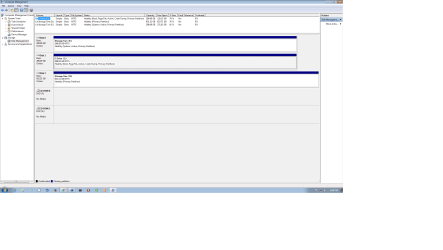
Couldn't figure out how to add a message with the attachment. Anyway, my problem appears to be good now. It was my error in that I did not have the boot priority setting correctly. After switching to the CD/DVD as priority No. 1, I am able to accomplish what I set out to do in doing a clean install of Windows 7, even though I haven't done it yet, but will follow up on this tomorrow. I wanted to verify that I could get to the step of formatting my C: drive without disturbing my storage drives and I can see how to do that now. I continued in trying to attach the Disk Management file just to see if I could do it. I have to admit it took a bit of time, but it appears I got it some what. Thanks guys for your help.
 

My Computer

Computer type
PC/Desktop
Computer Manufacturer/Model Number
Built Online @ AvaDirect
OS
Windows 7 Home Premium 64-Bit
CPU
E8500 Duel core
Motherboard
Asus P5ND
Memory
8 GB G Skill
Graphics Card(s)
XFX GeForce9600 GSO
Sound Card
Intergated
Monitor(s) Displays
Samsung 23"
Hard Drives
WD 320GB SATAII (2ea); 1TB WD SATA II
PSU
PC Power & Cooling 610 W
Case
NZXT Tempest Black
Cooling
Cooler Master Hyper 212 EVO
Keyboard
Logitech K520
Mouse
Logitech M310 Laser
Internet Speed
3 Mbps
Antivirus
McAFee
Browser
Firefox
You have other problems in your Disk Management that needs to be corrected. == Your E: Drive is marked as Active and System. The System and Active should be on your C:.== It might boot now, but one day it might not. You need to repair it correctly. ==
From the first message I am assuming you have a Windows 7 Disk. Unplug your E: drive. Insert the Win disk while you PC is running and do a Repair Install from this tutorial, http://www.sevenforums.com/tutorials/3413-repair-install.html This should put the Active and System files on your C:. Check to make sure it is on your C: after the Repair Install. Unplug your E: drive, shut down and see if it boots OK. If it does then you need to mark E: inactive (take the Active off of E: Plug in E: again and follow the tutorial. http://www.sevenforums.com/tutorials/197157-partition-mark-inactive.html Let us know how it goes.
 
Last edited:

My Computer

Computer type
PC/Desktop
Computer Manufacturer/Model Number
Custom Build
OS
Windows 7 Home Premium 32-Bit - Build 7600 SP1
CPU
Intel Core i3-2120 3.30Ghz
Motherboard
Asus P8Z68-V LX Intel Z68 Socket H2 ATX
Memory
Kingston 4 GB DDR3 1333 mhz
Graphics Card(s)
AMD Radeon HD6670
Sound Card
Sound Blaster Audigy SE 24-Bit
Monitor(s) Displays
Asus VE228
Screen Resolution
1440 X 900
Hard Drives
OCZ Vertex 3 120 GB Sata 3 SSD ==
Kingston SH103/S3 120 G Hyper X 120 GB SSD ==
Western Digital 500 GB Caviar Green 7200 RPM ==
PSU
Corsair CX600M == 600 Watt
Case
NZXT Apollo - Silver with Clear Side Panel
Cooling
Three 120 mm Fans
Keyboard
Microsoft Natural 4000
Mouse
Microsoft Custom Optical 3000
Internet Speed
AT&T Fiber Optic Wireless Network
Antivirus
Microsoft Security Essentials
Browser
Chrome
Other Info
120 mm Blue LED Fan -- Three Blue LED Lazer Light Sticks
Gilloz, remember to disconnect all drives (Storage) before going to format and do a clean install.
 

My Computers

System One System Two

  • Computer type
    PC/Desktop
    Computer Manufacturer/Model Number
    custom build
    OS
    Windows 7 HP 64
    CPU
    i5 6600K - 800MHz to 4200MHz
    Motherboard
    GA-Z170-HD3P
    Memory
    4+4G GSkill DDR4 3000
    Graphics Card(s)
    IG - Intel 530
    Monitor(s) Displays
    Samsung 226BW
    Screen Resolution
    1680x1050
    Hard Drives
    (1) -1 SM951 – 128GB M.2 AHCI PCIe SSD drive for Windows 7 and Lubuntu
    (2) -1 WD SATA 3 - 1T for Data
    (3) -1 WD SATA 3 - 1T for backup
    PSU
    Thermaltake 450W TR2 gold
    Keyboard
    Old and good Chicony mechanical keyboard
    Mouse
    Logitech mX performance - 9 buttons (had to disable some)
    Internet Speed
    500Mb/s
    Browser
    Firefox 64
    Other Info
    TinyWall firewall
  • Computer type
    Laptop
    System Manufacturer/Model Number
    Asus Q550LF
    OS
    Windows 7 Pro
    CPU
    i7-4500U 800MHz to 3.0GHz
    Motherboard
    Asus Q550LF
    Memory
    (4+4)G DDR3 1600
    Graphics Card(s)
    IG intel 4400 + NVIDIA GeForce GT 745M
    Sound Card
    Realtek
    Monitor(s) Displays
    LG Display LP156WF4-SPH1
    Screen Resolution
    1920 x 1080
    Hard Drives
    BX500 120G SSD for Windows and programs +
    1T HDD for data
    Internet Speed
    500 Mb/s
    Browser
    Firefox
    Other Info
    TinyWall firewall
Hi guys, it took this long just to get my computer to boot up. It appears that my Drive E which is a storage drive has to be connected in order for my computer to boot up. I had Drive D, the other storage drive disconnected and it did not affect the boot sequence. It appears that there is something on the E drive that affects my boot up. Like you said Bigmck, there will be times when it won't boot up. I am thinking back when I was dual booting with Windows 7 and Ubuntu 14.04 LTS. I was using Grub2 and I don't remember which drive I had that installed. I tried booting up with only my C:Drive and my D: Drive disconnected and it did boot up once, but I can't seem to repeat that. I ran the repair disc for my Windows 7 and it found about 14 items that they recommended me to send to Microsoft. Items only had numbers. The Error code was 0x490. Now, for sure I want to do a clean install, but I can't do it with the storage drive E uninstalled or it won't boot. Anyone have any ideas?
 

My Computer

Computer type
PC/Desktop
Computer Manufacturer/Model Number
Built Online @ AvaDirect
OS
Windows 7 Home Premium 64-Bit
CPU
E8500 Duel core
Motherboard
Asus P5ND
Memory
8 GB G Skill
Graphics Card(s)
XFX GeForce9600 GSO
Sound Card
Intergated
Monitor(s) Displays
Samsung 23"
Hard Drives
WD 320GB SATAII (2ea); 1TB WD SATA II
PSU
PC Power & Cooling 610 W
Case
NZXT Tempest Black
Cooling
Cooler Master Hyper 212 EVO
Keyboard
Logitech K520
Mouse
Logitech M310 Laser
Internet Speed
3 Mbps
Antivirus
McAFee
Browser
Firefox
Your System Files are on E:, that is why. Your System files are supposed to be on C:. This is why when installing Windows, you must unplug all other drives. You need to do a repair install as outlined in Message 8. You are going to have to Unplug all drives except C: and E:. You need E: connected so you can boot. After you boot, carefully open up your PC and unplug E: so that it is running with only C: connected. Then follow the instructions in Message 8 for the Repair Install to get the correct files on C:.
 

My Computer

Computer type
PC/Desktop
Computer Manufacturer/Model Number
Custom Build
OS
Windows 7 Home Premium 32-Bit - Build 7600 SP1
CPU
Intel Core i3-2120 3.30Ghz
Motherboard
Asus P8Z68-V LX Intel Z68 Socket H2 ATX
Memory
Kingston 4 GB DDR3 1333 mhz
Graphics Card(s)
AMD Radeon HD6670
Sound Card
Sound Blaster Audigy SE 24-Bit
Monitor(s) Displays
Asus VE228
Screen Resolution
1440 X 900
Hard Drives
OCZ Vertex 3 120 GB Sata 3 SSD ==
Kingston SH103/S3 120 G Hyper X 120 GB SSD ==
Western Digital 500 GB Caviar Green 7200 RPM ==
PSU
Corsair CX600M == 600 Watt
Case
NZXT Apollo - Silver with Clear Side Panel
Cooling
Three 120 mm Fans
Keyboard
Microsoft Natural 4000
Mouse
Microsoft Custom Optical 3000
Internet Speed
AT&T Fiber Optic Wireless Network
Antivirus
Microsoft Security Essentials
Browser
Chrome
Other Info
120 mm Blue LED Fan -- Three Blue LED Lazer Light Sticks
Before a clean install, you can run the Easy Transfer so user configurations can be restored.
Gilloz, remember to disconnect all drives (Storage) before going to format and do a clean install.
To do a clean install you must boot from the Windows installation disk.
 

My Computers

System One System Two

  • Computer type
    PC/Desktop
    Computer Manufacturer/Model Number
    custom build
    OS
    Windows 7 HP 64
    CPU
    i5 6600K - 800MHz to 4200MHz
    Motherboard
    GA-Z170-HD3P
    Memory
    4+4G GSkill DDR4 3000
    Graphics Card(s)
    IG - Intel 530
    Monitor(s) Displays
    Samsung 226BW
    Screen Resolution
    1680x1050
    Hard Drives
    (1) -1 SM951 – 128GB M.2 AHCI PCIe SSD drive for Windows 7 and Lubuntu
    (2) -1 WD SATA 3 - 1T for Data
    (3) -1 WD SATA 3 - 1T for backup
    PSU
    Thermaltake 450W TR2 gold
    Keyboard
    Old and good Chicony mechanical keyboard
    Mouse
    Logitech mX performance - 9 buttons (had to disable some)
    Internet Speed
    500Mb/s
    Browser
    Firefox 64
    Other Info
    TinyWall firewall
  • Computer type
    Laptop
    System Manufacturer/Model Number
    Asus Q550LF
    OS
    Windows 7 Pro
    CPU
    i7-4500U 800MHz to 3.0GHz
    Motherboard
    Asus Q550LF
    Memory
    (4+4)G DDR3 1600
    Graphics Card(s)
    IG intel 4400 + NVIDIA GeForce GT 745M
    Sound Card
    Realtek
    Monitor(s) Displays
    LG Display LP156WF4-SPH1
    Screen Resolution
    1920 x 1080
    Hard Drives
    BX500 120G SSD for Windows and programs +
    1T HDD for data
    Internet Speed
    500 Mb/s
    Browser
    Firefox
    Other Info
    TinyWall firewall
I'm Back! It seemed too much work for me, to go with the Repair Installed, so instead, I did a complete clean install with only the C:Drive in the computer. I hit a snag half way through in that Microsoft would not allow me to activate my Windows installation. Reason being, I removed my two storage hard drives, which modified my original installation configuration. But, after my explanation as to why I removed them, they went ahead and activated my Windows 7 installation. Not only does everything look good, it runs a bit faster than before. So, thanks guys for your support and information.
 

My Computer

Computer type
PC/Desktop
Computer Manufacturer/Model Number
Built Online @ AvaDirect
OS
Windows 7 Home Premium 64-Bit
CPU
E8500 Duel core
Motherboard
Asus P5ND
Memory
8 GB G Skill
Graphics Card(s)
XFX GeForce9600 GSO
Sound Card
Intergated
Monitor(s) Displays
Samsung 23"
Hard Drives
WD 320GB SATAII (2ea); 1TB WD SATA II
PSU
PC Power & Cooling 610 W
Case
NZXT Tempest Black
Cooling
Cooler Master Hyper 212 EVO
Keyboard
Logitech K520
Mouse
Logitech M310 Laser
Internet Speed
3 Mbps
Antivirus
McAFee
Browser
Firefox
Made an error here.
 

My Computer

Computer type
PC/Desktop
Computer Manufacturer/Model Number
Built Online @ AvaDirect
OS
Windows 7 Home Premium 64-Bit
CPU
E8500 Duel core
Motherboard
Asus P5ND
Memory
8 GB G Skill
Graphics Card(s)
XFX GeForce9600 GSO
Sound Card
Intergated
Monitor(s) Displays
Samsung 23"
Hard Drives
WD 320GB SATAII (2ea); 1TB WD SATA II
PSU
PC Power & Cooling 610 W
Case
NZXT Tempest Black
Cooling
Cooler Master Hyper 212 EVO
Keyboard
Logitech K520
Mouse
Logitech M310 Laser
Internet Speed
3 Mbps
Antivirus
McAFee
Browser
Firefox
I'm Back! It seemed too much work for me, to go with the Repair Installed, so instead, I did a complete clean install with only the C:Drive in the computer. I hit a snag half way through in that Microsoft would not allow me to activate my Windows installation. Reason being, I removed my two storage hard drives, which modified my original installation configuration. But, after my explanation as to why I removed them, they went ahead and activated my Windows 7 installation. Not only does everything look good, it runs a bit faster than before. So, thanks guys for your support and information.

I have never heard of your problem before. If that is true then no one would be able to buy a new HDD. Something else must be up with the Microsoft Guy. Anyway, glad you got things going.
 

My Computer

Computer type
PC/Desktop
Computer Manufacturer/Model Number
Custom Build
OS
Windows 7 Home Premium 32-Bit - Build 7600 SP1
CPU
Intel Core i3-2120 3.30Ghz
Motherboard
Asus P8Z68-V LX Intel Z68 Socket H2 ATX
Memory
Kingston 4 GB DDR3 1333 mhz
Graphics Card(s)
AMD Radeon HD6670
Sound Card
Sound Blaster Audigy SE 24-Bit
Monitor(s) Displays
Asus VE228
Screen Resolution
1440 X 900
Hard Drives
OCZ Vertex 3 120 GB Sata 3 SSD ==
Kingston SH103/S3 120 G Hyper X 120 GB SSD ==
Western Digital 500 GB Caviar Green 7200 RPM ==
PSU
Corsair CX600M == 600 Watt
Case
NZXT Apollo - Silver with Clear Side Panel
Cooling
Three 120 mm Fans
Keyboard
Microsoft Natural 4000
Mouse
Microsoft Custom Optical 3000
Internet Speed
AT&T Fiber Optic Wireless Network
Antivirus
Microsoft Security Essentials
Browser
Chrome
Other Info
120 mm Blue LED Fan -- Three Blue LED Lazer Light Sticks
I'm Back! It seemed too much work for me, to go with the Repair Installed, so instead, I did a complete clean install with only the C:Drive in the computer. I hit a snag half way through in that Microsoft would not allow me to activate my Windows installation. Reason being, I removed my two storage hard drives, which modified my original installation configuration. But, after my explanation as to why I removed them, they went ahead and activated my Windows 7 installation. Not only does everything look good, it runs a bit faster than before. So, thanks guys for your support and information.

Anyone who reads this. The OP ran into the problem in Bold above. Have any of you ever heard of this before? It just sounds all wrong to me.
 

My Computer

Computer type
PC/Desktop
Computer Manufacturer/Model Number
Custom Build
OS
Windows 7 Home Premium 32-Bit - Build 7600 SP1
CPU
Intel Core i3-2120 3.30Ghz
Motherboard
Asus P8Z68-V LX Intel Z68 Socket H2 ATX
Memory
Kingston 4 GB DDR3 1333 mhz
Graphics Card(s)
AMD Radeon HD6670
Sound Card
Sound Blaster Audigy SE 24-Bit
Monitor(s) Displays
Asus VE228
Screen Resolution
1440 X 900
Hard Drives
OCZ Vertex 3 120 GB Sata 3 SSD ==
Kingston SH103/S3 120 G Hyper X 120 GB SSD ==
Western Digital 500 GB Caviar Green 7200 RPM ==
PSU
Corsair CX600M == 600 Watt
Case
NZXT Apollo - Silver with Clear Side Panel
Cooling
Three 120 mm Fans
Keyboard
Microsoft Natural 4000
Mouse
Microsoft Custom Optical 3000
Internet Speed
AT&T Fiber Optic Wireless Network
Antivirus
Microsoft Security Essentials
Browser
Chrome
Other Info
120 mm Blue LED Fan -- Three Blue LED Lazer Light Sticks
bigmck I have also never heard of such a thing as the OP has posted.
Maybe what the OP had and has done got lost in the translation.
I know I'm somewhat confused.
 

My Computer

Computer type
PC/Desktop
Computer Manufacturer/Model Number
Home made Desktop
OS
Windows 10 Pro. 64/ version 1709 Windows 7 Pro/64
CPU
Intel i7-6800K @ 4.3
Motherboard
ASUS X-99 Deluxe II
Memory
Corsair Platinum 16 gig @2400
Graphics Card(s)
EVGA GTX 1070 OC
Monitor(s) Displays
Asus 27" LED LCD/VE278Q
Screen Resolution
1920-1080 or 1280-720 HDMI
Hard Drives
INTEL SSD 730-240 Gb Sata 3.0/
PSU
EVGA Platium 1200W
Case
Phanteks Luxe Tempered Glass 8 fans/ one radiator
Cooling
XSPC/ Water Cooled CPU
Keyboard
Das 4 Professional
Mouse
Logitech M705/MX Anywhere 2-S
Internet Speed
100 mbits
Antivirus
Microsoft Security Essentials/ Malwarebytes Premium 3.0/ SAS
Browser
I.E. 11 default/Firefox/ ISP Time Warner Cable/Spectrum
Other Info
LG BluRay Burner/
Sound system-KLipsch-THX/
Icy Dock ssd Hot Swap bays.
bigmck I have also never heard of such a thing as the OP has posted.
Maybe what the OP had and has done got lost in the translation.
I know I'm somewhat confused.

:thumbsup::thumbsup:
 

My Computer

Computer type
PC/Desktop
Computer Manufacturer/Model Number
Custom Build
OS
Windows 7 Home Premium 32-Bit - Build 7600 SP1
CPU
Intel Core i3-2120 3.30Ghz
Motherboard
Asus P8Z68-V LX Intel Z68 Socket H2 ATX
Memory
Kingston 4 GB DDR3 1333 mhz
Graphics Card(s)
AMD Radeon HD6670
Sound Card
Sound Blaster Audigy SE 24-Bit
Monitor(s) Displays
Asus VE228
Screen Resolution
1440 X 900
Hard Drives
OCZ Vertex 3 120 GB Sata 3 SSD ==
Kingston SH103/S3 120 G Hyper X 120 GB SSD ==
Western Digital 500 GB Caviar Green 7200 RPM ==
PSU
Corsair CX600M == 600 Watt
Case
NZXT Apollo - Silver with Clear Side Panel
Cooling
Three 120 mm Fans
Keyboard
Microsoft Natural 4000
Mouse
Microsoft Custom Optical 3000
Internet Speed
AT&T Fiber Optic Wireless Network
Antivirus
Microsoft Security Essentials
Browser
Chrome
Other Info
120 mm Blue LED Fan -- Three Blue LED Lazer Light Sticks
Back
Top