Computers identify different network?

badspell68

New member
Member
VIP
Local time
12:20 PM
Messages
231
Location
PA
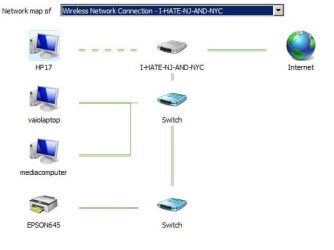
All my computers are on the same network (some wired and some wireless) but they show that they're attached to a different network. This is indicated by the name of the "little house" in the network diagram.

What is going on?
 

Attachments

  • 2.jpg
    2.jpg
    10.6 KB · Views: 23

My Computer

OS
Windows 7
That house is your home network, doesn't your other devices have the same name?
 

My Computer

Computer type
PC/Desktop
Computer Manufacturer/Model Number
HP
OS
Windows 7 Pro 32bit
CPU
Dual Core
Antivirus
Trend Micro
No - there are two other names indicated on the small house on each separate computer.
 

Attachments

  • 3.jpg
    3.jpg
    8.5 KB · Views: 23
  • 1.jpg
    1.jpg
    9 KB · Views: 23

My Computer

OS
Windows 7
The "I-HATE-NJ-AND-NYC" is the only one I have.

This is a picture of the whole network layout (I only have one switch...confused on that point):
 

Attachments

  • eee.jpg
    eee.jpg
    22.5 KB · Views: 23

My Computer

OS
Windows 7
Checked, there is only one. I'm thinking each device(switch, router) may have its own identity? The Homegroup instructions state that a Homegroup will not work if a network has more then one name/network. But, I don't know what would account for the third name, I only have one router and one switch.
 

My Computer

OS
Windows 7
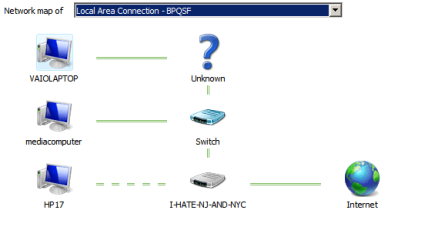
I just saw this and it is very confusing. The Vaio Laptop's network layout is in the picture below. I have Fios and I think the Verizon router has an internal switch, so in addition to my external switch I'm seeing the routers internal switch? But, I still have no idea why I have three network names.

Anyone know what is going on?
 

Attachments

  • Picture0001.png
    Picture0001.png
    30.1 KB · Views: 20

My Computer

OS
Windows 7
This is still driving me NUTS. Is these any way to delet all the home-group settings and find the other network?
 

My Computer

OS
Windows 7
See this tutorial by Brink:
http://www.sevenforums.com/tutorials/24683-network-name-icon-change.html
You can try the Merge or delete network locations on the page where you can change the name.
I'm not sure what it does, i never used it.

I also found this:
There is variety of "Names" involving the Network aspects of the OS.
It comes from the Group name, Computer name, Wireless SSID, Router's Network Name, Network name, the Local Area Connection name, and the ID of the Local Network Connection.
All but the latter can be easily Renamed.
By default Windows assigns to the connection name “Local Area Connection 1”, and every time a change is made, it advances the number.
Source: Wireless Network "name" mislabeled as "name 2" - Microsoft Community
 

My Computer

Computer type
PC/Desktop
Computer Manufacturer/Model Number
home built
OS
Multi-Boot W7_Pro_x64 W8.1_Pro_x64 W10_Pro_x64 +Linux_VMs +Chromium_VM
CPU
AMD Athlon II x4 620
Motherboard
Gigabyte GA-MA785G-UD3H
Memory
6GB GSkill DDR2 800
Graphics Card(s)
AMD 4670 GPU + AMD 4200 IGP
Sound Card
on board Realtek ALC889A
Monitor(s) Displays
RCA 40" LCD TV, Insignia 32" LCD TV, HP 15" LCD monitor
Screen Resolution
1680 x 1050
Hard Drives
OCZ Vertex 3 120GB,
Samsung F3 1TB (3),
Several others - WD, Seagate, Hitachi, ...
PSU
Corsair 500 W
Case
Rosewill mid tower
Cooling
CM 90mm rifle
Keyboard
Gyration wireless, Logitech wireless, Dell USB wired
Mouse
Gyration wireless, Logitech wireless, V7 USB wired
Internet Speed
Spectrum - 100Mbps D / 10Mbps U
Antivirus
Avast, MBAM3, EMET, WinPatrol
Browser
Pale Moon, Firefox, IE
Other Info
2 multi-boot PC's
Mainly HTPC/Office/Gen purpose (no gaming).
Trendnet USB KVM.
LG DVD burner/Blue Ray Player.
Tray system for removable SATA backup drives.

Not currently OCd, under-volted.
I use Hybrid sleep, rarely re-boot or shutdown.

Hauppauge HD-PVR, Avermedia PCIe TV Tuner, Hauppauge PCI TV Tuner.
Would this affect home group. I'm not connected to my home group and can't see a NAS. It some how is connecting to one that is not on my network or created by me, and the computer is hard-wired to the network.
 

My Computer

OS
Windows 7

My Computer

Computer type
PC/Desktop
Computer Manufacturer/Model Number
home built
OS
Multi-Boot W7_Pro_x64 W8.1_Pro_x64 W10_Pro_x64 +Linux_VMs +Chromium_VM
CPU
AMD Athlon II x4 620
Motherboard
Gigabyte GA-MA785G-UD3H
Memory
6GB GSkill DDR2 800
Graphics Card(s)
AMD 4670 GPU + AMD 4200 IGP
Sound Card
on board Realtek ALC889A
Monitor(s) Displays
RCA 40" LCD TV, Insignia 32" LCD TV, HP 15" LCD monitor
Screen Resolution
1680 x 1050
Hard Drives
OCZ Vertex 3 120GB,
Samsung F3 1TB (3),
Several others - WD, Seagate, Hitachi, ...
PSU
Corsair 500 W
Case
Rosewill mid tower
Cooling
CM 90mm rifle
Keyboard
Gyration wireless, Logitech wireless, Dell USB wired
Mouse
Gyration wireless, Logitech wireless, V7 USB wired
Internet Speed
Spectrum - 100Mbps D / 10Mbps U
Antivirus
Avast, MBAM3, EMET, WinPatrol
Browser
Pale Moon, Firefox, IE
Other Info
2 multi-boot PC's
Mainly HTPC/Office/Gen purpose (no gaming).
Trendnet USB KVM.
LG DVD burner/Blue Ray Player.
Tray system for removable SATA backup drives.

Not currently OCd, under-volted.
I use Hybrid sleep, rarely re-boot or shutdown.

Hauppauge HD-PVR, Avermedia PCIe TV Tuner, Hauppauge PCI TV Tuner.
Would this affect home group. I'm not connected to my home group and can't see a NAS. It some how is connecting to one that is not on my network or created by me, and the computer is hard-wired to the network.
 

My Computer

OS
Windows 7
Did you see my post #12 ?
 

My Computer

Computer type
PC/Desktop
Computer Manufacturer/Model Number
home built
OS
Multi-Boot W7_Pro_x64 W8.1_Pro_x64 W10_Pro_x64 +Linux_VMs +Chromium_VM
CPU
AMD Athlon II x4 620
Motherboard
Gigabyte GA-MA785G-UD3H
Memory
6GB GSkill DDR2 800
Graphics Card(s)
AMD 4670 GPU + AMD 4200 IGP
Sound Card
on board Realtek ALC889A
Monitor(s) Displays
RCA 40" LCD TV, Insignia 32" LCD TV, HP 15" LCD monitor
Screen Resolution
1680 x 1050
Hard Drives
OCZ Vertex 3 120GB,
Samsung F3 1TB (3),
Several others - WD, Seagate, Hitachi, ...
PSU
Corsair 500 W
Case
Rosewill mid tower
Cooling
CM 90mm rifle
Keyboard
Gyration wireless, Logitech wireless, Dell USB wired
Mouse
Gyration wireless, Logitech wireless, V7 USB wired
Internet Speed
Spectrum - 100Mbps D / 10Mbps U
Antivirus
Avast, MBAM3, EMET, WinPatrol
Browser
Pale Moon, Firefox, IE
Other Info
2 multi-boot PC's
Mainly HTPC/Office/Gen purpose (no gaming).
Trendnet USB KVM.
LG DVD burner/Blue Ray Player.
Tray system for removable SATA backup drives.

Not currently OCd, under-volted.
I use Hybrid sleep, rarely re-boot or shutdown.

Hauppauge HD-PVR, Avermedia PCIe TV Tuner, Hauppauge PCI TV Tuner.
Checking it out now...Thanks.
 

My Computer

OS
Windows 7
Still no idea...WOW, this is one I can't figure out.
 

My Computer

OS
Windows 7
One homegroup on two Routers

Hello,

My home network has my main router connected to my old router.
I have PCs connected to both routers directly (wired) and I'd like to see if these PCs can be placed in the same Homegroup. As it stands right now, they can't see each other since each PC has a different "Home Network".

I don't know too much about routers but is there a way to configure something so that PCs on either router can be in the same Homegroup?

Any guidance would be greatly appreciated.

Thanks

Victor
 

My Computer

Computer type
PC/Desktop
Computer Manufacturer/Model Number
ACER
OS
Windows 7 Home Premium 64bit
Back
Top