Concerns With Windows Backup Tool

Andy 01

New member
Member
Local time
12:22 AM
Messages
47
Location
Colchester Essex
Could do with some pointers on this please.
W7 Pro, backup facility.

I was allowing it to do a scheduled backup to a NAS, but it was taking to long to do the backup, so I put another drive in the case so it could back up to that.
This drive has nothing else on it, its just for the backup.
The C drive in the PC is 1 TB, and the backup drive is also 1 TB.

Now, I told windows to only keep the latest version of backup, so it should keep a bit of space free.
My C drive has approximately 350 gig used.
Following my second scheduled backup, the D drive now shows 800 gig used !!

How can it be taking 350 gig and turning it into 800 gig ??
My worry is if I get up to say 500 gig on C, a 1 TB drive would no longer be large enough to back it up !!

Any thoughts please.
 

My Computer

Computer type
PC/Desktop
Computer Manufacturer/Model Number
Mesh XGS I7
OS
Windows 7 Professional 64 Bit
CPU
Intel® Core™ i7 860 Quad Core Processor (2.80GHz, 8MB Cache)
Motherboard
ASUS P7P55 LX Mainboard - Intel Core™ i5 / i7 - LGA 1156 / A
Memory
16GB 1600MHz Dual Channel DDR3 SDRAM, Corsair XMS3
Graphics Card(s)
1GB ATI Radeon HD5750
Sound Card
7.1 High Definition onboard sound card
Monitor(s) Displays
22" LG FULL HD Monitor
Screen Resolution
1920x1080
Hard Drives
2 x 1TB Serial ATA 2 Hard Drive with 32MB Buffer
PSU
550W
Case
XGS Gaming Chassis - Midi Tower
Cooling
Standard fans
Keyboard
Logitech Deluxe Keyboard
Mouse
Logitech MX620 Cordless mouse
Internet Speed
60 meg
Antivirus
MSE
Browser
IE11
How many images do you have on your drive now - my guess would be at lest 2. With proper compression, the images should be only about 50% of the used space on C (about 180GBs in your case) - that is at least what I get with Macrium.
 

My Computer

Computer Manufacturer/Model Number
HP, Dell, Gateway, Toshiba - 4 laptops and 2 desktops
OS
Vista, Windows7, Mint Mate, Zorin, Windows 8
CPU
from 1.6GHz Duo to i7
Monitor(s) Displays
2x HP w2207
Hard Drives
5x HDD, 7x SSD, 12x Externals
Keyboard
with trackball - no mices
Mouse
Trackball mice
Internet Speed
DSL 6000
Thats part of my confusion :confused:
Only appear to have one image !
 

My Computer

Computer type
PC/Desktop
Computer Manufacturer/Model Number
Mesh XGS I7
OS
Windows 7 Professional 64 Bit
CPU
Intel® Core™ i7 860 Quad Core Processor (2.80GHz, 8MB Cache)
Motherboard
ASUS P7P55 LX Mainboard - Intel Core™ i5 / i7 - LGA 1156 / A
Memory
16GB 1600MHz Dual Channel DDR3 SDRAM, Corsair XMS3
Graphics Card(s)
1GB ATI Radeon HD5750
Sound Card
7.1 High Definition onboard sound card
Monitor(s) Displays
22" LG FULL HD Monitor
Screen Resolution
1920x1080
Hard Drives
2 x 1TB Serial ATA 2 Hard Drive with 32MB Buffer
PSU
550W
Case
XGS Gaming Chassis - Midi Tower
Cooling
Standard fans
Keyboard
Logitech Deluxe Keyboard
Mouse
Logitech MX620 Cordless mouse
Internet Speed
60 meg
Antivirus
MSE
Browser
IE11
This is indeed bizarre. I am not really an expert with the small details of Windows imaging since I use Macrium and Norton Ghost. I have therefore asked another member who is real knowledgeable with Win7 imaging to have a look at your problem.
 

My Computer

Computer Manufacturer/Model Number
HP, Dell, Gateway, Toshiba - 4 laptops and 2 desktops
OS
Vista, Windows7, Mint Mate, Zorin, Windows 8
CPU
from 1.6GHz Duo to i7
Monitor(s) Displays
2x HP w2207
Hard Drives
5x HDD, 7x SSD, 12x Externals
Keyboard
with trackball - no mices
Mouse
Trackball mice
Internet Speed
DSL 6000
In the mean time.
Windows backup uses 2 separate backup mechanisms which by default can run together. These are folder/file backups (uses hidden .zip files) and images of whole partitions (uses hidden .vhd files).
In your case out 350GB, 300GB may be personal files and folders and if these are being backed up they will appear as a separate entry like "your PC name" in addition to an image [WindowsImageBackup].
 
Last edited:

My Computer

Computer type
PC/Desktop
Computer Manufacturer/Model Number
Own build
OS
Windows 7x64 Home Premium SP1
CPU
Intel i7 2600k
Motherboard
ASUS P8Z68 Deluxe
Memory
G.Skill Ripjaws (DDR3-1600) 2x4GB
Graphics Card(s)
Nvidia GeForce GTS 450; Intel HD Graphics 3000(GT2+)
Monitor(s) Displays
Dell Ultrasharp IPS panel U2311H, Samsung SyncMaster P2350
Screen Resolution
1920x1080
Hard Drives
Samsung 850 Pro SSD 256GB, Samsung SSD 840 120GB, Seagates 1TB Barracuda ST31000528AS x2
PSU
Seasonic M12II 520W
Case
Lian Li Lancool PC-K60
Cooling
Case: 1x120mm, 3x140mm CPU: Hyper 212+
Keyboard
Logitech MK520 (wireless)
Mouse
Logitech MK520
Internet Speed
6-7 Mbps
Antivirus
Norton Security Premium, Malwarebytes on 2 (MSE on 3rd PC)
Browser
FireFox
Other Info
Audio: Logitech Z523 2.1
Thats part of my confusion :confused:
Only appear to have one image !

Ok here we go.

Connect your backup drive.

Using Wndows Explorer, rt-click on the icon for the drive. choose open.

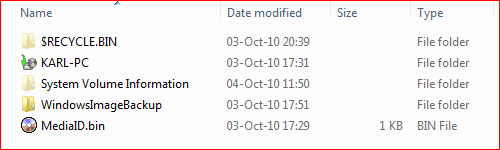
Here's a snip of what my backup drive shows.
contents of backup drive.PNG

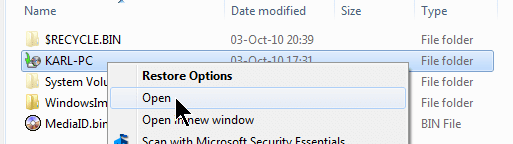
Now select the folder with the name of your computer and choose Open
Open folder with name of your computer.png
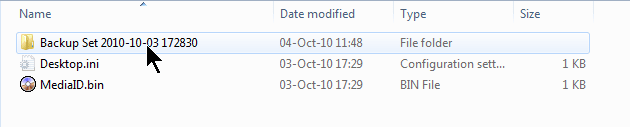
Rt-clk on the folder containing backups and choose Open
Folder of backups.png
You will see several backups listed.

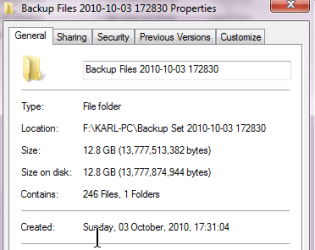
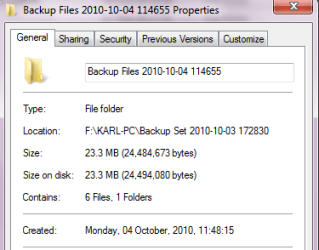
My next objective here is to indicate to you the Win 7 backup is incremental. I will show you you, via properties, the size of the first backup and then I will repeat the same sequence using the latest backup.
You will see there is a considerable size difference.
What you will do is rt-clk on a folder, and choose the properties item.
Here are the clips of my first and last.
oldest backup in set.png
Newest backup in set.png

That demonstrates the vast difference in the size of the backup of the folders and files on your computer.

Now we are going to look at the size of the image backup, a VHD file.

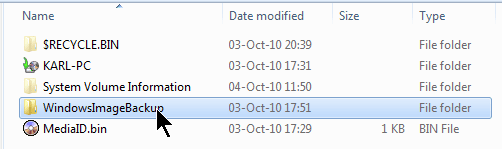
Using the Win explorer back arrow go back to that original display of folders on your backup drive. You will see a folder named WindowsImageBackup. Rt-clk, choose open.
selecting folder containg image file.png

You are going to see a folder with your computer name. Rt-clk, Open
Once again a folder with your computer name.png

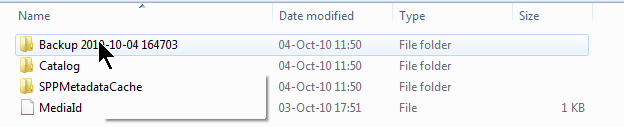
You are going to see a backup folder. Rt-clk, Open
Once again a backup folder.png

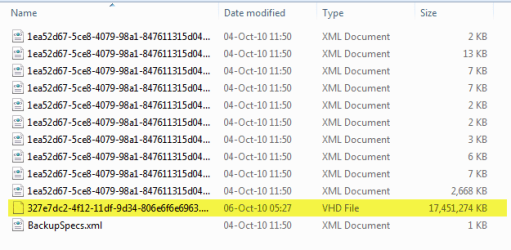
You will see a list of files, most contain info that restore operation uses, but
you will see one VHD file per partition you included in the sytem backup.
Notice the size of the image file.
The actual image file which you can mount in Disk Managment.png

This should help calm you worries about a rampart disk space chewer.

For a very excellent explanation of Win 7 Backup and Restore, I recommend Brink's tutorial:
Backup Complete Computer - Create an Image Backup

You may want to look at another piece of his handiwork:
Backup User and System Files - Delete Backups - Windows 7 Forums
 

My Computer

Computer Manufacturer/Model Number
Toshiba Satellite S875D-S7239 laptop
OS
MS Windows 7 Ultimate SP1 64-bit
CPU
AMD A10-4600M
Motherboard
AMD Pumori (Socket FT1)
Memory
6.00 GB Dual-Channel DDR3 @ 798MHz (11-11-12-28)
Graphics Card(s)
AMD Radeon HD 7660G
Sound Card
High Definition Audio Device
Monitor(s) Displays
Generic PnP Monitor (1600x900@60Hz)
Screen Resolution
1600x900@60Hz
Hard Drives
SSD 119GB Corsair CSSD-V128GB2 ATA Device
Keyboard
Standard PS/2 Keyboard
Mouse
HP Wireless Optical Mobile Mouse Model FHA-3410
Internet Speed
What the local pub, local coffee shop offers.
Other Info
Optical Drive:MATSHITA BD-CMB UJ160B ATA Device


Also have an Asus ha1002xp netbook with Win 7 Ultimate installed.
Thank you for such detailed responses.
I'm at work at present so will look into this tonight and report back.
Again, many thanks.
 

My Computer

Computer type
PC/Desktop
Computer Manufacturer/Model Number
Mesh XGS I7
OS
Windows 7 Professional 64 Bit
CPU
Intel® Core™ i7 860 Quad Core Processor (2.80GHz, 8MB Cache)
Motherboard
ASUS P7P55 LX Mainboard - Intel Core™ i5 / i7 - LGA 1156 / A
Memory
16GB 1600MHz Dual Channel DDR3 SDRAM, Corsair XMS3
Graphics Card(s)
1GB ATI Radeon HD5750
Sound Card
7.1 High Definition onboard sound card
Monitor(s) Displays
22" LG FULL HD Monitor
Screen Resolution
1920x1080
Hard Drives
2 x 1TB Serial ATA 2 Hard Drive with 32MB Buffer
PSU
550W
Case
XGS Gaming Chassis - Midi Tower
Cooling
Standard fans
Keyboard
Logitech Deluxe Keyboard
Mouse
Logitech MX620 Cordless mouse
Internet Speed
60 meg
Antivirus
MSE
Browser
IE11
Looking forward to hearing your questions.
 

My Computer

Computer Manufacturer/Model Number
Toshiba Satellite S875D-S7239 laptop
OS
MS Windows 7 Ultimate SP1 64-bit
CPU
AMD A10-4600M
Motherboard
AMD Pumori (Socket FT1)
Memory
6.00 GB Dual-Channel DDR3 @ 798MHz (11-11-12-28)
Graphics Card(s)
AMD Radeon HD 7660G
Sound Card
High Definition Audio Device
Monitor(s) Displays
Generic PnP Monitor (1600x900@60Hz)
Screen Resolution
1600x900@60Hz
Hard Drives
SSD 119GB Corsair CSSD-V128GB2 ATA Device
Keyboard
Standard PS/2 Keyboard
Mouse
HP Wireless Optical Mobile Mouse Model FHA-3410
Internet Speed
What the local pub, local coffee shop offers.
Other Info
Optical Drive:MATSHITA BD-CMB UJ160B ATA Device


Also have an Asus ha1002xp netbook with Win 7 Ultimate installed.
Hmm, Still struggle with the maths :D

OK, with the folder with my logon name, it shows two sets. 26/08/2010 (294 gig)and 03/10/2010 (193 gig).
Why two when I selected the option to only keep the latest backup ??

I then have the windows image folder, at 311 gig.

My total C drive usage is 334 gig.

So, how I see this is windows actually stores two backups !
One complete drive image, and another with personal files and folders.
As the bulk of my C drive usage is personal files, I guess thats why the user name folders are so large.

But if my assumption is correct, why does it need two backup types, effectivly doubling the required space needed on the target backup drive.
Does it re-do the drive image, or once taken its just safely stored ??

If I'm correct, my original worry still stands. I installed a 1TB drive to allow backup of the 1TB C drive.
If my usage of the C drive gets to say 500 GIG, the 1 TB available on the backup drive will no longer be enough ??

Looking like I may be needing a third party application to handle the backups.
 

My Computer

Computer type
PC/Desktop
Computer Manufacturer/Model Number
Mesh XGS I7
OS
Windows 7 Professional 64 Bit
CPU
Intel® Core™ i7 860 Quad Core Processor (2.80GHz, 8MB Cache)
Motherboard
ASUS P7P55 LX Mainboard - Intel Core™ i5 / i7 - LGA 1156 / A
Memory
16GB 1600MHz Dual Channel DDR3 SDRAM, Corsair XMS3
Graphics Card(s)
1GB ATI Radeon HD5750
Sound Card
7.1 High Definition onboard sound card
Monitor(s) Displays
22" LG FULL HD Monitor
Screen Resolution
1920x1080
Hard Drives
2 x 1TB Serial ATA 2 Hard Drive with 32MB Buffer
PSU
550W
Case
XGS Gaming Chassis - Midi Tower
Cooling
Standard fans
Keyboard
Logitech Deluxe Keyboard
Mouse
Logitech MX620 Cordless mouse
Internet Speed
60 meg
Antivirus
MSE
Browser
IE11
Andy,
If you investigate those two backups, you will find the first has zipped up about every folder and file. The 2nd backup will only have zipped up the files and folders you add/changed since the 1st backup.

Evidently you have some rather large files.

Futhermore, you have you system, your programs AND all of your data in one partition, C:

What the Win 7 Backup and Restore does, if you just go with the defaults, is generate a system image backup (the VHD file) AND zips up all of your folders and files. This approach is very powerful and flexible.

To reduce the size of your backups, you can:
1. create a new partition and put all of your libraries there OR
2. choose the custom backup option and only backup the folders of your choice. The system image will still be generated, but you will probably have far fewer folders being zipped OR
3. Use an approach which I personally use (except when generating examples for people who want to understand why the backups take so much space).

Approach 3 is: ONLY make a system image backup. With a system image you can always recover any individual folders/files by mounting the VHD file.

Since I use a notebook and a netbook and like to have all of my folders and files with me and to have both the notebook and the netbook in sync, then I use SyncToy to backup and to synchronize the data folders and files.

Approach 3 then gives me an image file which I make once every blue moon and allows me to have a fast backup and sync of folders/files between the two computer. I run synctoy about once a week.
 

My Computer

Computer Manufacturer/Model Number
Toshiba Satellite S875D-S7239 laptop
OS
MS Windows 7 Ultimate SP1 64-bit
CPU
AMD A10-4600M
Motherboard
AMD Pumori (Socket FT1)
Memory
6.00 GB Dual-Channel DDR3 @ 798MHz (11-11-12-28)
Graphics Card(s)
AMD Radeon HD 7660G
Sound Card
High Definition Audio Device
Monitor(s) Displays
Generic PnP Monitor (1600x900@60Hz)
Screen Resolution
1600x900@60Hz
Hard Drives
SSD 119GB Corsair CSSD-V128GB2 ATA Device
Keyboard
Standard PS/2 Keyboard
Mouse
HP Wireless Optical Mobile Mouse Model FHA-3410
Internet Speed
What the local pub, local coffee shop offers.
Other Info
Optical Drive:MATSHITA BD-CMB UJ160B ATA Device


Also have an Asus ha1002xp netbook with Win 7 Ultimate installed.
Thank you again for your time.

Option 3 seems the best idea.
My home network consists of 3 desktop's, 5 laptops, and a media player.
This is all served by 2 NAS drives.

I sort out the music, pictures, video and data folders on my C drive, then use Sync Toy to NAS 1, which is what the other pc's share.
I also Sync Toy to NAS 2, which I keep as a pure backup of my data.

So, in reality all I need Windows backup to do will be the system image.
Its just to save me having to install from scratch in the event of a drive failure or other such event.

I can see what your saying, its a comprehensive backup, but maybe more that what I actually need !

Thank you for taking the time to explain it so well.
 

My Computer

Computer type
PC/Desktop
Computer Manufacturer/Model Number
Mesh XGS I7
OS
Windows 7 Professional 64 Bit
CPU
Intel® Core™ i7 860 Quad Core Processor (2.80GHz, 8MB Cache)
Motherboard
ASUS P7P55 LX Mainboard - Intel Core™ i5 / i7 - LGA 1156 / A
Memory
16GB 1600MHz Dual Channel DDR3 SDRAM, Corsair XMS3
Graphics Card(s)
1GB ATI Radeon HD5750
Sound Card
7.1 High Definition onboard sound card
Monitor(s) Displays
22" LG FULL HD Monitor
Screen Resolution
1920x1080
Hard Drives
2 x 1TB Serial ATA 2 Hard Drive with 32MB Buffer
PSU
550W
Case
XGS Gaming Chassis - Midi Tower
Cooling
Standard fans
Keyboard
Logitech Deluxe Keyboard
Mouse
Logitech MX620 Cordless mouse
Internet Speed
60 meg
Antivirus
MSE
Browser
IE11
Karl, I would rep you again if I could.

The other method Karl mentions is worth considering even across a network:

Place your User files on another drive which acts as a data vault separate from OS/Programs partition: http://www.sevenforums.com/tutorials/18629-user-folders-change-default-location.html

This allows the OS/Programs partition image to be more compact and less urgent to back up than the latest data set easily backed up separately from its own drive.

In case Win7 becomes irreparable, it can be reimaged to it's partition in minutes while the data is all in place and waiting.
 
Karl, I would rep you again if I could.

The other method Karl mentions is worth considering even across a network:

Place your User files on another drive which acts as a data vault separate from OS/Programs partition: http://www.sevenforums.com/tutorials/18629-user-folders-change-default-location.html

This allows the OS/Programs partition image to be more compact and less urgent to back up than the latest data set easily backed up separately from its own drive.

In case Win7 becomes irreparable, it can be reimaged to it's partition in minutes while the data is all in place and waiting.

Thats how I used to work on my previous XP system.
With the new system I started with just the one drive / partition, so got stuck into that.
When I added the second 1TB drive, I split it into two 500 GIG partitions to do exactly that, with one half for data and one half for backup.
But, the backup failed reporting not enough disc space !

I guess i could delete the partition again on the second drive, split in half, copy data over 1st, then run the backup now I understand whats going on.

Or, I need to add a partition to my C drive, without loosing data or OS in the process, which makes me a little jumpy :)
 

My Computer

Computer type
PC/Desktop
Computer Manufacturer/Model Number
Mesh XGS I7
OS
Windows 7 Professional 64 Bit
CPU
Intel® Core™ i7 860 Quad Core Processor (2.80GHz, 8MB Cache)
Motherboard
ASUS P7P55 LX Mainboard - Intel Core™ i5 / i7 - LGA 1156 / A
Memory
16GB 1600MHz Dual Channel DDR3 SDRAM, Corsair XMS3
Graphics Card(s)
1GB ATI Radeon HD5750
Sound Card
7.1 High Definition onboard sound card
Monitor(s) Displays
22" LG FULL HD Monitor
Screen Resolution
1920x1080
Hard Drives
2 x 1TB Serial ATA 2 Hard Drive with 32MB Buffer
PSU
550W
Case
XGS Gaming Chassis - Midi Tower
Cooling
Standard fans
Keyboard
Logitech Deluxe Keyboard
Mouse
Logitech MX620 Cordless mouse
Internet Speed
60 meg
Antivirus
MSE
Browser
IE11
Windows 7 has what is called backup "periods" The first time you run a system settings and files backup, it will take a while because it's doing a "complete" backup. From then on, whenever you run backup, it will be incremental, meaning, it will only back up what has changed since the last backup. However, (Big caveat, here) Every once in a while, Windows 7 will do another "complete" backup. There's really no rhyme or reason to when this will happen but it's important to understand that each complete backup is called a backup "period". These backup periods are separate from backup "images" in that you can select to keep only the most recent backup image, not the most recent backup period. Your disk is getting full because of periods, not images.
 

My Computer

Computer Manufacturer/Model Number
Custom Build
OS
Windows 7 Pro/32 Academic. Build 7600
CPU
Intel 2.3 Duo core
Motherboard
EliteGroup G31T-M
Memory
4 GB DDR
Graphics Card(s)
Nvidia GeForce 9500 GT
Sound Card
Built in
Monitor(s) Displays
Viewsonic 15" 4:3
Screen Resolution
1280 x 1024
Hard Drives
WD Caviar Black 750 GB
WD 250 GB External
PSU
Antec 450w
Keyboard
Standard windows
Mouse
Logitech USB
Internet Speed
Bellsouth DSL 6.0
Actually, the periods are defined. I've forgotten the algorithm, simply because it so easy to leave it to Win 7. Everything gets done correctly.
 

My Computer

Computer Manufacturer/Model Number
Toshiba Satellite S875D-S7239 laptop
OS
MS Windows 7 Ultimate SP1 64-bit
CPU
AMD A10-4600M
Motherboard
AMD Pumori (Socket FT1)
Memory
6.00 GB Dual-Channel DDR3 @ 798MHz (11-11-12-28)
Graphics Card(s)
AMD Radeon HD 7660G
Sound Card
High Definition Audio Device
Monitor(s) Displays
Generic PnP Monitor (1600x900@60Hz)
Screen Resolution
1600x900@60Hz
Hard Drives
SSD 119GB Corsair CSSD-V128GB2 ATA Device
Keyboard
Standard PS/2 Keyboard
Mouse
HP Wireless Optical Mobile Mouse Model FHA-3410
Internet Speed
What the local pub, local coffee shop offers.
Other Info
Optical Drive:MATSHITA BD-CMB UJ160B ATA Device


Also have an Asus ha1002xp netbook with Win 7 Ultimate installed.
Or, I need to add a partition to my C drive, without loosing data or OS in the process, which makes me a little jumpy :)

In the long haul, repartitioning will be the ideal approach.

For your Win 7 files, your MS Office installation, everything in your program files and program data, you can't ever use 100 GB. My C is 50 GB with 23.5 GB free. And I've got several other MS packages loaded besides a pile of appps.

Wrapped up--you will need a very ultimate max of 100 GB. Here I'm allowing for all kinds of weird monstrous programs being installed.

If later you become interested in this option, let us know. The procedure is easy, using the right tools and the right knowledge. And, as a side line, Greg Rocker is a pro at this kind of operation.
 

My Computer

Computer Manufacturer/Model Number
Toshiba Satellite S875D-S7239 laptop
OS
MS Windows 7 Ultimate SP1 64-bit
CPU
AMD A10-4600M
Motherboard
AMD Pumori (Socket FT1)
Memory
6.00 GB Dual-Channel DDR3 @ 798MHz (11-11-12-28)
Graphics Card(s)
AMD Radeon HD 7660G
Sound Card
High Definition Audio Device
Monitor(s) Displays
Generic PnP Monitor (1600x900@60Hz)
Screen Resolution
1600x900@60Hz
Hard Drives
SSD 119GB Corsair CSSD-V128GB2 ATA Device
Keyboard
Standard PS/2 Keyboard
Mouse
HP Wireless Optical Mobile Mouse Model FHA-3410
Internet Speed
What the local pub, local coffee shop offers.
Other Info
Optical Drive:MATSHITA BD-CMB UJ160B ATA Device


Also have an Asus ha1002xp netbook with Win 7 Ultimate installed.
Windows 7 has what is called backup "periods" The first time you run a system settings and files backup, it will take a while because it's doing a "complete" backup. From then on, whenever you run backup, it will be incremental, meaning, it will only back up what has changed since the last backup. However, (Big caveat, here) Every once in a while, Windows 7 will do another "complete" backup. There's really no rhyme or reason to when this will happen but it's important to understand that each complete backup is called a backup "period". These backup periods are separate from backup "images" in that you can select to keep only the most recent backup image, not the most recent backup period. Your disk is getting full because of periods, not images.
Yes as most people will see for themselves multiple backups (zips not vhd images) will eventually get made. Clearly the algorithm MS uses isn't a random number generator but it could be more transparent (off hand I don't know what it is) . Of course it's easy with "backup and restore" to go in and delete old backup data sets.
Well before you get to the size of the OPs personal files/folders you need in my opinion a different backup strategy (including images of course). I manage my photo image library separately. It may be that large data sets could be stored on their own partition and imaged regularly. I believe some imaging software will allow differential imaging. Also, images can be mounted and files extracted.
 

My Computer

Computer type
PC/Desktop
Computer Manufacturer/Model Number
Own build
OS
Windows 7x64 Home Premium SP1
CPU
Intel i7 2600k
Motherboard
ASUS P8Z68 Deluxe
Memory
G.Skill Ripjaws (DDR3-1600) 2x4GB
Graphics Card(s)
Nvidia GeForce GTS 450; Intel HD Graphics 3000(GT2+)
Monitor(s) Displays
Dell Ultrasharp IPS panel U2311H, Samsung SyncMaster P2350
Screen Resolution
1920x1080
Hard Drives
Samsung 850 Pro SSD 256GB, Samsung SSD 840 120GB, Seagates 1TB Barracuda ST31000528AS x2
PSU
Seasonic M12II 520W
Case
Lian Li Lancool PC-K60
Cooling
Case: 1x120mm, 3x140mm CPU: Hyper 212+
Keyboard
Logitech MK520 (wireless)
Mouse
Logitech MK520
Internet Speed
6-7 Mbps
Antivirus
Norton Security Premium, Malwarebytes on 2 (MSE on 3rd PC)
Browser
FireFox
Other Info
Audio: Logitech Z523 2.1

My Computer

Computer Manufacturer/Model Number
Toshiba Satellite S875D-S7239 laptop
OS
MS Windows 7 Ultimate SP1 64-bit
CPU
AMD A10-4600M
Motherboard
AMD Pumori (Socket FT1)
Memory
6.00 GB Dual-Channel DDR3 @ 798MHz (11-11-12-28)
Graphics Card(s)
AMD Radeon HD 7660G
Sound Card
High Definition Audio Device
Monitor(s) Displays
Generic PnP Monitor (1600x900@60Hz)
Screen Resolution
1600x900@60Hz
Hard Drives
SSD 119GB Corsair CSSD-V128GB2 ATA Device
Keyboard
Standard PS/2 Keyboard
Mouse
HP Wireless Optical Mobile Mouse Model FHA-3410
Internet Speed
What the local pub, local coffee shop offers.
Other Info
Optical Drive:MATSHITA BD-CMB UJ160B ATA Device


Also have an Asus ha1002xp netbook with Win 7 Ultimate installed.
Back
Top