

I took out my GPU to do some maintenance cleaning and when I put it back in, the computer wouldn't boot past the motherboard's welcome screen. So I took it out and put it back in again and now it shows this:
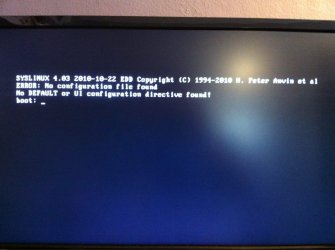
I'm guessing the CMOS needs a reset, but I am not sure :c
Any ideas?
I'm guessing the CMOS needs a reset, but I am not sure :c
Any ideas?
My Computer
- Computer Manufacturer/Model Number
- Home Built
- OS
- Windows 7 Ultimate x64 / Windows 8 Pro x64
- CPU
- Intel i7-3770k
- Motherboard
- Asus Sabertooth Z77
- Memory
- 4x4GB 1600mhz
- Graphics Card(s)
- EVGA SuperClocked+ GeForce GTX 660 Ti 3GB 192-bit
- Sound Card
- Integrated Realtek ALC892
- Monitor(s) Displays
- x2 Asus VW-246H 24" LCD
- Screen Resolution
- 1920x1080
- Hard Drives
- SanDisk Extreme 256GB SSD; 1TB External Seagate HDD
- PSU
- Corsair HX750
- Case
- Corsair Obsidian 650D
- Cooling
- Thermaltake Water 2.0 Extreme Water Cooling
- Keyboard
- Logitech K750 Black Wireless solar-powered
- Mouse
- Logitech M705 Wireless Laser Marathon