Solved Configuring Dual boot on Windows 7 using BCDedit

DannyNUFC

New member
Local time
1:02 PM
Messages
3
Hi everyone hopefully one of you can help!

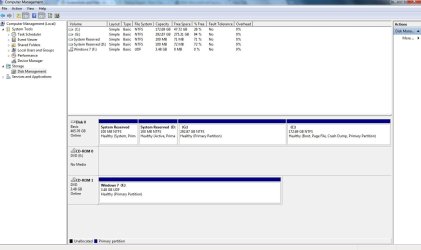
I had 2 Windows 7 installations on a single hardrive spilt into two partitions, one for work and one for family etc. The primary partition i.e the one with the most disk space became corrupt and I decided to format that and reinstall Windows 7 onto it. Now I'm having some trouble configuring the boot menu to display both o/s on start up. The computer will boot into the existing smaller partition automatically and I thought it would just be a case of downloading EasyBCD and configure dual boot. However this doesn't seem to work. Here are some Screen shots of bcdedit.exe from cmd prompt and Disk Management.


I also noticed the boot manager has D: drive as device id?? :confused: Not sure if that has any relevance.

Does any one know how I could resolve this?

Any help would be much appreciated. :)
 

My Computer

OS
Windows 7 Ultimate x64
Hello DannyNUFC, welcome to Seven Forums!


We can help but the snip you posted doesn't show what we need to see, will you please post a snip of just Windows disk management using the method listed below and make it as 'max' as you can, describing which OS is on which partition?

   Information

In the Windows start menu right click computer and click manage, in the left pane of the "Computer Management" window that opens click disk management and post a snip of that.

How to Upload and Post a Screenshot and File in Seven Forums


My Computer

Computer Manufacturer/Model Number
* BFK Customs *
OS
W 7 64-bit Ultimate
CPU
Intel Q9550 Yorkfield
Motherboard
ASUS P5Q Pro
Memory
8GB Dominator 8500C5D
Graphics Card(s)
ATI : XFX 5870
Sound Card
Realtek HD Audio 7-1
Monitor(s) Displays
1x 47" LCD HDMI & 3x 26" LCD HDMI
Screen Resolution
1920x1080P & 1920x1200
Hard Drives
1x 80GB Intel X25-M G2 SSD : 1x 500GB & 1x 640GB WD Caviar Black(s)
PSU
Corsair 620HX
Case
Cooler Master RC-690
Cooling
Tuniq Tower 120, 2x 140mm and 3x 120mm case fans
Keyboard
Microsoft 500
Mouse
Razer Diamondback 3G
Internet Speed
14 Mb/s
Other Info
1x Koutech 3Gb/s SATA HDD Hot Swap Rack
Thanks for the quick response.

I have Windows 7 x64 on both
 

Attachments

  • Untitled.jpg
    Untitled.jpg
    80.5 KB · Views: 198

My Computer

OS
Windows 7 Ultimate x64
OK, here's what I would do; mark the first "System Reserved" the one with no drive letter as "Active" then run the 3 separate startup repairs outlined in this tutorial at the link below to create a new set of boot files to that partition and that should automatically configure the Windows managed dual boot option; be sure to post back with any further questions you may have and to keep us informed.


Startup Repair - Run 3 Separate Times
 

My Computer

Computer Manufacturer/Model Number
* BFK Customs *
OS
W 7 64-bit Ultimate
CPU
Intel Q9550 Yorkfield
Motherboard
ASUS P5Q Pro
Memory
8GB Dominator 8500C5D
Graphics Card(s)
ATI : XFX 5870
Sound Card
Realtek HD Audio 7-1
Monitor(s) Displays
1x 47" LCD HDMI & 3x 26" LCD HDMI
Screen Resolution
1920x1080P & 1920x1200
Hard Drives
1x 80GB Intel X25-M G2 SSD : 1x 500GB & 1x 640GB WD Caviar Black(s)
PSU
Corsair 620HX
Case
Cooler Master RC-690
Cooling
Tuniq Tower 120, 2x 140mm and 3x 120mm case fans
Keyboard
Microsoft 500
Mouse
Razer Diamondback 3G
Internet Speed
14 Mb/s
Other Info
1x Koutech 3Gb/s SATA HDD Hot Swap Rack
That worked great! thanks alot for taking the time to help me out. Really appreciate it!
 

My Computer

OS
Windows 7 Ultimate x64
I'm glad I could help!

The next thing I would do is to wipe the second "System Reserved D:" using the installed Partition Wizard program and then that space can then be easily recovered into the first SysResv partition using Windows disk management; have a look at the second link below at Option Three for an outline of the wipe (secure erase) process.

That will free up the option of creating another Primary partition for use.


Partition Wizard Home Edition

Partition Wizard : Use the Bootable CD


I don't believe I've ever seen 2 separate SysResv partitions on a single HDD before, do you have any idea how it got that way?
 

My Computer

Computer Manufacturer/Model Number
* BFK Customs *
OS
W 7 64-bit Ultimate
CPU
Intel Q9550 Yorkfield
Motherboard
ASUS P5Q Pro
Memory
8GB Dominator 8500C5D
Graphics Card(s)
ATI : XFX 5870
Sound Card
Realtek HD Audio 7-1
Monitor(s) Displays
1x 47" LCD HDMI & 3x 26" LCD HDMI
Screen Resolution
1920x1080P & 1920x1200
Hard Drives
1x 80GB Intel X25-M G2 SSD : 1x 500GB & 1x 640GB WD Caviar Black(s)
PSU
Corsair 620HX
Case
Cooler Master RC-690
Cooling
Tuniq Tower 120, 2x 140mm and 3x 120mm case fans
Keyboard
Microsoft 500
Mouse
Razer Diamondback 3G
Internet Speed
14 Mb/s
Other Info
1x Koutech 3Gb/s SATA HDD Hot Swap Rack
Back
Top