Configuring Windows 7

crimson

New member
Power User
VIP
Local time
12:43 PM
Messages
178
Is there any good instructions for configuring W7? Like getting rid of unneccessary features that run in the background such as Windows Firewall or whatever. That way, the OS can use minimum resources.
 

My Computer

OS
Windows 7 Retail
Hello crimson

There are tweaks and hacks available if you search for them but many here, me included would suggest Windows 7 is set up as lean and efficient as it is out of the box so to speak. There's no real need to mess around with the OS and chances are you will do more harm than good in the long term. Often disabling services etc leads to more problems down the line than it does in gaining you any performance.

Just my thoughts
Danny
 

My Computer

Computer Manufacturer/Model Number
acer aspire 5935g
OS
Windows 7 Home Premium x64 SP1
CPU
intel(R)core(TM)2 duo CPU T6600 @ 2.20GHz
Motherboard
intel gm45/gm47 revision 07
Memory
3 gb ddr3
Graphics Card(s)
ati radeon hd4570/512mb
Monitor(s) Displays
lop156wh2-tle1 15.3 flat
Screen Resolution
1366x768
Hard Drives
OCZ-Agility3 60gig ssd
320gig external hdd
500gig external hdd
Mouse
Optical
Internet Speed
30Mbps Down/30Mbps Up
Hi crimson, I agree with Danny. Win7 tends to run slowly after its installed, but gets faster all by its self the more its used.
 

My Computer

Computer Manufacturer/Model Number
Look in my Signature.
OS
Win7 H.Prem. 32bit+SP1
Isn't it bloated? Like large on the hard drive, and use alot of resources? Ubuntu is less than 1GB I think with system requirements of 5GB. And minimum system requirements for W7 is 20GB.

Does anybody know why so much is needed for an OS? Shouldn't an OS use much less disk space, so the rest can be used for software?
 

My Computer

OS
Windows 7 Retail
Pass ????
 

My Computer

Computer Manufacturer/Model Number
Look in my Signature.
OS
Win7 H.Prem. 32bit+SP1
Huh?
 

My Computer

OS
Windows 7 Retail

My Computer

Computer type
PC/Desktop
Computer Manufacturer/Model Number
Alienware Aurora ALX R4
OS
Windows 10 Pro (x64)
CPU
Intel Core i7-3930K (3.2GHz - 4.5GHz)
Motherboard
Alienware Aurora-R4 x79
Memory
4x Samsung 4GB PC3-12800 DDR3 (16GB 1600MHz)
Graphics Card(s)
Nvidia Geforce GTX 690
Sound Card
SteelSeries Siberia Elite
Monitor(s) Displays
Dell UltraSharp U3011
Screen Resolution
2560x1600
Hard Drives
Samsung 850 Pro 256 GB, Seagate 1TB Desktop Hybrid HDD, 2x Western Digital 4TB Green HDD
PSU
875W Some Dell PSU <.<
Case
Alienware Aurora ALX
Cooling
Custom Liquid Cooling (EK CPU & GPU blocks) dual EK 480RAD
Keyboard
Logitech G710+ Mechanical
Mouse
Logitech G700s
Internet Speed
Verizon Fios (50 mbps average)
Other Info
Server: Intel NUC D54250WYK: i5-4250U, 16GB, 256 GB mSATA, Windows Server 2012 R2
Generally speaking, Windows 7 runs fast and efficient as is. turning off services, and uninstalling things can often just lead to slower overall system performance.

As far as being bloated, I don't think so. Besides, hard drive space is quite cheap. If you want to reduce the amount of disk space used, my best advice is to install 4-8GB of RAM, turn off the pagefile and eliminate the hibernate file (powercfg -h 0ff).

Linux distros are often smaller, no doubt about it. And they cost a lot less as well. If you are comfortable with branching out and trying something new, by all means give it a shot. If I recall correctly, Ubuntu takes about 4.5GB of space, while Windows is going to consume about 8GB.

 

My Computer

Computer Manufacturer/Model Number
Self-Built in July 2009
OS
Windows 7 Ultimate x64
CPU
Intel Q9550 2.83Ghz OC'd to 3.40Ghz
Motherboard
Gigabyte GA-EP45-UD3R rev. 1.1, F12 BIOS
Memory
8GB G.Skill PI DDR2-800, 4-4-4-12 timings
Graphics Card(s)
EVGA 1280MB Nvidia GeForce GTX570
Sound Card
Realtek ALC899A 8 channel onboard audio
Monitor(s) Displays
23" Acer x233H
Screen Resolution
1920x1080
Hard Drives
Intel X25-M 80GB Gen 2 SSD
Western Digital 1TB Caviar Black, 32MB cache. WD1001FALS
PSU
Corsair 620HX modular
Case
Antec P182
Cooling
stock
Keyboard
ABS M1 Mechanical
Mouse
Logitech G9 Laser Mouse
Internet Speed
15/2 cable modem
Other Info
Windows and Linux enthusiast. Logitech G35 Headset.
Ubuntu 11.04 takes about 4GB straight out of the box. I have just installed it in VMWare Player today and that is the disk usage ATM.
 

My Computer

Computer type
Laptop
Computer Manufacturer/Model Number
Hewlett-Packard/G62-107SA Notebook
OS
Microsoft Windows 7 Home Premium 64-bit Service Pack 1
CPU
Intel(R) Core(TM) i3 CPU M 330 @ 2.13GHz
Motherboard
Hewlett-Packard 1425
Memory
8 GB DDR3
Graphics Card(s)
Intel(R) HD Graphics
Sound Card
Realtek High Definition Audio
Monitor(s) Displays
Builtin
Screen Resolution
1366 x 768 x 32 bits (4294967296 colors) @ 60 Hz
Hard Drives
250 GB SATA Hard Disk Drive 7200 rpm
2TB Seagate GoFlex USB 2 Drive
1TB Iomega Prestige USB 2 Drive
1.5TB Iomega Prestige USB 2 Drive (Samsung)
2TB WD MyBook Live NAS.
Mouse
Logitech Anywhere MX
Internet Speed
152 Mbs download 10 Mbs upload
Antivirus
Norton 360
Browser
Chrome
If I recall correctly, Ubuntu takes about 4.5GB of space, while Windows is going to consume about 8GB.

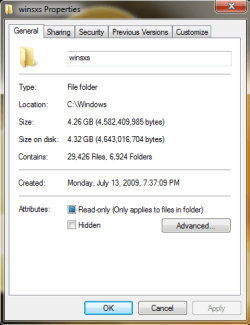
Well under 5 GB for Windows 7, SP1 and all current updates for the 32-bit version. The 64-bit version would be a little more, probably close to 8 GB. You would see about the same increase on the 64-bit version of Ubuntu. See screenshot. (The winsxs folder is Windows, it contains every DLL and application that is part of the installation.)
 

Attachments

  • winsxs.png
    winsxs.png
    49.5 KB · Views: 4

My Computer

Computer type
PC/Desktop
Computer Manufacturer/Model Number
Alienware Aurora ALX R4
OS
Windows 10 Pro (x64)
CPU
Intel Core i7-3930K (3.2GHz - 4.5GHz)
Motherboard
Alienware Aurora-R4 x79
Memory
4x Samsung 4GB PC3-12800 DDR3 (16GB 1600MHz)
Graphics Card(s)
Nvidia Geforce GTX 690
Sound Card
SteelSeries Siberia Elite
Monitor(s) Displays
Dell UltraSharp U3011
Screen Resolution
2560x1600
Hard Drives
Samsung 850 Pro 256 GB, Seagate 1TB Desktop Hybrid HDD, 2x Western Digital 4TB Green HDD
PSU
875W Some Dell PSU <.<
Case
Alienware Aurora ALX
Cooling
Custom Liquid Cooling (EK CPU & GPU blocks) dual EK 480RAD
Keyboard
Logitech G710+ Mechanical
Mouse
Logitech G700s
Internet Speed
Verizon Fios (50 mbps average)
Other Info
Server: Intel NUC D54250WYK: i5-4250U, 16GB, 256 GB mSATA, Windows Server 2012 R2
Isn't it bloated?
No.
Like large on the hard drive
No.
and use alot of resources
No.

Ubuntu is less than 1GB
Um...Ubuntu is not less then 1 GB, where did you even get that? Windows 7 takes up less then 8 GBs of space. Harly bloated, and no Ubuntu is not 1 GB, its around the same under 8 GB.

Let me guess, you are a troll?

I would not make assumptions just so early.

Is the Windows 7 one Pre-installed on a laptop? Then you may get some additional software installed by the OEM Manufacturer

However if it is a Retail edition then the simple answer is No

Why is Windows 7 bigger than Linux Distros? Well Windows is quite a sophisticated OS but I can only say it is :(

Josh
 

My Computer

Computer type
PC/Desktop
Computer Manufacturer/Model Number
Custom Built
OS
Windows 7 Professional x64 SP1 ; Windows Server 2012 R2 Standard
CPU
Intel Core i5 2400 @ 3.10GHz
Motherboard
Foxconn H67MP-S/-V/H67MP
Memory
8.0GB DDR3 @ 665MHz (2GBx4)
Graphics Card(s)
AMD Radeon HD 6870
Sound Card
Realtek High Definition Audio
Monitor(s) Displays
AOC 2243W & SMB1930NW
Screen Resolution
1440x900 & 1920x1080
Hard Drives
977GB Seagate ST31000524AS ATA Drive (SATA)
250GB WD iSCSI attached Drive
PSU
750W Gaming PSU
Case
Novatech Night
Cooling
Fan
Keyboard
Dell Standard PS/2 Keyboard
Mouse
R.A.T 07 Gaming Mouse
Internet Speed
Download: 10 Mbps Ping: 30ms Upload: 0.81 Mbps
Browser
Google Chrome
Other Info
Optiarc DVD RW AD-5260S ATA Device
Well under 5 GB for Windows 7, SP1 and all current updates for the 32-bit version. The 64-bit version would be a little more, probably close to 8 GB. You would see about the same increase on the 64-bit version of Ubuntu. See screenshot.
Also, I don't just look at what the C:\Windows uses..I look at the entire amount of disk space consumed on the entire hard drive after the OS is installed. Stuff in C:\Program Files and such count as well as far as I am concerned. And I'm talking about the 64bit version as well, that's really the only version that I have used with Windows 7.


Why is Windows 7 bigger than Linux Distros? Well Windows is quite a sophisticated OS but I can only say it is :(

Josh
Said like that, it makes it sound like Windows is more sophisticated and thus larger in size. That's not right. There are Linux distros out there which only consume 50MB of space (Damn Small Linux). You can run an enterprise Linux distro like Red Hat Enterprise Linux/CentOS 6 with a minimal install and it takes around 850MB of disk space. It's quite functional and sophisticated, but will lack features many might want..for example...like a graphical user interface.

Windows is what it is, and it's going to take 5-15GB of hard drive space once installed. These days, that's pretty cheap....even from an SSD standpoint. I remember that first "large" capacity hard drive I personally purchased and that was a 730MB Western Digital and that was nearly $400.
 

My Computer

Computer Manufacturer/Model Number
Self-Built in July 2009
OS
Windows 7 Ultimate x64
CPU
Intel Q9550 2.83Ghz OC'd to 3.40Ghz
Motherboard
Gigabyte GA-EP45-UD3R rev. 1.1, F12 BIOS
Memory
8GB G.Skill PI DDR2-800, 4-4-4-12 timings
Graphics Card(s)
EVGA 1280MB Nvidia GeForce GTX570
Sound Card
Realtek ALC899A 8 channel onboard audio
Monitor(s) Displays
23" Acer x233H
Screen Resolution
1920x1080
Hard Drives
Intel X25-M 80GB Gen 2 SSD
Western Digital 1TB Caviar Black, 32MB cache. WD1001FALS
PSU
Corsair 620HX modular
Case
Antec P182
Cooling
stock
Keyboard
ABS M1 Mechanical
Mouse
Logitech G9 Laser Mouse
Internet Speed
15/2 cable modem
Other Info
Windows and Linux enthusiast. Logitech G35 Headset.
Is the Windows 7 one Pre-installed on a laptop? Then you may get some additional software installed by the OEM Manufacturer

Which is not Windows. But third-party middleware.
 

My Computer

Computer type
PC/Desktop
Computer Manufacturer/Model Number
Alienware Aurora ALX R4
OS
Windows 10 Pro (x64)
CPU
Intel Core i7-3930K (3.2GHz - 4.5GHz)
Motherboard
Alienware Aurora-R4 x79
Memory
4x Samsung 4GB PC3-12800 DDR3 (16GB 1600MHz)
Graphics Card(s)
Nvidia Geforce GTX 690
Sound Card
SteelSeries Siberia Elite
Monitor(s) Displays
Dell UltraSharp U3011
Screen Resolution
2560x1600
Hard Drives
Samsung 850 Pro 256 GB, Seagate 1TB Desktop Hybrid HDD, 2x Western Digital 4TB Green HDD
PSU
875W Some Dell PSU <.<
Case
Alienware Aurora ALX
Cooling
Custom Liquid Cooling (EK CPU & GPU blocks) dual EK 480RAD
Keyboard
Logitech G710+ Mechanical
Mouse
Logitech G700s
Internet Speed
Verizon Fios (50 mbps average)
Other Info
Server: Intel NUC D54250WYK: i5-4250U, 16GB, 256 GB mSATA, Windows Server 2012 R2
Also, I don't just look at what the C:\Windows uses..I look at the entire amount of disk space consumed on the entire hard drive after the OS is installed. Stuff in C:\Program Files and such count as well as far as I am concerned. And I'm talking about the 64bit version as well, that's really the only version that I have used with Windows 7.

Almost everything in Program Files and such, are all hardlinked out of WinSxS. Very few items are not hardlinked on a fresh installation of Windows 7. To get an accurate listing you need to remove all the hardlinks except for the last reference. However, just by looking you can see everything in Program Files is pretty much hardlinked.
 

My Computer

Computer type
PC/Desktop
Computer Manufacturer/Model Number
Alienware Aurora ALX R4
OS
Windows 10 Pro (x64)
CPU
Intel Core i7-3930K (3.2GHz - 4.5GHz)
Motherboard
Alienware Aurora-R4 x79
Memory
4x Samsung 4GB PC3-12800 DDR3 (16GB 1600MHz)
Graphics Card(s)
Nvidia Geforce GTX 690
Sound Card
SteelSeries Siberia Elite
Monitor(s) Displays
Dell UltraSharp U3011
Screen Resolution
2560x1600
Hard Drives
Samsung 850 Pro 256 GB, Seagate 1TB Desktop Hybrid HDD, 2x Western Digital 4TB Green HDD
PSU
875W Some Dell PSU <.<
Case
Alienware Aurora ALX
Cooling
Custom Liquid Cooling (EK CPU & GPU blocks) dual EK 480RAD
Keyboard
Logitech G710+ Mechanical
Mouse
Logitech G700s
Internet Speed
Verizon Fios (50 mbps average)
Other Info
Server: Intel NUC D54250WYK: i5-4250U, 16GB, 256 GB mSATA, Windows Server 2012 R2
I understand however the OP may have gotten confused with Windows 7 and the Third Party software and since it may have been there at the first start-up it could be easily seen as part of windows to people who aren't as computer literate as some others
 

My Computer

Computer type
PC/Desktop
Computer Manufacturer/Model Number
Custom Built
OS
Windows 7 Professional x64 SP1 ; Windows Server 2012 R2 Standard
CPU
Intel Core i5 2400 @ 3.10GHz
Motherboard
Foxconn H67MP-S/-V/H67MP
Memory
8.0GB DDR3 @ 665MHz (2GBx4)
Graphics Card(s)
AMD Radeon HD 6870
Sound Card
Realtek High Definition Audio
Monitor(s) Displays
AOC 2243W & SMB1930NW
Screen Resolution
1440x900 & 1920x1080
Hard Drives
977GB Seagate ST31000524AS ATA Drive (SATA)
250GB WD iSCSI attached Drive
PSU
750W Gaming PSU
Case
Novatech Night
Cooling
Fan
Keyboard
Dell Standard PS/2 Keyboard
Mouse
R.A.T 07 Gaming Mouse
Internet Speed
Download: 10 Mbps Ping: 30ms Upload: 0.81 Mbps
Browser
Google Chrome
Other Info
Optiarc DVD RW AD-5260S ATA Device
I understand however the OP may have gotten confused with Windows 7 and the Third Party software and since it may have been there at the first start-up it could be easily seen as part of windows to people who aren't as computer literate as some others

Oh...well I guess me accusing the OP of being a troll is worst then accusing the OP of being computer illiterate. :sarc: Just saying.
 

My Computer

Computer type
PC/Desktop
Computer Manufacturer/Model Number
Alienware Aurora ALX R4
OS
Windows 10 Pro (x64)
CPU
Intel Core i7-3930K (3.2GHz - 4.5GHz)
Motherboard
Alienware Aurora-R4 x79
Memory
4x Samsung 4GB PC3-12800 DDR3 (16GB 1600MHz)
Graphics Card(s)
Nvidia Geforce GTX 690
Sound Card
SteelSeries Siberia Elite
Monitor(s) Displays
Dell UltraSharp U3011
Screen Resolution
2560x1600
Hard Drives
Samsung 850 Pro 256 GB, Seagate 1TB Desktop Hybrid HDD, 2x Western Digital 4TB Green HDD
PSU
875W Some Dell PSU <.<
Case
Alienware Aurora ALX
Cooling
Custom Liquid Cooling (EK CPU & GPU blocks) dual EK 480RAD
Keyboard
Logitech G710+ Mechanical
Mouse
Logitech G700s
Internet Speed
Verizon Fios (50 mbps average)
Other Info
Server: Intel NUC D54250WYK: i5-4250U, 16GB, 256 GB mSATA, Windows Server 2012 R2
I use Linux on a ton of machines and for a bunch of reasons, but the amount of disk space consumed after the OS is installed is NOT one of them.
 

My Computer

Computer Manufacturer/Model Number
Self-Built in July 2009
OS
Windows 7 Ultimate x64
CPU
Intel Q9550 2.83Ghz OC'd to 3.40Ghz
Motherboard
Gigabyte GA-EP45-UD3R rev. 1.1, F12 BIOS
Memory
8GB G.Skill PI DDR2-800, 4-4-4-12 timings
Graphics Card(s)
EVGA 1280MB Nvidia GeForce GTX570
Sound Card
Realtek ALC899A 8 channel onboard audio
Monitor(s) Displays
23" Acer x233H
Screen Resolution
1920x1080
Hard Drives
Intel X25-M 80GB Gen 2 SSD
Western Digital 1TB Caviar Black, 32MB cache. WD1001FALS
PSU
Corsair 620HX modular
Case
Antec P182
Cooling
stock
Keyboard
ABS M1 Mechanical
Mouse
Logitech G9 Laser Mouse
Internet Speed
15/2 cable modem
Other Info
Windows and Linux enthusiast. Logitech G35 Headset.
I didn't refer to the OP being Computer illiterate in the above post :confused:
 

My Computer

Computer type
PC/Desktop
Computer Manufacturer/Model Number
Custom Built
OS
Windows 7 Professional x64 SP1 ; Windows Server 2012 R2 Standard
CPU
Intel Core i5 2400 @ 3.10GHz
Motherboard
Foxconn H67MP-S/-V/H67MP
Memory
8.0GB DDR3 @ 665MHz (2GBx4)
Graphics Card(s)
AMD Radeon HD 6870
Sound Card
Realtek High Definition Audio
Monitor(s) Displays
AOC 2243W & SMB1930NW
Screen Resolution
1440x900 & 1920x1080
Hard Drives
977GB Seagate ST31000524AS ATA Drive (SATA)
250GB WD iSCSI attached Drive
PSU
750W Gaming PSU
Case
Novatech Night
Cooling
Fan
Keyboard
Dell Standard PS/2 Keyboard
Mouse
R.A.T 07 Gaming Mouse
Internet Speed
Download: 10 Mbps Ping: 30ms Upload: 0.81 Mbps
Browser
Google Chrome
Other Info
Optiarc DVD RW AD-5260S ATA Device
I use 64-bit. It's not just about hard drive space. It's also use of resources. Why does it require so much space? It doesn't use alot of system resources? Then why does it have firewall/security stuff? I could get that from a third party. Shouldn't the MS security features be disabled because it's pointless to have 2 security softwares running at the same time. I'm going to keep automatic updates on. But I plan to use a firewall that will block anything from coming in as well as anything from going out.

This isn't about Windows + 3rd party software. This is about Windows 7.


Let me guess, you are a troll?
No that's what you are considering your obnoxious and inappropriate behavior.
 

My Computer

OS
Windows 7 Retail
Very shortly after I got my new laptop, I made my recovery disks and began uninstalling all the bloatware that came packaged with the machine. Was careful not to touch the MS stuff, and I've been quite impressed with Windows so far. This is all the Microsoft's credit as my previous OS was/is Ubuntu.
 

My Computer

Computer type
Laptop
Computer Manufacturer/Model Number
HP 355 G2 laptop
OS
windows 7 professional 64-bit
CPU
AMD A8-6410
Memory
4 G
Hard Drives
320 gig 7200 RPM
Other Info
Wireless adapter: Atheros AR9285 802.11 b/g/n
Back
Top