
Solved Configuring Windows Endless After Reboot

Hikertrash

New member
This was yesterday.

I had been doing a lot of work when I noticed the laptop lagging, so I finished up and planned on rebooting after CCleaner. CCleaner needed a update, did that and went to restart. Background programs stalled that, canceled, closed explorer, went to reboot. Another undescribed background program stalled again, forced reboot. As it was rebooting said something about Windows updates, do not shut off. After 10 minutes with no progress I hit the power button, shut down and restarted in safe mode.

Tried system restore. Same Window updating, do not shut off. Same no progress whatsoever.

I hit the power button again, restarted and went looking for my Windows reinstall CD.

Miraculously, windows starts, a little slow, windows checking for problems. I get online, things seemed fine, windows still checking for problems. tells me to back up! Says nothing about system restore.

Here's the message and possible problem, which i think is related to a WD external drive, I can't recall attaching recently.

Driver software installation
Problem: Could not install driver software
Files that help describe the problem:
DMI9556.tmp.log.xml
xmlprn.inf setupapi.app.log
View a temporary copy of these files

Warning: If a virus or other security threat caused the problem, opening a copy of the files could harm your computer.

The laptop ran fine all day long, but tonight I uninstalled a program that came with my Canon camera that was also mentioned in the action center. I needed to reboot after uninstall and had the same problems as above. No message about system restore, Canon programs are gone and Windows update shows all the latest updates.

I've made Windows 7 repair disk. Think I should try it?
 

Attachments
  • Capture.JPG
    Capture.JPG
    113.1 KB · Views: 8

My Computer

Computer type
PC/Desktop
Computer Manufacturer/Model Number
Dell Vostro 3558 (Laptop)
OS
Windows 7 Professional 64bit
Motherboard
Dell
Memory
8GB
Graphics Card(s)
Intel HD Graphics, NVIDIA GeForce
Screen Resolution
1366 x 768
Antivirus
Avira Free, MalwareBytes AntiMalware Pro
Browser
Chrome
I'm think this may be the problem. Would it be safe to uninstall? Odd, doesn't show in installed updates.
 

Attachments

  • Capture1.JPG
    Capture1.JPG
    50.5 KB · Views: 21

My Computer

Computer type
PC/Desktop
Computer Manufacturer/Model Number
Dell Vostro 3558 (Laptop)
OS
Windows 7 Professional 64bit
Motherboard
Dell
Memory
8GB
Graphics Card(s)
Intel HD Graphics, NVIDIA GeForce
Screen Resolution
1366 x 768
Antivirus
Avira Free, MalwareBytes AntiMalware Pro
Browser
Chrome

My Computer

Computer type
PC/Desktop
Computer Manufacturer/Model Number
Dell Vostro 3558 (Laptop)
OS
Windows 7 Professional 64bit
Motherboard
Dell
Memory
8GB
Graphics Card(s)
Intel HD Graphics, NVIDIA GeForce
Screen Resolution
1366 x 768
Antivirus
Avira Free, MalwareBytes AntiMalware Pro
Browser
Chrome
Try booting to Safe Mode and do your System Restore. That can sometimes work if doing it in normal mode doesn't.
 

My Computer

OS
Windows 7 Ultimate x64
Try booting to Safe Mode and do your System Restore. That can sometimes work if doing it in normal mode doesn't.


I tried from safe mode twice and when it rebooted it would almost start normally ended up with a black screen. Ctrl, alt, del got me to the options, and I took task manager, that opened over the black screen but appeared to load the processes normally.

I then tried system restore from a repair DVD twice using different restore points which gave the same error code each time.
 

My Computer

Computer type
PC/Desktop
Computer Manufacturer/Model Number
Dell Vostro 3558 (Laptop)
OS
Windows 7 Professional 64bit
Motherboard
Dell
Memory
8GB
Graphics Card(s)
Intel HD Graphics, NVIDIA GeForce
Screen Resolution
1366 x 768
Antivirus
Avira Free, MalwareBytes AntiMalware Pro
Browser
Chrome
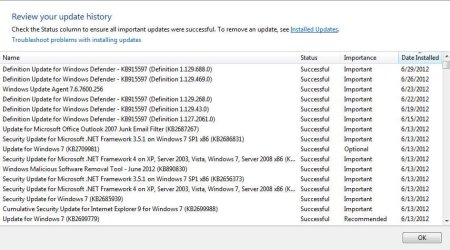
The update shown in your screenshot in post #2 was an out-of-band update that MS pushed out around that time (and I do see it in the list you posted a screenshot of). It was a "special" one that gets installed no matter if you have update set to install automatically or not. All update needed to do was to make its daily check and you were going to get it when it rolled out. The update itself, if I recall, has something to do with ensuring the integrity of all future updates (kind of like patching Windows Update itself).

Can you do this in Safe Mode: http://www.sevenforums.com/tutorials/1538-sfc-scannow-command-system-file-checker.html (by Brink)?

Specifically relating to Update issues. The second link is for fairly advanced users and specifically mentions the two error codes you received (both by Flavius):

http://www.sevenforums.com/tutorials/111245-troubleshooting-system-update-readiness-tool.html

http://www.sevenforums.com/tutorial...eadiness-tool-checksur-log-file-analyzis.html
 

My Computer

OS
Windows 7 Ultimate x64

That's probably more my speed. :(

I'm going to prepare for the worst and have everything in order in case I need to re-install Windows. Something I'm not looking forward to, but will create a data partition if I do. Atleast that way, I can backup the OS and programs separately for cases like this.

I already have all my docs, photos and music backed up.

One question I have that I don't fully understand, once partitioned, if I make a image of the C drive (OS and programs) and need to reinstall at a later date does having the appdata on a different partition matter, since it's not being updated, or is that folder kept on the same as the OS?

BTW, I appreciate your time and suggestions. :D
 

My Computer

Computer type
PC/Desktop
Computer Manufacturer/Model Number
Dell Vostro 3558 (Laptop)
OS
Windows 7 Professional 64bit
Motherboard
Dell
Memory
8GB
Graphics Card(s)
Intel HD Graphics, NVIDIA GeForce
Screen Resolution
1366 x 768
Antivirus
Avira Free, MalwareBytes AntiMalware Pro
Browser
Chrome
If you're speaking of the appdata folder under your username I'd say keep it with the OS/apps partition. I think a relatively easy way for you to determine which folders under your username can be moved is to right click each subfolder and select "properties". If the dialog box that pops up has a "Location" tab the folder is a candidate for moving elsewhere. With w7 you can also just use the libraries feature.

Those are probably the easiest ways to separate your data from the OS/apps, especially if you plan on using that user account for restoring data after a catastrophe. There are ways to move all user accounts (all folders including appdata) by doing a bunch of manual moves of folders (keeping in mind permission properties), creating junctions/links, changing registry keys, etc., and setting it up so that if you later create a new user it gets created with the same setup. But to me, it just complicates a restore because you've got to think how you'd go about doing it. And how do you know a restore would go according to plan? So after you finish setting it all up, you've actually got to do a restore to make sure it works as expected. I've done it before on a couple machines but in the end quit doing it. For the rare times I set up a new user, and even more rare catastrophic recoveries (never) I've determined it wasn't remotely worth the effort (other than learning).

Check out:

http://www.sevenforums.com/tutorials/1649-clean-install-windows-7-a.html

http://www.sevenforums.com/tutorials/219487-clean-reinstall-factory-oem-windows-7-a.html

... just in case! ;)
 

My Computer

OS
Windows 7 Ultimate x64
And one more thing to think of before you encounter a potential reinstall. Even though you've got your personal data already backed up and safe, think about copying hardware drivers (you're gonna need an internet connection for updates) and also inventory your installed apps. Make sure you've got install disks or links as well as any product keys you need. This will help: Belarc Advisor - Free Personal PC Audit, for software, hardware and security configuration information on your computer. Software license management, IT asset management, cyber security audits, and more.
 

My Computer

OS
Windows 7 Ultimate x64

My Computer

Computer type
PC/Desktop
Computer Manufacturer/Model Number
Dell Vostro 3558 (Laptop)
OS
Windows 7 Professional 64bit
Motherboard
Dell
Memory
8GB
Graphics Card(s)
Intel HD Graphics, NVIDIA GeForce
Screen Resolution
1366 x 768
Antivirus
Avira Free, MalwareBytes AntiMalware Pro
Browser
Chrome

Never found the need, so I really don't know. Check out the following:

http://www.sevenforums.com/general-...imal-install-win7-64-using-vlite-rt7lite.html

http://www.sevenforums.com/general-...ates-w7-office-2010-can-done.html#post1928395

http://www.sevenforums.com/performance-maintenance/225378-native-64-bit.html#post1888357

I'm not sure why you would use something like that for a one-time install. w7 is already flexible enough and I'm not sure what you could gain from it. After you do your one install you could just create an image of it if you ever found the need to recover. Instead of reinstalling and starting from scratch, you simply restore your image (unattended as well) and I'm back in business. All I have to do is the installs, updates, tweaks I've made in that last month. I make a new image (for each machine), on average, about once a month. So I can go back many months, all the way back to the image made when it was in the "out-of-box" state if I found the need to.
 

My Computer

OS
Windows 7 Ultimate x64
Refresh your view of this thread, as I've made a few changes to my prior post.
 

My Computer

OS
Windows 7 Ultimate x64
Refresh your view of this thread, as I've made a few changes to my prior post.

Thanks, I'll follow ir from the beginning.
 

My Computer

Computer type
PC/Desktop
Computer Manufacturer/Model Number
Dell Vostro 3558 (Laptop)
OS
Windows 7 Professional 64bit
Motherboard
Dell
Memory
8GB
Graphics Card(s)
Intel HD Graphics, NVIDIA GeForce
Screen Resolution
1366 x 768
Antivirus
Avira Free, MalwareBytes AntiMalware Pro
Browser
Chrome
Refresh your view of this thread, as I've made a few changes to my prior post.

Thanks, I'll follow ir from the beginning.

Of course, for you to see that post, you must've already refreshed. I didn't mean going back to the beginning of the thread, just review the last paragraph in post #12. The 3 links in that post have not changed...
 

My Computer

OS
Windows 7 Ultimate x64
Maybe I didn't describe the problem as simply as I should have in the title and first post but I found the solution to my original problem in another thread I hadn't seem before by...

Deleting the pending.xml file located @ C:\Windows\winsxs\pending.xml

I'll save re-installing windows for another day.

Thanks again.
 

My Computer

Computer type
PC/Desktop
Computer Manufacturer/Model Number
Dell Vostro 3558 (Laptop)
OS
Windows 7 Professional 64bit
Motherboard
Dell
Memory
8GB
Graphics Card(s)
Intel HD Graphics, NVIDIA GeForce
Screen Resolution
1366 x 768
Antivirus
Avira Free, MalwareBytes AntiMalware Pro
Browser
Chrome
Back
Top