

- Local time
- 1:27 AM
- Messages
- 53
Installed Win 7 SP1 with media refresh from heidoc.net (X17-58997). Made it a bootable dvd with MS USB/DVD Download Tool. Booted from dvd and used "custom" install option. I did not reformat nor set partitions (this is where I maybe goofed?).
My disk mgmt ended up looking like this:
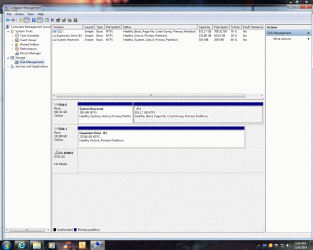
BUT, I also have a windows.old file which I understand only appears after a repair. Also, I thought System Reserved was supposed to be 100 MB and mine is 350??
So do I have a clean install or a repair install? There have been a couple of glitches (display adapter acting up and WMP initially not playing any files until I reinstalled mf.dll file).
Any comments? Help? Suggestions? Thank you in advance.
My disk mgmt ended up looking like this:
BUT, I also have a windows.old file which I understand only appears after a repair. Also, I thought System Reserved was supposed to be 100 MB and mine is 350??
So do I have a clean install or a repair install? There have been a couple of glitches (display adapter acting up and WMP initially not playing any files until I reinstalled mf.dll file).
Any comments? Help? Suggestions? Thank you in advance.
My Computer
At a glance
Windows 7 Premium x64 SP13.8 ghz AMD FX-4300 Quad-Core8 MBXFX Radeon R7-250e
- Computer type
- PC/Desktop
- Computer Manufacturer/Model Number
- Cyberpower
- OS
- Windows 7 Premium x64 SP1
- CPU
- 3.8 ghz AMD FX-4300 Quad-Core
- Motherboard
- 760GM-P23(FX) (MS-7641) 3.0
- Memory
- 8 MB
- Graphics Card(s)
- XFX Radeon R7-250e
- Hard Drives
- TOSHIBA DT01ACA100 1 TB
- PSU
- Thermaltake SMART 650W
- Case
- Thermaltake Commander MS-I
- Antivirus
- Avast 2015 and MalwareBytes AM Pro
- Browser
- IE10


