Confirmation of file deletion

  • Thread starter Thread starter izzyforeal
  • Start date Start date
I

izzyforeal

Guest
Hello all, new to the forum but happy to be with you. I've used this site many times for information and guidance so I thought I would join and get answers from people that can help. My issue is that I don't want to have to confirm every, single file deletion in the history of ever. But I cannot turn it off. I have done the recycle been thing, I have done a registry tweak and I have changed the settings in GPE but nothing works. I do not want to bypass the Recycle Bin because it does come in handy I just don't want to be asked ever again if I'm "sure." Any ideas on how I can stop the confirmation?
 
Hi Izzy.
Welcome to Seven Forums
It looks like you're run out of options. But to my knowledge Windows set files/folders deletion on all fixed drives and external HDD drives without confirmation by default. Unless we need to bypass recycle bin it needs to combine shift+del, and confirmation dialog is prompted for cautionary step.
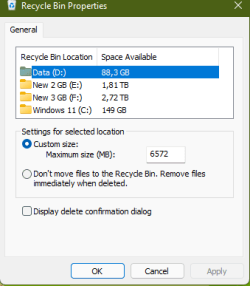
If we open recycle bin property "Display delete confirmation dialog" is uncheck by default.

Flash/pen drive is an exception, confirmation dialog is always needed as it has no recycle bin.
Recycle property.png

Kevin.
 

My Computers My Computers

  • At a glance

    Windows 11 PrereleaseCORE i5 1040016GBGTX 750Ti
    Computer type
    PC/Desktop
    Computer Manufacturer/Model Number
    MSI
    OS
    Windows 11 Prerelease
    CPU
    CORE i5 10400
    Motherboard
    MSI H510M Pro
    Memory
    16GB
    Graphics Card(s)
    GTX 750Ti
    Sound Card
    Realtek HD Integrated
    Monitor(s) Displays
    Samsung Curved 24"; Samsung TV 50"
    Screen Resolution
    1920 x 1080
    Hard Drives
    Vi-Gen NVMe 256GB
    WD 3 TB
    Seagate 2 TB
    Seagate 4TB
    PSU
    Power Striker
    Case
    VBR
    Cooling
    Conventional
    Keyboard
    Logitech Wireless
    Mouse
    Logitech Wireless
    Internet Speed
    2MBPs
  • At a glance

    BigSurCore i58 GB
    Computer type
    Laptop
    System Manufacturer/Model Number
    Apple MacBook
    OS
    BigSur
    CPU
    Core i5
    Memory
    8 GB
    Monitor(s) Displays
    13 "
    Screen Resolution
    1366 x 768
    Hard Drives
    SSD 256 GB
Thank you Kevin. I don't know about "without confirmation by default." I have had to confirm file deletion since I was a young man which is a long long time ago, LOL. It makes no sense to have 3 available options floating around the internet and none of them work. It's just annoying.
 
File deletion confirmation has been active by default up to and including Windows 7.
Since Windows 8 and beyond, it has been disabled by default (possibly one of the worst design decisions in Windows).

Removable drives are in no way special in this regard. Windows Explorer will use its recycle bin folder in the very same way if enabled, and will use the confirmation settings as any other drive.

Of course, since the entire configuration screen is part of Windows Explorer, all these settings only affect file deletion within Windows Explorer. Anything done though other programs isn't affected at all.
 

My Computer My Computer

At a glance

Windows 7 Ultimate x64Intel Core i7-740QM8 GB DDR3NVIDIA GeForce 330GT
Computer type
Laptop
Computer Manufacturer/Model Number
Toshiba Sattelite A665-S6092
OS
Windows 7 Ultimate x64
CPU
Intel Core i7-740QM
Memory
8 GB DDR3
Graphics Card(s)
NVIDIA GeForce 330GT
Screen Resolution
1366x768
Hard Drives
Samsung 840 SSD 500GB
1TB USB3 external HD
Cooling
Coolermaster Notepal U3 notebook cooling pad
Internet Speed
3mbps ASDL
Antivirus
ClamWin 0.98.7
Browser
Opera 12.17 x86 (main), Firefox 38 (sec), IE11 (last resort)
Back
Top