- Local time
- 10:39 PM
- Messages
- 1,308
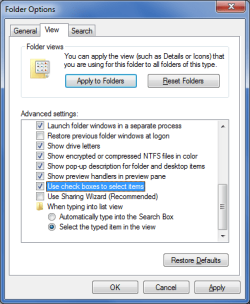
I have folders with a large number of files/folders such that I must scroll the window to view them all. Often I find myself needing to select specific items requiring scrolling out of view items already selected in order to select additional items. I would like an easy way to know what exactly I have selected, i.e. to confirm I have not selected unwanted or to know if I have not selected something I needed to select. AFAIK, only the windows highlighting is how we know what is/is not selected and my current theme makes this difficult. It would be cool if I could bring up a dialogue/display/window showing the file/folder names of all items selected.
Better yet, perhaps there is an an android-type folder/file manger and how it will display little select/unselect check boxes next to each item.
Better yet, perhaps there is an an android-type folder/file manger and how it will display little select/unselect check boxes next to each item.
My Computer
- Computer type
- PC/Desktop
- Computer Manufacturer/Model Number
- HP (HP-P6212F)
- OS
- Microsoft Windows 7 Home Premium 64-bit 7601 Multiprocessor Free Service Pack 1
- CPU
- Pentium(R) Dual-Core CPU E5300 @ 2.60GHz
- Motherboard
- PEGATRON CORPORATION Benicia
- Memory
- 6.00 GB
- Graphics Card(s)
- Intel(R) G33/G31 Express Chipset Family
- Sound Card
- Realtek High Definition Audio
- Monitor(s) Displays
- 24'' HP WS LCD
- Screen Resolution
- 1920 x 1080 x 32 bits (4294967296 colors) @ 60 Hz
- Hard Drives
- (1) ATA Hitachi HDT72106 SCSI Disk Device (2) Generic- Compact Flash USB Device (3) Generic- MS/MS-Pro USB Device (4) Generic- SD/MMC USB Device (5) Generic- SM/xD-Picture USB Device (6) Verbatim STORE N GO USB Device
- Keyboard
- Logitech G510s
- Mouse
- Logitech Trackball M570
- Antivirus
- Microsoft Security Essentials / Malwarebytes
- Browser
- IE / Firefox / Chrome