Solved Confused after initial install Macrium

markg2

New member
Member
VIP
Local time
8:54 AM
Messages
477
Version 6.1 free

I first created and ran an image. During the process I could not figure out how to create a schedule for the backup. Since I had used none for template (no choice this being free) nothing was automatically placed in the add/edit schedules box/clicking the add schedule threw an error.

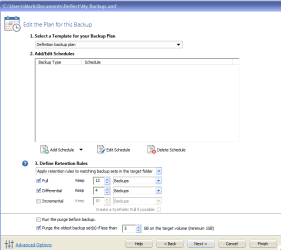
After completion I tried to edit the backup to add a schedule--no luck. I clicked Backup Definition Files tab (because I couldn't find where to display the image I just created), right clicked the one xml file figuring that file was the parameters I had selected for the initial image, selected schedule but that can't be right. When the Edit the Plan for this Backup comes up it has Definition backup plan in step #1, but if I click on Add Schedule in step #2 I have to choose among full, incremental, differential. Which makes no sense for the edit of an existing since my initial 'none' template used the default which is a combo of both full and differential.

Further, I see no way of viewing the image I created within Macrium. I'm thinking if I could view the image then I should be able to right click on it and modify.

Btw, I tried to run the video on Macrium you have here but couldn't get any sound.

Mark
 

My Computer

Computer type
PC/Desktop
OS
Windows 7 & Windows 10
It's really easy to schedule. See here:

v5: How to schedule your backups (Schedule, v5)

And I am sorry for the sound problem on a couple of my videos. I tried to fix it, but there was only so much I could do. I guess one day I have to make new videos since I know now how to avoid that problem.
 
Last edited:

My Computer

Computer Manufacturer/Model Number
HP, Dell, Gateway, Toshiba - 4 laptops and 2 desktops
OS
Vista, Windows7, Mint Mate, Zorin, Windows 8
CPU
from 1.6GHz Duo to i7
Monitor(s) Displays
2x HP w2207
Hard Drives
5x HDD, 7x SSD, 12x Externals
Keyboard
with trackball - no mices
Mouse
Trackball mice
Internet Speed
DSL 6000
basicly, create & save a backup definition file, select the definition file, after it appears in the list of saved definitions, right click & use the create vbscript,powershell,or msdos batch file option from the context menu. after you create that, you should find it in the list when you go to schedule your backups. each step will have a variety of options you will also need to decide on. good luck.
 

My Computer

Computer type
PC/Desktop
Computer Manufacturer/Model Number
Custom build Nanu by 3SX
OS
Win 7 ultimate x64 sp1
CPU
Intel i7 4 core 3770k ivy bridge o/c to 4.2ghz
Motherboard
Asus p8z77-i Deluxe
Memory
16 GB
Graphics Card(s)
Nvidia geforce GTX650
Sound Card
Realtek on mb
Monitor(s) Displays
24in. lcd/led
Screen Resolution
1920x1080
Hard Drives
128GB Kingston SSD
500GB seagate maximus xt hybrid
500GB hitachi HD
500GB external WD Passport usb3
PSU
Silverstone 450 watt
Case
Silverstone FT03 Black Fortress
Cooling
Water cooler
Keyboard
Logitech wireless kbd/mouse mk300
Mouse
Logitech wireless kbd/mouse mk300
Internet Speed
8mb adsl (actuall speed is around 6mb)
Other Info
Asus DSL-N55U wireless router
SONY BC-5850H 6X BLURAY writer
OUTPOST Security Suite
Version 6.1 free

I first created and ran an image. During the process I could not figure out how to create a schedule for the backup. Since I had used none for template (no choice this being free) nothing was automatically placed in the add/edit schedules box/clicking the add schedule threw an error.

After completion I tried to edit the backup to add a schedule--no luck. I clicked Backup Definition Files tab (because I couldn't find where to display the image I just created), right clicked the one xml file figuring that file was the parameters I had selected for the initial image, selected schedule but that can't be right. When the Edit the Plan for this Backup comes up it has Definition backup plan in step #1, but if I click on Add Schedule in step #2 I have to choose among full, incremental, differential. Which makes no sense for the edit of an existing since my initial 'none' template used the default which is a combo of both full and differential.

Further, I see no way of viewing the image I created within Macrium. I'm thinking if I could view the image then I should be able to right click on it and modify.


Btw, I tried to run the video on Macrium you have here but couldn't get any sound.

Mark

No, there is no way to view the files in the Macrium Image. It is compressed and is not viewable. If you want to edit a file, you will need to do so and make another image.
 

My Computer

Computer type
PC/Desktop
Computer Manufacturer/Model Number
Custom Build
OS
Windows 7 Home Premium 32-Bit - Build 7600 SP1
CPU
Intel Core i3-2120 3.30Ghz
Motherboard
Asus P8Z68-V LX Intel Z68 Socket H2 ATX
Memory
Kingston 4 GB DDR3 1333 mhz
Graphics Card(s)
AMD Radeon HD6670
Sound Card
Sound Blaster Audigy SE 24-Bit
Monitor(s) Displays
Asus VE228
Screen Resolution
1440 X 900
Hard Drives
OCZ Vertex 3 120 GB Sata 3 SSD ==
Kingston SH103/S3 120 G Hyper X 120 GB SSD ==
Western Digital 500 GB Caviar Green 7200 RPM ==
PSU
Corsair CX600M == 600 Watt
Case
NZXT Apollo - Silver with Clear Side Panel
Cooling
Three 120 mm Fans
Keyboard
Microsoft Natural 4000
Mouse
Microsoft Custom Optical 3000
Internet Speed
AT&T Fiber Optic Wireless Network
Antivirus
Microsoft Security Essentials
Browser
Chrome
Other Info
120 mm Blue LED Fan -- Three Blue LED Lazer Light Sticks
The image files are easy to view. Just double click on the image file for mounting that.

PS - I know there is a sound problem with my videos but there is little I could do about it - short of redoing them.
 

My Computer

Computer Manufacturer/Model Number
HP, Dell, Gateway, Toshiba - 4 laptops and 2 desktops
OS
Vista, Windows7, Mint Mate, Zorin, Windows 8
CPU
from 1.6GHz Duo to i7
Monitor(s) Displays
2x HP w2207
Hard Drives
5x HDD, 7x SSD, 12x Externals
Keyboard
with trackball - no mices
Mouse
Trackball mice
Internet Speed
DSL 6000
The image files are easy to view. Just double click on the image file for mounting that.

I always Started MR and browsed in MR to find an image to view (mount).
I just double clicked a MR image in Windows (file) Explorer, and it auto mounted the image for viewing.
Thanks for that tip, it's faster and simpler for me :)
:thumbsup:
 

My Computer

Computer type
PC/Desktop
Computer Manufacturer/Model Number
home built
OS
Multi-Boot W7_Pro_x64 W8.1_Pro_x64 W10_Pro_x64 +Linux_VMs +Chromium_VM
CPU
AMD Athlon II x4 620
Motherboard
Gigabyte GA-MA785G-UD3H
Memory
6GB GSkill DDR2 800
Graphics Card(s)
AMD 4670 GPU + AMD 4200 IGP
Sound Card
on board Realtek ALC889A
Monitor(s) Displays
RCA 40" LCD TV, Insignia 32" LCD TV, HP 15" LCD monitor
Screen Resolution
1680 x 1050
Hard Drives
OCZ Vertex 3 120GB,
Samsung F3 1TB (3),
Several others - WD, Seagate, Hitachi, ...
PSU
Corsair 500 W
Case
Rosewill mid tower
Cooling
CM 90mm rifle
Keyboard
Gyration wireless, Logitech wireless, Dell USB wired
Mouse
Gyration wireless, Logitech wireless, V7 USB wired
Internet Speed
Spectrum - 100Mbps D / 10Mbps U
Antivirus
Avast, MBAM3, EMET, WinPatrol
Browser
Pale Moon, Firefox, IE
Other Info
2 multi-boot PC's
Mainly HTPC/Office/Gen purpose (no gaming).
Trendnet USB KVM.
LG DVD burner/Blue Ray Player.
Tray system for removable SATA backup drives.

Not currently OCd, under-volted.
I use Hybrid sleep, rarely re-boot or shutdown.

Hauppauge HD-PVR, Avermedia PCIe TV Tuner, Hauppauge PCI TV Tuner.
>>>>>It's really easy to schedule. See here:
v5: How to schedule your backups (Schedule, v5)<<<<<

Macrium is Acronis upside down as far as similarity of the UI and method to create an image job and that's likely giving me more headaches than necessary.

I double clicked the .xml file, it mounted and I could pull out any file I wish just as with Acronis. However, Macrium mounted the image to a virtual drive w a y faster than Acronis and I can do so directly at the image file instead of having to do so within the program.

However, your 'How to' link for scheduling is no help--maybe since your link is v5 and I've got v6? Or I'm just thick.

Link option 1: Click Scheduled Backups, Click 'New Scheduled Task' wizard--my icon is grayed out--not an option.

Link option 2: Right click xml, schedule, go to step 4. I have no step 4 (attached screen shot)
 

Attachments

  • No #4 after right click xml, schedule.PNG
    No #4 after right click xml, schedule.PNG
    14.3 KB · Views: 1

My Computer

Computer type
PC/Desktop
OS
Windows 7 & Windows 10
Hi,
As far as I've read the free version does not allow Differential or Incremental backups.
 

My Computer

Computer type
PC/Desktop
Computer Manufacturer/Model Number
Custom assembled by me :}
OS
Win-7-Pro64bit 7-H-Prem-64bit
CPU
i7-5930K 2nd i9-9940x both water blocked VRM's too
Motherboard
ASUS SABERTOOTH X99 2nd ASUS x299 Apex
Memory
Trident-z 3200C14 2nd Trident-z 3600C16
Graphics Card(s)
EVGA 1080ti ftw3 2nd Titan Xp both water blocked
Sound Card
Built-in Realtek
Monitor(s) Displays
1-AOC G2460PG 24"G-Sync 144Hz/ 2nd 1-ASUS VG248QE 24" 144Hz
Screen Resolution
1920 x 1080 144Hz
Hard Drives
2-Samsung M.2 Evo & Evo Plus
2-Samsung 850 EVO 500GB SSD's/ 3-2.5 W.D. Black 1tb-&3-1tb/3-3.5 WD Black 1tb hdd's
PSU
EVGA SuperNOVA 1000-P2 2nd 1200-P2
Case
2-Corsair Obsidian Series 450D Black ATX Mid Tower
Cooling
Custom water loops
Keyboard
Logitech G710+/ 2nd Logitech G910
Mouse
2-RedDragon M901 Perdition 16400 dpi Gaming mouse = wired
Internet Speed
Comcast Ping 19ms 89.31mbps download speed 6.12mbps upload
Antivirus
Malwarebytes Pro/ Superantispyware Pro
Browser
FireFox & Pale moon
Other Info
2nd ASUS X299 Apex/Intel i9-9940x with Custom water loop/7H-Prem-x64/Corsair 450D case/Ram Trident-z 3600C16 4x8gb / Samsung970Evo plus 500gb SSD/Dual ssd EZ swap evo/PSU EVGA SuperNova 1200w-P2 80+Platinum/GPU Titan Xp /8-ML-140 on push-pull on 2-280GTX rads
The free version must do a differential since their default screen that I was using was comprised of x # of Fulls and x # of Differentials.
 

My Computer

Computer type
PC/Desktop
OS
Windows 7 & Windows 10
Full images each time is a better plan. They are much easier to manage and safer.
 

My Computer

Computer Manufacturer/Model Number
HP, Dell, Gateway, Toshiba - 4 laptops and 2 desktops
OS
Vista, Windows7, Mint Mate, Zorin, Windows 8
CPU
from 1.6GHz Duo to i7
Monitor(s) Displays
2x HP w2207
Hard Drives
5x HDD, 7x SSD, 12x Externals
Keyboard
with trackball - no mices
Mouse
Trackball mice
Internet Speed
DSL 6000
Hi,
Possibly
I see it another way
I never know exactly when I want to make an image
So I don't use a schedule and do a full when I want too :)

Could just be a default setting quirk to prompt you to upgrade for that feature ;)
 

My Computer

Computer type
PC/Desktop
Computer Manufacturer/Model Number
Custom assembled by me :}
OS
Win-7-Pro64bit 7-H-Prem-64bit
CPU
i7-5930K 2nd i9-9940x both water blocked VRM's too
Motherboard
ASUS SABERTOOTH X99 2nd ASUS x299 Apex
Memory
Trident-z 3200C14 2nd Trident-z 3600C16
Graphics Card(s)
EVGA 1080ti ftw3 2nd Titan Xp both water blocked
Sound Card
Built-in Realtek
Monitor(s) Displays
1-AOC G2460PG 24"G-Sync 144Hz/ 2nd 1-ASUS VG248QE 24" 144Hz
Screen Resolution
1920 x 1080 144Hz
Hard Drives
2-Samsung M.2 Evo & Evo Plus
2-Samsung 850 EVO 500GB SSD's/ 3-2.5 W.D. Black 1tb-&3-1tb/3-3.5 WD Black 1tb hdd's
PSU
EVGA SuperNOVA 1000-P2 2nd 1200-P2
Case
2-Corsair Obsidian Series 450D Black ATX Mid Tower
Cooling
Custom water loops
Keyboard
Logitech G710+/ 2nd Logitech G910
Mouse
2-RedDragon M901 Perdition 16400 dpi Gaming mouse = wired
Internet Speed
Comcast Ping 19ms 89.31mbps download speed 6.12mbps upload
Antivirus
Malwarebytes Pro/ Superantispyware Pro
Browser
FireFox & Pale moon
Other Info
2nd ASUS X299 Apex/Intel i9-9940x with Custom water loop/7H-Prem-x64/Corsair 450D case/Ram Trident-z 3600C16 4x8gb / Samsung970Evo plus 500gb SSD/Dual ssd EZ swap evo/PSU EVGA SuperNova 1200w-P2 80+Platinum/GPU Titan Xp /8-ML-140 on push-pull on 2-280GTX rads
MR V6 free can do Differentials, it can not do Incrementals.

Link option 1: Click Scheduled Backups, Click 'New Scheduled Task' wizard--my icon is grayed out--not an option.

Link option 2: Right click xml, schedule, go to step 4. I have no step 4 (attached screen shot)

In your screen print in post #7 click on the Add Schedule down arrow and select Full or Differential.

I just added a scheduled task in MR v6 free:

MR_Sched_BU_SP_02.png
 

My Computer

Computer type
PC/Desktop
Computer Manufacturer/Model Number
home built
OS
Multi-Boot W7_Pro_x64 W8.1_Pro_x64 W10_Pro_x64 +Linux_VMs +Chromium_VM
CPU
AMD Athlon II x4 620
Motherboard
Gigabyte GA-MA785G-UD3H
Memory
6GB GSkill DDR2 800
Graphics Card(s)
AMD 4670 GPU + AMD 4200 IGP
Sound Card
on board Realtek ALC889A
Monitor(s) Displays
RCA 40" LCD TV, Insignia 32" LCD TV, HP 15" LCD monitor
Screen Resolution
1680 x 1050
Hard Drives
OCZ Vertex 3 120GB,
Samsung F3 1TB (3),
Several others - WD, Seagate, Hitachi, ...
PSU
Corsair 500 W
Case
Rosewill mid tower
Cooling
CM 90mm rifle
Keyboard
Gyration wireless, Logitech wireless, Dell USB wired
Mouse
Gyration wireless, Logitech wireless, V7 USB wired
Internet Speed
Spectrum - 100Mbps D / 10Mbps U
Antivirus
Avast, MBAM3, EMET, WinPatrol
Browser
Pale Moon, Firefox, IE
Other Info
2 multi-boot PC's
Mainly HTPC/Office/Gen purpose (no gaming).
Trendnet USB KVM.
LG DVD burner/Blue Ray Player.
Tray system for removable SATA backup drives.

Not currently OCd, under-volted.
I use Hybrid sleep, rarely re-boot or shutdown.

Hauppauge HD-PVR, Avermedia PCIe TV Tuner, Hauppauge PCI TV Tuner.
The schedule is set.

I will not divulge the reason behind my previous schedule inability. If I did, the local assisted living facility might proactively pick me up!

Thanks for the help--


Mark
 

My Computer

Computer type
PC/Desktop
OS
Windows 7 & Windows 10
:p
You're welcome and glad to see you got this solved :)
 

My Computer

Computer type
PC/Desktop
Computer Manufacturer/Model Number
home built
OS
Multi-Boot W7_Pro_x64 W8.1_Pro_x64 W10_Pro_x64 +Linux_VMs +Chromium_VM
CPU
AMD Athlon II x4 620
Motherboard
Gigabyte GA-MA785G-UD3H
Memory
6GB GSkill DDR2 800
Graphics Card(s)
AMD 4670 GPU + AMD 4200 IGP
Sound Card
on board Realtek ALC889A
Monitor(s) Displays
RCA 40" LCD TV, Insignia 32" LCD TV, HP 15" LCD monitor
Screen Resolution
1680 x 1050
Hard Drives
OCZ Vertex 3 120GB,
Samsung F3 1TB (3),
Several others - WD, Seagate, Hitachi, ...
PSU
Corsair 500 W
Case
Rosewill mid tower
Cooling
CM 90mm rifle
Keyboard
Gyration wireless, Logitech wireless, Dell USB wired
Mouse
Gyration wireless, Logitech wireless, V7 USB wired
Internet Speed
Spectrum - 100Mbps D / 10Mbps U
Antivirus
Avast, MBAM3, EMET, WinPatrol
Browser
Pale Moon, Firefox, IE
Other Info
2 multi-boot PC's
Mainly HTPC/Office/Gen purpose (no gaming).
Trendnet USB KVM.
LG DVD burner/Blue Ray Player.
Tray system for removable SATA backup drives.

Not currently OCd, under-volted.
I use Hybrid sleep, rarely re-boot or shutdown.

Hauppauge HD-PVR, Avermedia PCIe TV Tuner, Hauppauge PCI TV Tuner.
I had to come back and say how incredibly pleased I am with Reflect. Being a refugee from the increasingly meaningless, convoluted iterations of Acronis' UI (apparently looking for some reason to justify yearly new versions apart from OS arrivals) vs. Reflect's simple and clear UI one wonders how Acronis could still be in business. After I stopped thinking in terms of complexity and just paid attention to Reflect's screens I am one amazed user.

One question that I've had from Acronis and now for Reflect. There's the option to validate existing backups and another option to validate upon restore. If validate is done during the initial backup and then the file just stays put on the drive from then on, why the need for all this after the fact validation? Such post validation is never necessary for an ordinary folder/file backup or opening an Excel, Word or whatever file after years of not using.

FWIW, using the free version for home use, I can see only one reason to possibly purchase the software at some point--email notification upon failure.
 

My Computer

Computer type
PC/Desktop
OS
Windows 7 & Windows 10
Post validation is indeed not obvious. But an image can, like any other record in the system, get corrupted at any time of it's existance. Then you will have trouble with the restore and a post-validation may tell you the cause.
 

My Computer

Computer Manufacturer/Model Number
HP, Dell, Gateway, Toshiba - 4 laptops and 2 desktops
OS
Vista, Windows7, Mint Mate, Zorin, Windows 8
CPU
from 1.6GHz Duo to i7
Monitor(s) Displays
2x HP w2207
Hard Drives
5x HDD, 7x SSD, 12x Externals
Keyboard
with trackball - no mices
Mouse
Trackball mice
Internet Speed
DSL 6000
As a practical matter, is there consensus here regarding setting a profile to periodically validate and/or validate prior to restore?
 

My Computer

Computer type
PC/Desktop
OS
Windows 7 & Windows 10
No idea whether there is consensus. I myself never do any validation. But I make frequent images so if one does not work I take another one.
 

My Computer

Computer Manufacturer/Model Number
HP, Dell, Gateway, Toshiba - 4 laptops and 2 desktops
OS
Vista, Windows7, Mint Mate, Zorin, Windows 8
CPU
from 1.6GHz Duo to i7
Monitor(s) Displays
2x HP w2207
Hard Drives
5x HDD, 7x SSD, 12x Externals
Keyboard
with trackball - no mices
Mouse
Trackball mice
Internet Speed
DSL 6000
As a practical matter, is there consensus here regarding setting a profile to periodically validate and/or validate prior to restore?

I'm not sure of a consensus either, but I wouldn't make any assumptions that a successful validation means that you will necessarily have a successful restore. Put another way---I can't recall an instance where it was known that an unsuccessful restore would have been successful if only the user had validated the image. The unsuccessful restores are more often attributable to operator error or unknown reasons.
 

My Computer

Computer type
PC/Desktop
Computer Manufacturer/Model Number
Ignatz Special; 4 speed manual gearbox; factory air conditioning; one of one
OS
Windows 7 Home Premium SP1, 64-bit
CPU
Intel Skylake i5-6600K, not overclocked
Motherboard
AsRock Z170M Extreme 4, micro ATX
Memory
8 GB HyperX DDR4-2666 (2 x 4 GB)
Graphics Card(s)
none; graphics are integrated on CPU
Sound Card
onboard: Realtek ALC1150; external: USB Behringer UF0-202
Monitor(s) Displays
Dell S2340M 23 inch IPS
Screen Resolution
1600 x 900
Hard Drives
System: Crucial MX100 series SSD, 128 GB;
Data: Samsung Spinpoint 103SJ, 1 TB;
Backup: WD Caviar Green WD30EZRX-00D8PB0, 3 TB
PSU
Rosewill SilentNight 500 watt fanless, semi-modular
Case
Antec Solo II
Cooling
Noctua NH-U12S; Noctua F12 intake, Noctua S12A exhaust
Keyboard
Microsoft 200 6JH-00001 USB
Mouse
Dell or Microsoft optical wired; USB
Antivirus
Microsoft Security Essentials and Malwarebytes Premium
Browser
Pale Moon
Other Info
All fans PWM; speeds at idle: CPU circa 500 rpm; intake circa 600 rpm; exhaust circa 600 rpm; CPU temps 27 idle and 47 C load in a warm room (27 C/81 F) when running Intel Extreme Tuning Utility stress test.
I usually verify them after creating them = why not ;/
 

My Computer

Computer type
PC/Desktop
Computer Manufacturer/Model Number
Custom assembled by me :}
OS
Win-7-Pro64bit 7-H-Prem-64bit
CPU
i7-5930K 2nd i9-9940x both water blocked VRM's too
Motherboard
ASUS SABERTOOTH X99 2nd ASUS x299 Apex
Memory
Trident-z 3200C14 2nd Trident-z 3600C16
Graphics Card(s)
EVGA 1080ti ftw3 2nd Titan Xp both water blocked
Sound Card
Built-in Realtek
Monitor(s) Displays
1-AOC G2460PG 24"G-Sync 144Hz/ 2nd 1-ASUS VG248QE 24" 144Hz
Screen Resolution
1920 x 1080 144Hz
Hard Drives
2-Samsung M.2 Evo & Evo Plus
2-Samsung 850 EVO 500GB SSD's/ 3-2.5 W.D. Black 1tb-&3-1tb/3-3.5 WD Black 1tb hdd's
PSU
EVGA SuperNOVA 1000-P2 2nd 1200-P2
Case
2-Corsair Obsidian Series 450D Black ATX Mid Tower
Cooling
Custom water loops
Keyboard
Logitech G710+/ 2nd Logitech G910
Mouse
2-RedDragon M901 Perdition 16400 dpi Gaming mouse = wired
Internet Speed
Comcast Ping 19ms 89.31mbps download speed 6.12mbps upload
Antivirus
Malwarebytes Pro/ Superantispyware Pro
Browser
FireFox & Pale moon
Other Info
2nd ASUS X299 Apex/Intel i9-9940x with Custom water loop/7H-Prem-x64/Corsair 450D case/Ram Trident-z 3600C16 4x8gb / Samsung970Evo plus 500gb SSD/Dual ssd EZ swap evo/PSU EVGA SuperNova 1200w-P2 80+Platinum/GPU Titan Xp /8-ML-140 on push-pull on 2-280GTX rads
Back
Top