
Solved Confusing info

grits

New member
Power User
VIP
Local time
11:34 PM
Messages
582
Are Adobe Flash, Java, & Microsoft Silverlight really needed? I've read conflicting posts about all of them.:confused:

Thanks a bunch,
grits
 

My Computer

Computer type
PC/Desktop
Computer Manufacturer/Model Number
emachines
OS
Microsoft Windows 7 Home Premium 64-bit 7601 Multiprocessor Free Service Pack 1
CPU
AMD Athlon(tm) II X2 220 Processor
Motherboard
eMachines EL1358G
Memory
3.00 GB
Graphics Card(s)
NVIDIA GeForce 6150SE nForce 430
Sound Card
Realtek High Definition Audio
Screen Resolution
1280 x 1024 x 32 bits (4294967296 colors) @ 60 Hz
Hard Drives
(1) WDC WD10 EADX-22TDHB0 SCSI Disk Device (2) Generic- Multi-Card USB Device
Keyboard
came with PC
Mouse
came with PC
Antivirus
Avast
Browser
IE 9
Other Info
don't know how to get info for the other 5 areas
I uninstalled Java over a year ago when they started having a lot of security problems. Haven't missed it at all. Silverlight came pre-installed on one of my computers. I went about 6 months and realized I never used it. I uninstalled it as well and that was about 2 years ago.

Adobe Flash is a different story. There are many websites that require Flash in order to view their video content (news sites, YouTube, etc.) So I have that installed on all my machines. And I make it a priority to check for updates on a regular basis because Adobe Flash has also had its share of security issues.

My suggestion is to keep Flash but ditch Java and Silverlight. If you come across a site that needs Java or Silverlight it will only take a few minutes to visit the download site and install. If it turns out you use Java or Silverlight on a regular basis then you might reconsider and leave them installed permanently.
 

My Computer

Computer type
Laptop
Computer Manufacturer/Model Number
Sony Vaio VPCEB47GM Laptop
OS
Win 7 Pro 64-bit
CPU
Intel i5 2.4 Ghz
Memory
8GB DDR3
Graphics Card(s)
Intel HD 3000
Sound Card
IDT High Definition
Monitor(s) Displays
15.6 WGXA Anti-Glare LED
Screen Resolution
1280x800
Hard Drives
640Gb 7200rpm
Antivirus
MSE
Browser
Opera (primary) with IE9 backup
Thank you, evidently I haven't needed Java, it's not listed in Programs & Features. Silverlight came pre-installed here also. If memory serves me right, the only time it's popped up is on Microsoft sites so will go ahead & uninstall. I did go to Adobe site to update Flash since I'd clicked the 'Remind me later' button yesterday. By the way, it's listed in Programs & Features as Adobe Flash Player 11 Active X. Is that the only way it should be listed?

Thanks again,
grits
 

My Computer

Computer type
PC/Desktop
Computer Manufacturer/Model Number
emachines
OS
Microsoft Windows 7 Home Premium 64-bit 7601 Multiprocessor Free Service Pack 1
CPU
AMD Athlon(tm) II X2 220 Processor
Motherboard
eMachines EL1358G
Memory
3.00 GB
Graphics Card(s)
NVIDIA GeForce 6150SE nForce 430
Sound Card
Realtek High Definition Audio
Screen Resolution
1280 x 1024 x 32 bits (4294967296 colors) @ 60 Hz
Hard Drives
(1) WDC WD10 EADX-22TDHB0 SCSI Disk Device (2) Generic- Multi-Card USB Device
Keyboard
came with PC
Mouse
came with PC
Antivirus
Avast
Browser
IE 9
Other Info
don't know how to get info for the other 5 areas
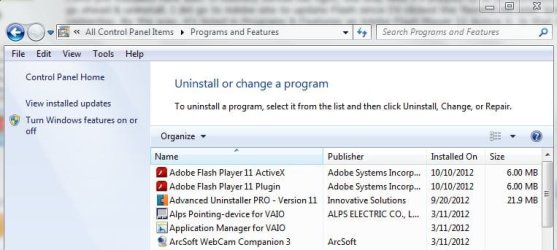
That's how it should be listed. In my screenshot you'll notice that I also have Adobe Flash Player 11 Plugin. That's because I'm using the Opera browser. If you're using only Internet Explorer you get the Active X. If you use an additional browser you get an additional plugin for that browser.

adobe flash.JPG

Sorry for the delayed reply. I was out of town for the day.
 

My Computer

Computer type
Laptop
Computer Manufacturer/Model Number
Sony Vaio VPCEB47GM Laptop
OS
Win 7 Pro 64-bit
CPU
Intel i5 2.4 Ghz
Memory
8GB DDR3
Graphics Card(s)
Intel HD 3000
Sound Card
IDT High Definition
Monitor(s) Displays
15.6 WGXA Anti-Glare LED
Screen Resolution
1280x800
Hard Drives
640Gb 7200rpm
Antivirus
MSE
Browser
Opera (primary) with IE9 backup
Thanks, no problem, we can't sit in front of these machines 24/7 :)

You've been a big help.
 

My Computer

Computer type
PC/Desktop
Computer Manufacturer/Model Number
emachines
OS
Microsoft Windows 7 Home Premium 64-bit 7601 Multiprocessor Free Service Pack 1
CPU
AMD Athlon(tm) II X2 220 Processor
Motherboard
eMachines EL1358G
Memory
3.00 GB
Graphics Card(s)
NVIDIA GeForce 6150SE nForce 430
Sound Card
Realtek High Definition Audio
Screen Resolution
1280 x 1024 x 32 bits (4294967296 colors) @ 60 Hz
Hard Drives
(1) WDC WD10 EADX-22TDHB0 SCSI Disk Device (2) Generic- Multi-Card USB Device
Keyboard
came with PC
Mouse
came with PC
Antivirus
Avast
Browser
IE 9
Other Info
don't know how to get info for the other 5 areas
Another old one I'm reviving. I just checked my Programs list & have both listed but only have IE browser. I tried Firefox awhile back but didn't like it so uninstalled it. Or should say "thought" I did, have found reference in different places in machine to several programs I 'uninstalled'. :huh: Anyway, it's safe then to uninstall plugin since I just have the one browser?
Thanks,
grits
 

My Computer

Computer type
PC/Desktop
Computer Manufacturer/Model Number
emachines
OS
Microsoft Windows 7 Home Premium 64-bit 7601 Multiprocessor Free Service Pack 1
CPU
AMD Athlon(tm) II X2 220 Processor
Motherboard
eMachines EL1358G
Memory
3.00 GB
Graphics Card(s)
NVIDIA GeForce 6150SE nForce 430
Sound Card
Realtek High Definition Audio
Screen Resolution
1280 x 1024 x 32 bits (4294967296 colors) @ 60 Hz
Hard Drives
(1) WDC WD10 EADX-22TDHB0 SCSI Disk Device (2) Generic- Multi-Card USB Device
Keyboard
came with PC
Mouse
came with PC
Antivirus
Avast
Browser
IE 9
Other Info
don't know how to get info for the other 5 areas
Back
Top