Conhost.exe cannot be terminated from Task Manager at system reboot

rzn6jw

New member
Member
VIP
Local time
10:56 AM
Messages
114
Every time I reboot my Win 7 Pro, I have high system resources and disk usage for at least 5 minutes. Looking into the problem I find that, using task manager, there's a conhost.exe running. I cannot terminate this task from the task manager window. However, if I go into Resources, from Task Manager, I find the only way to terminate this task is by terminating the task tree.

Is there any way I can find what process triggers this program at start up? I wouldn't think a conhost.exe running immediately at start up and using high system resources would be a good thing!
 

My Computer My Computer

Computer type
PC/Desktop
Computer Manufacturer/Model Number
DIY
OS
Windows 7 Pro 64-bit Service Pack 1
CPU
AMD FX 8370 BE 8-core
Motherboard
Gigabyte 990FXA-UD3
Memory
32G Corsair DDR3 1600
Graphics Card(s)
2 GTX660 SC in SLI
Sound Card
Reaktek
Monitor(s) Displays
Samsung 23" LCD
Screen Resolution
1920x1080
Hard Drives
5 SATA HDD
1 eSATA HDD
PSU
Corsair 850w
Case
AZZA Hurricane
Cooling
Case fans
Keyboard
Microsoft
Mouse
Logitech
Internet Speed
T3
Antivirus
Norton Internet Security
Browser
IE, Firefox
Thanks for the link.

I can see the way it works and usually, in the past, conhost only ran when some other program (like BOINC) used it. Then, if BOINC ended its process, I could terminate conhost directly from the Task Manager without any problem.

However, in this case, conhost is running at start up and using vast memory and HDD resources for up to 5 minutes or so. Ans in this case, I can't terminate it from Tast Manager. I have to go through the Resource Monitor and terminate the task tree. I cannot see what resources conhost is using at this point either.

This just started up a week or so ago and I'm told that conhost running could also be a bad thing as a rootkit, malware, or virus could be using it. So far, MalwareBytes and Norton 2013 have come up clean so I'm at a loss as to why this is running so soon after system boot.

I've tried to look for the 'tree' but conhost does not return anything. Is there anything else out there that would let me see the tree so I can maybe figure out what's triggering it?
 

My Computer My Computer

Computer type
PC/Desktop
Computer Manufacturer/Model Number
DIY
OS
Windows 7 Pro 64-bit Service Pack 1
CPU
AMD FX 8370 BE 8-core
Motherboard
Gigabyte 990FXA-UD3
Memory
32G Corsair DDR3 1600
Graphics Card(s)
2 GTX660 SC in SLI
Sound Card
Reaktek
Monitor(s) Displays
Samsung 23" LCD
Screen Resolution
1920x1080
Hard Drives
5 SATA HDD
1 eSATA HDD
PSU
Corsair 850w
Case
AZZA Hurricane
Cooling
Case fans
Keyboard
Microsoft
Mouse
Logitech
Internet Speed
T3
Antivirus
Norton Internet Security
Browser
IE, Firefox
Hi there ... As you say this could be some thing else ... So i have asked a System Security Expert to have a look at this post ... You will get excellent advise from him .. Better to be safe than sorry
 

My Computer My Computer

Computer Manufacturer/Model Number
W530-3630QM1
OS
windows 7 home 64bit
CPU
INTEL-CORE I7
Memory
16GB
Hard Drives
750GB
Browser
Chrome
Thanks. I will look forward to what they have to say.
 

My Computer My Computer

Computer type
PC/Desktop
Computer Manufacturer/Model Number
DIY
OS
Windows 7 Pro 64-bit Service Pack 1
CPU
AMD FX 8370 BE 8-core
Motherboard
Gigabyte 990FXA-UD3
Memory
32G Corsair DDR3 1600
Graphics Card(s)
2 GTX660 SC in SLI
Sound Card
Reaktek
Monitor(s) Displays
Samsung 23" LCD
Screen Resolution
1920x1080
Hard Drives
5 SATA HDD
1 eSATA HDD
PSU
Corsair 850w
Case
AZZA Hurricane
Cooling
Case fans
Keyboard
Microsoft
Mouse
Logitech
Internet Speed
T3
Antivirus
Norton Internet Security
Browser
IE, Firefox
rzn6jw,

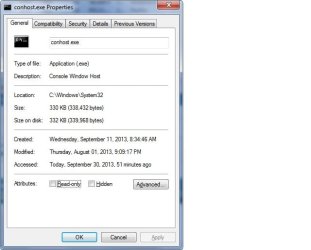
Did you look at the conhost.exe file properties, and see if it is running from the system32 folder?
Is it a Microsoft file?

Please post the General and Detail tabs of the file's Properties.
To post the images, try using the Snipping Tool:
How to Use the Snipping Tool in Vista
(Also applies to Windows 7)

Also, is your Windows 7 system 32-bit, or 64-bit?
 

My Computer My Computer

Computer type
PC/Desktop
Computer Manufacturer/Model Number
An ol' eMachines
OS
Windows 7 Home Premium
Internet Speed
Fine for me...I'm retired!
Thanks for posting Cottonball
 

My Computer My Computer

Computer Manufacturer/Model Number
W530-3630QM1
OS
windows 7 home 64bit
CPU
INTEL-CORE I7
Memory
16GB
Hard Drives
750GB
Browser
Chrome
Yes, it looks like it's coming from the system 32 folder (I'm running 64 bit Win 7 Pro).
 

Attachments

  • conhost.jpg
    conhost.jpg
    29.8 KB · Views: 27
  • conhost1.jpg
    conhost1.jpg
    30 KB · Views: 27

My Computer My Computer

Computer type
PC/Desktop
Computer Manufacturer/Model Number
DIY
OS
Windows 7 Pro 64-bit Service Pack 1
CPU
AMD FX 8370 BE 8-core
Motherboard
Gigabyte 990FXA-UD3
Memory
32G Corsair DDR3 1600
Graphics Card(s)
2 GTX660 SC in SLI
Sound Card
Reaktek
Monitor(s) Displays
Samsung 23" LCD
Screen Resolution
1920x1080
Hard Drives
5 SATA HDD
1 eSATA HDD
PSU
Corsair 850w
Case
AZZA Hurricane
Cooling
Case fans
Keyboard
Microsoft
Mouse
Logitech
Internet Speed
T3
Antivirus
Norton Internet Security
Browser
IE, Firefox
Size = 0 Bytes!!! Oh boy!!

:info: Please go to the ComboFix Download

:warn: Save ComboFix.exe to the Desktop

Disable your AntiVirus and AntiSpyware applications as they will interfere with ComboFix.
Info: http://www.techsupportforum.com/secu...lications.html

Double click combofix.exe and follow the prompts.
Please be patient, it will take a while.

When finished, it produces a log.

:ar: Please include the C:\ComboFix.txt in your reply.


NOTE: If you encounter a message "Illegal operation attempted on registry key that has been marked for deletion" and no programs run, please reboot to resolve the error.
 

My Computer My Computer

Computer type
PC/Desktop
Computer Manufacturer/Model Number
An ol' eMachines
OS
Windows 7 Home Premium
Internet Speed
Fine for me...I'm retired!
Sorry this is taking so long. I've been working long hours and the only time I'll have to do this is tomorrow evening (Wednesday the 2nd). Will post the data then.
 

My Computer My Computer

Computer type
PC/Desktop
Computer Manufacturer/Model Number
DIY
OS
Windows 7 Pro 64-bit Service Pack 1
CPU
AMD FX 8370 BE 8-core
Motherboard
Gigabyte 990FXA-UD3
Memory
32G Corsair DDR3 1600
Graphics Card(s)
2 GTX660 SC in SLI
Sound Card
Reaktek
Monitor(s) Displays
Samsung 23" LCD
Screen Resolution
1920x1080
Hard Drives
5 SATA HDD
1 eSATA HDD
PSU
Corsair 850w
Case
AZZA Hurricane
Cooling
Case fans
Keyboard
Microsoft
Mouse
Logitech
Internet Speed
T3
Antivirus
Norton Internet Security
Browser
IE, Firefox
Whenever you can is fine. We understand.
 

My Computer My Computer

Computer type
PC/Desktop
Computer Manufacturer/Model Number
An ol' eMachines
OS
Windows 7 Home Premium
Internet Speed
Fine for me...I'm retired!
Sorry about the delay. Here's the file from the combo run.
 

Attachments

My Computer My Computer

Computer type
PC/Desktop
Computer Manufacturer/Model Number
DIY
OS
Windows 7 Pro 64-bit Service Pack 1
CPU
AMD FX 8370 BE 8-core
Motherboard
Gigabyte 990FXA-UD3
Memory
32G Corsair DDR3 1600
Graphics Card(s)
2 GTX660 SC in SLI
Sound Card
Reaktek
Monitor(s) Displays
Samsung 23" LCD
Screen Resolution
1920x1080
Hard Drives
5 SATA HDD
1 eSATA HDD
PSU
Corsair 850w
Case
AZZA Hurricane
Cooling
Case fans
Keyboard
Microsoft
Mouse
Logitech
Internet Speed
T3
Antivirus
Norton Internet Security
Browser
IE, Firefox
Please download the Farbar Recovery Scan Tool
Download: http://www.bleepingcomputer.com/download/farbar-recovery-scan-tool/
Select the version that applies to your system.
Save it to your Desktop.

Double-click the downloaded file to run it.

When the tool opens click Yes to the disclaimer.

Press the Scan button.

The tool makes a log (FRST.txt) in the same directory from which the tool is run (Desktop).
:ar: Please provide the FRST.txt in your reply.

The first time the tool is run, it also makes another log: Addition.txt
:ar: Also post the Addition.txt in your reply.

Back at the program's main console, type the following text in the blank box after Search:
conhost.exe

Click: Search file(s)

When done searching, FRST makes a log, Search.txt, on the Desktop.
:ar: Please provide the Search.txt in your reply.
 

My Computer My Computer

Computer type
PC/Desktop
Computer Manufacturer/Model Number
An ol' eMachines
OS
Windows 7 Home Premium
Internet Speed
Fine for me...I'm retired!
Here's the files:
 

Attachments

My Computer My Computer

Computer type
PC/Desktop
Computer Manufacturer/Model Number
DIY
OS
Windows 7 Pro 64-bit Service Pack 1
CPU
AMD FX 8370 BE 8-core
Motherboard
Gigabyte 990FXA-UD3
Memory
32G Corsair DDR3 1600
Graphics Card(s)
2 GTX660 SC in SLI
Sound Card
Reaktek
Monitor(s) Displays
Samsung 23" LCD
Screen Resolution
1920x1080
Hard Drives
5 SATA HDD
1 eSATA HDD
PSU
Corsair 850w
Case
AZZA Hurricane
Cooling
Case fans
Keyboard
Microsoft
Mouse
Logitech
Internet Speed
T3
Antivirus
Norton Internet Security
Browser
IE, Firefox
conhost

i too had this issue, first time round after a lot of troubleshooting, i had to format my c drive and reinstall my OS.
the next time when i installed my pc softwares one by one, i doubled checked if any of my pirated ones were doing this. however, i discovered that the CORSAIR k70 keyboard software iCUbe was the one which caused the conhost to apprear in the task manager.. and the process couldnt be killed.

just uninstall the CORSAIR software and then recheck the task manager.
 

My Computer My Computer

Computer type
PC/Desktop
OS
win 7
Back
Top