Connect printer via crossover cable

speedlever

New member
Member
VIP
Local time
4:32 PM
Messages
128
I need to connect a printer via crossover cable to a Win7/64 laptop. The printer has a USB port, but it is defective. I created a xover cable (and tested it so I know it's good). How do I set up this printer (HP Deskjet 6940) using the xover cable connected to the ethernet port on the laptop?

I found this thread, but as the last post indicates, it lacks the details needed to do the job.
http://www.sevenforums.com/hardware-devices/61696-installing-printer-via-ethernet-cable-2.html

I connected the printer to the laptop with the xover cable, ran through the printer wizard to install the HP6940 drivers as per the Win7 printer installation routine, but nothing will print. I tried the MS FixIt routine and still no printing.

Any suggestions how to fix this? All I see is an error - printing for this printer when I open up active printers.

Thanks!
 

My Computer

OS
Windows 7 x64 home premium
CPU
Intel core i5-2500k
Motherboard
Asus P8Z68-V Pro
Memory
2x4GB G.Skill DDR3-1333, 2x2GB AData DDR3-1333
Graphics Card(s)
HD3000 graphics
Sound Card
on board
Monitor(s) Displays
Samsung 19" syncmaster
Screen Resolution
1280x1024
Hard Drives
Intel 80 GB X25-M SSD
Samsung HD321KJ 320 GB SATA
Samsung HD204UI 2.0 TB SATA
WD 1.5 TB Green eSATA in an external NexStar enclosure
PSU
Corsair HX520W
Case
Antec Solo
Cooling
CoolerMaster Hyper 212+ with dual fans
Keyboard
MS Natural Ergonomic 4000
Mouse
Logitech
Internet Speed
RoadRunner
Speedlever, the crossover cable is designed for when you are assigning IP's directly on the two machines.
setting the IP for the printer has to be accomplised at the panel on the printer. Same on the PC.

Suggest that you just get a ethernet switch and connect your pc and the printer to it and then to your router
so that your pc and the printer will receive an IP. The printer cdrom will find it if the printers ethernet port
is ok and it has picked up an IP from your router via the switch.
Unless your router has a spare ethernet port and then all you have to do is connect it to your printer.

Although, if your USB port on the printer is defective, there is a possibility that the electronics has problems and the IP port might not work either.

Time for a new printer :(

Rich
 

My Computer

Computer type
Laptop
Computer Manufacturer/Model Number
Toshiba Laptop Qosimo X870
OS
Windows 7 Pro x64 SP1
CPU
Intel Core I7
Motherboard
Toshiba Qosmio
Memory
16 Gigs
Graphics Card(s)
NVIDIA GeForce GTX 670M
Monitor(s) Displays
17.7" laptop
Screen Resolution
1600 x 900
Hard Drives
256 Gig SanDisk SSD for C
256 Gig Intel SSD for D
Internet Speed
50/25 FIOS
Antivirus
Vipre (all you can eat for 10 machines)
Browser
IE and FF
Other Info
I have dos 6.22, wfwg 3.11, win98, 2000 and xp VHD's available for testing. MS's Virtual PC works great.
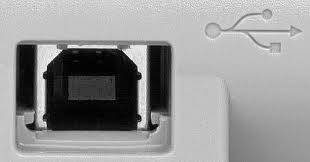
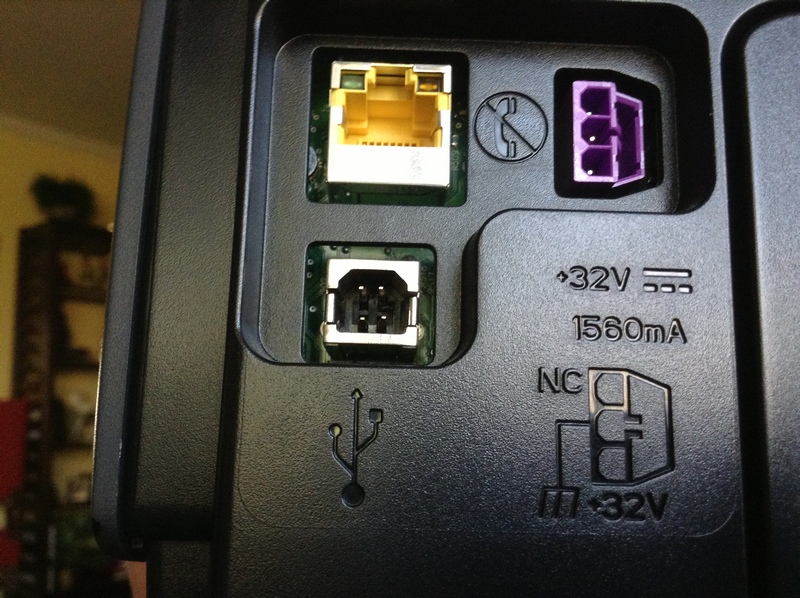
Thanks for the info Rich. The router is in another room. The USB port on the printer somehow has been damaged physically... there are 4 metal prongs showing and no center plug. I have no idea what happened to damage it. There is no panel on this printer, so I have no idea how to set the IP from the printer.
HP Deskjet 6940 Printer series*-* Download drivers and software - specify product name - HP Business Support Center

There's no center plug like this one has:
wv8etUA.jpg


I was trying to do this for a friend on the cheap.

I Googled connecting printers with crossover cables and saw examples of how to do it, but nothing I've found will make it work as the examples appear to indicate.
 

My Computer

OS
Windows 7 x64 home premium
CPU
Intel core i5-2500k
Motherboard
Asus P8Z68-V Pro
Memory
2x4GB G.Skill DDR3-1333, 2x2GB AData DDR3-1333
Graphics Card(s)
HD3000 graphics
Sound Card
on board
Monitor(s) Displays
Samsung 19" syncmaster
Screen Resolution
1280x1024
Hard Drives
Intel 80 GB X25-M SSD
Samsung HD321KJ 320 GB SATA
Samsung HD204UI 2.0 TB SATA
WD 1.5 TB Green eSATA in an external NexStar enclosure
PSU
Corsair HX520W
Case
Antec Solo
Cooling
CoolerMaster Hyper 212+ with dual fans
Keyboard
MS Natural Ergonomic 4000
Mouse
Logitech
Internet Speed
RoadRunner
Without being able to get to the control panel for the printer, you can't set the ip for a crossover cable.
take the printer into the other room. connect it to the router and then install the software to be able to set
the ip if that is what you want.

Otherwise, you might be out of luck.

Rich
 

My Computer

Computer type
Laptop
Computer Manufacturer/Model Number
Toshiba Laptop Qosimo X870
OS
Windows 7 Pro x64 SP1
CPU
Intel Core I7
Motherboard
Toshiba Qosmio
Memory
16 Gigs
Graphics Card(s)
NVIDIA GeForce GTX 670M
Monitor(s) Displays
17.7" laptop
Screen Resolution
1600 x 900
Hard Drives
256 Gig SanDisk SSD for C
256 Gig Intel SSD for D
Internet Speed
50/25 FIOS
Antivirus
Vipre (all you can eat for 10 machines)
Browser
IE and FF
Other Info
I have dos 6.22, wfwg 3.11, win98, 2000 and xp VHD's available for testing. MS's Virtual PC works great.
OK. Umm, install what software so I can set the IP? There may be something obvious that I'm missing here.
 

My Computer

OS
Windows 7 x64 home premium
CPU
Intel core i5-2500k
Motherboard
Asus P8Z68-V Pro
Memory
2x4GB G.Skill DDR3-1333, 2x2GB AData DDR3-1333
Graphics Card(s)
HD3000 graphics
Sound Card
on board
Monitor(s) Displays
Samsung 19" syncmaster
Screen Resolution
1280x1024
Hard Drives
Intel 80 GB X25-M SSD
Samsung HD321KJ 320 GB SATA
Samsung HD204UI 2.0 TB SATA
WD 1.5 TB Green eSATA in an external NexStar enclosure
PSU
Corsair HX520W
Case
Antec Solo
Cooling
CoolerMaster Hyper 212+ with dual fans
Keyboard
MS Natural Ergonomic 4000
Mouse
Logitech
Internet Speed
RoadRunner
Speedlever, most printer software installs will allow you to open the control panel for the printer. Either via a web browser for the default IP for the printer or directly to the printer via it's printer Mac address.

Also, most printers have a configuration print out which is normally gotten thru a power on sequence where you have to push a button at the same time you plug it in so that you can see how it is connected.

When you install the printer software it will search the network if you tell it that the printer is conneced via network connection. The sofware normally finds the printer directly and then will allow you to set options in its control panel.

Rich
 

My Computer

Computer type
Laptop
Computer Manufacturer/Model Number
Toshiba Laptop Qosimo X870
OS
Windows 7 Pro x64 SP1
CPU
Intel Core I7
Motherboard
Toshiba Qosmio
Memory
16 Gigs
Graphics Card(s)
NVIDIA GeForce GTX 670M
Monitor(s) Displays
17.7" laptop
Screen Resolution
1600 x 900
Hard Drives
256 Gig SanDisk SSD for C
256 Gig Intel SSD for D
Internet Speed
50/25 FIOS
Antivirus
Vipre (all you can eat for 10 machines)
Browser
IE and FF
Other Info
I have dos 6.22, wfwg 3.11, win98, 2000 and xp VHD's available for testing. MS's Virtual PC works great.
Yeah, I discovered the configuration print out button combo last night. Will have to visit the site today and see what I get.

The auto printer software install seems to rely on a USB connection. When I visited the HP site to check for printer drivers, it tells me to use the Win7 built-in drivers. Go figure. ;)

IAC, I ran through the printer install function, chose the correct HP printer model.. and nothing. Maybe I can finagle it with the info on the print info page.. and connect it to the router temporarily to make/change settings, if I can figure that out.

Thanks for the help.
 

My Computer

OS
Windows 7 x64 home premium
CPU
Intel core i5-2500k
Motherboard
Asus P8Z68-V Pro
Memory
2x4GB G.Skill DDR3-1333, 2x2GB AData DDR3-1333
Graphics Card(s)
HD3000 graphics
Sound Card
on board
Monitor(s) Displays
Samsung 19" syncmaster
Screen Resolution
1280x1024
Hard Drives
Intel 80 GB X25-M SSD
Samsung HD321KJ 320 GB SATA
Samsung HD204UI 2.0 TB SATA
WD 1.5 TB Green eSATA in an external NexStar enclosure
PSU
Corsair HX520W
Case
Antec Solo
Cooling
CoolerMaster Hyper 212+ with dual fans
Keyboard
MS Natural Ergonomic 4000
Mouse
Logitech
Internet Speed
RoadRunner
OK. I printed out the config page: as expected (not connected to the computer) it shows an ip/subnet/default gateway of 0.0.0.0. So I connected it to the wifi router in a spare LAN port. It gets assigned an ip of 192.168.1.106 (within the defined DCHP range I allow). Subnet mask and default gateway look good. But still no printing.

I don't know how to access the printer control panel to set a static IP or make any changes.

Any suggestions at this point?
 

My Computer

OS
Windows 7 x64 home premium
CPU
Intel core i5-2500k
Motherboard
Asus P8Z68-V Pro
Memory
2x4GB G.Skill DDR3-1333, 2x2GB AData DDR3-1333
Graphics Card(s)
HD3000 graphics
Sound Card
on board
Monitor(s) Displays
Samsung 19" syncmaster
Screen Resolution
1280x1024
Hard Drives
Intel 80 GB X25-M SSD
Samsung HD321KJ 320 GB SATA
Samsung HD204UI 2.0 TB SATA
WD 1.5 TB Green eSATA in an external NexStar enclosure
PSU
Corsair HX520W
Case
Antec Solo
Cooling
CoolerMaster Hyper 212+ with dual fans
Keyboard
MS Natural Ergonomic 4000
Mouse
Logitech
Internet Speed
RoadRunner
BTW, here's a pic of the USB port on the printer. I have no idea what happened to it.

3QqXNY9.jpg
 

My Computer

OS
Windows 7 x64 home premium
CPU
Intel core i5-2500k
Motherboard
Asus P8Z68-V Pro
Memory
2x4GB G.Skill DDR3-1333, 2x2GB AData DDR3-1333
Graphics Card(s)
HD3000 graphics
Sound Card
on board
Monitor(s) Displays
Samsung 19" syncmaster
Screen Resolution
1280x1024
Hard Drives
Intel 80 GB X25-M SSD
Samsung HD321KJ 320 GB SATA
Samsung HD204UI 2.0 TB SATA
WD 1.5 TB Green eSATA in an external NexStar enclosure
PSU
Corsair HX520W
Case
Antec Solo
Cooling
CoolerMaster Hyper 212+ with dual fans
Keyboard
MS Natural Ergonomic 4000
Mouse
Logitech
Internet Speed
RoadRunner
Go to the printer install page, add the printer if it is not already there. select add port by IP. then put the IP into the standard IP port address. then it should be fine.

Sometimes the install software for the printer will search for the printers IP if you tell the install that it is connected via the network port. put in 192.168.1.106 and it should work.

it would then configure it all for you, print a test page and you should be fine.

Rich
 

My Computer

Computer type
Laptop
Computer Manufacturer/Model Number
Toshiba Laptop Qosimo X870
OS
Windows 7 Pro x64 SP1
CPU
Intel Core I7
Motherboard
Toshiba Qosmio
Memory
16 Gigs
Graphics Card(s)
NVIDIA GeForce GTX 670M
Monitor(s) Displays
17.7" laptop
Screen Resolution
1600 x 900
Hard Drives
256 Gig SanDisk SSD for C
256 Gig Intel SSD for D
Internet Speed
50/25 FIOS
Antivirus
Vipre (all you can eat for 10 machines)
Browser
IE and FF
Other Info
I have dos 6.22, wfwg 3.11, win98, 2000 and xp VHD's available for testing. MS's Virtual PC works great.
Rich,

The router assigned that IP from the DHCP pool. It is not sent into the printer configuration itself, is it?

My point is that when I remove the printer from the router and attach it via the crossover cable to the laptop, that IP will no longer exist within the printer configuration settings, will it? Or maybe it does, if it saved that to the printers memory. ?? One way to find out!

I've worked with other printers before that have an LCD screen so you can make setting adjustments on the printer itself. This one does not have any such interface.

When I ran through the Win7 add printer routine, I chose local printer but did not choose new port/Standard TCP/IP port because I had no way to set an IP on the printer itself. I chose LPT1 thinking that might work (it didn't).

I'm stuck trying to figure out how to set an IP address within the printer. Or am I misunderstanding how this should work?

** Reading through the user guide, this printer has an embedded web server. Maybe I can use that to manipulate the settings so I can make this work via the crossover cable. I am obviously dabbling in uncharted waters here. ;)
 

My Computer

OS
Windows 7 x64 home premium
CPU
Intel core i5-2500k
Motherboard
Asus P8Z68-V Pro
Memory
2x4GB G.Skill DDR3-1333, 2x2GB AData DDR3-1333
Graphics Card(s)
HD3000 graphics
Sound Card
on board
Monitor(s) Displays
Samsung 19" syncmaster
Screen Resolution
1280x1024
Hard Drives
Intel 80 GB X25-M SSD
Samsung HD321KJ 320 GB SATA
Samsung HD204UI 2.0 TB SATA
WD 1.5 TB Green eSATA in an external NexStar enclosure
PSU
Corsair HX520W
Case
Antec Solo
Cooling
CoolerMaster Hyper 212+ with dual fans
Keyboard
MS Natural Ergonomic 4000
Mouse
Logitech
Internet Speed
RoadRunner
you can setup the static IP for the printer once your connected to the printer via your router.
set the ip to whatever you want and then save it. then when you connect via the crossover cable.
use the web interface and then it should work.

You have to do all this before you disconnect the printer from the router as the default will not work via IP until you change the ip and gateway to a static ip.

Rich
 

My Computer

Computer type
Laptop
Computer Manufacturer/Model Number
Toshiba Laptop Qosimo X870
OS
Windows 7 Pro x64 SP1
CPU
Intel Core I7
Motherboard
Toshiba Qosmio
Memory
16 Gigs
Graphics Card(s)
NVIDIA GeForce GTX 670M
Monitor(s) Displays
17.7" laptop
Screen Resolution
1600 x 900
Hard Drives
256 Gig SanDisk SSD for C
256 Gig Intel SSD for D
Internet Speed
50/25 FIOS
Antivirus
Vipre (all you can eat for 10 machines)
Browser
IE and FF
Other Info
I have dos 6.22, wfwg 3.11, win98, 2000 and xp VHD's available for testing. MS's Virtual PC works great.
Interesting. I'll have to go back and play with that another day.

I got it fixed today, but another way. I connected the printer via the crossover cable to the laptop and printed a report page. As would be expected, it had one of the 169.254.x.x auto IP assignments. So I opened up the printer properties and changed the port to a TCP/IP port, plugged in the 169.254.x.x IP and voila! It works.

I even got into the printer EWS (embedded web server) but didn't see any way to adjust the IP, etc.

I really should connect back to the router and change it to a static IP. Maybe I'll get around to that one day. I didn't realize the printer would save the IP assignment.

Thanks much for your help in this process.
 

My Computer

OS
Windows 7 x64 home premium
CPU
Intel core i5-2500k
Motherboard
Asus P8Z68-V Pro
Memory
2x4GB G.Skill DDR3-1333, 2x2GB AData DDR3-1333
Graphics Card(s)
HD3000 graphics
Sound Card
on board
Monitor(s) Displays
Samsung 19" syncmaster
Screen Resolution
1280x1024
Hard Drives
Intel 80 GB X25-M SSD
Samsung HD321KJ 320 GB SATA
Samsung HD204UI 2.0 TB SATA
WD 1.5 TB Green eSATA in an external NexStar enclosure
PSU
Corsair HX520W
Case
Antec Solo
Cooling
CoolerMaster Hyper 212+ with dual fans
Keyboard
MS Natural Ergonomic 4000
Mouse
Logitech
Internet Speed
RoadRunner
Sometimes the solution is pretty simple. Glad that you got it fixed.

Rich
 

My Computer

Computer type
Laptop
Computer Manufacturer/Model Number
Toshiba Laptop Qosimo X870
OS
Windows 7 Pro x64 SP1
CPU
Intel Core I7
Motherboard
Toshiba Qosmio
Memory
16 Gigs
Graphics Card(s)
NVIDIA GeForce GTX 670M
Monitor(s) Displays
17.7" laptop
Screen Resolution
1600 x 900
Hard Drives
256 Gig SanDisk SSD for C
256 Gig Intel SSD for D
Internet Speed
50/25 FIOS
Antivirus
Vipre (all you can eat for 10 machines)
Browser
IE and FF
Other Info
I have dos 6.22, wfwg 3.11, win98, 2000 and xp VHD's available for testing. MS's Virtual PC works great.
Back
Top