Connect to TV

PoBear

New member
Member
Local time
8:25 PM
Messages
51
Hi can anybody help?

I am trying to connect an ATI4550 card to a SDTV via component. I have bought an adapter cable which connects to the DVI socket on the card and provides a component cable which I have connected to the TV.

I have tried configuring through both Windows 7 and the ATI Catalyst Control Centre, but neither will show a dispaly on the TV.

I am running WIndows 7 (fully patched), the latest ATI drivers and software, the display is connected to an LCD and the TV and is running at 1024x768 and high colour, I have also tried it at 800x600.

The TV is cable of displaying a computer display as I had the PC connected through s-video until the card blew and I had a DVD player connected via component.

Any ideas.
 

My Computer

Computer Manufacturer/Model Number
Various
OS
Windows 7
CPU
Various
Motherboard
Various
Memory
Various
Hello PoBear Make & Model of TV Please.
 

My Computer

Computer type
PC/Desktop
Computer Manufacturer/Model Number
Self Build
OS
MS Windows 7 Professional 64-bit SP1
CPU
AMD FX(tm)-6100 Six-Core Processor Socket AM3+ (942)
Motherboard
ASUSTeK COMPUTER INC. SABERTOOTH 990FX (AM3r2)
Memory
8.00 GB Dual-Channel DDR3 @ 802MHz (11-11-11-36) 1.5Volts
Graphics Card(s)
NVIDIA GeForce GTX 560 Ti
Sound Card
Onboard Realtek HD
Monitor(s) Displays
shimian (1920x1080@60Hz)
Screen Resolution
1920*1080
Hard Drives
OCZ-AGIL ITY3 SATA Disk Device 120GB
PSU
Corsair TX 750
Case
Corsair
Cooling
WaterCooled
Keyboard
Microsoft Wired
Mouse
Logitech USB Optical TiltWheel Mouse
Internet Speed
Realtek PCIe GBE Family Controller 20MB*1MB
Antivirus
Avast
Browser
Firefox
Other Info
150GB Internal Hard Drive for Backing Up Important Files -
Hauppauge Nova-DT Dual DVB-T Tuner Device (+IR) -
USB PC Camera with Mic (SN9C105)
Its a Toshiba 36ZP38B. I've had a W7 desktop running at 1024x768 and lower resoloutions via an S-Video connected in by Scart with no problem.
 

My Computer

Computer Manufacturer/Model Number
Various
OS
Windows 7
CPU
Various
Motherboard
Various
Memory
Various
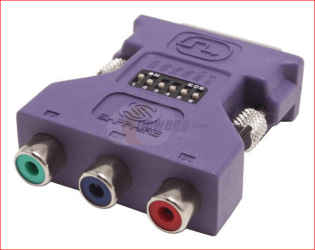
Think you will find the problem is that that card doesn't support what you are trying to do. As far as I know the last ATI card that supported component via DVI adapter was the old 9800 series, and came with an adapter like this,

dvicomponent.PNG

I have a feeling that your HD 4550 is one of those that doesn't support using that type of adapter.

What is the exact make and model number of your HD 4550?
 

My Computer

Computer type
PC/Desktop
Computer Manufacturer/Model Number
Me
OS
Win 7 Ultimate x64
CPU
FX-8350 @ 4.6 GHz so far
Motherboard
Asus M5A97 EVO
Memory
ADATA XPG V1 Series Black 8GB DDR3 1600
Graphics Card(s)
Sapphire R9 270x Dual-X
Sound Card
Xonar DGX w/ Corsair Vengence 1300
Monitor(s) Displays
Acer S232HL Abid
Screen Resolution
1920x1080
Hard Drives
120 GB OCZ Vertex 3
500 GB Seagate 7200.12
PSU
Antec Earthwatts 650W Green
Case
Antec Three Hundred
Cooling
Cooler Master 212 EVO
Keyboard
Logitech G510
Mouse
Logitech G500s
Internet Speed
35000/3000
I have the XFX Radeon 4550. According to AMD there is only supposed to be one version, but I ordered one with an S-Video, but was delivered one with HDMI! The former doesn't appear to be available anymore.

According to AMD the card supports output thru component, s-video and composite.
 

My Computer

Computer Manufacturer/Model Number
Various
OS
Windows 7
CPU
Various
Motherboard
Various
Memory
Various
Think you will find the support for those three all depends on which connectors the manufacturer uses on the card. Here are three of them all with different connectors on them,

ATI Radeon HD 4550 512MB review

AMD's ATI Radeon HD 4550 Video Card Review - The Entry Level Radeon HD 4550 Graphics Card - Legit Reviews

Newegg.ca - SAPPHIRE 100252HDMI Radeon HD 4550 512MB 64-bit DDR3 PCI Express 2.0 x16 HDCP Ready Low Profile Ready Video Card

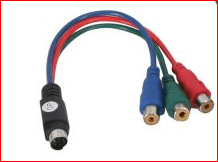
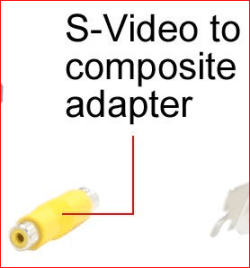
and I think you will find that the only one that supports component will be the first one with the s-video port on it. Another thing is that those s-video ports on most video cards is not the standard 4 pin, but is a 7 pin that can put out either of; s-video, component or composite depending on which adapter/dongle is used. My last card (X1950 Pro) to have the s-video on it came with the following,

svidcomp.PNG

svideocomposite.PNG

as well as a s-video cable with a 7 pin connector on one end that plugged into the card, and a standard 4 pin for connecting to a TV.

Most if not all of the DVI-component adapters should have a warning somewhere like this one,

For only $4.26 each when QTY 50+ purchased - DVI-I Male to 3 RCA Component Adapter w/ DIP Switch for ATI Video Cards (Gold Plated) | DVI <--> 3RCA Component

where it only works with select cards, all of which are from the old 9800 and back.
 

My Computer

Computer type
PC/Desktop
Computer Manufacturer/Model Number
Me
OS
Win 7 Ultimate x64
CPU
FX-8350 @ 4.6 GHz so far
Motherboard
Asus M5A97 EVO
Memory
ADATA XPG V1 Series Black 8GB DDR3 1600
Graphics Card(s)
Sapphire R9 270x Dual-X
Sound Card
Xonar DGX w/ Corsair Vengence 1300
Monitor(s) Displays
Acer S232HL Abid
Screen Resolution
1920x1080
Hard Drives
120 GB OCZ Vertex 3
500 GB Seagate 7200.12
PSU
Antec Earthwatts 650W Green
Case
Antec Three Hundred
Cooling
Cooler Master 212 EVO
Keyboard
Logitech G510
Mouse
Logitech G500s
Internet Speed
35000/3000
My card is the last of three in your list.

Forgive me but I am confused, The card has has a DVI-I socket which is supposed to carry an analogue signal as well digital, which it does as the component cable has a VGA connector on the block that works, the cable was described as any card providing it was DVI-I.
 

My Computer

Computer Manufacturer/Model Number
Various
OS
Windows 7
CPU
Various
Motherboard
Various
Memory
Various
Can I turn the question around, is there anyway to connect this card to an SDTV. My TV will take component, scart, s-video or composite.

I've seen HDMI to component cables, would one of these work?
 
Last edited:

My Computer

Computer Manufacturer/Model Number
Various
OS
Windows 7
CPU
Various
Motherboard
Various
Memory
Various
DVI-I may be both digital and analogue, but the analogue portion has to support outputting to component in order for it to work. On most if not all video cards today they don't. The warning on this cable sums it up,

Amazon.com: DVI-I to 3 RCA Component Cable - 6ft: Electronics

This cable connects DVI device to 3RCA component RCA. 100% Shield with an Overlapped Foil and Copper Braid. The shield is continues through the connector with a 360-degree Tin Solder Joint between the Cable Braid and a Copper Foil wrap on the DVI-I Copper Shield Under Mold, Providing a Shielding Solution for a Noise-free Connection. (*)The Cable Not Support your Computer Monitor Video Port, or Y , Cr, Cb Video. Your Video Source Must Provide a YpbPr Component Video Signal form the DVI-I Video Ports to Use Cable. *****WARNING*****IT WILL NOT ALLOW YOU TO CONNECT YOUR COMPONENT VIDEO SOURCES TO A REGULAR COMPUTER MONITOR OR HDTV unless you monitor specifically has this capability. Most do not. (Please check the documentation for your computer monitor). THIS CABLE WILL NOT ALLOW YOU TO CONNECT YOUR COMPUTER'S DVI PORT TO THE COMPONENT INPUT ON YOUR HDTV unless your video card supports component out function through it's DVI port (please confirm with your video cards documentation before purchasing. Some require adapter, not this cable). ***

Only way to find out for sure is to contact XFX.

As for connecting HDMI to component, it can be done but probably not worth the hassle,

HDMI To Component
 

My Computer

Computer type
PC/Desktop
Computer Manufacturer/Model Number
Me
OS
Win 7 Ultimate x64
CPU
FX-8350 @ 4.6 GHz so far
Motherboard
Asus M5A97 EVO
Memory
ADATA XPG V1 Series Black 8GB DDR3 1600
Graphics Card(s)
Sapphire R9 270x Dual-X
Sound Card
Xonar DGX w/ Corsair Vengence 1300
Monitor(s) Displays
Acer S232HL Abid
Screen Resolution
1920x1080
Hard Drives
120 GB OCZ Vertex 3
500 GB Seagate 7200.12
PSU
Antec Earthwatts 650W Green
Case
Antec Three Hundred
Cooling
Cooler Master 212 EVO
Keyboard
Logitech G510
Mouse
Logitech G500s
Internet Speed
35000/3000
THanks for your patience and help, looks like I am going to have to go back to the drawing board.
 

My Computer

Computer Manufacturer/Model Number
Various
OS
Windows 7
CPU
Various
Motherboard
Various
Memory
Various
Back
Top