Connect with windows xp to windows 7 and vice versa?

Hawake

New member
Local time
3:59 PM
Messages
16
Location
Sweden
Hello!

I'm trying to access certain files from my windows 7 computer with my windows xp professional laptop, but it denies my access, why does this happen?

in a normal case when i enter the correct IP-adress it would ask me for my username and password like it did when i had windows vista on my windows-7 computer, but now it doesn't it just denies access when i enter the correct ip adress.

Sorry for my bad english and please tell me if there is something that isn't understandable and i will try to rewrite it :)
 

My Computer My Computer

At a glance

Windows 7 x64 UltimateAMD Phenom X4 Quad Core Processor4000mb 800mhzNvidia G-Force GTX260
OS
Windows 7 x64 Ultimate
CPU
AMD Phenom X4 Quad Core Processor
Motherboard
MSI K9A2 CF
Memory
4000mb 800mhz
Graphics Card(s)
Nvidia G-Force GTX260
Sound Card
Built in
Monitor(s) Displays
Asus
Screen Resolution
1440x900
PSU
Corsair VX550w
Case
Coolermaster
Keyboard
Razer Lycosa Gaming Keyboard
Internet Speed
24mb/s
actually I just got through answering this question. I answer it so often I'll keep it short this time (because you can search the forum for longer explanations).

The easiest thing to try is to create the same username and password on both computers. Then log in using that username to access the shared folders.
 

My Computer My Computer

At a glance

XP, Seven, 2008R2AMD, Intel, VIACorsair, Kingston, etc.ATI, NVIDIA
Computer Manufacturer/Model Number
Too many to list.
OS
XP, Seven, 2008R2
CPU
AMD, Intel, VIA
Motherboard
Various
Memory
Corsair, Kingston, etc.
Graphics Card(s)
ATI, NVIDIA
Monitor(s) Displays
Samsung
Hard Drives
Maxtor, Western Digital
Keyboard
qwerty
Internet Speed
22 Mb/s @ home, 1 Gb/s @ server
Other Info
All of my systems still run fastest on XP 32-bit for the most part. Win7 is fun to play with, but I still prefer XP for raw speed, security, and functionality.
Hello Hawake, Welcome so much to SevenForums.
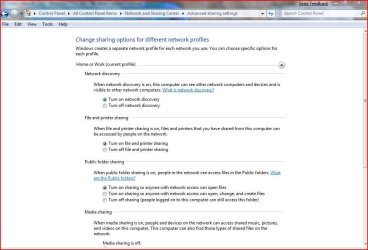
Do you have your permissions set on windows 7 install?
advance.JPG
 

My Computer My Computer

At a glance

Windows 7 Ulti. x64AMD Phenom 8450 triple-core 2.10 ghz4GBATI Radion HD 3200
Computer Manufacturer/Model Number
Gateway GT5692
OS
Windows 7 Ulti. x64
CPU
AMD Phenom 8450 triple-core 2.10 ghz
Memory
4GB
Graphics Card(s)
ATI Radion HD 3200
Monitor(s) Displays
Gateway FPD1775W
Screen Resolution
1280x720
Hard Drives
465.6613 Gibibytes
do you have password protected sharing enabled or not?

if it's disabled then the computer generally will not prompt you to enter a username and password. in that case you can map a network drive using alternate credentials (so long as the password isn't blank)
 

My Computer My Computer

At a glance

XP, Seven, 2008R2AMD, Intel, VIACorsair, Kingston, etc.ATI, NVIDIA
Computer Manufacturer/Model Number
Too many to list.
OS
XP, Seven, 2008R2
CPU
AMD, Intel, VIA
Motherboard
Various
Memory
Corsair, Kingston, etc.
Graphics Card(s)
ATI, NVIDIA
Monitor(s) Displays
Samsung
Hard Drives
Maxtor, Western Digital
Keyboard
qwerty
Internet Speed
22 Mb/s @ home, 1 Gb/s @ server
Other Info
All of my systems still run fastest on XP 32-bit for the most part. Win7 is fun to play with, but I still prefer XP for raw speed, security, and functionality.
I do have Password Protected sharing enabled since i live in an appartment with more people in and if i dont got protected sharing they will be aviable to access my files aswell wich i dont.

And i dont know about the permission thingy, the ony thing that is diffrent from your picture on my computer is that you got 3 options on the public folder sharing: Turn on sharing so anyone with network access can open, change, and create files.

And sadly i cannot create a new account on my windows xp computer cause its my work-computer that only has normal account settings etc.

Something i maybe should mention is that it worked fine to use the network between my laptop and win7 this summer before i reinstalled them both.


Edit: And after doing some research, i Actually got up a Log in promt from the laptop when i used the guide to add another computer to my network with my IP-adress \\xxx.xxx.x.xxx\Public wich should be the default shared map in win 7. However it denies me here aswell saying that the map doesn't exist and exits the guide.
 

My Computer My Computer

At a glance

Windows 7 x64 UltimateAMD Phenom X4 Quad Core Processor4000mb 800mhzNvidia G-Force GTX260
OS
Windows 7 x64 Ultimate
CPU
AMD Phenom X4 Quad Core Processor
Motherboard
MSI K9A2 CF
Memory
4000mb 800mhz
Graphics Card(s)
Nvidia G-Force GTX260
Sound Card
Built in
Monitor(s) Displays
Asus
Screen Resolution
1440x900
PSU
Corsair VX550w
Case
Coolermaster
Keyboard
Razer Lycosa Gaming Keyboard
Internet Speed
24mb/s

My Computer My Computer

At a glance

XP, Seven, 2008R2AMD, Intel, VIACorsair, Kingston, etc.ATI, NVIDIA
Computer Manufacturer/Model Number
Too many to list.
OS
XP, Seven, 2008R2
CPU
AMD, Intel, VIA
Motherboard
Various
Memory
Corsair, Kingston, etc.
Graphics Card(s)
ATI, NVIDIA
Monitor(s) Displays
Samsung
Hard Drives
Maxtor, Western Digital
Keyboard
qwerty
Internet Speed
22 Mb/s @ home, 1 Gb/s @ server
Other Info
All of my systems still run fastest on XP 32-bit for the most part. Win7 is fun to play with, but I still prefer XP for raw speed, security, and functionality.
problem connecting WinXP computers to Win7 computers

sup3rsprt

I am having a similar problem connecting WinXP to Win7 on my home network.

The Win7 machine(s) can connect anywhere, the WinXP machine(s) can connect only to other WinXP machines.

I do not have passwords set on any computers.

Most of my "computers" are running in VMware 7, which to date has not been the source of any connectivity problems.

I have tried any number of solution and am flumoxed; PPPPPPPlease help!

Regards

k
 

My Computer My Computer

At a glance

Win 7
OS
Win 7
I solved the problems by making the settings similar to the picture in the post above.

But to begin with. be sure that You have shared file the advanced way on your Win7 Machine.
Because so far i know if you only use the normal sharing your windows 7 machine will ONLY share the map or file in the homegroup and the homegroup is only accesiable from other win7 machines in the same homegroup.

i cannot post any pictures on how to due i got my Machine on a diffrent language.

but it should be done something like this: Properties on the file > Sharing > Advanced Sharing > and then under advanced sharing Mark "Share this file on the network or share this file or map.

then you just should type the local adress of your win7 computer into your xp machine: like \\192.168.... and then if you got password protected sharing you will get a login promt otherwise you should get connected to the win7 machine.

Hope this helps
 

My Computer My Computer

At a glance

Windows 7 x64 UltimateAMD Phenom X4 Quad Core Processor4000mb 800mhzNvidia G-Force GTX260
OS
Windows 7 x64 Ultimate
CPU
AMD Phenom X4 Quad Core Processor
Motherboard
MSI K9A2 CF
Memory
4000mb 800mhz
Graphics Card(s)
Nvidia G-Force GTX260
Sound Card
Built in
Monitor(s) Displays
Asus
Screen Resolution
1440x900
PSU
Corsair VX550w
Case
Coolermaster
Keyboard
Razer Lycosa Gaming Keyboard
Internet Speed
24mb/s
Theoretically if the machines can ping one another, and the shares are created, you should be able to map from one machine to that share on the other machine. The credential used would be that is used to log onto the machine with the share (assuming it has admin rights). If that username doesn't allow, make sure it's in the Security tab of the sharing properties of that share and retry.
 

My Computer My Computer

At a glance

Windows 7 Ultimate 64BitGenuineIntel Intel(R) Core(TM) DuoCore T2400 ...2.00 GBMobile Intel(R) 945 Express Chipset
Computer Manufacturer/Model Number
Lenovo ThinkPad T60
OS
Windows 7 Ultimate 64Bit
CPU
GenuineIntel Intel(R) Core(TM) DuoCore T2400 @ 1.83GHz
Motherboard
Intel(R) 82801G (ICH7 Family)
Memory
2.00 GB
Graphics Card(s)
Mobile Intel(R) 945 Express Chipset
Sound Card
SoundMAX Integrated Digital HD Audio
Monitor(s) Displays
ThinkPad Display
Screen Resolution
1400x1050
Hard Drives
100Gb SATA
Keyboard
Standard Keyboard
Mouse
HID-compliant Mouse
Internet Speed
Cable Broadband - 54Mbps
Other Info
Intel(R) PRO/1000 PL Network Connection
11a/b/g Wireless LAN Mini PCI Express Adapter
win 7 64 ,wired on ruter ,and win xp pro sp3 wirelles

i can share internet connection in ruter mode,one comp is on win 7 ,wired,other is xp pro sp3 ,wirelles..so,i want to connect from win xp to win 7 c drive ..i can ping from laptop(xp) to win 7 and also to ruter,but i just dont know HOW FOR gOD SAKE i should find solution to connect from xp (laptop) to read/write files on pc win 7 ..Please help...
 

My Computer My Computer

At a glance

windows 7 proX2 DUAL CORE AM2 4600+4GB DDR2 800 MHZ3D CLUB GTS8800 320 MB
Computer Manufacturer/Model Number
AMD
OS
windows 7 pro
CPU
X2 DUAL CORE AM2 4600+
Motherboard
ASUS M2N
Memory
4GB DDR2 800 MHZ
Graphics Card(s)
3D CLUB GTS8800 320 MB
Sound Card
ON BOARD
Monitor(s) Displays
PHILIPS 19 INCH
Hard Drives
WD 6400 AAKS
PSU
SILENT GREEN LC POWER 550 WATS

My Computer My Computer

At a glance

Windows 7 Ulti. x64AMD Phenom 8450 triple-core 2.10 ghz4GBATI Radion HD 3200
Computer Manufacturer/Model Number
Gateway GT5692
OS
Windows 7 Ulti. x64
CPU
AMD Phenom 8450 triple-core 2.10 ghz
Memory
4GB
Graphics Card(s)
ATI Radion HD 3200
Monitor(s) Displays
Gateway FPD1775W
Screen Resolution
1280x720
Hard Drives
465.6613 Gibibytes
Neverall Hello and Welcome to SevenForums
Here is a little how to from Microsoft that will help you share files and such between your differnt OS's :D
Good luck to you with this problem.
Networking home computers running different versions of Windows
i solved it by tutorial,i can go into shared files on win xp laptop,and so on,:othanks,now i inquieri solution for getting into win 7 trough my laptop installed with xp pro..please help...
 

My Computer My Computer

At a glance

windows 7 proX2 DUAL CORE AM2 4600+4GB DDR2 800 MHZ3D CLUB GTS8800 320 MB
Computer Manufacturer/Model Number
AMD
OS
windows 7 pro
CPU
X2 DUAL CORE AM2 4600+
Motherboard
ASUS M2N
Memory
4GB DDR2 800 MHZ
Graphics Card(s)
3D CLUB GTS8800 320 MB
Sound Card
ON BOARD
Monitor(s) Displays
PHILIPS 19 INCH
Hard Drives
WD 6400 AAKS
PSU
SILENT GREEN LC POWER 550 WATS
neverall.. Do you have your Windows 7 permissions in Advanced Network Sharing set like in the pic at the start of this thread? Share with anyone on network? This should allow your xp laptop to access win 7 files. Good luck to you :D
 

My Computer My Computer

At a glance

Windows 7 Ulti. x64AMD Phenom 8450 triple-core 2.10 ghz4GBATI Radion HD 3200
Computer Manufacturer/Model Number
Gateway GT5692
OS
Windows 7 Ulti. x64
CPU
AMD Phenom 8450 triple-core 2.10 ghz
Memory
4GB
Graphics Card(s)
ATI Radion HD 3200
Monitor(s) Displays
Gateway FPD1775W
Screen Resolution
1280x720
Hard Drives
465.6613 Gibibytes
i assume its issue in the xp..please guide me to conect to win 7 from winxp ,vice versa works fine,all sharing options are as u said,so what next,i just need to go to my desktop pc with win 7 via mine laptop having win xp..please!
 

My Computer My Computer

At a glance

windows 7 proX2 DUAL CORE AM2 4600+4GB DDR2 800 MHZ3D CLUB GTS8800 320 MB
Computer Manufacturer/Model Number
AMD
OS
windows 7 pro
CPU
X2 DUAL CORE AM2 4600+
Motherboard
ASUS M2N
Memory
4GB DDR2 800 MHZ
Graphics Card(s)
3D CLUB GTS8800 320 MB
Sound Card
ON BOARD
Monitor(s) Displays
PHILIPS 19 INCH
Hard Drives
WD 6400 AAKS
PSU
SILENT GREEN LC POWER 550 WATS
neverall.. I do not have a copy of XP Pro running on my small home network so not sure if the path would be the same on my xp home box. I go to start then/my network places. Then in the left column Network Tasks/ view workgroup computers. Then left column other places/Microsoft windows network/workgroup. Then choose which of my windows 7 PC's I wish to copy from. Hope this helps you :D
 

My Computer My Computer

At a glance

Windows 7 Ulti. x64AMD Phenom 8450 triple-core 2.10 ghz4GBATI Radion HD 3200
Computer Manufacturer/Model Number
Gateway GT5692
OS
Windows 7 Ulti. x64
CPU
AMD Phenom 8450 triple-core 2.10 ghz
Memory
4GB
Graphics Card(s)
ATI Radion HD 3200
Monitor(s) Displays
Gateway FPD1775W
Screen Resolution
1280x720
Hard Drives
465.6613 Gibibytes

My Computer My Computer

At a glance

windows 7 proX2 DUAL CORE AM2 4600+4GB DDR2 800 MHZ3D CLUB GTS8800 320 MB
Computer Manufacturer/Model Number
AMD
OS
windows 7 pro
CPU
X2 DUAL CORE AM2 4600+
Motherboard
ASUS M2N
Memory
4GB DDR2 800 MHZ
Graphics Card(s)
3D CLUB GTS8800 320 MB
Sound Card
ON BOARD
Monitor(s) Displays
PHILIPS 19 INCH
Hard Drives
WD 6400 AAKS
PSU
SILENT GREEN LC POWER 550 WATS
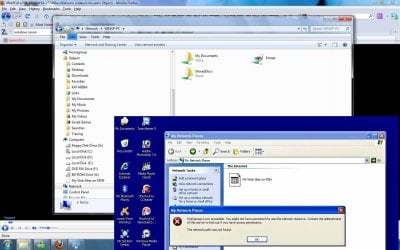
so i know how to view xp files from win 7 ,but i nees detailed info on seeing win7 fom xp..pleae someone come and help e,we can arrange to do it trough team viewer if possible..i am almost online much of the day time..please!
 

Attachments

  • i can acess folder from win7 to x but when i click view workgroup computers on xp i got error me.jpg
    i can acess folder from win7 to x but when i click view workgroup computers on xp i got error me.jpg
    132.8 KB · Views: 256

My Computer My Computer

At a glance

windows 7 proX2 DUAL CORE AM2 4600+4GB DDR2 800 MHZ3D CLUB GTS8800 320 MB
Computer Manufacturer/Model Number
AMD
OS
windows 7 pro
CPU
X2 DUAL CORE AM2 4600+
Motherboard
ASUS M2N
Memory
4GB DDR2 800 MHZ
Graphics Card(s)
3D CLUB GTS8800 320 MB
Sound Card
ON BOARD
Monitor(s) Displays
PHILIPS 19 INCH
Hard Drives
WD 6400 AAKS
PSU
SILENT GREEN LC POWER 550 WATS
1- Disable firewall on both computers (try to be disconnected from the internet so no viruses attack your pc)
2- Connect your laptop to the router network connection.
3- Go to Network.
you should be able to c your laptop from your computer that has windows 7 installed.
if still not able try to ping your laptop.
to make things faster assign an IP for each pc, but the router should do it automatically once the device is connected to the network.
 

My Computer My Computer

At a glance

Windows 7 Ultimate x64Core 2 Quad Q6600 2.40 GHz, 8 MB L2 Cach4 GB DDR21GB MSI nvidia 8600 GeForce
OS
Windows 7 Ultimate x64
CPU
Core 2 Quad Q6600 2.40 GHz, 8 MB L2 Cach
Motherboard
MSI P35
Memory
4 GB DDR2
Graphics Card(s)
1GB MSI nvidia 8600 GeForce
Sound Card
Realtech
Monitor(s) Displays
Samsung 19 inch LCD
Hard Drives
500 GB SATA
Internet Speed
DSL 512Kbps :( VERY SLOW :(
1- Disable firewall on both computers (try to be disconnected from the internet so no viruses attack your pc)
2- Connect your laptop to the router network connection.
3- Go to Network.
you should be able to c your laptop from your computer that has windows 7 installed.
if still not able try to ping your laptop.
to make things faster assign an IP for each pc, but the router should do it automatically once the device is connected to the network.

i did al that,u know,i can ping eah other no issuess at all,i do see may laptop (with win xp os on)from desktop pc(win 7 on),i am just damn a bit not to put two and two together to see and enable acess to desktop(runnning win7) via laptop ,who is still driving on win xp pro...
 

My Computer My Computer

At a glance

windows 7 proX2 DUAL CORE AM2 4600+4GB DDR2 800 MHZ3D CLUB GTS8800 320 MB
Computer Manufacturer/Model Number
AMD
OS
windows 7 pro
CPU
X2 DUAL CORE AM2 4600+
Motherboard
ASUS M2N
Memory
4GB DDR2 800 MHZ
Graphics Card(s)
3D CLUB GTS8800 320 MB
Sound Card
ON BOARD
Monitor(s) Displays
PHILIPS 19 INCH
Hard Drives
WD 6400 AAKS
PSU
SILENT GREEN LC POWER 550 WATS
For XP pro you need to disable simple file sharing in order to see and access the Win 7 machine.


To disable simple file sharing yourself, follow these steps:
  1. Click Start, and then click My Computer.
  2. On the Tools menu, click Folder Options.
  3. Click the View tab.
  4. In the Advanced Settings section, click to clear the Use simple file sharing (Recommended) check box.
  5. Click OK.
 

My Computer My Computer

At a glance

Windows 7 Ult, Windows 8.1 Pro,Q9650-4.275GHz, E8600 4.5GHz, E6750-3.8GHzG.Skill PC2 9600 1200Mhz 5 5 5 15 2TGTX480
Computer type
PC/Desktop
Computer Manufacturer/Model Number
Home built
OS
Windows 7 Ult, Windows 8.1 Pro,
CPU
Q9650-4.275GHz, E8600 4.5GHz, E6750-3.8GHz
Motherboard
Evga 780i FTW
Memory
G.Skill PC2 9600 1200Mhz 5 5 5 15 2T
Graphics Card(s)
GTX480
Sound Card
Asus Xonar D2
Monitor(s) Displays
HannsG
Screen Resolution
1680X1050
Hard Drives
GSkill Phoenix Pro 120GB SSD
PSU
ThermalTake Toughpower 1000Watt modular
Case
ThermalTake XaserV
Cooling
Xigmatek S1283
Keyboard
Logitech G15
Mouse
Logitech G9
Internet Speed
T1
Back
Top