Connected but web pages don't open

ROOTOY260

New member
Local time
7:41 AM
Messages
12
Location
Salisbury, MD
My computer indicates that I am connected to my Comcast router, but when I click to access my homepage or any other webpage, I get a message that there is no internet connection.

My Network and sharing page reads:
Access: No Internet Access
Connection: Wireless Network Connection (home router name)

Any assistance will be greatly appreciated.
 

My Computer

Computer type
PC/Desktop
Computer Manufacturer/Model Number
Dell XPS 8300
OS
Windows 7 Home Premium x64
CPU
Intel Core i72600 @3.40GHz
Motherboard
Dell OY2M (CPU 1)
Memory
8.00 GB Dual Channel DDR3 @665 MHz
Graphics Card(s)
T27B 350 (1776 x 1000 @ 59Hz)
Hard Drives
1863 GB TOSHIBA DT01 ACA 200 (SATA)
Antivirus
McAfee
Browser
Chrome

My Computer

Computer type
PC/Desktop
Computer Manufacturer/Model Number
Own build (new) Desk1 / Asus ROG Win 7 / Desk2 1st build
OS
Desk1 7 Home Prem / Desk2 10 Pro / Main lap Asus ROG 10 Pro 2 laptop Toshiba 7 Pro Asus P2520 7 & 10
CPU
Desk1 i5 3750K / Laptop i7 GTX 860M / Desk2 i5 2500
Motherboard
Desk1 Asus P877-V / Desk2 Gigabyte H67 UD3H / Laptop ?
Memory
Desk1 8GB (1866) / Desk2 16GB (1333) / Laptop 8Gb DDR3
Graphics Card(s)
Desk 1& 2NVidia GTX 650 & Laptops on board Intel
Sound Card
Desk 1 & 2 -XONAR DG Realtek High Def audio Laptop
Monitor(s) Displays
Desk 1 Benq HD 2450 / Desk2 Philips 24" / Laptop 17.5"
Screen Resolution
1920x1080 D1 & D2 & Laptop 1
Hard Drives
Desk1 Samsung 120GB 830 SSD
Asus ROG 256GB 850 Pro SSD
Desk2 Samsung 840 256 SSD
Toshiba 120GB EVO
PSU
Desk 1 Corsair HX 1050/ Laptop ? / Desk 2 Corsair HX 650
Case
Desk 1 Cooler HAF XM ? Toshiba laptop / Desk2 Coolermaster
Cooling
Fans on all Desk1 -2 Desk2 - all Coolermasters 5 Laptop ?
Keyboard
Desk 1 MS Sidewinder X6 Desk 2 MS Sidewinder X 4
Mouse
Desk 1&2 - Gigabyte MS 900 gamer - laptop - Logitec wireless
Internet Speed
ADSL2+
Other Info
One other Desktop (tester) and spare Toshba laptop both with SSD's
Running Kaspersky 2016 ISS on all machines config'd identically
Logitec audio stereo systems on each machine (x3)
Canon MG5250MFC
Router/modem TP-Link running WPA2SK
Thx ICit2lol,

I tried disconnecting then reconnecting the router but that did not resolve the problem.

I ran snf/scannow three times. Each resulted in the message "Windows Resource Protection did not find any integrity violations."

I ran Windows Network Diagnostics with results: "Problems Found Your computer appears to be correctly configured, but the device or resource (DNS Server) is not responding.

Also, I had previously received "Network adapter has been manually turned off."

In response to your question, I haven't knowingly downloaded or changed any drivers.

Router is xFinity Arris TG862 G/CT

Thx
 

My Computer

Computer type
PC/Desktop
Computer Manufacturer/Model Number
Dell XPS 8300
OS
Windows 7 Home Premium x64
CPU
Intel Core i72600 @3.40GHz
Motherboard
Dell OY2M (CPU 1)
Memory
8.00 GB Dual Channel DDR3 @665 MHz
Graphics Card(s)
T27B 350 (1776 x 1000 @ 59Hz)
Hard Drives
1863 GB TOSHIBA DT01 ACA 200 (SATA)
Antivirus
McAfee
Browser
Chrome

Attachments

  • DSKCHECK.PNG
    DSKCHECK.PNG
    40.6 KB · Views: 1

My Computer

Computer type
PC/Desktop
Computer Manufacturer/Model Number
Own build (new) Desk1 / Asus ROG Win 7 / Desk2 1st build
OS
Desk1 7 Home Prem / Desk2 10 Pro / Main lap Asus ROG 10 Pro 2 laptop Toshiba 7 Pro Asus P2520 7 & 10
CPU
Desk1 i5 3750K / Laptop i7 GTX 860M / Desk2 i5 2500
Motherboard
Desk1 Asus P877-V / Desk2 Gigabyte H67 UD3H / Laptop ?
Memory
Desk1 8GB (1866) / Desk2 16GB (1333) / Laptop 8Gb DDR3
Graphics Card(s)
Desk 1& 2NVidia GTX 650 & Laptops on board Intel
Sound Card
Desk 1 & 2 -XONAR DG Realtek High Def audio Laptop
Monitor(s) Displays
Desk 1 Benq HD 2450 / Desk2 Philips 24" / Laptop 17.5"
Screen Resolution
1920x1080 D1 & D2 & Laptop 1
Hard Drives
Desk1 Samsung 120GB 830 SSD
Asus ROG 256GB 850 Pro SSD
Desk2 Samsung 840 256 SSD
Toshiba 120GB EVO
PSU
Desk 1 Corsair HX 1050/ Laptop ? / Desk 2 Corsair HX 650
Case
Desk 1 Cooler HAF XM ? Toshiba laptop / Desk2 Coolermaster
Cooling
Fans on all Desk1 -2 Desk2 - all Coolermasters 5 Laptop ?
Keyboard
Desk 1 MS Sidewinder X6 Desk 2 MS Sidewinder X 4
Mouse
Desk 1&2 - Gigabyte MS 900 gamer - laptop - Logitec wireless
Internet Speed
ADSL2+
Other Info
One other Desktop (tester) and spare Toshba laptop both with SSD's
Running Kaspersky 2016 ISS on all machines config'd identically
Logitec audio stereo systems on each machine (x3)
Canon MG5250MFC
Router/modem TP-Link running WPA2SK
Ran scan disk - scan, fix errors, and recover bad sectors - didn't come up with anything. No errors were found.

I ran windows network troubleshooters several times. Two problems were reported:

"Windows cannot access\\RAY-PC" and "Windows cannot find RAY-PC."
 

My Computer

Computer type
PC/Desktop
Computer Manufacturer/Model Number
Dell XPS 8300
OS
Windows 7 Home Premium x64
CPU
Intel Core i72600 @3.40GHz
Motherboard
Dell OY2M (CPU 1)
Memory
8.00 GB Dual Channel DDR3 @665 MHz
Graphics Card(s)
T27B 350 (1776 x 1000 @ 59Hz)
Hard Drives
1863 GB TOSHIBA DT01 ACA 200 (SATA)
Antivirus
McAfee
Browser
Chrome
Ray I might ask for some help on this one as there seems to be more to it than just a non net connection if that is ok by you?
 

My Computer

Computer type
PC/Desktop
Computer Manufacturer/Model Number
Own build (new) Desk1 / Asus ROG Win 7 / Desk2 1st build
OS
Desk1 7 Home Prem / Desk2 10 Pro / Main lap Asus ROG 10 Pro 2 laptop Toshiba 7 Pro Asus P2520 7 & 10
CPU
Desk1 i5 3750K / Laptop i7 GTX 860M / Desk2 i5 2500
Motherboard
Desk1 Asus P877-V / Desk2 Gigabyte H67 UD3H / Laptop ?
Memory
Desk1 8GB (1866) / Desk2 16GB (1333) / Laptop 8Gb DDR3
Graphics Card(s)
Desk 1& 2NVidia GTX 650 & Laptops on board Intel
Sound Card
Desk 1 & 2 -XONAR DG Realtek High Def audio Laptop
Monitor(s) Displays
Desk 1 Benq HD 2450 / Desk2 Philips 24" / Laptop 17.5"
Screen Resolution
1920x1080 D1 & D2 & Laptop 1
Hard Drives
Desk1 Samsung 120GB 830 SSD
Asus ROG 256GB 850 Pro SSD
Desk2 Samsung 840 256 SSD
Toshiba 120GB EVO
PSU
Desk 1 Corsair HX 1050/ Laptop ? / Desk 2 Corsair HX 650
Case
Desk 1 Cooler HAF XM ? Toshiba laptop / Desk2 Coolermaster
Cooling
Fans on all Desk1 -2 Desk2 - all Coolermasters 5 Laptop ?
Keyboard
Desk 1 MS Sidewinder X6 Desk 2 MS Sidewinder X 4
Mouse
Desk 1&2 - Gigabyte MS 900 gamer - laptop - Logitec wireless
Internet Speed
ADSL2+
Other Info
One other Desktop (tester) and spare Toshba laptop both with SSD's
Running Kaspersky 2016 ISS on all machines config'd identically
Logitec audio stereo systems on each machine (x3)
Canon MG5250MFC
Router/modem TP-Link running WPA2SK
Thx ICit2lol,

I tried disconnecting then reconnecting the router but that did not resolve the problem.

I ran snf/scannow three times. Each resulted in the message "Windows Resource Protection did not find any integrity violations."

I ran Windows Network Diagnostics with results: "Problems Found Your computer appears to be correctly configured, but the device or resource (DNS Server) is not responding.

Also, I had previously received "Network adapter has been manually turned off."

In response to your question, I haven't knowingly downloaded or changed any drivers.

Router is xFinity Arris TG862 G/CT

Thx

To better assist you can you please follow this tutorial - http://www.sevenforums.com/network-sharing/300288-basic-requirements-before-posting-your-networking-thread.html. This can help us identify what may be causing your issue.

Your error messages seem to point to DNS which is the protocol used to translate legible host names into IP addresses. If that doesn't work then you can get symptoms such as no internet access or being unable to find a computer name.

More specifically we would be interested into looking at the IPconfig output so we can see what DNS settings are currently being used

Josh :)
 

My Computer

Computer type
PC/Desktop
Computer Manufacturer/Model Number
Custom Built
OS
Windows 7 Professional x64 SP1 ; Windows Server 2012 R2 Standard
CPU
Intel Core i5 2400 @ 3.10GHz
Motherboard
Foxconn H67MP-S/-V/H67MP
Memory
8.0GB DDR3 @ 665MHz (2GBx4)
Graphics Card(s)
AMD Radeon HD 6870
Sound Card
Realtek High Definition Audio
Monitor(s) Displays
AOC 2243W & SMB1930NW
Screen Resolution
1440x900 & 1920x1080
Hard Drives
977GB Seagate ST31000524AS ATA Drive (SATA)
250GB WD iSCSI attached Drive
PSU
750W Gaming PSU
Case
Novatech Night
Cooling
Fan
Keyboard
Dell Standard PS/2 Keyboard
Mouse
R.A.T 07 Gaming Mouse
Internet Speed
Download: 10 Mbps Ping: 30ms Upload: 0.81 Mbps
Browser
Google Chrome
Other Info
Optiarc DVD RW AD-5260S ATA Device
Yes, ICit2lol, that's fine by me.
 

My Computer

Computer type
PC/Desktop
Computer Manufacturer/Model Number
Dell XPS 8300
OS
Windows 7 Home Premium x64
CPU
Intel Core i72600 @3.40GHz
Motherboard
Dell OY2M (CPU 1)
Memory
8.00 GB Dual Channel DDR3 @665 MHz
Graphics Card(s)
T27B 350 (1776 x 1000 @ 59Hz)
Hard Drives
1863 GB TOSHIBA DT01 ACA 200 (SATA)
Antivirus
McAfee
Browser
Chrome
Thx Shadowjk,
The connection is wireless.
ISP is Comcast
Cable
router is Comcast xFinity Arris model TG 862 G/T
McAfee Internet security suite

Here's ipconfig/all

Windows IP Configuration

Host Name . . . . . . . . . . . . : RAY-PC
Primary Dns Suffix . . . . . . . :
Node Type . . . . . . . . . . . . : Hybrid
IP Routing Enabled. . . . . . . . : No
WINS Proxy Enabled. . . . . . . . : No
DNS Suffix Search List. . . . . . : hsd1.md.comcast.net.

Ethernet adapter Local Area Connection 2:

Media State . . . . . . . . . . . : Media disconnected
Connection-specific DNS Suffix . :
Description . . . . . . . . . . . : Broadcom NetLink (TM) Gigabit Ethernet
Physical Address. . . . . . . . . : 18-03-73-CA-AC-59
DHCP Enabled. . . . . . . . . . . : Yes
Autoconfiguration Enabled . . . . : Yes

Wireless LAN adapter Wireless Network Connection 2:

Media State . . . . . . . . . . . : Media disconnected
Connection-specific DNS Suffix . :
Description . . . . . . . . . . . : Microsoft Virtual WiFi Miniport Adapter
Physical Address. . . . . . . . . : 94-39-E5-86-00-51
DHCP Enabled. . . . . . . . . . . : Yes
Autoconfiguration Enabled . . . . : Yes

Wireless LAN adapter Wireless Network Connection:

Connection-specific DNS Suffix . : hsd1.md.comcast.net.
Description . . . . . . . . . . . : DW1501 Wireless-N WLAN Half-Mini Card
Physical Address. . . . . . . . . : 94-39-E5-86-00-51
DHCP Enabled. . . . . . . . . . . : Yes
Autoconfiguration Enabled . . . . : Yes
IPv4 Address. . . . . . . . . . . : 10.0.0.3(Preferred)
Subnet Mask . . . . . . . . . . . : 255.255.255.0
Lease Obtained. . . . . . . . . . : May 07, 2014 2:50:50 PM
Lease Expires . . . . . . . . . . : May 14, 2014 2:50:50 PM
Default Gateway . . . . . . . . . : 10.0.0.1
DHCP Server . . . . . . . . . . . : 10.0.0.1
DNS Servers . . . . . . . . . . . : 75.75.75.75
75.75.76.76
NetBIOS over Tcpip. . . . . . . . : Enabled

Tunnel adapter Local Area Connection* 11:

Media State . . . . . . . . . . . : Media disconnected
Connection-specific DNS Suffix . :
Description . . . . . . . . . . . : Microsoft 6to4 Adapter
Physical Address. . . . . . . . . : 00-00-00-00-00-00-00-E0
DHCP Enabled. . . . . . . . . . . : No
Autoconfiguration Enabled . . . . : Yes

Tunnel adapter Teredo Tunneling Pseudo-Interface:

Media State . . . . . . . . . . . : Media disconnected
Connection-specific DNS Suffix . :
Description . . . . . . . . . . . : Teredo Tunneling Pseudo-Interface
Physical Address. . . . . . . . . : 00-00-00-00-00-00-00-E0
DHCP Enabled. . . . . . . . . . . : No
Autoconfiguration Enabled . . . . : Yes

Tunnel adapter isatap.{36652ABE-663A-4A66-A2D4-FAE7875FE6A8}:

Media State . . . . . . . . . . . : Media disconnected
Connection-specific DNS Suffix . :
Description . . . . . . . . . . . : Microsoft ISATAP Adapter #3
Physical Address. . . . . . . . . : 00-00-00-00-00-00-00-E0
DHCP Enabled. . . . . . . . . . . : No
Autoconfiguration Enabled . . . . : Yes
 

My Computer

Computer type
PC/Desktop
Computer Manufacturer/Model Number
Dell XPS 8300
OS
Windows 7 Home Premium x64
CPU
Intel Core i72600 @3.40GHz
Motherboard
Dell OY2M (CPU 1)
Memory
8.00 GB Dual Channel DDR3 @665 MHz
Graphics Card(s)
T27B 350 (1776 x 1000 @ 59Hz)
Hard Drives
1863 GB TOSHIBA DT01 ACA 200 (SATA)
Antivirus
McAfee
Browser
Chrome

My Computer

Computer type
PC/Desktop
Computer Manufacturer/Model Number
Custom Built
OS
Windows 7 Professional x64 SP1 ; Windows Server 2012 R2 Standard
CPU
Intel Core i5 2400 @ 3.10GHz
Motherboard
Foxconn H67MP-S/-V/H67MP
Memory
8.0GB DDR3 @ 665MHz (2GBx4)
Graphics Card(s)
AMD Radeon HD 6870
Sound Card
Realtek High Definition Audio
Monitor(s) Displays
AOC 2243W & SMB1930NW
Screen Resolution
1440x900 & 1920x1080
Hard Drives
977GB Seagate ST31000524AS ATA Drive (SATA)
250GB WD iSCSI attached Drive
PSU
750W Gaming PSU
Case
Novatech Night
Cooling
Fan
Keyboard
Dell Standard PS/2 Keyboard
Mouse
R.A.T 07 Gaming Mouse
Internet Speed
Download: 10 Mbps Ping: 30ms Upload: 0.81 Mbps
Browser
Google Chrome
Other Info
Optiarc DVD RW AD-5260S ATA Device
Didn't get connectivity after making the changes.

Windows Network Diagnostics resulting from checking validation box read "Troubleshooting couldn't identify the problem."

I noticed that, even after making the suggested changes, Network Connection 2 had a red X and "Network cable unplugged" Broadcom Netlink Gigabit Ether.
Don't know if that is of any relevance to you.
 

My Computer

Computer type
PC/Desktop
Computer Manufacturer/Model Number
Dell XPS 8300
OS
Windows 7 Home Premium x64
CPU
Intel Core i72600 @3.40GHz
Motherboard
Dell OY2M (CPU 1)
Memory
8.00 GB Dual Channel DDR3 @665 MHz
Graphics Card(s)
T27B 350 (1776 x 1000 @ 59Hz)
Hard Drives
1863 GB TOSHIBA DT01 ACA 200 (SATA)
Antivirus
McAfee
Browser
Chrome

My Computer

Computer type
PC/Desktop
Computer Manufacturer/Model Number
Own build (new) Desk1 / Asus ROG Win 7 / Desk2 1st build
OS
Desk1 7 Home Prem / Desk2 10 Pro / Main lap Asus ROG 10 Pro 2 laptop Toshiba 7 Pro Asus P2520 7 & 10
CPU
Desk1 i5 3750K / Laptop i7 GTX 860M / Desk2 i5 2500
Motherboard
Desk1 Asus P877-V / Desk2 Gigabyte H67 UD3H / Laptop ?
Memory
Desk1 8GB (1866) / Desk2 16GB (1333) / Laptop 8Gb DDR3
Graphics Card(s)
Desk 1& 2NVidia GTX 650 & Laptops on board Intel
Sound Card
Desk 1 & 2 -XONAR DG Realtek High Def audio Laptop
Monitor(s) Displays
Desk 1 Benq HD 2450 / Desk2 Philips 24" / Laptop 17.5"
Screen Resolution
1920x1080 D1 & D2 & Laptop 1
Hard Drives
Desk1 Samsung 120GB 830 SSD
Asus ROG 256GB 850 Pro SSD
Desk2 Samsung 840 256 SSD
Toshiba 120GB EVO
PSU
Desk 1 Corsair HX 1050/ Laptop ? / Desk 2 Corsair HX 650
Case
Desk 1 Cooler HAF XM ? Toshiba laptop / Desk2 Coolermaster
Cooling
Fans on all Desk1 -2 Desk2 - all Coolermasters 5 Laptop ?
Keyboard
Desk 1 MS Sidewinder X6 Desk 2 MS Sidewinder X 4
Mouse
Desk 1&2 - Gigabyte MS 900 gamer - laptop - Logitec wireless
Internet Speed
ADSL2+
Other Info
One other Desktop (tester) and spare Toshba laptop both with SSD's
Running Kaspersky 2016 ISS on all machines config'd identically
Logitec audio stereo systems on each machine (x3)
Canon MG5250MFC
Router/modem TP-Link running WPA2SK
Changed the settings and checked "Validate settings upon exit." The resulting Windows Network Diagnostics message was "Troubleshooting couldn't identify the problem." I tried opening several webpages but was unsuccessful -> "This webpage is not available."

I noticed that even after making the settings changes, Network Connection 2 has a red X and the message "Network cable unplugged. Broadcom Netlink Gigabit Ether..."

Don't know if that's of any relevance to you, but I thought I should pass it along anyway.
 

My Computer

Computer type
PC/Desktop
Computer Manufacturer/Model Number
Dell XPS 8300
OS
Windows 7 Home Premium x64
CPU
Intel Core i72600 @3.40GHz
Motherboard
Dell OY2M (CPU 1)
Memory
8.00 GB Dual Channel DDR3 @665 MHz
Graphics Card(s)
T27B 350 (1776 x 1000 @ 59Hz)
Hard Drives
1863 GB TOSHIBA DT01 ACA 200 (SATA)
Antivirus
McAfee
Browser
Chrome
Shadowjk I know very little of such matters but I do have a thought.

Could McAfee be causing this problem?

From ROOTOY260 SPECS.

Hard Drives 1863 GB TOSHIBA DT01 ACA 200 (SATA)
Antivirus McAfee
Browser Chrome

I will go back to watching.
 

My Computer

Computer type
PC/Desktop
Computer Manufacturer/Model Number
Home made Desktop
OS
Windows 10 Pro. 64/ version 1709 Windows 7 Pro/64
CPU
Intel i7-6800K @ 4.3
Motherboard
ASUS X-99 Deluxe II
Memory
Corsair Platinum 16 gig @2400
Graphics Card(s)
EVGA GTX 1070 OC
Monitor(s) Displays
Asus 27" LED LCD/VE278Q
Screen Resolution
1920-1080 or 1280-720 HDMI
Hard Drives
INTEL SSD 730-240 Gb Sata 3.0/
PSU
EVGA Platium 1200W
Case
Phanteks Luxe Tempered Glass 8 fans/ one radiator
Cooling
XSPC/ Water Cooled CPU
Keyboard
Das 4 Professional
Mouse
Logitech M705/MX Anywhere 2-S
Internet Speed
100 mbits
Antivirus
Microsoft Security Essentials/ Malwarebytes Premium 3.0/ SAS
Browser
I.E. 11 default/Firefox/ ISP Time Warner Cable/Spectrum
Other Info
LG BluRay Burner/
Sound system-KLipsch-THX/
Icy Dock ssd Hot Swap bays.
Aye Layback Bear! Very possible.

@ROOTOY260 - Can you try and disable any security related software that you have and then boot into Safe Mode with Networking. This will help us to determine if there is a third party application potentially causing issues with your connectivity. Once booted please test internet connectivity. If you can, also post an updated IPconfig when you are in safe mode.

Follow this tutorial (OPTION ONE ONLY) - http://www.sevenforums.com/tutorials/69585-safe-mode.html

   Note
Please replace all references of 'Safe Mode' with 'Safe Mode with Networking'


Lastly, could you shows us a screenshot of your HOSTS file contents. Since this can override the DNS settings I would be interested to see if there are any erroneous entries in there. To do so:

1. Open an elevated command prompt

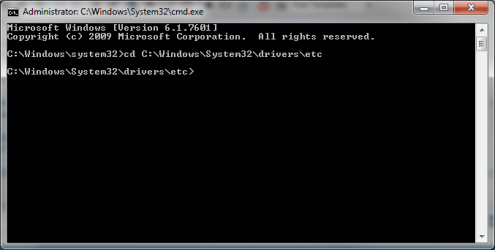
2. Type in the following to change directory: - cd C:\Windows\System32\drivers\etc
cd.png

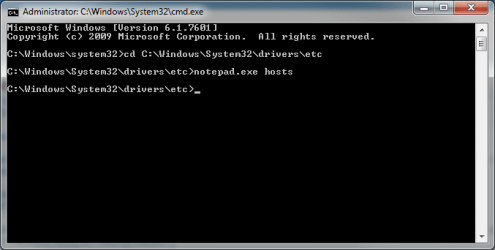
3. Then type in the following afterwards: - notepad.exe hosts
cmd notepad.png

4. Now copy and paste the contents of the opened file into your next post. It should look something like mine:

HOST.png

Now you can close everything!

Please report back your results,
Josh :)
 

My Computer

Computer type
PC/Desktop
Computer Manufacturer/Model Number
Custom Built
OS
Windows 7 Professional x64 SP1 ; Windows Server 2012 R2 Standard
CPU
Intel Core i5 2400 @ 3.10GHz
Motherboard
Foxconn H67MP-S/-V/H67MP
Memory
8.0GB DDR3 @ 665MHz (2GBx4)
Graphics Card(s)
AMD Radeon HD 6870
Sound Card
Realtek High Definition Audio
Monitor(s) Displays
AOC 2243W & SMB1930NW
Screen Resolution
1440x900 & 1920x1080
Hard Drives
977GB Seagate ST31000524AS ATA Drive (SATA)
250GB WD iSCSI attached Drive
PSU
750W Gaming PSU
Case
Novatech Night
Cooling
Fan
Keyboard
Dell Standard PS/2 Keyboard
Mouse
R.A.T 07 Gaming Mouse
Internet Speed
Download: 10 Mbps Ping: 30ms Upload: 0.81 Mbps
Browser
Google Chrome
Other Info
Optiarc DVD RW AD-5260S ATA Device
Monday past I called the local computer tech who had recently replaced my hard drive and told him about my connectivity problem. He said it was caused by McAfee and that I should completely remove my McAfee Internet Security Suite. I did and, as you know, nothing changed. My point being that McAfee isn't running.

I have two others, iObit Malware Fighter and Malwarebytes Anti-malware ver. 2.01.
I don't know how to disable them, only to uninstall them so I didn't do either with them.

I booted to safe with networking and checked connectivity in that mode. No go - still unable to open webpages though windows continues to indicate that I'm connected.

Here is this morning's Ipconfig/all from safe mode with networking.


Windows IP Configuration

Host Name . . . . . . . . . . . . : RAY-PC
Primary Dns Suffix . . . . . . . :
Node Type . . . . . . . . . . . . : Hybrid
IP Routing Enabled. . . . . . . . : No
WINS Proxy Enabled. . . . . . . . : No
DNS Suffix Search List. . . . . . : hsd1.md.comcast.net.

Wireless LAN adapter Wireless Network Connection 2:

Media State . . . . . . . . . . . : Media disconnected
Connection-specific DNS Suffix . :
Description . . . . . . . . . . . : Microsoft Virtual WiFi Miniport Adapter
Physical Address. . . . . . . . . : 94-39-E5-86-00-51
DHCP Enabled. . . . . . . . . . . : Yes
Autoconfiguration Enabled . . . . : Yes

Wireless LAN adapter Wireless Network Connection:

Connection-specific DNS Suffix . : hsd1.md.comcast.net.
Description . . . . . . . . . . . : DW1501 Wireless-N WLAN Half-Mini Card
Physical Address. . . . . . . . . : 94-39-E5-86-00-51
DHCP Enabled. . . . . . . . . . . : Yes
Autoconfiguration Enabled . . . . : Yes
IPv4 Address. . . . . . . . . . . : 10.0.0.3(Preferred)
Subnet Mask . . . . . . . . . . . : 255.255.255.0
Lease Obtained. . . . . . . . . . : May 08, 2014 10:54:16 AM
Lease Expires . . . . . . . . . . : May 15, 2014 10:54:16 AM
Default Gateway . . . . . . . . . : 10.0.0.1
DHCP Server . . . . . . . . . . . : 10.0.0.1
DNS Servers . . . . . . . . . . . : 75.75.75.75
75.75.76.76
NetBIOS over Tcpip. . . . . . . . : Enabled

Tunnel adapter Local Area Connection* 11:

Media State . . . . . . . . . . . : Media disconnected
Connection-specific DNS Suffix . :
Description . . . . . . . . . . . : Microsoft 6to4 Adapter
Physical Address. . . . . . . . . : 00-00-00-00-00-00-00-E0
DHCP Enabled. . . . . . . . . . . : No
Autoconfiguration Enabled . . . . : Yes

Tunnel adapter Teredo Tunneling Pseudo-Interface:

Media State . . . . . . . . . . . : Media disconnected
Connection-specific DNS Suffix . :
Description . . . . . . . . . . . : Teredo Tunneling Pseudo-Interface
Physical Address. . . . . . . . . : 00-00-00-00-00-00-00-E0
DHCP Enabled. . . . . . . . . . . : No
Autoconfiguration Enabled . . . . : Yes

Tunnel adapter isatap.{36652ABE-663A-4A66-A2D4-FAE7875FE6A8}:

Media State . . . . . . . . . . . : Media disconnected
Connection-specific DNS Suffix . :
Description . . . . . . . . . . . : Microsoft ISATAP Adapter #3
Physical Address. . . . . . . . . : 00-00-00-00-00-00-00-E0
DHCP Enabled. . . . . . . . . . . : No
Autoconfiguration Enabled . . . . : Yes

I will send HOST file in about 2 hours ... unfortunately I have a lunch meeting so won't be able to continue now.
 

My Computer

Computer type
PC/Desktop
Computer Manufacturer/Model Number
Dell XPS 8300
OS
Windows 7 Home Premium x64
CPU
Intel Core i72600 @3.40GHz
Motherboard
Dell OY2M (CPU 1)
Memory
8.00 GB Dual Channel DDR3 @665 MHz
Graphics Card(s)
T27B 350 (1776 x 1000 @ 59Hz)
Hard Drives
1863 GB TOSHIBA DT01 ACA 200 (SATA)
Antivirus
McAfee
Browser
Chrome
Back again.

From post # 16

iObit Malware Fighter
Anything that comes from IOBit can cause a Clean Install.
After having IOBit anything on your system I recommend do all the security scans after removing the program.
IOBit is known to bring little buddies with it and call home (China) which is scary.
 

My Computer

Computer type
PC/Desktop
Computer Manufacturer/Model Number
Home made Desktop
OS
Windows 10 Pro. 64/ version 1709 Windows 7 Pro/64
CPU
Intel i7-6800K @ 4.3
Motherboard
ASUS X-99 Deluxe II
Memory
Corsair Platinum 16 gig @2400
Graphics Card(s)
EVGA GTX 1070 OC
Monitor(s) Displays
Asus 27" LED LCD/VE278Q
Screen Resolution
1920-1080 or 1280-720 HDMI
Hard Drives
INTEL SSD 730-240 Gb Sata 3.0/
PSU
EVGA Platium 1200W
Case
Phanteks Luxe Tempered Glass 8 fans/ one radiator
Cooling
XSPC/ Water Cooled CPU
Keyboard
Das 4 Professional
Mouse
Logitech M705/MX Anywhere 2-S
Internet Speed
100 mbits
Antivirus
Microsoft Security Essentials/ Malwarebytes Premium 3.0/ SAS
Browser
I.E. 11 default/Firefox/ ISP Time Warner Cable/Spectrum
Other Info
LG BluRay Burner/
Sound system-KLipsch-THX/
Icy Dock ssd Hot Swap bays.
HOSTS file

As suggested by Layback Bear, uninstalled iObit Malware Fighter and then ran my only remaining security program's scan. [Malwarebytes]

Here is the HOSTS file you wanted, Josh:

# Copyright (c) 1993-2009 Microsoft Corp.
#
# This is a sample HOSTS file used by Microsoft TCP/IP for Windows.
#
# This file contains the mappings of IP addresses to host names. Each
# entry should be kept on an individual line. The IP address should
# be placed in the first column followed by the corresponding host name.
# The IP address and the host name should be separated by at least one
# space.
#
# Additionally, comments (such as these) may be inserted on individual
# lines or following the machine name denoted by a '#' symbol.
#
# For example:
#
# 102.54.94.97 rhino.acme.com # source server
# 38.25.63.10 x.acme.com # x client host

# localhost name resolution is handled within DNS itself.
# 127.0.0.1 localhost
# ::1 localhost
 

My Computer

Computer type
PC/Desktop
Computer Manufacturer/Model Number
Dell XPS 8300
OS
Windows 7 Home Premium x64
CPU
Intel Core i72600 @3.40GHz
Motherboard
Dell OY2M (CPU 1)
Memory
8.00 GB Dual Channel DDR3 @665 MHz
Graphics Card(s)
T27B 350 (1776 x 1000 @ 59Hz)
Hard Drives
1863 GB TOSHIBA DT01 ACA 200 (SATA)
Antivirus
McAfee
Browser
Chrome
HOSTS file looks clean to me :) awaiting your results after the scan...

I will say, from a network connection standpoint your machine seems fine which makes me to believe something software based is messing things up. Sorry if you have already said, is this the only machine affected by this?

Josh :)
 

My Computer

Computer type
PC/Desktop
Computer Manufacturer/Model Number
Custom Built
OS
Windows 7 Professional x64 SP1 ; Windows Server 2012 R2 Standard
CPU
Intel Core i5 2400 @ 3.10GHz
Motherboard
Foxconn H67MP-S/-V/H67MP
Memory
8.0GB DDR3 @ 665MHz (2GBx4)
Graphics Card(s)
AMD Radeon HD 6870
Sound Card
Realtek High Definition Audio
Monitor(s) Displays
AOC 2243W & SMB1930NW
Screen Resolution
1440x900 & 1920x1080
Hard Drives
977GB Seagate ST31000524AS ATA Drive (SATA)
250GB WD iSCSI attached Drive
PSU
750W Gaming PSU
Case
Novatech Night
Cooling
Fan
Keyboard
Dell Standard PS/2 Keyboard
Mouse
R.A.T 07 Gaming Mouse
Internet Speed
Download: 10 Mbps Ping: 30ms Upload: 0.81 Mbps
Browser
Google Chrome
Other Info
Optiarc DVD RW AD-5260S ATA Device
It is.

A laptop (also Windows 7), an iPad, and a Chromebook are all operating well on Home-1172.

I'm not sure which scan results you're awaiting.
 

My Computer

Computer type
PC/Desktop
Computer Manufacturer/Model Number
Dell XPS 8300
OS
Windows 7 Home Premium x64
CPU
Intel Core i72600 @3.40GHz
Motherboard
Dell OY2M (CPU 1)
Memory
8.00 GB Dual Channel DDR3 @665 MHz
Graphics Card(s)
T27B 350 (1776 x 1000 @ 59Hz)
Hard Drives
1863 GB TOSHIBA DT01 ACA 200 (SATA)
Antivirus
McAfee
Browser
Chrome
Back
Top