Connected to internet but cant browse

waeough

New member
Local time
9:02 AM
Messages
14
Hello, I am running an Asus notebook, model UX50V with Windows 7.

Last night restarted my computer because skype was not working properly, and when it started up again, it would connect to the internet, but not let me browse on Google Chrome or Internet Explorer. Skype will not connect, and my windows updates will not either.

I brought it to Best buy to have them look at it, they could not figure it out, and wanted to charge me lots of money to do a deeper diagnostics test on it. Well, I'm poor with no job. so i cant afford that.

I tried running a system restore, but i had never set that up. so i cant restore it to a previous date..

i also tried restarting the network server things with the command prompt..

I look around a lot online, but whatever solutions were posted in the forums, none of the simpler ones i have found helped me.

I really would not like to have to wipe the hard drive and boot it from scratch with the OS.

Anyone have any advice???
 

My Computer My Computer

At a glance

Windows 7 Home Premium 64 bit
Computer Manufacturer/Model Number
Asus
OS
Windows 7 Home Premium 64 bit
Ho waeough and welcome to SF.
There are quite a few things we could try before we start wiping any hard drives ;)
Unplug your router from power for at least 60 seconds then plug it back in, let it go through the init cycles and when all necessary lights are on, connect the computer and start it up.
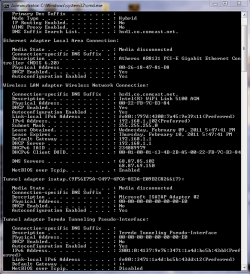
see if that helps if not, post a snip of the command line after executing ipconfig /all

start>search>type cmd>type ipconfig /all
Use built in snipping tool (type snipping in search) to take a snapshot of results, and upload it to us using the attachment icon (shaped like a paperclip) in the reply forms

-DG
 

My Computer My Computer

At a glance

Windows 7 Ultimate x86DualCore AMD Athlon 64 X2, 2600 MHz 5200+Samsung 2GB DDR2Onboard NVIDIA GeForce 6150SE nForce 430
Computer Manufacturer/Model Number
HP m8000n
OS
Windows 7 Ultimate x86
CPU
DualCore AMD Athlon 64 X2, 2600 MHz 5200+
Motherboard
Asus M2N68-LA (Narra)
Memory
Samsung 2GB DDR2
Graphics Card(s)
Onboard NVIDIA GeForce 6150SE nForce 430
Sound Card
Onboard nVIDIA nForce 6100-430 (MCP61P)
Monitor(s) Displays
Westinghouse 19" LED
Screen Resolution
1280x1024
Hard Drives
SATA II Seagate Barracuda 500GB
USB II WD Elements 500GB
USB II WD My Book 1TB
USB II WD My Book 2TB
PSU
Stock (HP)
Case
Stock (HP)
Cooling
Stock
Keyboard
Logitech Classic KB 200
Mouse
Standard HP opticle USB mouse
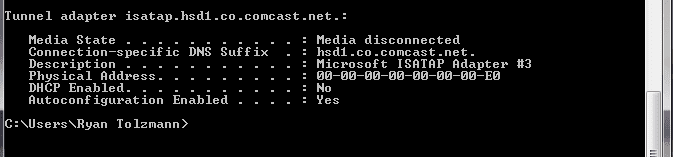
here is what came up..
 

Attachments

  • Capture.PNG
    Capture.PNG
    27.4 KB · Views: 210
  • Capture2.PNG
    Capture2.PNG
    3 KB · Views: 86

My Computer My Computer

At a glance

Windows 7 Home Premium 64 bit
Computer Manufacturer/Model Number
Asus
OS
Windows 7 Home Premium 64 bit
That looks OK so far.
I take it, power cycling the router didn't change the situation ?

-DG
 

My Computer My Computer

At a glance

Windows 7 Ultimate x86DualCore AMD Athlon 64 X2, 2600 MHz 5200+Samsung 2GB DDR2Onboard NVIDIA GeForce 6150SE nForce 430
Computer Manufacturer/Model Number
HP m8000n
OS
Windows 7 Ultimate x86
CPU
DualCore AMD Athlon 64 X2, 2600 MHz 5200+
Motherboard
Asus M2N68-LA (Narra)
Memory
Samsung 2GB DDR2
Graphics Card(s)
Onboard NVIDIA GeForce 6150SE nForce 430
Sound Card
Onboard nVIDIA nForce 6100-430 (MCP61P)
Monitor(s) Displays
Westinghouse 19" LED
Screen Resolution
1280x1024
Hard Drives
SATA II Seagate Barracuda 500GB
USB II WD Elements 500GB
USB II WD My Book 1TB
USB II WD My Book 2TB
PSU
Stock (HP)
Case
Stock (HP)
Cooling
Stock
Keyboard
Logitech Classic KB 200
Mouse
Standard HP opticle USB mouse
na, i reset the router like 4 different times. didnt do anything
 

My Computer My Computer

At a glance

Windows 7 Home Premium 64 bit
Computer Manufacturer/Model Number
Asus
OS
Windows 7 Home Premium 64 bit
Are you saying you can get to your homepage but cannot navigate further?
 

My Computer My Computer

At a glance

Windows 7 Home Premium 64bit
OS
Windows 7 Home Premium 64bit
the computer itself will connect to the internet. but if i open a browser it says cannot connect to server.

no homepage or anything.
 

My Computer My Computer

At a glance

Windows 7 Home Premium 64 bit
Computer Manufacturer/Model Number
Asus
OS
Windows 7 Home Premium 64 bit
I had a similar problem with my network card but I found a fix.

Go to Device Manager, find your Network Card, and right click Properties. Go to Advanced, Speed and Duplex, and force it to run at 10 Mbps Full Duplex. Let me know if that helps.
 

My Computer My Computer

At a glance

Windows 7 Ultimate x64AMD Phenom II x6 1100T @ 4.0 GHZ4GB Corsair XMS DDR3 1600MHzMSI Twin Frozr GTX 560 Ti
Computer Manufacturer/Model Number
Custom Build
OS
Windows 7 Ultimate x64
CPU
AMD Phenom II x6 1100T @ 4.0 GHZ
Motherboard
MSI 890FX-GD65
Memory
4GB Corsair XMS DDR3 1600MHz
Graphics Card(s)
MSI Twin Frozr GTX 560 Ti
Sound Card
Asus Xonar Essense STX
Monitor(s) Displays
23" 1080p LG LCD Flatscreen Panel
Screen Resolution
1920x1080 @ 60Hz
Hard Drives
1 x 120 GB OCZ Agility 2 SSD
1 x 500 GB WD Caviar Black 7200 RPM HDD
1 x 250 GB Maxtor OneTouch external USB Flash HDD
PSU
Corsair TX850W
Case
Antec 900
Cooling
4 case fans, 1xZalman 9500 CPU Heatsink
Keyboard
Logitech G110 Gaming Keyboard
Mouse
Razer Deathadder 3500DPI Infrared Gaming Mouse
Other Info
Sennheiser HD555 Headphones with Zalman Mic
my network card as in the wireless card?

i wen tto the advanced tab and dont see an option for what you said...
 

My Computer My Computer

At a glance

Windows 7 Home Premium 64 bit
Computer Manufacturer/Model Number
Asus
OS
Windows 7 Home Premium 64 bit
ah, didn't notice you were using your wireless connection. my mistake. have you tried a wired connection?
 

My Computer My Computer

At a glance

Windows 7 Ultimate x64AMD Phenom II x6 1100T @ 4.0 GHZ4GB Corsair XMS DDR3 1600MHzMSI Twin Frozr GTX 560 Ti
Computer Manufacturer/Model Number
Custom Build
OS
Windows 7 Ultimate x64
CPU
AMD Phenom II x6 1100T @ 4.0 GHZ
Motherboard
MSI 890FX-GD65
Memory
4GB Corsair XMS DDR3 1600MHz
Graphics Card(s)
MSI Twin Frozr GTX 560 Ti
Sound Card
Asus Xonar Essense STX
Monitor(s) Displays
23" 1080p LG LCD Flatscreen Panel
Screen Resolution
1920x1080 @ 60Hz
Hard Drives
1 x 120 GB OCZ Agility 2 SSD
1 x 500 GB WD Caviar Black 7200 RPM HDD
1 x 250 GB Maxtor OneTouch external USB Flash HDD
PSU
Corsair TX850W
Case
Antec 900
Cooling
4 case fans, 1xZalman 9500 CPU Heatsink
Keyboard
Logitech G110 Gaming Keyboard
Mouse
Razer Deathadder 3500DPI Infrared Gaming Mouse
Other Info
Sennheiser HD555 Headphones with Zalman Mic
yes. i have tried a wired ethernet connection. :(
 

My Computer My Computer

At a glance

Windows 7 Home Premium 64 bit
Computer Manufacturer/Model Number
Asus
OS
Windows 7 Home Premium 64 bit
Are you able to access your router through your internet browser? Type 192.168.1.1 in your address bar. Default password is usually admin.

If both your wireless and wired connections aren't working, and you can't get internet on any other machine, then that could possibly be a router issue. Only workarounds I've known to work are either Static IPs or getting a new router, the latter being recommended if you do in fact have any sort of router issues. But just try the above first so we don't have to jump to conclusions :)
 

My Computer My Computer

At a glance

Windows 7 Ultimate x64AMD Phenom II x6 1100T @ 4.0 GHZ4GB Corsair XMS DDR3 1600MHzMSI Twin Frozr GTX 560 Ti
Computer Manufacturer/Model Number
Custom Build
OS
Windows 7 Ultimate x64
CPU
AMD Phenom II x6 1100T @ 4.0 GHZ
Motherboard
MSI 890FX-GD65
Memory
4GB Corsair XMS DDR3 1600MHz
Graphics Card(s)
MSI Twin Frozr GTX 560 Ti
Sound Card
Asus Xonar Essense STX
Monitor(s) Displays
23" 1080p LG LCD Flatscreen Panel
Screen Resolution
1920x1080 @ 60Hz
Hard Drives
1 x 120 GB OCZ Agility 2 SSD
1 x 500 GB WD Caviar Black 7200 RPM HDD
1 x 250 GB Maxtor OneTouch external USB Flash HDD
PSU
Corsair TX850W
Case
Antec 900
Cooling
4 case fans, 1xZalman 9500 CPU Heatsink
Keyboard
Logitech G110 Gaming Keyboard
Mouse
Razer Deathadder 3500DPI Infrared Gaming Mouse
Other Info
Sennheiser HD555 Headphones with Zalman Mic
that didnt work for one.

and two, the rest of the computers in my house have internet, the ps3 has internet, the xbox 360 has internet..

so something is blocking the browers and programs on my computer that connect to the internet..
 

My Computer My Computer

At a glance

Windows 7 Home Premium 64 bit
Computer Manufacturer/Model Number
Asus
OS
Windows 7 Home Premium 64 bit
Ok. Good to know. Do you have any third-party firewalls/anti-viruses installed?
 

My Computer My Computer

At a glance

Windows 7 Ultimate x64AMD Phenom II x6 1100T @ 4.0 GHZ4GB Corsair XMS DDR3 1600MHzMSI Twin Frozr GTX 560 Ti
Computer Manufacturer/Model Number
Custom Build
OS
Windows 7 Ultimate x64
CPU
AMD Phenom II x6 1100T @ 4.0 GHZ
Motherboard
MSI 890FX-GD65
Memory
4GB Corsair XMS DDR3 1600MHz
Graphics Card(s)
MSI Twin Frozr GTX 560 Ti
Sound Card
Asus Xonar Essense STX
Monitor(s) Displays
23" 1080p LG LCD Flatscreen Panel
Screen Resolution
1920x1080 @ 60Hz
Hard Drives
1 x 120 GB OCZ Agility 2 SSD
1 x 500 GB WD Caviar Black 7200 RPM HDD
1 x 250 GB Maxtor OneTouch external USB Flash HDD
PSU
Corsair TX850W
Case
Antec 900
Cooling
4 case fans, 1xZalman 9500 CPU Heatsink
Keyboard
Logitech G110 Gaming Keyboard
Mouse
Razer Deathadder 3500DPI Infrared Gaming Mouse
Other Info
Sennheiser HD555 Headphones with Zalman Mic
avg. thats it.
 

My Computer My Computer

At a glance

Windows 7 Home Premium 64 bit
Computer Manufacturer/Model Number
Asus
OS
Windows 7 Home Premium 64 bit
Which version of AVG? Do you have a full suite (firewall/anti-virus/etc.)? In which case, do you have Windows Firewall disabled? I don't mean turned off, I mean the actual service disabled.
 

My Computer My Computer

At a glance

Windows 7 Ultimate x64AMD Phenom II x6 1100T @ 4.0 GHZ4GB Corsair XMS DDR3 1600MHzMSI Twin Frozr GTX 560 Ti
Computer Manufacturer/Model Number
Custom Build
OS
Windows 7 Ultimate x64
CPU
AMD Phenom II x6 1100T @ 4.0 GHZ
Motherboard
MSI 890FX-GD65
Memory
4GB Corsair XMS DDR3 1600MHz
Graphics Card(s)
MSI Twin Frozr GTX 560 Ti
Sound Card
Asus Xonar Essense STX
Monitor(s) Displays
23" 1080p LG LCD Flatscreen Panel
Screen Resolution
1920x1080 @ 60Hz
Hard Drives
1 x 120 GB OCZ Agility 2 SSD
1 x 500 GB WD Caviar Black 7200 RPM HDD
1 x 250 GB Maxtor OneTouch external USB Flash HDD
PSU
Corsair TX850W
Case
Antec 900
Cooling
4 case fans, 1xZalman 9500 CPU Heatsink
Keyboard
Logitech G110 Gaming Keyboard
Mouse
Razer Deathadder 3500DPI Infrared Gaming Mouse
Other Info
Sennheiser HD555 Headphones with Zalman Mic
i just have the avg free version. i dont do much downloading. so i never paid for anything higher up..

i have the windows firewall on
 

My Computer My Computer

At a glance

Windows 7 Home Premium 64 bit
Computer Manufacturer/Model Number
Asus
OS
Windows 7 Home Premium 64 bit
I just thought of another issue that just happens to affect both Chrome and IE. Sometimes they force you to use proxy servers by default on LAN. Follow these steps and check if this applies to you.

Open IE and on the menu: Tools -> Internet Options
Hit the Connections tab, then hit the LAN Settings button and UNCHECK
"Use a proxy server for your LAN" if it already isn't, then OK both windows.
Refresh the browser and both Chrome & IE should work.
 

My Computer My Computer

At a glance

Windows 7 Ultimate x64AMD Phenom II x6 1100T @ 4.0 GHZ4GB Corsair XMS DDR3 1600MHzMSI Twin Frozr GTX 560 Ti
Computer Manufacturer/Model Number
Custom Build
OS
Windows 7 Ultimate x64
CPU
AMD Phenom II x6 1100T @ 4.0 GHZ
Motherboard
MSI 890FX-GD65
Memory
4GB Corsair XMS DDR3 1600MHz
Graphics Card(s)
MSI Twin Frozr GTX 560 Ti
Sound Card
Asus Xonar Essense STX
Monitor(s) Displays
23" 1080p LG LCD Flatscreen Panel
Screen Resolution
1920x1080 @ 60Hz
Hard Drives
1 x 120 GB OCZ Agility 2 SSD
1 x 500 GB WD Caviar Black 7200 RPM HDD
1 x 250 GB Maxtor OneTouch external USB Flash HDD
PSU
Corsair TX850W
Case
Antec 900
Cooling
4 case fans, 1xZalman 9500 CPU Heatsink
Keyboard
Logitech G110 Gaming Keyboard
Mouse
Razer Deathadder 3500DPI Infrared Gaming Mouse
Other Info
Sennheiser HD555 Headphones with Zalman Mic
nope. didnt work. ha
 

My Computer My Computer

At a glance

Windows 7 Home Premium 64 bit
Computer Manufacturer/Model Number
Asus
OS
Windows 7 Home Premium 64 bit
Back
Top