Connected to network, can't see other computers

vbgooroo

New member
Local time
5:06 PM
Messages
6
I will try and make this as simple and clear cut as possible...

I have a network setup that includes 3 wired computers, 10 wired printers and 9 computers connected wireless. I have a modem, connected to a wireless router and then the router connected to a switch. All other wired connections run through the switch.

-When using a wired computer, I can see all computers and printers that are wired. I can NOT see any of the computers that are wireless.

-When using a wireless computer, I can only see that computer and the router (I can not see other wireless computers as well).

-I have every computers network discovery ON and all other settings are set to share files (this is not my first rodeo setting up a network).

-I HAVE internet connection on all of the wireless computers.

-When I plug into the network using an ethernet cable, I can see the entire network, just not wireless.

-I have laptop that is on the network wirelessly and can see the entire network.

-I have all of the computers with the same workgroup name.

Please help. I can give you any information that you may need or ask for.

Thank you!
 

My Computer My Computer

Computer Manufacturer/Model Number
Gateway
OS
Windows 7 Premium 64 bit
I also forgot to add a couple things...
-I tried turning off the firewall (Windows firewall) and the antivirus.
-I can ping other WIRED computers on the network and vice versa.
 

My Computer My Computer

Computer Manufacturer/Model Number
Gateway
OS
Windows 7 Premium 64 bit
It sounds like the wireless machines are on a different subnet. They should all be on the same subnet using the same default gateway obviously enough.

I would assume that your router is both a wireless/wired type and that there is not a secondary router involved in the mix?

Have you tried pulling up the network map in Windows 7 and seeing what it shows?

Is this a new problem or has it always been this way?
 

My Computer My Computer

Computer type
PC/Desktop
Computer Manufacturer/Model Number
Home built
OS
Windows 7 Ult, Windows 8.1 Pro,
CPU
Q9650-4.275GHz, E8600 4.5GHz, E6750-3.8GHz
Motherboard
Evga 780i FTW
Memory
G.Skill PC2 9600 1200Mhz 5 5 5 15 2T
Graphics Card(s)
GTX480
Sound Card
Asus Xonar D2
Monitor(s) Displays
HannsG
Screen Resolution
1680X1050
Hard Drives
GSkill Phoenix Pro 120GB SSD
PSU
ThermalTake Toughpower 1000Watt modular
Case
ThermalTake XaserV
Cooling
Xigmatek S1283
Keyboard
Logitech G15
Mouse
Logitech G9
Internet Speed
T1
The subnets are all the same 255.255.255.0.
Router is both wired and wireless.
Network map (on the wireless) shows the computer, router, internet and nothing else. I will check one of the wired computers.
This is a brand new setup in a new building, so no interference from past installs.
 

My Computer My Computer

Computer Manufacturer/Model Number
Gateway
OS
Windows 7 Premium 64 bit
The subnets are all the same 255.255.255.0.
Router is both wired and wireless.
Network map (on the wireless) shows the computer, router, internet and nothing else. I will check one of the wired computers.
This is a brand new setup in a new building, so no interference from past installs.


The network map seems confirm what you are seeing.

I'd have to see an Ipconfig/all from both the wired and wireless machines to see what is going on. It seems like a router problem from what I'm seeing here.
 

My Computer My Computer

Computer type
PC/Desktop
Computer Manufacturer/Model Number
Home built
OS
Windows 7 Ult, Windows 8.1 Pro,
CPU
Q9650-4.275GHz, E8600 4.5GHz, E6750-3.8GHz
Motherboard
Evga 780i FTW
Memory
G.Skill PC2 9600 1200Mhz 5 5 5 15 2T
Graphics Card(s)
GTX480
Sound Card
Asus Xonar D2
Monitor(s) Displays
HannsG
Screen Resolution
1680X1050
Hard Drives
GSkill Phoenix Pro 120GB SSD
PSU
ThermalTake Toughpower 1000Watt modular
Case
ThermalTake XaserV
Cooling
Xigmatek S1283
Keyboard
Logitech G15
Mouse
Logitech G9
Internet Speed
T1
I will get you that ASAP as I am doing this remotely now.
 

My Computer My Computer

Computer Manufacturer/Model Number
Gateway
OS
Windows 7 Premium 64 bit
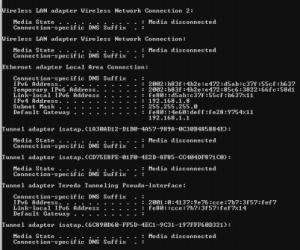
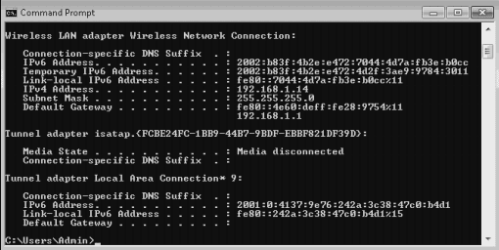
I am not sure if they attached or not...wired.PNG

wireless.PNG
 

My Computer My Computer

Computer Manufacturer/Model Number
Gateway
OS
Windows 7 Premium 64 bit
Larger one is the wired, smaller is the wireless
 

My Computer My Computer

Computer Manufacturer/Model Number
Gateway
OS
Windows 7 Premium 64 bit
For some reason there is no reference to the DNS servers in the ipconfig's. There is also no reference to indicate if DHCP is enabled or not.

For some reason there is an IPv6 address in front of the default gateway, I'm not sure what it means but it doesn't look right to me.

From what I can see here something isn't quite right with the router, perhaps a reset of the router followed by manual configuration for both the wired and wireless connections would be the best way to proceed at this point.
 

My Computer My Computer

Computer type
PC/Desktop
Computer Manufacturer/Model Number
Home built
OS
Windows 7 Ult, Windows 8.1 Pro,
CPU
Q9650-4.275GHz, E8600 4.5GHz, E6750-3.8GHz
Motherboard
Evga 780i FTW
Memory
G.Skill PC2 9600 1200Mhz 5 5 5 15 2T
Graphics Card(s)
GTX480
Sound Card
Asus Xonar D2
Monitor(s) Displays
HannsG
Screen Resolution
1680X1050
Hard Drives
GSkill Phoenix Pro 120GB SSD
PSU
ThermalTake Toughpower 1000Watt modular
Case
ThermalTake XaserV
Cooling
Xigmatek S1283
Keyboard
Logitech G15
Mouse
Logitech G9
Internet Speed
T1
Back
Top