Connected to network, only google website works

JonahH

New member
Local time
12:11 PM
Messages
2
I just installed windows 7 on my computer. I am able to connect to my wireless router/network, however the ONLY thing I can access on the internet is google.com or gmail.com (that i know of).

I have disabled all security/firewalls and tried just about everything i can think of. I am able to connect to the wireless router with multiple other computers (running xp and vista). How is it possible that I can access google and my email, and even chat with people on gchat but I can't do anything else?

In the network status window my IPv4 says "internet" and IPv6 says "No network Access".

I am using a Zonet Wireless 802.11g usb 2.0 adapter (ZEW2500P) and connect through a Netgear cg814wg v2 wireless cable modem gateway supplied by comcast.

Is anyone else having this problem? Solutions anyone??

Thanks for your time.
 

My Computer My Computer

OS
windows 7
Have you rebooted your modem and your router?
 

My Computer My Computer

Computer Manufacturer/Model Number
Dell XPS 15 L502x
OS
Windows 7 Ultimate x64 SP1
CPU
Core i7-2670QM
Memory
8GB DDR3 PC3-10600
Graphics Card(s)
Intel HD Graphics 3000 + GeForce GT 540M
Screen Resolution
1920x1080
Hard Drives
1TB 5400RPM Seagate
Check your hosts file at C:\Windows\System32\drivers\etc\hosts

It should only have a 127.0.0.1 localhost entry unless you've edited it.

Look for the presence of mdnsresponder.exe in task manager.

You have some kind of dns problem even if those are ok. Try to use a free dns service online with a static ip for the adapter or set the free dns on your router to use.

Uninstall antivirus and firewall to test.
 

My Computer My Computer

Computer Manufacturer/Model Number
self built
OS
7600.20510 x86
CPU
P4 550 3.4 GHz HT running at 3.5 GHz
Motherboard
MSI PM8M3-V (MS-7211 v1.x) Micro-ATX mainboard
Memory
OCZ 2 GB(2x1GB) DDR400mHz running @ 414 mHz
Graphics Card(s)
HIS Radeon HD 3850 IceQ 3 Turbo HDMI Dual DL-DVI AGP
Sound Card
MOTU Traveler firewire studio interface 192 kHz 24 bit
Monitor(s) Displays
22" widescreen Acer X223W LCD, 17" Compaq P75 CRT
Screen Resolution
1680x1050 and 1280x1024
Hard Drives
SATA I x2 WD, 400 GB and 120 GB, SATA 2 WD Caviar Black 1 TB
PSU
350W generic
Case
Cybertronpc, it glows blue
Cooling
stock cpu fan, Ice-Q 3 gpu and system, many case fans
Keyboard
Logitch Classical Keyboard 200
Mouse
Logitech Mediaplay cordless
Internet Speed
1792/448 kbits/sec
Other Info
SATA II PCI fake RAID adapter, 1 GB Readyboost, original ATI Remote Wonder (even works with WMC perfectly), Logitech Rumblepad 2 game controller x2
Ok, I opened the host file and it has two localhosts. The one u listed and "# ::1 localhost". I also do not see that app running in the task manager.

What is this free dns service? Im kinda newb to all this...

Ive spent hours trying to fix this crap now. Im already regretting moving to windows 7. Figures.
 

My Computer My Computer

OS
windows 7
Use 208.67.222.222 for the dns server while setting either a static ip in Windows for the network adapter

or

set the router to use that dns address if using DHCP and pulling an ip automatically from router.

So there's no mdnsresponder.exe in task manager?
 

My Computer My Computer

Computer Manufacturer/Model Number
self built
OS
7600.20510 x86
CPU
P4 550 3.4 GHz HT running at 3.5 GHz
Motherboard
MSI PM8M3-V (MS-7211 v1.x) Micro-ATX mainboard
Memory
OCZ 2 GB(2x1GB) DDR400mHz running @ 414 mHz
Graphics Card(s)
HIS Radeon HD 3850 IceQ 3 Turbo HDMI Dual DL-DVI AGP
Sound Card
MOTU Traveler firewire studio interface 192 kHz 24 bit
Monitor(s) Displays
22" widescreen Acer X223W LCD, 17" Compaq P75 CRT
Screen Resolution
1680x1050 and 1280x1024
Hard Drives
SATA I x2 WD, 400 GB and 120 GB, SATA 2 WD Caviar Black 1 TB
PSU
350W generic
Case
Cybertronpc, it glows blue
Cooling
stock cpu fan, Ice-Q 3 gpu and system, many case fans
Keyboard
Logitch Classical Keyboard 200
Mouse
Logitech Mediaplay cordless
Internet Speed
1792/448 kbits/sec
Other Info
SATA II PCI fake RAID adapter, 1 GB Readyboost, original ATI Remote Wonder (even works with WMC perfectly), Logitech Rumblepad 2 game controller x2
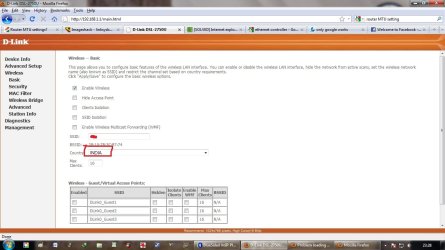
hi, I had the same problem on my Win7.. Only Google sites were working and no other sites were working. I changed the country and it started working you can see the picture.. I have selected my country India.. it was United States over there. just check if you country is perfect. Hope it helps.. regards Nitin Ule
 

Attachments

  • only google.jpg
    only google.jpg
    93 KB · Views: 1,069

My Computer My Computer

OS
32bit
So had been searching for a solution to this for a whole day and found something that finally worked. Hopefully this helps someone else out. What I did was go to my LAN network adapter properties, uncheck both ipv4 and ipv6, then disable the network adapter. Then I re enabled the adapter, and checked ONLY ONE of either ipv4 or ipv6. For me, checking only ipv4 made my internet work again, although you may have to repeat and try the other protocol.

All settings were on automatic by the way.
 

My Computer My Computer

Computer type
PC/Desktop
OS
windows
Back
Top