JavaScript is disabled. For a better experience, please enable JavaScript in your browser before proceeding.
You are using an out of date browser. It may not display this or other websites correctly.
You should upgrade or use an
alternative browser .
Connected with no internet access
Up until last night my main computer's internet has been really good, when trying to access the internet today it just decided that I have no internet access.
Computer Manufacturer/Model Number Acer OS Windows 7 Home Premium 64bit CPU Intel i7-860 Memory 6GB Graphics Card(s) ATI Radeon HD 5770 Screen Resolution 1440x900 Hard Drives 1TB Keyboard Basic Acer Mouse Basic Acer Internet Speed 20mb Fibre optic
New member
Guru
Gold Member
VIP
Welcome to SF, Corpsus. Please fill out more completely your System Specs.
Computer Manufacturer/Model Number Dell and Custom OS Systems 1 and 2: Windows 7 Enterprise x64, Win 8 Developer CPU System 1: i7 [email protected] , System 2: AMD FX-4100 Zambezi 3.6G Motherboard System 1:Dell 06NWYK System 2: ASUS M5A97 AM3+ Memory System 1: 8GB System 2: 8GB Graphics Card(s) System 1: ATI FirePro V4800 System 2: Radeon HD 6850 Sound Card System 1: onboard System 2: onboard Monitor(s) Displays System1: Viewsonic HDMI 24" Screen Resolution System 1: 1920x1080 System 2: 1920x1080 Hard Drives System 1: Mirrored .5B drives System 2: Seagate Barracuda ST1000DM003 1TB 7200 RPM 64MB Cache SATA 6.0Gb/s Case System 1: Dell System 2: Cooler Master Internet Speed 10 MBPS
New member
Thread Starter
I have tried resetting router and modem but nothing seems to change.
Computer Manufacturer/Model Number Acer OS Windows 7 Home Premium 64bit CPU Intel i7-860 Memory 6GB Graphics Card(s) ATI Radeon HD 5770 Screen Resolution 1440x900 Hard Drives 1TB Keyboard Basic Acer Mouse Basic Acer Internet Speed 20mb Fibre optic
New member
Guru
Gold Member
VIP
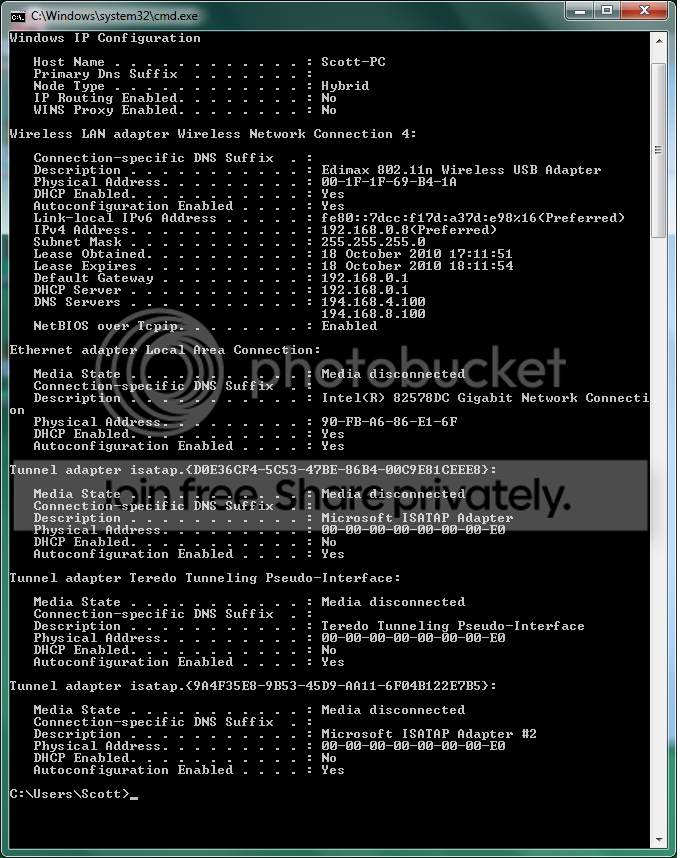
What if you go to a command prompt and type ipconfig /all
Computer Manufacturer/Model Number Dell and Custom OS Systems 1 and 2: Windows 7 Enterprise x64, Win 8 Developer CPU System 1: i7 [email protected] , System 2: AMD FX-4100 Zambezi 3.6G Motherboard System 1:Dell 06NWYK System 2: ASUS M5A97 AM3+ Memory System 1: 8GB System 2: 8GB Graphics Card(s) System 1: ATI FirePro V4800 System 2: Radeon HD 6850 Sound Card System 1: onboard System 2: onboard Monitor(s) Displays System1: Viewsonic HDMI 24" Screen Resolution System 1: 1920x1080 System 2: 1920x1080 Hard Drives System 1: Mirrored .5B drives System 2: Seagate Barracuda ST1000DM003 1TB 7200 RPM 64MB Cache SATA 6.0Gb/s Case System 1: Dell System 2: Cooler Master Internet Speed 10 MBPS
New member
Thread Starter
That is what I see when doing ipconfig /all
I can ping outside to other computers on the network and the wireless router and also the other computers on the network can ping me.
At the moment I physically can't connect the computer to the router as it's in a mates room and I don't have a long enough ethernet cable.
And all other things I have which are wireless can connect.
Computer Manufacturer/Model Number Acer OS Windows 7 Home Premium 64bit CPU Intel i7-860 Memory 6GB Graphics Card(s) ATI Radeon HD 5770 Screen Resolution 1440x900 Hard Drives 1TB Keyboard Basic Acer Mouse Basic Acer Internet Speed 20mb Fibre optic
New member
Guru
Gold Member
VIP
Well, you have an ip address, and a dns address is listed.
Computer Manufacturer/Model Number Dell and Custom OS Systems 1 and 2: Windows 7 Enterprise x64, Win 8 Developer CPU System 1: i7 [email protected] , System 2: AMD FX-4100 Zambezi 3.6G Motherboard System 1:Dell 06NWYK System 2: ASUS M5A97 AM3+ Memory System 1: 8GB System 2: 8GB Graphics Card(s) System 1: ATI FirePro V4800 System 2: Radeon HD 6850 Sound Card System 1: onboard System 2: onboard Monitor(s) Displays System1: Viewsonic HDMI 24" Screen Resolution System 1: 1920x1080 System 2: 1920x1080 Hard Drives System 1: Mirrored .5B drives System 2: Seagate Barracuda ST1000DM003 1TB 7200 RPM 64MB Cache SATA 6.0Gb/s Case System 1: Dell System 2: Cooler Master Internet Speed 10 MBPS
New member
Thread Starter
Yeah it goes to newegg.
Computer Manufacturer/Model Number Acer OS Windows 7 Home Premium 64bit CPU Intel i7-860 Memory 6GB Graphics Card(s) ATI Radeon HD 5770 Screen Resolution 1440x900 Hard Drives 1TB Keyboard Basic Acer Mouse Basic Acer Internet Speed 20mb Fibre optic
New member
Guru
Gold Member
VIP
There's a problem with your DNS. Go to your ISP and tell them what you have done. Let them know your DNS address listed. Ask them if their DNS server is having problems and what to do to resolve it. They may want you to hard code another DNS address on your ip configuration.
Computer Manufacturer/Model Number Dell and Custom OS Systems 1 and 2: Windows 7 Enterprise x64, Win 8 Developer CPU System 1: i7 [email protected] , System 2: AMD FX-4100 Zambezi 3.6G Motherboard System 1:Dell 06NWYK System 2: ASUS M5A97 AM3+ Memory System 1: 8GB System 2: 8GB Graphics Card(s) System 1: ATI FirePro V4800 System 2: Radeon HD 6850 Sound Card System 1: onboard System 2: onboard Monitor(s) Displays System1: Viewsonic HDMI 24" Screen Resolution System 1: 1920x1080 System 2: 1920x1080 Hard Drives System 1: Mirrored .5B drives System 2: Seagate Barracuda ST1000DM003 1TB 7200 RPM 64MB Cache SATA 6.0Gb/s Case System 1: Dell System 2: Cooler Master Internet Speed 10 MBPS
Looks to me like somebody typed your DNS servers manually into your IPv4 properties rather than designating the DNS server addresses in the routers set up page which usually works best.
Last edited: Oct 18, 2010
Computer type PC/Desktop Computer Manufacturer/Model Number Home built OS Windows 7 Ult, Windows 8.1 Pro, CPU Q9650-4.275GHz, E8600 4.5GHz, E6750-3.8GHz Motherboard Evga 780i FTW Memory G.Skill PC2 9600 1200Mhz 5 5 5 15 2T Graphics Card(s) GTX480 Sound Card Asus Xonar D2 Monitor(s) Displays HannsG Screen Resolution 1680X1050 Hard Drives GSkill Phoenix Pro 120GB SSD PSU ThermalTake Toughpower 1000Watt modular Case ThermalTake XaserV Cooling Xigmatek S1283 Keyboard Logitech G15 Mouse Logitech G9 Internet Speed T1
New member
Thread Starter
I have nothing in my IPv4 properties, its all set to obtain it all automatically and where on the router settings would you input the dns stuff?
Computer Manufacturer/Model Number Acer OS Windows 7 Home Premium 64bit CPU Intel i7-860 Memory 6GB Graphics Card(s) ATI Radeon HD 5770 Screen Resolution 1440x900 Hard Drives 1TB Keyboard Basic Acer Mouse Basic Acer Internet Speed 20mb Fibre optic
New member
Guru
Gold Member
VIP
Look at Network Connections. Find your connection and right click on it. Select Properties. Go to Internet Protocol IPV4. Click on properties. Select the radio button "Use the following DNS server addresses".
You can use the DNS addresses from below if you don't know those for your ISP:
Using Google Public DNS
Capture.JPG
46.7 KB
· Views: 29
Computer Manufacturer/Model Number Dell and Custom OS Systems 1 and 2: Windows 7 Enterprise x64, Win 8 Developer CPU System 1: i7 [email protected] , System 2: AMD FX-4100 Zambezi 3.6G Motherboard System 1:Dell 06NWYK System 2: ASUS M5A97 AM3+ Memory System 1: 8GB System 2: 8GB Graphics Card(s) System 1: ATI FirePro V4800 System 2: Radeon HD 6850 Sound Card System 1: onboard System 2: onboard Monitor(s) Displays System1: Viewsonic HDMI 24" Screen Resolution System 1: 1920x1080 System 2: 1920x1080 Hard Drives System 1: Mirrored .5B drives System 2: Seagate Barracuda ST1000DM003 1TB 7200 RPM 64MB Cache SATA 6.0Gb/s Case System 1: Dell System 2: Cooler Master Internet Speed 10 MBPS
New member
Thread Starter
Doing that didn't work sadly >.<
Computer Manufacturer/Model Number Acer OS Windows 7 Home Premium 64bit CPU Intel i7-860 Memory 6GB Graphics Card(s) ATI Radeon HD 5770 Screen Resolution 1440x900 Hard Drives 1TB Keyboard Basic Acer Mouse Basic Acer Internet Speed 20mb Fibre optic
New member
Guru
Gold Member
VIP
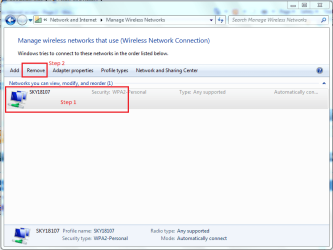
Have you tried removing the wireless network from within Windows? What I mean is the network that shows in 'Network and Sharing center' -> 'Manage wireless networks'. If you click the network then click remove you can retry connecting as if it were a completely new network.
Computer Manufacturer/Model Number Compaq Desktop OS Windows 7 Ultimate x64 CPU AMD Sempron Dual Core Memory 3GB Graphics Card(s) NVIDIA GeForce 6150SE nForce 430 Screen Resolution 1024x768 Hard Drives 150GB Sata
New member
Thread Starter
With the google DNS?
Computer Manufacturer/Model Number Acer OS Windows 7 Home Premium 64bit CPU Intel i7-860 Memory 6GB Graphics Card(s) ATI Radeon HD 5770 Screen Resolution 1440x900 Hard Drives 1TB Keyboard Basic Acer Mouse Basic Acer Internet Speed 20mb Fibre optic
New member
Guru
Gold Member
VIP
No, if you've tried it before then i'm currently out of ideas
OS
Computer Manufacturer/Model Number Compaq Desktop OS Windows 7 Ultimate x64 CPU AMD Sempron Dual Core Memory 3GB Graphics Card(s) NVIDIA GeForce 6150SE nForce 430 Screen Resolution 1024x768 Hard Drives 150GB Sata
New member
Guru
Gold Member
VIP
Just to make sure, after you made those changes you should have rebooted your pc (or ran ipconfig /release ipconfig/renew). Rebooting is probably better. Did you do that?
Computer Manufacturer/Model Number Dell and Custom OS Systems 1 and 2: Windows 7 Enterprise x64, Win 8 Developer CPU System 1: i7 [email protected] , System 2: AMD FX-4100 Zambezi 3.6G Motherboard System 1:Dell 06NWYK System 2: ASUS M5A97 AM3+ Memory System 1: 8GB System 2: 8GB Graphics Card(s) System 1: ATI FirePro V4800 System 2: Radeon HD 6850 Sound Card System 1: onboard System 2: onboard Monitor(s) Displays System1: Viewsonic HDMI 24" Screen Resolution System 1: 1920x1080 System 2: 1920x1080 Hard Drives System 1: Mirrored .5B drives System 2: Seagate Barracuda ST1000DM003 1TB 7200 RPM 64MB Cache SATA 6.0Gb/s Case System 1: Dell System 2: Cooler Master Internet Speed 10 MBPS
New member
Thread Starter
No, but I shall now seeing as you have mentioned it
Computer Manufacturer/Model Number Acer OS Windows 7 Home Premium 64bit CPU Intel i7-860 Memory 6GB Graphics Card(s) ATI Radeon HD 5770 Screen Resolution 1440x900 Hard Drives 1TB Keyboard Basic Acer Mouse Basic Acer Internet Speed 20mb Fibre optic
New member
Thread Starter
Nope, that didn't work either >.<
Computer Manufacturer/Model Number Acer OS Windows 7 Home Premium 64bit CPU Intel i7-860 Memory 6GB Graphics Card(s) ATI Radeon HD 5770 Screen Resolution 1440x900 Hard Drives 1TB Keyboard Basic Acer Mouse Basic Acer Internet Speed 20mb Fibre optic
New member
Thread Starter
I think it might be the wireless usb adapter I have, Just tested it on another machine and it wouldn't let me connect to the internet either so will have to order one and see.
Computer Manufacturer/Model Number Acer OS Windows 7 Home Premium 64bit CPU Intel i7-860 Memory 6GB Graphics Card(s) ATI Radeon HD 5770 Screen Resolution 1440x900 Hard Drives 1TB Keyboard Basic Acer Mouse Basic Acer Internet Speed 20mb Fibre optic
Could be the wireless adaptor but that doesn't explain why it's not resolving DNS addresses but works when the IP is typed in.
I tracked down your DNS server which shows up as, NTL (Cable) and Virgin.net (ADSL)
194.168.4.100
194.168.8.100
You must be using one of those so called modem-router combos from them, not sure about those but their DNS doesn't seem to be working.
You might try flushing the DNS with ipconfig /flushdns
Then try resetting the tcp/ip stack amd winsock with these commands.
netsh int ip reset C:\netsh.log.txt netsh winsock reset
Computer type PC/Desktop Computer Manufacturer/Model Number Home built OS Windows 7 Ult, Windows 8.1 Pro, CPU Q9650-4.275GHz, E8600 4.5GHz, E6750-3.8GHz Motherboard Evga 780i FTW Memory G.Skill PC2 9600 1200Mhz 5 5 5 15 2T Graphics Card(s) GTX480 Sound Card Asus Xonar D2 Monitor(s) Displays HannsG Screen Resolution 1680X1050 Hard Drives GSkill Phoenix Pro 120GB SSD PSU ThermalTake Toughpower 1000Watt modular Case ThermalTake XaserV Cooling Xigmatek S1283 Keyboard Logitech G15 Mouse Logitech G9 Internet Speed T1