Connecting 2 laptops

creswelllad

New member
Local time
12:59 AM
Messages
5
I am trying to connect 2 laptops as a peer-to-peer network for file sharing. I've done this quite easily in older versions of windows, but there doesn't seem to be this option with W7. I have connected both PCs using the Homegroup option but I still can't see any files/folders from either machine. I don't use/understand the libraries thing in W7 preferring to use traditional files/folders.

Can anyone please help?

Thanks in advance
 

My Computer

OS
Windows 7
I am trying to connect 2 laptops as a peer-to-peer network for file sharing. I've done this quite easily in older versions of windows, but there doesn't seem to be this option with W7. I have connected both PCs using the Homegroup option but I still can't see any files/folders from either machine. I don't use/understand the libraries thing in W7 preferring to use traditional files/folders.

Can anyone please help?

Thanks in advance

did you share both network interfaces on both machines?
 

My Computer

Computer Manufacturer/Model Number
HP Pavillion dv-7 1005 Tx
OS
Win 8 Release candidate 8400
CPU
[email protected]
Memory
4 gigs
Graphics Card(s)
Nvidia 9600M
Sound Card
HD built-in
Monitor(s) Displays
17" Wxga
Screen Resolution
1440x900
Cooling
none
Internet Speed
45Mb down 5Mb up
thanks for the reply zigzag, but I'm afraid I don't know the answer to your question - what is a 'network interface'?
 

My Computer

OS
Windows 7
thanks for the reply zigzag, but I'm afraid I don't know the answer to your question - what is a 'network interface'?

Do you mean AdHoc Sharing/Peering...that might be enable in the wifi or Lan card
 

My Computer

Computer type
PC/Desktop
Computer Manufacturer/Model Number
Custom Build
OS
Windows 7 Professional SP1 - x64 [Non-UEFI Boot]
CPU
Ivy Bridge Core i5 3570K (Delidded)
Motherboard
Asus P8Z77-V LE PLUS
Memory
G.Skill "Ares" DDR3 PC3-12800 - 1600MHz (16Gb)
Graphics Card(s)
Asus Dual-RX480-O4G
Sound Card
Creative Sound Blaster Z w/5.1 sound system
Monitor(s) Displays
Asus IPS 23"
Screen Resolution
16/9
Hard Drives
Internal:
500Go Sata 6Gb/s (x2)
500Go Sata 3Gb/s (x2)
SSD 60Go Sata 6Gb/s
PSU
In Win C 900W Series 80+ Platinum
Case
Thermaltake Chaser A71
Cooling
Custom Water Cooling Loop
Keyboard
Cooler Master QuickFire XTi
Mouse
Razer Imperator 2012 (4G)
Antivirus
MSE
Browser
IE 11.0.xxx Rtm
Other Info
"Raid0" with Intel Smart Response Technology (HDD/SSD)
NoN, thanks for the reply. My need is very simple - to be able to use one machine to create/edit/read files which are on the other machine and vice versa. I thought that ad hoc was only a temporary solution? I need a permanenet one!
 

My Computer

OS
Windows 7
NoN, thanks for the reply. My need is very simple - to be able to use one machine to create/edit/read files which are on the other machine and vice versa. I thought that ad hoc was only a temporary solution? I need a permanenet one!

In Homegroup did you gave the proper password to both machines? This should be set easily normaly.

I did a search in the Forums...Here you can find a list related to "HomeGroup":

http://www.sevenforums.com/search.php?searchid=1300539&pp=25

That's all in "Tutorial" Sections. Hope this helps!
 

My Computer

Computer type
PC/Desktop
Computer Manufacturer/Model Number
Custom Build
OS
Windows 7 Professional SP1 - x64 [Non-UEFI Boot]
CPU
Ivy Bridge Core i5 3570K (Delidded)
Motherboard
Asus P8Z77-V LE PLUS
Memory
G.Skill "Ares" DDR3 PC3-12800 - 1600MHz (16Gb)
Graphics Card(s)
Asus Dual-RX480-O4G
Sound Card
Creative Sound Blaster Z w/5.1 sound system
Monitor(s) Displays
Asus IPS 23"
Screen Resolution
16/9
Hard Drives
Internal:
500Go Sata 6Gb/s (x2)
500Go Sata 3Gb/s (x2)
SSD 60Go Sata 6Gb/s
PSU
In Win C 900W Series 80+ Platinum
Case
Thermaltake Chaser A71
Cooling
Custom Water Cooling Loop
Keyboard
Cooler Master QuickFire XTi
Mouse
Razer Imperator 2012 (4G)
Antivirus
MSE
Browser
IE 11.0.xxx Rtm
Other Info
"Raid0" with Intel Smart Response Technology (HDD/SSD)
Yes, I did that OK. I can see each machine from the other but can't read the folders or files.
 

My Computer

OS
Windows 7
Follow the tutorial list linked...i'm sure you'll find your needs...:)
 

My Computer

Computer type
PC/Desktop
Computer Manufacturer/Model Number
Custom Build
OS
Windows 7 Professional SP1 - x64 [Non-UEFI Boot]
CPU
Ivy Bridge Core i5 3570K (Delidded)
Motherboard
Asus P8Z77-V LE PLUS
Memory
G.Skill "Ares" DDR3 PC3-12800 - 1600MHz (16Gb)
Graphics Card(s)
Asus Dual-RX480-O4G
Sound Card
Creative Sound Blaster Z w/5.1 sound system
Monitor(s) Displays
Asus IPS 23"
Screen Resolution
16/9
Hard Drives
Internal:
500Go Sata 6Gb/s (x2)
500Go Sata 3Gb/s (x2)
SSD 60Go Sata 6Gb/s
PSU
In Win C 900W Series 80+ Platinum
Case
Thermaltake Chaser A71
Cooling
Custom Water Cooling Loop
Keyboard
Cooler Master QuickFire XTi
Mouse
Razer Imperator 2012 (4G)
Antivirus
MSE
Browser
IE 11.0.xxx Rtm
Other Info
"Raid0" with Intel Smart Response Technology (HDD/SSD)
Assuming you have Homegroups set up correctly you only need to click on the folder icon in the taskbar lower left, click on Library's in the left pane, then highlight which ever folder you want to share, click the "share with" button and choose "Homegroup read/write" do this for each folder you need to share on both machines. If you are still having problems then most likely it has to do with the A/V software you have installed.
 

My Computer

Computer type
PC/Desktop
Computer Manufacturer/Model Number
Home built
OS
Windows 7 Ult, Windows 8.1 Pro,
CPU
Q9650-4.275GHz, E8600 4.5GHz, E6750-3.8GHz
Motherboard
Evga 780i FTW
Memory
G.Skill PC2 9600 1200Mhz 5 5 5 15 2T
Graphics Card(s)
GTX480
Sound Card
Asus Xonar D2
Monitor(s) Displays
HannsG
Screen Resolution
1680X1050
Hard Drives
GSkill Phoenix Pro 120GB SSD
PSU
ThermalTake Toughpower 1000Watt modular
Case
ThermalTake XaserV
Cooling
Xigmatek S1283
Keyboard
Logitech G15
Mouse
Logitech G9
Internet Speed
T1
You might want to have a look aswell in the Advanced Parameters in your Homegroup if Sharing Files & Printers are enable and Publics Folder Share aswell..
 

My Computer

Computer type
PC/Desktop
Computer Manufacturer/Model Number
Custom Build
OS
Windows 7 Professional SP1 - x64 [Non-UEFI Boot]
CPU
Ivy Bridge Core i5 3570K (Delidded)
Motherboard
Asus P8Z77-V LE PLUS
Memory
G.Skill "Ares" DDR3 PC3-12800 - 1600MHz (16Gb)
Graphics Card(s)
Asus Dual-RX480-O4G
Sound Card
Creative Sound Blaster Z w/5.1 sound system
Monitor(s) Displays
Asus IPS 23"
Screen Resolution
16/9
Hard Drives
Internal:
500Go Sata 6Gb/s (x2)
500Go Sata 3Gb/s (x2)
SSD 60Go Sata 6Gb/s
PSU
In Win C 900W Series 80+ Platinum
Case
Thermaltake Chaser A71
Cooling
Custom Water Cooling Loop
Keyboard
Cooler Master QuickFire XTi
Mouse
Razer Imperator 2012 (4G)
Antivirus
MSE
Browser
IE 11.0.xxx Rtm
Other Info
"Raid0" with Intel Smart Response Technology (HDD/SSD)
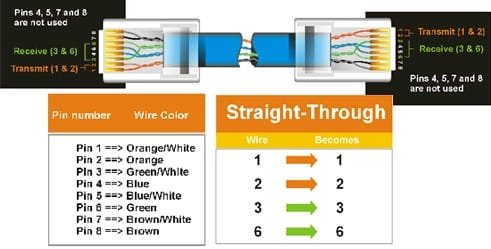
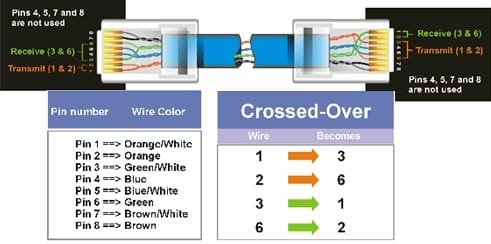
Its simple, use a cross-cable connection only for 2 pc's (or laptops).

Normally, for a typical LAN cable connection is straight used on a LAN / Network layout in offices or Internet Cafes.

See image for the straight and cross-connection cable layout and create your own cabling for cross-cable. ;)
 

Attachments

  • straight-connect.jpg
    straight-connect.jpg
    20.3 KB · Views: 1
  • cross-connect.jpg
    cross-connect.jpg
    19.9 KB · Views: 3

My Computer

Computer Manufacturer/Model Number
SONY VAIO Laptop
OS
Windows® 7 Home Basic 64bit, Build 7600
CPU
Inter Core 2 Duo CPU T6600 @ 2.20GHz
Memory
4GB
Graphics Card(s)
nVidia GeForce G210M
Sound Card
Realtek HD Integrated Audio
Monitor(s) Displays
LG TV-1 (NVIDIA High Definition Audio)
Screen Resolution
1366 x 768 (Wide)
Hard Drives
320GB HDD - Internal
360GB - External
500GB (x2) - External
1TB - External
PSU
Internal
Keyboard
Integrated
Mouse
Synaptic Keypad & A4tech Cordless MOuse
Internet Speed
LAN, T1
Other Info
A4tech Analog Joypad
Thanks, I needed to set the folders to be 'shared' to the homegroup, everything now works fine - thanks
 

My Computer

OS
Windows 7
Assuming this information helped you solve your problem.

Assuming you have Homegroups set up correctly you only need to click on the folder icon in the taskbar lower left, click on Library's in the left pane, then highlight which ever folder you want to share, click the "share with" button and choose "Homegroup read/write" do this for each folder you need to share on both machines. If you are still having problems then most likely it has to do with the A/V software you have installed.

Your welcome for the help creswelllad. Thanks for reporting back in. ;)

As your just found out, Homegroups works absolutely perfectly.
 

My Computer

Computer type
PC/Desktop
Computer Manufacturer/Model Number
Home built
OS
Windows 7 Ult, Windows 8.1 Pro,
CPU
Q9650-4.275GHz, E8600 4.5GHz, E6750-3.8GHz
Motherboard
Evga 780i FTW
Memory
G.Skill PC2 9600 1200Mhz 5 5 5 15 2T
Graphics Card(s)
GTX480
Sound Card
Asus Xonar D2
Monitor(s) Displays
HannsG
Screen Resolution
1680X1050
Hard Drives
GSkill Phoenix Pro 120GB SSD
PSU
ThermalTake Toughpower 1000Watt modular
Case
ThermalTake XaserV
Cooling
Xigmatek S1283
Keyboard
Logitech G15
Mouse
Logitech G9
Internet Speed
T1
Back
Top