Connecting Modem to PC

huffman

New member
Pro User
Local time
8:01 AM
Messages
715
At present, I have the following setup:

router1.jpg

Cable comes into the modem and goes to the router. The router then feeds my Vonage phone system and all my computers. The only computer that connects wireless is my wife's laptop, everything else is hard wired.

99% of the time this setup works flawlessly, but there are times I want to hook my main pc directly to the modem (for troubleshooting). It will not connect to internet that way. I suspect the reason is that when I installed Win 7 Pro I told it that it would connect to my local network.

There has to a way to connect that one pc directly to the modem. This where I need the help.

Thanks for any help.
 

My Computer

OS
Windows 7 Pro
CPU
Intel(R) Pentium(R) Duel CPU E2200 2.20 Ghz
Motherboard
GA-G41M-ES2L
Memory
4 gb 2.96 Usable
Graphics Card(s)
Onboard
Sound Card
Onboard
Hard Drives
2 - 1TB WD Sata Drives
Every time you attempt to connect to the Internet, your ISP checks the MAC address of the 1st component that's connected to the modem, which normally is your router.
However, if you did not clone the MAC address of your main PC's network card to the router when you set up the router, then your ISP will be seeing your network card's MAC address when you connect the modem directly to your main PC. And since your ISP does not recognize the network card's MAC address, it will not allow you to access the Internet.
If that's the case, then just clone the MAC address of your network card to the router at the router's online administrative site.
You can find your network card's MAC address by doing this:
Click Start, type system information in the Search box, click on System Information, click the + next to Components and then Network, and scroll down to MAC Address.
 

My Computer

OS
windows 7
Another possibility would be to power off the modem and PC. Disconnect the router and connect the PC to the modem then turn on the modem. Wait for it to settle down then power up the PC. That often resolves this type of problem, at least for me.
 

My Computer

Computer type
PC/Desktop
Computer Manufacturer/Model Number
Lenovo IdeaCenter 450
OS
Windows 10 Pro X64
CPU
Intel Quad Core i7-4770 @ 3.4Ghz
Memory
16.0GB PC3-12800 DDR3 SDRAM 1600 MHz
Graphics Card(s)
Intel Integrated HD Graphics
Sound Card
Realtek HD Audio
Monitor(s) Displays
HP 22" LCD
Screen Resolution
1680 x 1050
Hard Drives
250GB Samsung EVO SATA-3 SSD
2TB Seagate ST2000DM001 SATA-2
1.5TB Seagate ST3150041AS SATA
Keyboard
Dell USB
Mouse
Lenovo USB
Internet Speed
Cable via Road Runner 3MB Upload, 30MB Download
Antivirus
Windows Defender, MBAM Pro, MBAE
Browser
Seamonkey
Other Info
UEFI/GPT
PLDS DVD-RW DH16AERSH
Ztruker thanks for the reply I have tried that on numerous occassions and it did not resolve itself.

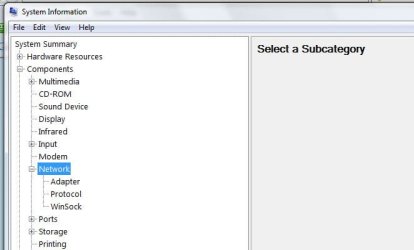
Click Start, type system information in the Search box, click on System Information, click the + next to Components and then Network, and scroll down to MAC Address

router2.jpg

Under "Network" there is NO MAC Address shown. If I select "Adapter" then it shows the "MAC Address" as not availiable.

I am still working on finding a way to get the pc to connect using just the modem.
 

My Computer

OS
Windows 7 Pro
CPU
Intel(R) Pentium(R) Duel CPU E2200 2.20 Ghz
Motherboard
GA-G41M-ES2L
Memory
4 gb 2.96 Usable
Graphics Card(s)
Onboard
Sound Card
Onboard
Hard Drives
2 - 1TB WD Sata Drives
Oops, sorry. I should have said Components/Network/Adapter.

There should be one adapter in the list that has an MAC address.
It's name will be the same as the name of the network adapter in Control Panel/Device Manager. (Ex: Realtek PCIe FE Family Controller)
 

My Computer

OS
windows 7
Thanks ski I found the MAC address (Realtek PCIe GBE Family Controller) now how do I use it to get the pc to connect to internet just using the modem?
 

My Computer

OS
Windows 7 Pro
CPU
Intel(R) Pentium(R) Duel CPU E2200 2.20 Ghz
Motherboard
GA-G41M-ES2L
Memory
4 gb 2.96 Usable
Graphics Card(s)
Onboard
Sound Card
Onboard
Hard Drives
2 - 1TB WD Sata Drives
If you have the instructions for the router, they will tell you how to access the router's setup site on the Internet where you will be able to clone the network card's MAC address to the router.
If you do not have the instructions, then what make is your router?
Also, did your ISP provide the router?

And FYI, the MAC address for your router is a series of 2 digit numbers.
For example => 03:E4:98:4F:29:05
 

My Computer

OS
windows 7
I know how to access the router setup. What I am still confused about is why I have to put the MAC address in the router setup so that I can remove the router from my system to be able to connect just using the modem.
 

My Computer

OS
Windows 7 Pro
CPU
Intel(R) Pentium(R) Duel CPU E2200 2.20 Ghz
Motherboard
GA-G41M-ES2L
Memory
4 gb 2.96 Usable
Graphics Card(s)
Onboard
Sound Card
Onboard
Hard Drives
2 - 1TB WD Sata Drives
If you set the router to use the same mac address as your PC the cable modem won't know the difference. I can see why you're confused though. Normally you would do that before you ever connected the router for the first time. Then you could switch back to the PC if need be. Doing it now though will result in neither being able to connect. You could do it any way and then call your ISP and have them update the MAC address they have stored for your connection. If they ask, just tell them you had to replace your router. Then either one should work.
Just out of curiosity why do you need the direct connection?
 

My Computer

Computer type
PC/Desktop
Computer Manufacturer/Model Number
Home Built
OS
Windows 10 Education 64 bit
CPU
AMD Phenom II X4 980 Black Edition Deneb 3.7GHz
Motherboard
Asus M4N68T-M V2 µATX Motherboard
Memory
8GB 4GBx2 Kingston PC10600 DDR3 1333 Memory
Graphics Card(s)
Zotac NVIDIA Geforce GT640 2 Gig DDR3 PCIe
Sound Card
VIA VT1708s High Definition Audio 8-channel Onboard
Monitor(s) Displays
22" LG E2242 1080p and 2 19" I-INC AG191D
Screen Resolution
1280x1024 - 1920x1080 - 1280x1024
Hard Drives
Crucial M100 256 GB SSD and 500 GB WD Blue SATA
PSU
Thermaltake TR 620
Case
Power Up Black ATX Mid-Tower Case
Cooling
Stock heatsink and fan
Keyboard
Logitech Wireless K350 Wave
Mouse
Logitech Wireless M570 Trackman Wheel
Internet Speed
80 Mbps Down 30 Mbps Up
Antivirus
Windows Defender
Browser
Internet Explorer 11
Other Info
HP DVD1040e Lightscribe - External USB2
Trying to solve why he can't connect his main pc directly to the modem when troubleshooting network problems, at least that's what the first post said.

Try it again but do the power off stuff I mentioned before, then this:

[FONT=&quot]Click on Start then Run and paste the following into the Run box, exactly as shown, including double quotes:[/FONT]
[FONT=&quot] [/FONT]
[FONT=&quot]cmd /c "ipconfig /all > postme.txt & notepad postme.txt & del postme.txt" [/FONT]
[FONT=&quot] [/FONT]
[FONT=&quot]and press ENTER.[/FONT]
[FONT=&quot] [/FONT]
[FONT=&quot]A file will open in Notepad. Please copy and paste the contents here. Close the Notepad window and the file will be deleted and the Command Prompt window will also close.[/FONT]
 

My Computer

Computer type
PC/Desktop
Computer Manufacturer/Model Number
Lenovo IdeaCenter 450
OS
Windows 10 Pro X64
CPU
Intel Quad Core i7-4770 @ 3.4Ghz
Memory
16.0GB PC3-12800 DDR3 SDRAM 1600 MHz
Graphics Card(s)
Intel Integrated HD Graphics
Sound Card
Realtek HD Audio
Monitor(s) Displays
HP 22" LCD
Screen Resolution
1680 x 1050
Hard Drives
250GB Samsung EVO SATA-3 SSD
2TB Seagate ST2000DM001 SATA-2
1.5TB Seagate ST3150041AS SATA
Keyboard
Dell USB
Mouse
Lenovo USB
Internet Speed
Cable via Road Runner 3MB Upload, 30MB Download
Antivirus
Windows Defender, MBAM Pro, MBAE
Browser
Seamonkey
Other Info
UEFI/GPT
PLDS DVD-RW DH16AERSH
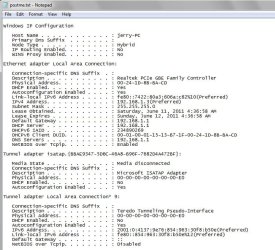
Ztruker here is the postme from running

cmd /c "ipconfig /all > postme.txt & notepad postme.txt & del postme.txt"

router3.jpg
 

My Computer

OS
Windows 7 Pro
CPU
Intel(R) Pentium(R) Duel CPU E2200 2.20 Ghz
Motherboard
GA-G41M-ES2L
Memory
4 gb 2.96 Usable
Graphics Card(s)
Onboard
Sound Card
Onboard
Hard Drives
2 - 1TB WD Sata Drives
Looks like you have a valid ip address, Default gateway and DNS servers. If you open a Command Prompt and enter

Code:
ping www.mozlla.org
do you get valid responses or does it time out?

Should look like this:
Pinging www-mozilla-org.glb.mozilla.net [63.245.217

Reply from 63.245.217.21: bytes=32 time=90ms TTL=46
Reply from 63.245.217.21: bytes=32 time=86ms TTL=46
Reply from 63.245.217.21: bytes=32 time=85ms TTL=46
Reply from 63.245.217.21: bytes=32 time=87ms TTL=46
 

My Computer

Computer type
PC/Desktop
Computer Manufacturer/Model Number
Lenovo IdeaCenter 450
OS
Windows 10 Pro X64
CPU
Intel Quad Core i7-4770 @ 3.4Ghz
Memory
16.0GB PC3-12800 DDR3 SDRAM 1600 MHz
Graphics Card(s)
Intel Integrated HD Graphics
Sound Card
Realtek HD Audio
Monitor(s) Displays
HP 22" LCD
Screen Resolution
1680 x 1050
Hard Drives
250GB Samsung EVO SATA-3 SSD
2TB Seagate ST2000DM001 SATA-2
1.5TB Seagate ST3150041AS SATA
Keyboard
Dell USB
Mouse
Lenovo USB
Internet Speed
Cable via Road Runner 3MB Upload, 30MB Download
Antivirus
Windows Defender, MBAM Pro, MBAE
Browser
Seamonkey
Other Info
UEFI/GPT
PLDS DVD-RW DH16AERSH
192.168.1.3 is a private IP address, if huffman is connected to the cable modem that means it has a built in router. Huffman do you know what the IP address is for the status page for your modem and can you connect to it? If that was a router it would be 192.168.1.1.
 

My Computer

Computer type
PC/Desktop
Computer Manufacturer/Model Number
Home Built
OS
Windows 10 Education 64 bit
CPU
AMD Phenom II X4 980 Black Edition Deneb 3.7GHz
Motherboard
Asus M4N68T-M V2 µATX Motherboard
Memory
8GB 4GBx2 Kingston PC10600 DDR3 1333 Memory
Graphics Card(s)
Zotac NVIDIA Geforce GT640 2 Gig DDR3 PCIe
Sound Card
VIA VT1708s High Definition Audio 8-channel Onboard
Monitor(s) Displays
22" LG E2242 1080p and 2 19" I-INC AG191D
Screen Resolution
1280x1024 - 1920x1080 - 1280x1024
Hard Drives
Crucial M100 256 GB SSD and 500 GB WD Blue SATA
PSU
Thermaltake TR 620
Case
Power Up Black ATX Mid-Tower Case
Cooling
Stock heatsink and fan
Keyboard
Logitech Wireless K350 Wave
Mouse
Logitech Wireless M570 Trackman Wheel
Internet Speed
80 Mbps Down 30 Mbps Up
Antivirus
Windows Defender
Browser
Internet Explorer 11
Other Info
HP DVD1040e Lightscribe - External USB2

My Computer

OS
Windows 7 Pro
CPU
Intel(R) Pentium(R) Duel CPU E2200 2.20 Ghz
Motherboard
GA-G41M-ES2L
Memory
4 gb 2.96 Usable
Graphics Card(s)
Onboard
Sound Card
Onboard
Hard Drives
2 - 1TB WD Sata Drives
Command Prompt
"Request timed out" is the response.

My modem does NOT have a built-in router.

Well the IP address you posted in your ipconfig was a private IP address. If your modem doesn't have a router built in you should have gotten a public IP address from it. Open a command prompt and do an ipconfig /release, and then an ipconfig /renew while connected to the modem. Then do another ipconfig /all to see if it changes. 192.168.1.3 is in the private IP address range. You can't connect to the internet with it without going though a router. It has to be translated into a public IP address. Thats what a router does, its called NAT. Network Address Translation. The 192.168.1.3 must be the IP address your router assigned to your PC and the PC didn't update when you swapped it over to your modem. I'd say its not getting an IP address from the modem.
 

My Computer

Computer type
PC/Desktop
Computer Manufacturer/Model Number
Home Built
OS
Windows 10 Education 64 bit
CPU
AMD Phenom II X4 980 Black Edition Deneb 3.7GHz
Motherboard
Asus M4N68T-M V2 µATX Motherboard
Memory
8GB 4GBx2 Kingston PC10600 DDR3 1333 Memory
Graphics Card(s)
Zotac NVIDIA Geforce GT640 2 Gig DDR3 PCIe
Sound Card
VIA VT1708s High Definition Audio 8-channel Onboard
Monitor(s) Displays
22" LG E2242 1080p and 2 19" I-INC AG191D
Screen Resolution
1280x1024 - 1920x1080 - 1280x1024
Hard Drives
Crucial M100 256 GB SSD and 500 GB WD Blue SATA
PSU
Thermaltake TR 620
Case
Power Up Black ATX Mid-Tower Case
Cooling
Stock heatsink and fan
Keyboard
Logitech Wireless K350 Wave
Mouse
Logitech Wireless M570 Trackman Wheel
Internet Speed
80 Mbps Down 30 Mbps Up
Antivirus
Windows Defender
Browser
Internet Explorer 11
Other Info
HP DVD1040e Lightscribe - External USB2
Back
Top