Connecting to workgroup with 7 Home

BigSich

New member
Local time
2:44 AM
Messages
22
At our office we have mostly XP computers, with a Vista laptop, 3 7 Pro and a Windows Home Server. All the computers communicate fine, except the 7 Home laptop. It can only see the 7 Pro computers and the Vista machine. It can ping all the other computers, but they will not show up in the network neighborhood. When I tried to map the server shares, it didn't work despite being able to see it under the "Other Devices".

The 7 Home laptop has network discovery turned on and all the XP clients have LLTD installed.

I can't figure out why the 7 Pro machines are having no problem, and all the computers can see the 7 Home laptop. Any help is appreciated.
 

My Computer My Computer

At a glance

Windows 7 Ultimate 64 bitIntel 2.53 Dual Core4 GB DDR2GeForce 9600 GS
Computer Manufacturer/Model Number
ASUS M50Vm
OS
Windows 7 Ultimate 64 bit
CPU
Intel 2.53 Dual Core
Memory
4 GB DDR2
Graphics Card(s)
GeForce 9600 GS
Hard Drives
320 GB
I have had a similar problem and have found the following to help:

Start > Run > gpedit.msc > Computer Configuration > Windows Settings > Security Settings > Local Policies > Security Option > Double-click ‘Network Security: LAN Manager authentication level’

Under the Local Security Setting’s tab choose ‘Send LM & NTLM – use NTLMv2 session security if negotiated’.

Reboot.

do this on all machines in the workgroup
 
Last edited:

My Computer My Computer

At a glance

MAC OS X v10.4.102.4 Ghz2GBNVIDIA GeForce 320M 256MB of DDR3 SD
Computer Manufacturer/Model Number
Mac Mini
OS
MAC OS X v10.4.10
CPU
2.4 Ghz
Motherboard
Intel Mini ITX iG45
Memory
2GB
Graphics Card(s)
NVIDIA GeForce 320M 256MB of DDR3 SD
Hard Drives
320GB
I'm not sure if you mean Win 7 Home basic or Win 7 Home premium but apparently there is a problem Windows 7 Home versions not connecting properly when there is a server involved. I'm not sure about all the limitations of the Home version but there is a Technet thread which talks about the problem. The solution seems to be changing the authenitcation level on the Win 7 Home machine.

This does the same thing as the post above but it only needs to be done on the problem machine.

1 . Open registry editor ( Start search - regedit)
2 . Browse to HKEY_LOCAL_MACHINE\SYSTEM\CurrentControlSet\Control\Lsa
3. Create a new DWORD value with the following properties: NAME: LmCompatibilityLevel
VALUE: 1
Source> Network Share not working through Windows 7 home premium
 

My Computer My Computer

At a glance

Windows 7 Ult, Windows 8.1 Pro,Q9650-4.275GHz, E8600 4.5GHz, E6750-3.8GHzG.Skill PC2 9600 1200Mhz 5 5 5 15 2TGTX480
Computer type
PC/Desktop
Computer Manufacturer/Model Number
Home built
OS
Windows 7 Ult, Windows 8.1 Pro,
CPU
Q9650-4.275GHz, E8600 4.5GHz, E6750-3.8GHz
Motherboard
Evga 780i FTW
Memory
G.Skill PC2 9600 1200Mhz 5 5 5 15 2T
Graphics Card(s)
GTX480
Sound Card
Asus Xonar D2
Monitor(s) Displays
HannsG
Screen Resolution
1680X1050
Hard Drives
GSkill Phoenix Pro 120GB SSD
PSU
ThermalTake Toughpower 1000Watt modular
Case
ThermalTake XaserV
Cooling
Xigmatek S1283
Keyboard
Logitech G15
Mouse
Logitech G9
Internet Speed
T1
I tried the regedit fix and so far it doesn't seem to be working. I'm still left with his laptop seeing the other computers running 7 and Vista, but no XP or Windows Home Server.
 

My Computer My Computer

At a glance

Windows 7 Ultimate 64 bitIntel 2.53 Dual Core4 GB DDR2GeForce 9600 GS
Computer Manufacturer/Model Number
ASUS M50Vm
OS
Windows 7 Ultimate 64 bit
CPU
Intel 2.53 Dual Core
Memory
4 GB DDR2
Graphics Card(s)
GeForce 9600 GS
Hard Drives
320 GB
I'm telling you man . . . I have had this exact problem and the suggestion I gave you earlier did it for me. . . .give it a try and see if that helps . . .
 

My Computer My Computer

At a glance

MAC OS X v10.4.102.4 Ghz2GBNVIDIA GeForce 320M 256MB of DDR3 SD
Computer Manufacturer/Model Number
Mac Mini
OS
MAC OS X v10.4.10
CPU
2.4 Ghz
Motherboard
Intel Mini ITX iG45
Memory
2GB
Graphics Card(s)
NVIDIA GeForce 320M 256MB of DDR3 SD
Hard Drives
320GB
I will try your idea stuberB, unfortunately, he will be gone next week so I won't have an answer for awhile. Thanks for the help.
 

My Computer My Computer

At a glance

Windows 7 Ultimate 64 bitIntel 2.53 Dual Core4 GB DDR2GeForce 9600 GS
Computer Manufacturer/Model Number
ASUS M50Vm
OS
Windows 7 Ultimate 64 bit
CPU
Intel 2.53 Dual Core
Memory
4 GB DDR2
Graphics Card(s)
GeForce 9600 GS
Hard Drives
320 GB
Our consultant got back from the road today and I tried the above suggestions, both the registry edit and gpedit on computers in the network. The first problem is that only XP pro has gpedit so I was only able to do that on a few computers (most of the XP machines are home edition). That did not fix the problem.

The current state is this:
1. Network has approx 20 comptuers mostly running XP Home. Have a couple XP Pro, one 98, one Vista, three 7 Pro and a Windows Home Server(so bascailly server 2k3). All the comptuers except for the 7 Home Permium can see each other in the network neighborhood and share files and everything.
2. The 7 Home premuim can only see the other windows 7 computers.
3. The 7 Home premium comptuer has network discovery enabled, is using windows firewall (so the right ports are open), is on the same workgroup as the rest of the network, has been selected to use 40 or 56 bit encryption (however the 7 Pro comptuers have 128 selected and work fine).
4. All the computers can see the 7 Home premium computer, but only the 7 pro comptuers can access the shares on it.

I'm running out of ideas. My only guess is that there is something missing in 7 Home Premium that 7 Pro has, but I cannot for the life of me figure out what it is. Any help is appreciated.
 

My Computer My Computer

At a glance

Windows 7 Ultimate 64 bitIntel 2.53 Dual Core4 GB DDR2GeForce 9600 GS
Computer Manufacturer/Model Number
ASUS M50Vm
OS
Windows 7 Ultimate 64 bit
CPU
Intel 2.53 Dual Core
Memory
4 GB DDR2
Graphics Card(s)
GeForce 9600 GS
Hard Drives
320 GB
Are you certain that the time/date settings are correct on the problem machine? "Yes it does matter"! :D
 

My Computer My Computer

At a glance

Windows 7 Ult, Windows 8.1 Pro,Q9650-4.275GHz, E8600 4.5GHz, E6750-3.8GHzG.Skill PC2 9600 1200Mhz 5 5 5 15 2TGTX480
Computer type
PC/Desktop
Computer Manufacturer/Model Number
Home built
OS
Windows 7 Ult, Windows 8.1 Pro,
CPU
Q9650-4.275GHz, E8600 4.5GHz, E6750-3.8GHz
Motherboard
Evga 780i FTW
Memory
G.Skill PC2 9600 1200Mhz 5 5 5 15 2T
Graphics Card(s)
GTX480
Sound Card
Asus Xonar D2
Monitor(s) Displays
HannsG
Screen Resolution
1680X1050
Hard Drives
GSkill Phoenix Pro 120GB SSD
PSU
ThermalTake Toughpower 1000Watt modular
Case
ThermalTake XaserV
Cooling
Xigmatek S1283
Keyboard
Logitech G15
Mouse
Logitech G9
Internet Speed
T1
I checked the time and date on his computer and they are synched with the rest of the network. Still no dice, the win 7 computers can see him and access his shares, and he can do the same with them. But he can't see anyone elses computer. They can all see him but not access his shares. Thanks for the continued ideas.
 

My Computer My Computer

At a glance

Windows 7 Ultimate 64 bitIntel 2.53 Dual Core4 GB DDR2GeForce 9600 GS
Computer Manufacturer/Model Number
ASUS M50Vm
OS
Windows 7 Ultimate 64 bit
CPU
Intel 2.53 Dual Core
Memory
4 GB DDR2
Graphics Card(s)
GeForce 9600 GS
Hard Drives
320 GB
If you can post a screen shot of your ipconfig /all typed into your command prompt then hit enter, from the problem laptop and also from one of the working machines that would be helpful. It sounds like the laptop isn't using the correct default gateway.
 

My Computer My Computer

At a glance

Windows 7 Ult, Windows 8.1 Pro,Q9650-4.275GHz, E8600 4.5GHz, E6750-3.8GHzG.Skill PC2 9600 1200Mhz 5 5 5 15 2TGTX480
Computer type
PC/Desktop
Computer Manufacturer/Model Number
Home built
OS
Windows 7 Ult, Windows 8.1 Pro,
CPU
Q9650-4.275GHz, E8600 4.5GHz, E6750-3.8GHz
Motherboard
Evga 780i FTW
Memory
G.Skill PC2 9600 1200Mhz 5 5 5 15 2T
Graphics Card(s)
GTX480
Sound Card
Asus Xonar D2
Monitor(s) Displays
HannsG
Screen Resolution
1680X1050
Hard Drives
GSkill Phoenix Pro 120GB SSD
PSU
ThermalTake Toughpower 1000Watt modular
Case
ThermalTake XaserV
Cooling
Xigmatek S1283
Keyboard
Logitech G15
Mouse
Logitech G9
Internet Speed
T1
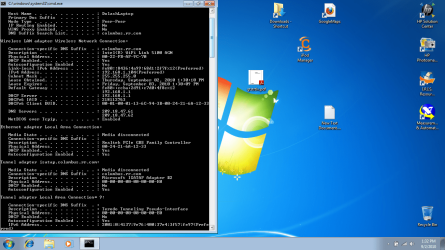
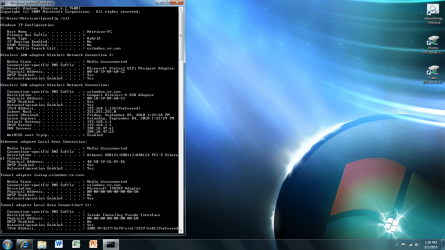
I have posted a screen shot of the working and non working comptuers. Both on wireless, the working one using 7 Pro 64x with default settings except that I turned off IPv6. Maybe i need to change his node type from p2p to hybrid?

As a somewhat related question I've been having problems with the 7 Pro computer reconnecting to the wireless after sleep. I have the usb port which the receiver is plugged into set to not power off and the network is set to connect automatically, but after sleep it loses internet. But the network which is in range and if i click connect it works fine. Any ideas?

Thanks again for all the help.
 

Attachments

  • not working.png
    not working.png
    170.6 KB · Views: 37
  • working.png
    working.png
    310.5 KB · Views: 24

My Computer My Computer

At a glance

Windows 7 Ultimate 64 bitIntel 2.53 Dual Core4 GB DDR2GeForce 9600 GS
Computer Manufacturer/Model Number
ASUS M50Vm
OS
Windows 7 Ultimate 64 bit
CPU
Intel 2.53 Dual Core
Memory
4 GB DDR2
Graphics Card(s)
GeForce 9600 GS
Hard Drives
320 GB
The first one shows something interesting and also incorrect. Hybrid is an old standard and should not be used.

The first picture is showing your IPv6 address mixed with the IPv4 settings which isn't correct. It also has the IPv6 address showing up as your first default gateway then it lists the IPv4 routers default gateway below it.

You should be using > 192.168.0.1 only for the default gateway. This isn't going to work the way it is now. Those IPv4 and IPv6 addresses need to be seperate. I'm not sure what could have caused this but it's definately not correct.

I would say that either someone attempted to use a static IP and typed in all the addresses incorrectly or the router you are using is not up to date, because of this it's not assigning the DHCP addresses correctly.

I would go with using DHCP settings on both the IPv4 properties and also set your router to use DHCP in your routers settings. I would also update the routers firmware before I did anything else.
 

My Computer My Computer

At a glance

Windows 7 Ult, Windows 8.1 Pro,Q9650-4.275GHz, E8600 4.5GHz, E6750-3.8GHzG.Skill PC2 9600 1200Mhz 5 5 5 15 2TGTX480
Computer type
PC/Desktop
Computer Manufacturer/Model Number
Home built
OS
Windows 7 Ult, Windows 8.1 Pro,
CPU
Q9650-4.275GHz, E8600 4.5GHz, E6750-3.8GHz
Motherboard
Evga 780i FTW
Memory
G.Skill PC2 9600 1200Mhz 5 5 5 15 2T
Graphics Card(s)
GTX480
Sound Card
Asus Xonar D2
Monitor(s) Displays
HannsG
Screen Resolution
1680X1050
Hard Drives
GSkill Phoenix Pro 120GB SSD
PSU
ThermalTake Toughpower 1000Watt modular
Case
ThermalTake XaserV
Cooling
Xigmatek S1283
Keyboard
Logitech G15
Mouse
Logitech G9
Internet Speed
T1
Hey thanks for all the help. The router and his computer were already set to use DHCP, changing the node is what fixed it. I'm not really familiar with nodes, all I knew is that the choices are peer-peer, brodacast, hybrid and mixed. From what i could find apparently peer-peer only works when you have a WINS server. I feel like hybrid is the best because it uses both WINS and broadcast.

Thanks again for all the help.
 

My Computer My Computer

At a glance

Windows 7 Ultimate 64 bitIntel 2.53 Dual Core4 GB DDR2GeForce 9600 GS
Computer Manufacturer/Model Number
ASUS M50Vm
OS
Windows 7 Ultimate 64 bit
CPU
Intel 2.53 Dual Core
Memory
4 GB DDR2
Graphics Card(s)
GeForce 9600 GS
Hard Drives
320 GB
Back
Top