Connecting two laptops running Windows 7?

iNic

New member
Local time
12:58 AM
Messages
1
Hi,

I need some help in connecting my two laptops together using my home wifi network.
I have tried to find a tutorial on how to do this but I couldn't find a good one.

Could anyone explain how to connect two win 7 computers using wifi, or point me in the direction of a proper walk trough.

Also is it possible to have an ongoing sync between two computers? My ideal situation would be to have two identically (content wise) computers whom both synced up to a external hard drive connected to one of those computers. So e.g. every time a picture was added to the picture folder on one computer the picture would be synced to the hard drive and then to computer nr 2 automatically.
Is anything like this possible?

Thank you:)
 

My Computer

OS
Windows 7
I can't really think of a way to do it unless they were connected and synced to a server. You can always open explorer and click Network. From there you should be able to access the files on another computer. I do this for using my dads printer and getting pictures off his computer to put on Facebook.
 

My Computer

Computer type
Laptop
Computer Manufacturer/Model Number
Toshiba P775-S7100
OS
Windows 7 Professional SP1 64-bit
CPU
Intel Core i5-2450M @2.5 GHz
Memory
6 GB DDR3 1333MHz
Graphics Card(s)
Intel HD 3000
Monitor(s) Displays
Built-in 17.3" LED; 22" Insignia NS-L22Q-10A
Screen Resolution
1600x900; 1360x768
Hard Drives
750 GB Hitachi
1TB Seagate FreeAgent External
Internet Speed
Verizon DSL Speed(Down/Up): 3360 Kbps / 800 Kbps
Antivirus
MSE and MBAM Pro
Browser
IE10
...Also is it possible to have an ongoing sync between two computers? My ideal situation would be to have two identically (content wise) computers whom both synced up to a external hard drive connected to one of those computers. So e.g. every time a picture was added to the picture folder on one computer the picture would be synced to the hard drive and then to computer nr 2 automatically.
Is anything like this possible?...

Sure can in more ways than one. However this does come with a however note.

First, you will need your network connectivity up and running. There should be a networking tutorial in the tutorials section.

To sync folders..
Option 1: Network share.
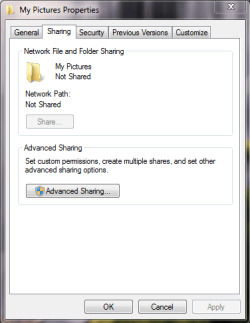
You will need to find the folder with the images you want, and share it. Right click>properties>Sharing
Click the advanced sharing button.
844639-1.PNG
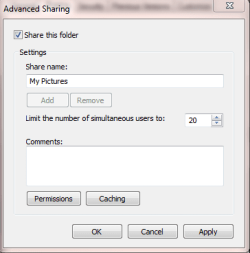
Enable the [ ] Share this folder box.
844639-2.PNG
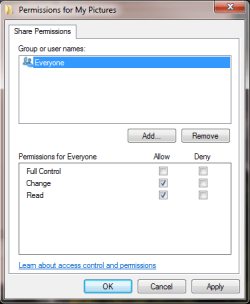
Click on permissions, then set everyone to Change and Read
844639-3.PNG
Ok on all dialog boxes.

However! This will allow everyone on the network to read/write to that folder with more than just pictures.
 

My Computer

OS
Windows 7 Enterprise
CPU
Intel Pentium Dual E2200 @2.2GHz
Motherboard
Gigabyte II-G31
Memory
4GB
Graphics Card(s)
Palit GForce 9500GT 1GB
Sound Card
onBoard
Hard Drives
WesternDigital: 250GB + 1TB + 1TB + 2TB
PSU
450W
Case
CoolerMaster CM690
Cooling
Corsair H50
Mouse
Logitech MX518
Option 2: Symbolic Link.
Basically it creates a shortcut to that share folder as created above.
However! I havnt tested this to see if it works if the host laptop is not online...

go to your home folder
Hold shift+right click > open command prompt here
type the command:
Code:
mklink /d "[I]more pics[/I]" "[I]\\laptop2\My Pictures\[/I]"

where "more pics" is the name of the new linked folder you want to create; and
"\\laptop2" is the name of the laptop and "My Pictures" is the name of the share you created in above post.

Now everytime you open your home folder, you will have another folder called "more pics". This is not really a shortcut, its an actual folder. So you can apply properties to it, and copy and paste it to where you want, just like you can with any other folder. However, the files are still physically on laptop2. I think properties on the folder are inherited to the contents, but not sure. I havnt tested that part either.


I prefer this method to redirect my user files to my network file share instead of using the C:\users\username\documents & music & pictures folders. But then again, it is a dedicated network fileserver, not a laptop.
 

My Computer

OS
Windows 7 Enterprise
CPU
Intel Pentium Dual E2200 @2.2GHz
Motherboard
Gigabyte II-G31
Memory
4GB
Graphics Card(s)
Palit GForce 9500GT 1GB
Sound Card
onBoard
Hard Drives
WesternDigital: 250GB + 1TB + 1TB + 2TB
PSU
450W
Case
CoolerMaster CM690
Cooling
Corsair H50
Mouse
Logitech MX518
Back
Top