Connecting Wireless Router

DanielHumphreys

New member
Local time
3:53 PM
Messages
43
Hi. Sorry if this is the wrong place to put this topic but I felt it was the right place.
Basically, my computer needed a new PCI network card but my only local PC shop didnt have any so i bought a wireless router instead. I can't get this router working though.

I thought that I could just plug an ethernet cable from the wireless router into my PC which are both in my bedroom, then run the install CD and connect to the wireless modem router downstairs. I always connected to the wireless modem router downstairs with my network card but when I try to run the install CD for the router it says -

"The ethernet adapter is either disabled or no ethernet adapter is installed on this computer. Either enable or add an ethernet adapter and run the application again."

The model of the wireless router is 'Netgear N150 wireless router'. Any help would be greatly appreciated as I dont want the money I spent to go to waste. :P

Thanks in advance.
 

My Computer

OS
Windows 7 Ultimate x64 N Edition
CPU
Intel Core 2 Quad Q8200 2.33GHz
Memory
OCZ 4GB (2x2GB) DDR2 800Mhz/PC2-6400 unbuffered
Graphics Card(s)
nVidia PNY GT220 1GB DDR2
PSU
JeanTech ATX2.2 350w
So you got two wireless routers and trying to connect the wireless router downstairs (which is connected to the internet) wirelessly to the other wireless router?

If thats the case, the routers must have a feature called Range Extender or atleast the one ur trying to connect to the one with internet. As typically you use a wireless access point in place of your 2nd router. Most routers do not have this feature. some do some don't. Ill check to see if your new router does allow this feature.

Correct me if im wrong. About what your trying to do.

- Tony
 

My Computer

Computer Manufacturer/Model Number
Custom
OS
Windows 7 Ultimate x64
CPU
AMD Phenom x4 965 BE
Motherboard
MSI 790FX GD70 Not Wiki
Memory
4gb Gskill
Graphics Card(s)
HD 4850
Sound Card
Onboard Realtek
Monitor(s) Displays
Asus VW246H
Screen Resolution
1920x1080 Native
Hard Drives
2 Seagate Drives Raid 0
PSU
650Watt Corsair
Case
CoolerMaster
Cooling
Air Cooling Stock Heatsink and Fan
Keyboard
Logitech Cordless Duo
Mouse
Logitech Cordless Duo
Internet Speed
24000 KBPS
Hi. Yeah i have a wireless router upstairs in my room which I'm trying to connect wirelessly to my wireless modem router downstairs which is connected to the internet.


|Wireless router| <-- in my room

|
<-- trying to connect wirelessly
|

|Wireless modem router| <-- downstairs (connected to the internet)


Hope that diagram kinda helped. Thanks for the help.
 

My Computer

OS
Windows 7 Ultimate x64 N Edition
CPU
Intel Core 2 Quad Q8200 2.33GHz
Memory
OCZ 4GB (2x2GB) DDR2 800Mhz/PC2-6400 unbuffered
Graphics Card(s)
nVidia PNY GT220 1GB DDR2
PSU
JeanTech ATX2.2 350w
Unfortunately i do not believe you will be able to connect your Netgear N150 wirelessly with the other wireless router downstairs. You must either replace this "Netgear N150" with a wireless access point or purchase a router with extender. Some of the newer routers can act as a wireless access point.

You can however connect both routers together via Ethernet cable or purchse a router that can act as a range extender or have range extender mode. Or purchase an access point.

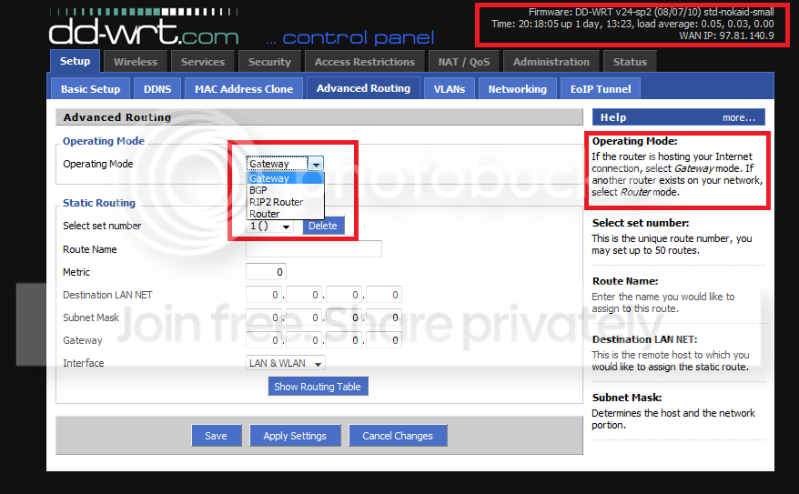
Mine for example... Mine is a Linksys with aftermarket dd-wrt software which enables more features to fully take advantage of your router.
Router.png
 

My Computer

Computer Manufacturer/Model Number
Custom
OS
Windows 7 Ultimate x64
CPU
AMD Phenom x4 965 BE
Motherboard
MSI 790FX GD70 Not Wiki
Memory
4gb Gskill
Graphics Card(s)
HD 4850
Sound Card
Onboard Realtek
Monitor(s) Displays
Asus VW246H
Screen Resolution
1920x1080 Native
Hard Drives
2 Seagate Drives Raid 0
PSU
650Watt Corsair
Case
CoolerMaster
Cooling
Air Cooling Stock Heatsink and Fan
Keyboard
Logitech Cordless Duo
Mouse
Logitech Cordless Duo
Internet Speed
24000 KBPS
Oh wow that sucks. Thanks for the help anyway, I appreciate it!

One last question, the one downstairs is a 'modem router'. I'm not sure what that is tbh but would it make a difference?
 

My Computer

OS
Windows 7 Ultimate x64 N Edition
CPU
Intel Core 2 Quad Q8200 2.33GHz
Memory
OCZ 4GB (2x2GB) DDR2 800Mhz/PC2-6400 unbuffered
Graphics Card(s)
nVidia PNY GT220 1GB DDR2
PSU
JeanTech ATX2.2 350w
Oh wow that sucks. Thanks for the help anyway, I appreciate it!

One last question, the one downstairs is a 'modem router'. I'm not sure what that is tbh but would it make a difference?

What kind is it? Typically no, as a modem router is just a router with the modem built in, so instead of having 1 modem and 1 router it has the modem and router as one unit.

- Tony
 

My Computer

Computer Manufacturer/Model Number
Custom
OS
Windows 7 Ultimate x64
CPU
AMD Phenom x4 965 BE
Motherboard
MSI 790FX GD70 Not Wiki
Memory
4gb Gskill
Graphics Card(s)
HD 4850
Sound Card
Onboard Realtek
Monitor(s) Displays
Asus VW246H
Screen Resolution
1920x1080 Native
Hard Drives
2 Seagate Drives Raid 0
PSU
650Watt Corsair
Case
CoolerMaster
Cooling
Air Cooling Stock Heatsink and Fan
Keyboard
Logitech Cordless Duo
Mouse
Logitech Cordless Duo
Internet Speed
24000 KBPS
The modem router is a belkin dg834g.
 

My Computer

OS
Windows 7 Ultimate x64 N Edition
CPU
Intel Core 2 Quad Q8200 2.33GHz
Memory
OCZ 4GB (2x2GB) DDR2 800Mhz/PC2-6400 unbuffered
Graphics Card(s)
nVidia PNY GT220 1GB DDR2
PSU
JeanTech ATX2.2 350w
You mention a network card in your first paragraph, but nothing further. How do you know the PCI NIC is bad? If you couldn't get the new NIC, are you still using that, or do you additionally have a wireless capable NIC as well? How did your system connect to the internet before? Could it connect from the bedroom? How does buying a wireless router solve your bad NIC? Desktop or laptop? Give us all details possible.

James
 

My Computer

OS
Win7U 64 RTM
CPU
Q9550
Motherboard
GA-EP45-UD3R
Memory
8GB Gskill
Graphics Card(s)
ASUS|EAH4850/HTDI/1GD3/A
Sound Card
xfi Plat
Monitor(s) Displays
Dell 2405fpw
Screen Resolution
1920x1200
Hard Drives
Seagate & WD sata Drives
PSU
Antec
Case
Antec
Keyboard
MS Natural Ergonomic 4000
Mouse
Logitech MX610 USB Cordless
I had a wireless network card in my computer, but my computer crashed alot from an outdated driver that the network card used, so I was adviced to replace the network card. PC World, the only computer store near me, didnt have any wireless network cards so I bought a wireless router thinking that I could easily connect this to the wireless modem router downstairs wirelessly, but I was wrong and I'm now down £30 with a wireless router I dont need.
 

My Computer

OS
Windows 7 Ultimate x64 N Edition
CPU
Intel Core 2 Quad Q8200 2.33GHz
Memory
OCZ 4GB (2x2GB) DDR2 800Mhz/PC2-6400 unbuffered
Graphics Card(s)
nVidia PNY GT220 1GB DDR2
PSU
JeanTech ATX2.2 350w
I had a wireless network card in my computer, but my computer crashed alot from an outdated driver that the network card used, so I was adviced to replace the network card. PC World, the only computer store near me, didnt have any wireless network cards so I bought a wireless router thinking that I could easily connect this to the wireless modem router downstairs wirelessly, but I was wrong and I'm now down £30 with a wireless router I dont need.

Should be able to return it :) As its only a few hours old. Tell them you where unsatisfied.
 

My Computer

Computer Manufacturer/Model Number
Custom
OS
Windows 7 Ultimate x64
CPU
AMD Phenom x4 965 BE
Motherboard
MSI 790FX GD70 Not Wiki
Memory
4gb Gskill
Graphics Card(s)
HD 4850
Sound Card
Onboard Realtek
Monitor(s) Displays
Asus VW246H
Screen Resolution
1920x1080 Native
Hard Drives
2 Seagate Drives Raid 0
PSU
650Watt Corsair
Case
CoolerMaster
Cooling
Air Cooling Stock Heatsink and Fan
Keyboard
Logitech Cordless Duo
Mouse
Logitech Cordless Duo
Internet Speed
24000 KBPS
I would try to return the router and either order the NIC via the store or order it online (likely faster and cheaper, although you may want to order from the store if they take the router back). If outdated drivers are indeed causing your crashes and you can't get compatible drivers, a new router is not going to correct the problem.

James
 

My Computer

OS
Win7U 64 RTM
CPU
Q9550
Motherboard
GA-EP45-UD3R
Memory
8GB Gskill
Graphics Card(s)
ASUS|EAH4850/HTDI/1GD3/A
Sound Card
xfi Plat
Monitor(s) Displays
Dell 2405fpw
Screen Resolution
1920x1200
Hard Drives
Seagate & WD sata Drives
PSU
Antec
Case
Antec
Keyboard
MS Natural Ergonomic 4000
Mouse
Logitech MX610 USB Cordless
I would try to return the router and either order the NIC via the store or order it online (likely faster and cheaper, although you may want to order from the store if they take the router back). If outdated drivers are indeed causing your crashes and you can't get compatible drivers, a new router is not going to correct the problem.

James

He was just trying to get his internet up and running the same day, since they did not have a replacement nic card. He bought a router thinking he could connect the two of his routers together. The 2nd router (new one) being directly connected to the computer via Ethernet cable. But i do believe he knows what hes gotta do now :)

- Tony
 

My Computer

Computer Manufacturer/Model Number
Custom
OS
Windows 7 Ultimate x64
CPU
AMD Phenom x4 965 BE
Motherboard
MSI 790FX GD70 Not Wiki
Memory
4gb Gskill
Graphics Card(s)
HD 4850
Sound Card
Onboard Realtek
Monitor(s) Displays
Asus VW246H
Screen Resolution
1920x1080 Native
Hard Drives
2 Seagate Drives Raid 0
PSU
650Watt Corsair
Case
CoolerMaster
Cooling
Air Cooling Stock Heatsink and Fan
Keyboard
Logitech Cordless Duo
Mouse
Logitech Cordless Duo
Internet Speed
24000 KBPS
thanks for the help guys, lets just hope pc world let me return it. (yn)
 

My Computer

OS
Windows 7 Ultimate x64 N Edition
CPU
Intel Core 2 Quad Q8200 2.33GHz
Memory
OCZ 4GB (2x2GB) DDR2 800Mhz/PC2-6400 unbuffered
Graphics Card(s)
nVidia PNY GT220 1GB DDR2
PSU
JeanTech ATX2.2 350w
Back
Top